
Pyccel : write Python code, get Fortran speed









Pyccel stands for Python extension language using accelerators.
The aim of Pyccel is to provide a simple way to generate automatically, parallel low level code. The main uses would be:
- Convert a Python code (or project) into a Fortran or C code.
- Accelerate Python functions by converting them to Fortran or C functions.
Pyccel can be viewed as:
- Python-to-Fortran/C converter
- a compiler for a Domain Specific Language with Python syntax
Pyccel comes with a selection of extensions allowing you to convert calls to some specific Python packages to Fortran/C. The following packages will be (partially) covered:
numpyscipy
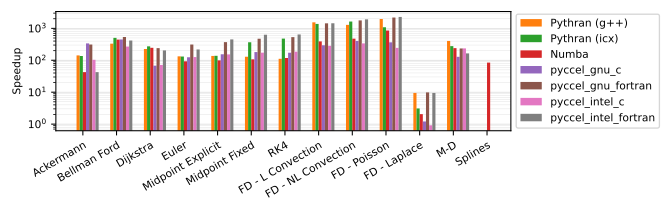
Pyccel's acceleration capabilities lead to much faster code. Comparisons of Python vs Pyccel or other tools can be found in the benchmarks repository.
The results for the devel branch currently show the following performance on Python 3.10:
If you are eager to try Pyccel out, we recommend reading our quick-start guide.
Citing Pyccel
If Pyccel has been significant in your research, and you would like to acknowledge the project in your academic publication, we would ask that you cite the following paper:
Bourne, Güçlü, Hadjout and Ratnani (2023). Pyccel: a Python-to-X transpiler for scientific high-performance computing. Journal of Open Source Software, 8(83), 4991, https://doi.org/10.21105/joss.04991
The associated bibtex can be found here.
Installation
Pyccel has a few system requirements to ensure that the system where it is installed is capable of compiling Fortran code. These requirements are detailed in the documentation. Once all requirements are satisfied, we recommend installing Pyccel into a Python virtual environment, which can be created with venv. Once the Python virtual environment is ready and activated, Pyccel can be easily installed using pip, the Python package installer. The simple command
pip install pyccel
will download the latest release of Pyccel from PyPI, the Python package index. Alternative installation methods such as installing from source, or installing with a docker, are described in the documentation.
Testing
It is good practice to test that Pyccel works as intended on the machine where it is installed.
To this end Pyccel provides an extended test suite which can be downloaded from the official repository.
Assuming the Python virtual environment is in the directory <ENV-PATH>, we activate it with
source <ENV-PATH>/bin/activate
and install the test component of the Pyccel package:
pip install "pyccel[test]"
This installs a few additional Python packages which are necessary for running the unit tests and getting a coverage report.
The recommended way of running the unit tests is simply using the command line tool pyccel test which is installed with Pyccel.
This runs all unit tests using Pytest under the hood.
Alternatively, if more fine-grained control over which tests are run is desired, e.g. for debugging local modifications to Pyccel, Pytest can be called directly using the commands provided in the documentation.
Environment variables affecting Pyccel's behaviour
Pyccel's behaviour is affected by some environment variables:
PYCCEL_DEFAULT_COMPILER: Changes the default compiler fromGNUto a new compiler family or JSON compiler configuration file.PYCCEL_CONFIG_HOME: Changes the default location for new compiler families from~/.pyccel.PYCCEL_ERROR_MODE: Can be set to 'developer' or 'user' to control the default verbosity of the errors.
Contributing
We welcome any and all contributions.
There are many ways to help with the Pyccel project which are more or less involved. A summary can be found in the documentation.
We can also be contacted via the Pyccel Discord Server.


Release files for pyccel 2.2.3
For a detailed explanation of source distributions (sdists) and built distributions (wheels), please see the package formats documentation.
Source distribution (sdist)
| File | Size | Uploaded | Provenance | Actions |
|---|---|---|---|---|
| pyccel-2.2.3.tar.gz | 2.3 MB | Without provenance | Details for pyccel-2.2.3.tar.gz |
Release files / pyccel-2.2.3.tar.gz
| Download URL | pyccel-2.2.3.tar.gz |
|---|---|
| Size | 2.3 MB |
| Tags | Source |
|
SHA-256 checksum How to use checksums |
781f7c8fea82a4f985ce74ceb43e3653bce78ec5d9b5849ad9fc2e00754c8bf2
|
|
BLAKE2b-256 checksum How to use checksums |
1ffd48ffde7dbe1005894f595aa42d9aaf1c2dc660303101b712aae0fe20f389
|
| Upload date | |
|
Uploaded using Trusted Publishing? What is trusted publishing? |
No |
| Uploaded via |
twine/6.2.0 CPython/3.12.13
|
Security for pyccel 2.2.3
Provenance
Provenance describes where a file came from. On PyPI, provenance is shared via attestations, which provide a verifiable record of the build or publishing details. View details, limitations and caveats.
No provenance found
None of the files in this release were uploaded with provenance metadata.
A note on package security
PyPI is a repository for distributing packages, not a service for auditing them. While third-party security researchers and our staff do their best to detect and remove malicious packages, PyPI cannot guarantee the quality, security or suitability of any given package.
To learn more about protecting yourself from malicious actors, visit our package security documentation.














