
Pycograph







Homepage: https://pycograph.com/
PyPI: https://pypi.org/project/pycograph/
RedisConf 2021 talk
Explore your Python code with graph queries
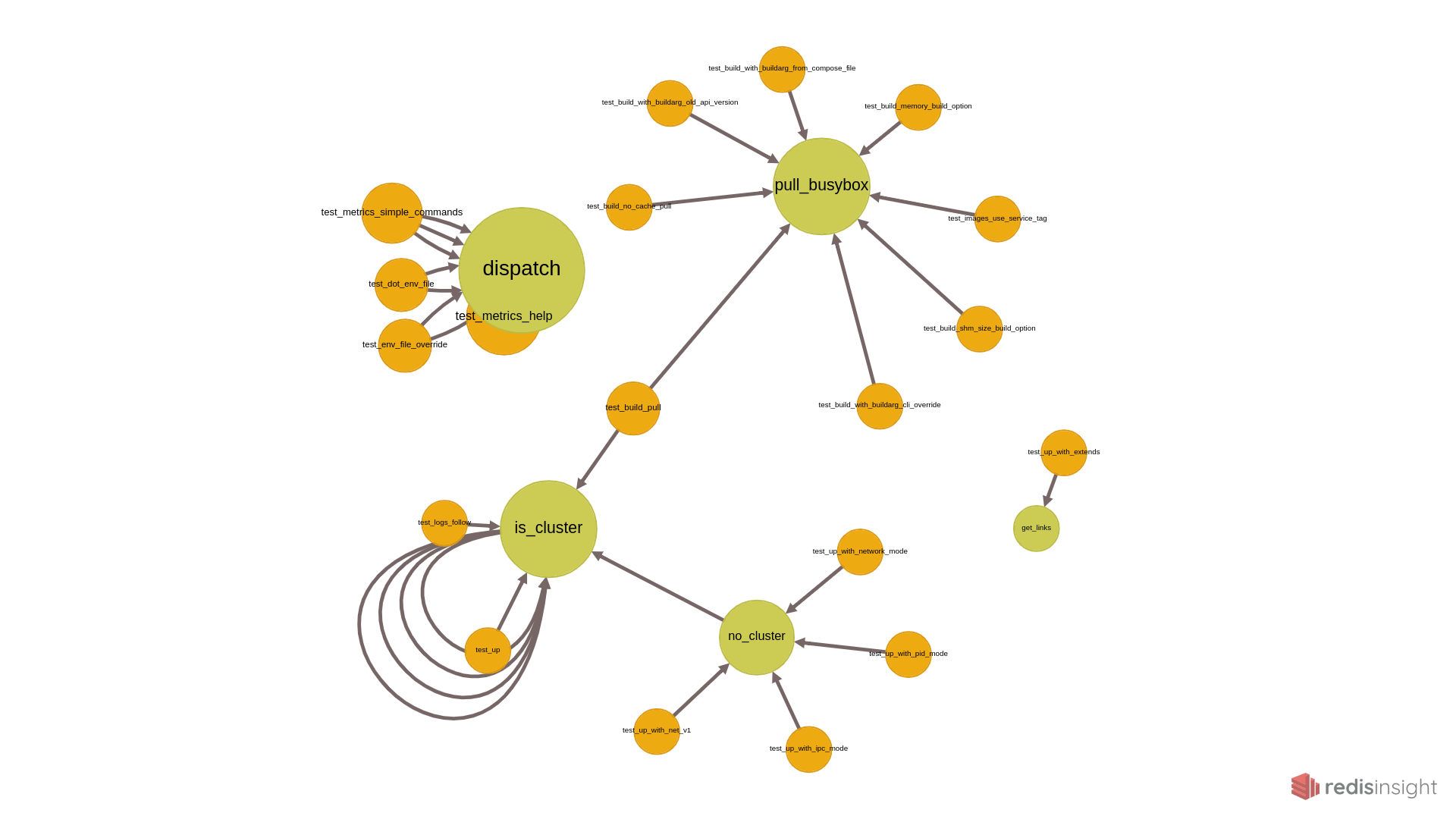
Pycograph creates a RedisGraph model of your Python code. You can:
- query it with Cypher
- visualize it with RedisInsight
Getting Started
Requirements:
- Python 3.8 or higher
- a Redis instance with the RedisGraph module (local, remote or via Docker)
- not strictly necessary, but recommended: RedisInsight for visualizing the query results
Install Pycograph from PyPI:
pip install pycograph
Start a Redis instance with the RedisGraph module and RedisInsight. E.g. via Docker containers:
docker run -d -p 6379:6379 redislabs/redismod
docker run -d -v redisinsight:/db -p 8001:8001 redislabs/redisinsight:latest
Visit your RedisInstance at http://localhost:8001 in a browser.
Connect to your local Redis database.
Create a RedisGraph model of your project's code with the pycograph load command:
pycograph load --project-dir ~/code/your-project --test-types
By default, if you don't provide the --project-dir option, Pycograph tries to find Python code in the current working directory.
Run a query in RedisInsight. E.g.
GRAPH.QUERY "your-project" "MATCH (n) return n"
To see some more advanced queries, check out the examples at pycograph.com
Options
--project-dir: The root directory of the Python project you want to analyze. If you omit this option, Pycograph will search for.pyfiles in your current working directory.--graph-name: Specifies the name of the generated graph. Default: the name of the project directory.--overwrite: If a graph with this name exists overwrite it. If you don't provide this flag, the new nodes and edges will be appended to the graph.--test-types: Determine the types of tests based on the subdirectories of thetestsdirectory.--redis-host: The host of the Redis instance. Default: localhost--redis-port: The port of the Redis instance. Default: 6379--version: Print Pycograph version and exit.
Limitations
Pycograph is in beta version.
It creates a basic model with focus on the relationships betweeen the different parts of the code base. Even that model might be incomplete, ignoring some less common syntax. The goal is to provide some useful insight, not to create an exhaustive model.
If Pycograph finds a syntax error, it skips the module containing the syntax error and tries to build a model from the rest of the code base.
Below are some of the limitations. If you bump into other limitations, please open a GitHub issue.
Imports
The following imports will be ignored by Pycograph:
- imported external packages
import *syntax- variables
- globals
Calls
- All the limitations of the imports.
Other Known Limitations
- No support for
.pyfiles containing Jinja templates (e.g. cookiecutter) - Inner functions are ignored.
How Does It Work?
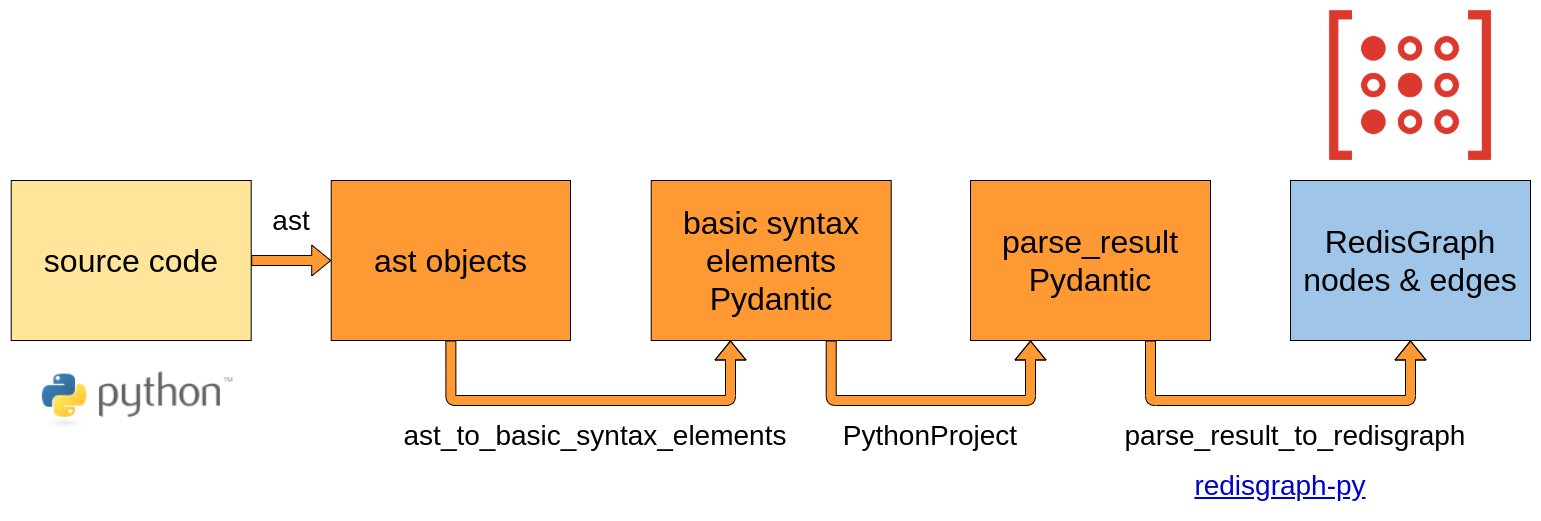
Libraries used:
- ast module of the Python standard library for the abstract syntax tree
- Pydantic both for the models of the intermediate objects and for the settings
- redisgraph-py for creating the RedisGraph model
- typer for the command line interface
Contributing
see the Contributing guide
1 maintainer

Metadata
1 maintainer
Release files for pycograph 0.3.0
For a detailed explanation of source distributions (sdists) and built distributions (wheels), please see the package formats documentation.
Source distribution (sdist)
| File | Size | Uploaded | Provenance | Actions |
|---|---|---|---|---|
| pycograph-0.3.0.tar.gz | 17.1 kB | Without provenance | Details for pycograph-0.3.0.tar.gz |
Built distribution (wheel)
| File | Interpreter | ABI | Platform | Actions Reset |
|---|---|---|---|---|
| pycograph-0.3.0-py3-none-any.whl | Python 3 | none | any | Details for pycograph-0.3.0-py3-none-any.whl |
Total release size: 36.4 kB
Release files / pycograph-0.3.0.tar.gz
| Download URL | pycograph-0.3.0.tar.gz |
|---|---|
| Size | 17.1 kB |
| Tags | Source |
|
SHA-256 checksum How to use checksums |
aaa26a7911630e7d5d098a4332982d018e584eead17d91feab82817a9af140b8
|
|
BLAKE2b-256 checksum How to use checksums |
9a70fc2cf44eae76267e19051ec9ef489c3e8138e3fa61f21726fa897838915d
|
| Upload date | |
|
Uploaded using Trusted Publishing? What is trusted publishing? |
No |
| Uploaded via |
poetry/1.1.6 CPython/3.9.5 Linux/5.11.0-25-generic
|
Release files / pycograph-0.3.0-py3-none-any.whl
| Download URL | pycograph-0.3.0-py3-none-any.whl |
|---|---|
| Size | 19.2 kB |
| Tags | Python 3 |
|
SHA-256 checksum How to use checksums |
146dbea6c6dae699563d6445a7e5621e73103be9a772a2c5b968993661eefcfa
|
|
BLAKE2b-256 checksum How to use checksums |
d4e183454d1cb5ec0765137dd2d33b902cc012ff711e777a0075cfdacc79367a
|
| Upload date | |
|
Uploaded using Trusted Publishing? What is trusted publishing? |
No |
| Uploaded via |
poetry/1.1.6 CPython/3.9.5 Linux/5.11.0-25-generic
|
Security for pycograph 0.3.0
Provenance
Provenance describes where a file came from. On PyPI, provenance is shared via attestations, which provide a verifiable record of the build or publishing details. View details, limitations and caveats.
No provenance found
None of the files in this release were uploaded with provenance metadata.
A note on package security
PyPI is a repository for distributing packages, not a service for auditing them. While third-party security researchers and our staff do their best to detect and remove malicious packages, PyPI cannot guarantee the quality, security or suitability of any given package.
To learn more about protecting yourself from malicious actors, visit our package security documentation.














