
Generates design of experiements by constructing a nearly orthogonal latin hypercube with user-defined factors and appropriate factor ranges.

Project description
pycubedoe
pycubedoe generates a design of experiments (DOE) by constructing a Nearly Orthogonal Latin Hypercube (NOLH) with user-defined factors and appropriate factor levels.
Terminology:
- Factor: Independent variables of a model or experiment.
- Level: A specific factor value or factor setting.
- DOE: A method to evaluate the effects of various factor levels on a model or experiment.
- Design Point: A subset of the DOE where each row of the design matrix is a design point. Each factor in the design point is assigned a unique level inclusive to a pre-defined range.
- Metamodel: The result of instantiating a model run over each design point. Through analysis, a metamodel can provide insights into the model’s behavior.
A “good” DOE will have space-filling properties with design points that are “distributed throughout the entire experimental region. This permits a greater opportunity to identify contours that define regions where interesting behavior occurs” [Cioppa, 23]. While there are several DOE classes such as full and fractional factorials, or response surface analysis, this package leverages the NOLH technique that allows for the efficient sampling of large design spaces.
The NOLH design improves upon Latin Hypercube Techniques (implemented by the pyDOE package which assigns levels randomly) by generating nearly orthogonal design points with a maximum pairwise correlation no greater than 0.03 [Cioppa, 23]. Randomly generated Latin Hypercube design points cannot claim this same correlation minimization. By eliminating or minimizing the correlation, the NOLH DOE “enhances our ability to analyze and estimate as many effects [and] interactions…as possible” [Cioppa, 21]. NOLH design also reduces the computational load requirements when compared to other DOE design techniques. This allows for faster, yet still effective, exploration of the design space.
A note on design points:
pycubedoe allows for both numeric and categorical factors. The number of design points is dictated by the total number of factors, both numeric and categorical. Below is table detailing the number of design points that will be generated based on the number of factors:
| Number of Factors | Number of Design Points (rows) |
|---|---|
| [1, 7] | 17 |
| [8, 11] | 33 |
| [12, 16] | 56 |
| [17, 22] | 129 |
| [23, 29] | 257 |
| [30, inf] | None, too many factors! |
Quick Start
-
Install the pycubedoe package to your environment:
pip3 install pycubedoe -
Import the package:
import pycubedoe as pc -
Create a dictionary of your desired factors and their associated levels. pycubedoe can support both numeric and categorical factor-types. For each factor-type, build a dictionary as described below:
In general:
-
For numeric factors: {"factor name": [min Value, max Value, number of desired decimal places],...}
-
For categorical factors: {"factor name": ["list", "of", "categorical", "levels"],...}
Example Parameter Dictionaries:
-
Numeric Factors Only Dictionary:
numeric = {"a":[1,5,2],...}where
ais the factor label and the list is:[<min factor value = 1>, <max factor value = 5>, <number of significant digits = 2>] -
Categorical Factors Only Dictionary:
categorical = {"flag": ["red", "white", "blue"],...}where
flagis the factor label and the list is:["a", list", "of", "all", categorical", "levels"] -
Both Numeric and Categorical Factors, as seen above:
numeric = {"a":[1,5,2],...}categorical = {"flag": ["red", "white", "blue"],...}
-
-
Build the Design of Experiments (DOE):
-
Default:
pc.pycubeDOE(numeric = None, categorical = None) -
Assign your pre-built factor-type dictionaries:
DOE = pc.pycubeDOE(numeric = numeric, categorical = categorical) -
pc.pycubeDOE()returns a dataframe with user-defined factors and factor-values for user-defined ranges.- Each column is a user-defined factor; either numeric or categorical.
- Each row is a design point.
- In aggregate, all design points form a Nearly-Orthogonal Latin Hypercube that efficiently explores the parameter space while reducing the computational load.
NOTE: for factor-types not used, you must assign it a value of
None.For example:
DOE = pc.pycubeDOE(numeric = None, categorical = categorical)
-
-
There is a helper function
pc.designPoints(DOE)that iterates over each design point (row) of your DOE dataframe. First you will need to assign each design point value to a factor name. Below is an example usingexampleRunas the model:
def exampleRun(designPT):
    #Assign your variable values from the DOE design point
    a = designPT[0]
    flag = designPT[1]
    ### DO SOMETHING WITH YOUR DESIGN POINT, for example:
    if flag == "red" and a <= 2.5:
        return round(a*a,2)
    else:
        return "Fly Navy"
Then run the design points over exampleRun where we call pycubedoe's pc.designPoints function:
modelResults = []
for designPT in pc.designPoints(DOE):
    sim = exampleRun(designPT)
    modelResults.append(sim)
print(modelResults)
Vignette:
Problem: You are a submarine captain and wish to transit an area undetected. Only two factors determine whether or not you will be detected: speed (in knots) and depth (in meters). Your submarine is capable of making up to 10 knots underwater and can descend to a maximum depth of 100 meters.
You are provided with two models, probDetect_SPEED and probDetect_DEPTH, that predict the probability of detection for various speeds and depths.
What speed and depth should you make your transit?
First, bring your own model for the analysis. In this vignette, the detect model predicts the probability that at least one detection (due to speed or depth) occurs:
def detect(designPT):

    speed = designPT[0]
    depth = designPT[1]

    #Calculate probability "at least one detection happens"
    P_speed = 1 - probDetect_SPEED(speed)
    P_depth = 1 - probDetect_DEPTH(depth)

    P_detect = 1 - (P_speed * P_depth)
    return P_detect
Second, generate your DOE:
speed = [0,10,1]   # knots
depth = [0,100,0]  # meters

nums = {"speed":speed, "depth": depth}
cats = None

DOE = pc.pycubeDOE(nums,cats)
Then, run your model over each design point in the DOE:
modelResults = []
for designPT in pc.designPoints(DOE):
    sim = detect(designPT)
    modelResults.append(sim)
Finally, analyze the results. For this analysis, the captain told his analyst to categorize speed/depth pairings by their probability of detection: “low”=green, “medium” = yellow, and “high” = red:
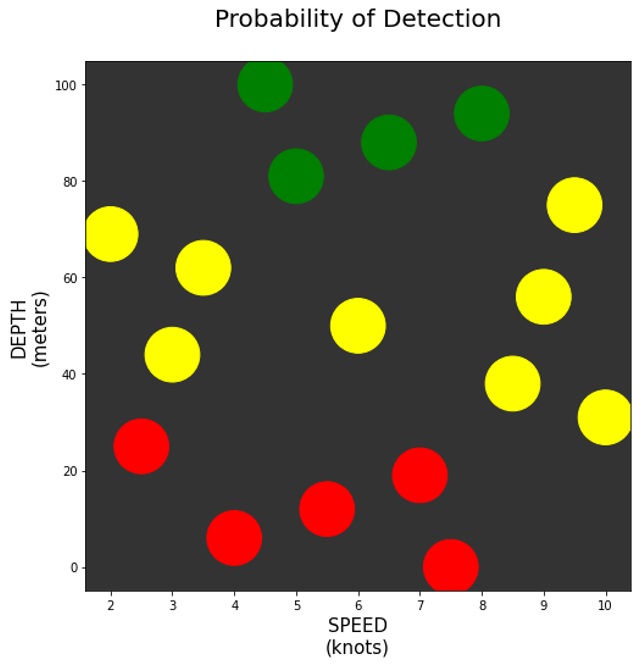
From the plot we can see to minimize the probability of detection, the captain should make his transit between 4 and 8 knots at a depth greater than 80 meters.
Acknowledgments
The underlying code to generate the DOE was provided by NOLHDesign_v6.xls spreadsheet provided under a GNU Lesser General Public License and developed by Susan M. Sanchez, January 2004. Version 6: March 2015:
Sanchez, S. M. 2015. NOLHdesigns spreadsheet. Available online via http://harvest.nps.edu/ accessed 02/15/2021
The full designs for up to 22 factors are from Tom Cioppa's 2002 PhD dissertation (2002). The 29-factor design was provided by Andy Hernandez. For more details about the properties or application of these designs, see
Cioppa, T. M. (2002) Efficient Nearly Orthogonal and Space-filling Experimental Design for High-Dimensional Compex Models. (https://apps.dtic.mil/dtic/tr/fulltext/u2/a406957.pdf.
Kleijnen, J. P. C., S. M. Sanchez, T. W. Lucas, and T. M. Cioppa. A user's guide to the brave new world of designing simulation experiments. INFORMS Journal on Computing 17(3): 263-289.
License:
GNU Lesser General Public License v3 or later (LGPLv3+)
Copyright (c) 2021 Travis Hartman
Permission is granted to copy, distribute and/or modify this document under the terms of the GNU Free Documentation License, Version 1.2 or any later version published by the Free Software Foundation; with no Invariant Sections, no Front-Cover Texts, and no Back-Cover Texts. A copy of the license is included in the section entitled "GNU Free Documentation License".


Download files
Download the file for your platform. If you're not sure which to choose, learn more about installing packages.
Source Distribution
Built Distribution
Filter files by name, interpreter, ABI, and platform.
If you're not sure about the file name format, learn more about wheel file names.
Copy a direct link to the current filters
File details
Details for the file pycubedoe-0.1.7.tar.gz.
File metadata
- Download URL: pycubedoe-0.1.7.tar.gz
- Upload date:
- Size: 41.1 kB
- Tags: Source
- Uploaded using Trusted Publishing? No
- Uploaded via: twine/3.3.0 pkginfo/1.6.1 requests/2.25.1 setuptools/53.0.0 requests-toolbelt/0.9.1 tqdm/4.55.0 CPython/3.7.6
File hashes
| Algorithm | Hash digest | |
|---|---|---|
| SHA256 |
4a0cdaa78c9c56cd2c1b1ec53120332c87c41162e0ac8aadd2aaf83d3f63c084
|
|
| MD5 |
228968a72830acc57beca1e2ca18d152
|
|
| BLAKE2b-256 |
95b4c8235cd79cee9e58c807ff9b98d6c8434e54a207745ef7a9e42f3d808295
|
File details
Details for the file pycubedoe-0.1.7-py3-none-any.whl.
File metadata
- Download URL: pycubedoe-0.1.7-py3-none-any.whl
- Upload date:
- Size: 37.8 kB
- Tags: Python 3
- Uploaded using Trusted Publishing? No
- Uploaded via: twine/3.3.0 pkginfo/1.6.1 requests/2.25.1 setuptools/53.0.0 requests-toolbelt/0.9.1 tqdm/4.55.0 CPython/3.7.6
File hashes
| Algorithm | Hash digest | |
|---|---|---|
| SHA256 |
90c5dee9a32db4fdb7baa2ec83ea45975e689bd9b528c650a0b30e1b5dc23254
|
|
| MD5 |
2ad71b5d8a1b5c4df8adf83d78b87498
|
|
| BLAKE2b-256 |
5c614dd4f435a2b73cb95fcfd7ec2dbd67c8f8dfa771d1161a3cbe8bb8132227
|






