


Support the project
If your company has embedded pyexcel and its components into a revenue generating product, please support me on patreon to maintain the project and develop it further.
If you are an individual, you are welcome to support me too on patreon and for however long you feel like to. As a patreon, you will receive early access to pyexcel related contents.
With your financial support, I will be able to invest a little bit more time in coding, documentation and writing interesting posts.
Known constraints
Fonts, colors and charts are not supported.
Introduction
pyexcel-cli brings pyexcel to make it easy to consume/produce information stored in excel files on command line interface. This library can turn the excel data into a list of lists, a list of records(dictionaries), dictionaries of lists. And vice versa. Hence it lets you focus on data in shell programming, instead of file formats.
Hightlighted features:
View data in the excel files without Microsoft Office or Open Office
Transcode data among supported excel file formats
Merge files in various excel file formats into one
Split a multi-sheet excel file into single sheet files
Find difference in data between two excel files
Usage
$ cd demo
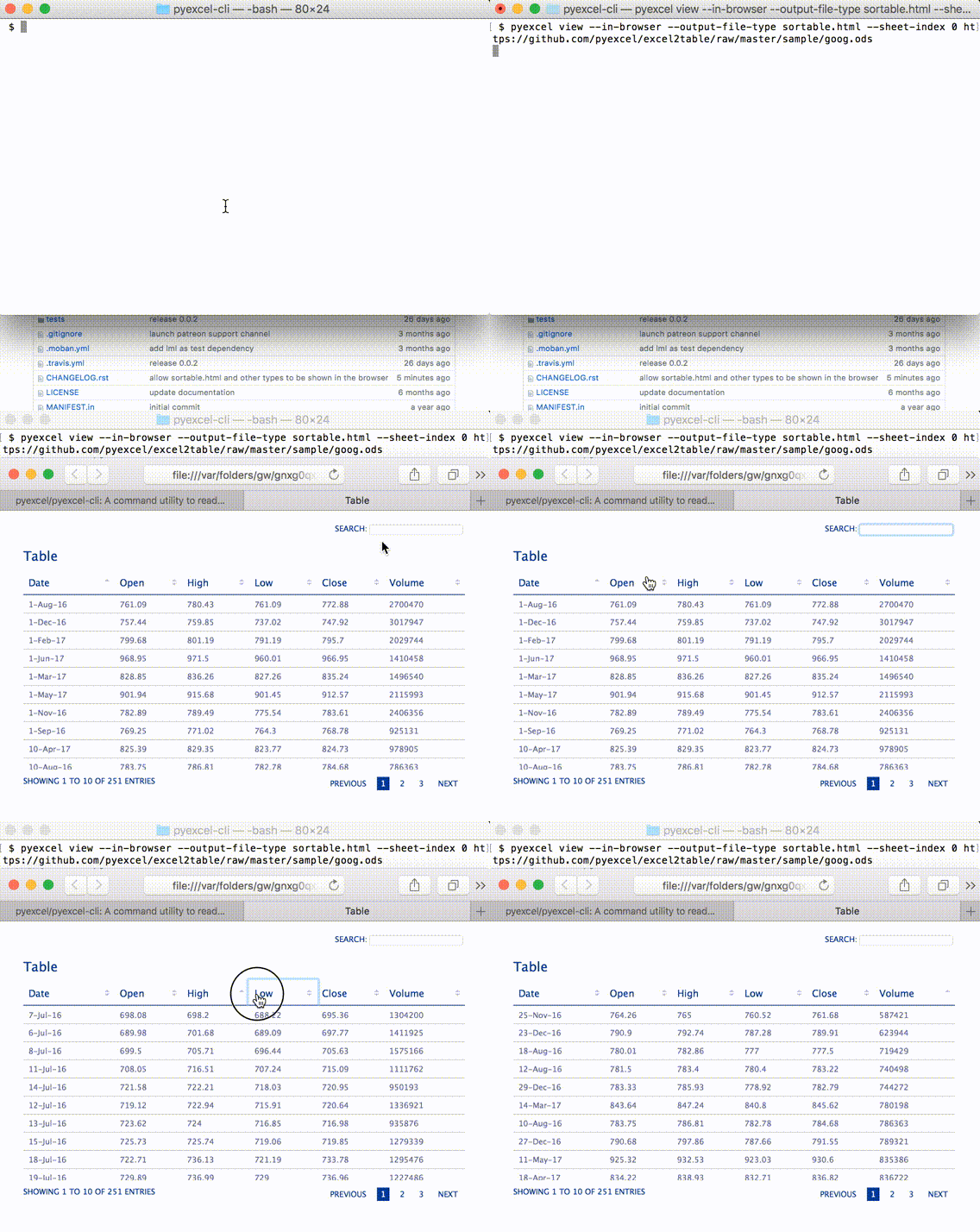
$ pyexcel view --in-browser --output-file-type sortable.html --sheet-index 0 https://github.com/pyexcel/excel2table/raw/master/sample/goog.ods
Here’s what you will get:
Here is another cli example usage:
$ pyexcel view https://github.com/pyexcel/pyexcel-cli/blob/master/tests/fixtures/multiple-sheets.xls
Sheet 1:
+---+---+---+
| 1 | 2 | 3 |
+---+---+---+
| 4 | 5 | 6 |
+---+---+---+
| 7 | 8 | 9 |
+---+---+---+
Sheet 2:
+---+---+---+
| X | Y | Z |
+---+---+---+
| 1 | 2 | 3 |
+---+---+---+
| 4 | 5 | 6 |
+---+---+---+
Sheet 3:
+---+---+---+
| O | P | Q |
+---+---+---+
| 3 | 2 | 1 |
+---+---+---+
| 4 | 3 | 2 |
+---+---+---+
Because pyexcel family is loosely coupled, especially for file format supports, you install the libraries that you need to. If you need to support xls format, you will need to install pyexcel-xls. For more information, please see the plugin section. .. _file-format-list: .. _a-map-of-plugins-and-file-formats:
Package name |
Supported file formats |
Dependencies |
Python versions |
|---|---|---|---|
2.6, 2.7, 3.3, 3.4, 3.5, 3.6 pypy |
|||
xls, xlsx(read only), xlsm(read only) |
same as above |
||
xlsx |
same as above |
||
xlsx(write only) |
same as above |
||
ods |
ezodf, lxml |
2.6, 2.7, 3.3, 3.4 3.5, 3.6 |
|
ods |
same as above |
||
ods(read only) |
lxml |
same as above |
|
(write only)json, rst, mediawiki, html, latex, grid, pipe, orgtbl, plain simple |
2.6, 2.7, 3.3, 3.4 3.5, 3.6, pypy |
||
handsontable in html |
same as above |
||
svg chart |
2.7, 3.3, 3.4, 3.5 3.6, pypy |
||
sortable table in html |
same as above |
In order to manage the list of plugins installed, you need to use pip to add or remove a plugin. When you use virtualenv, you can have different plugins per virtual environment. In the situation where you have multiple plugins that does the same thing in your environment, you need to tell pyexcel which plugin to use per function call. For example, pyexcel-ods and pyexcel-odsr, and you want to get_array to use pyexcel-odsr. You need to append get_array(…, library=’pyexcel-odsr’).
Footnotes
Installation
You can install it via pip:
$ pip install pyexcel-clior clone it and install it:
$ git clone https://github.com/pyexcel/pyexcel-cli.git
$ cd pyexcel-cli
$ python setup.py install
Development guide
Development steps for code changes
cd pyexcel-cli
Upgrade your setup tools and pip. They are needed for development and testing only:
pip install –upgrade setuptools pip
Then install relevant development requirements:
pip install -r rnd_requirements.txt # if such a file exists
pip install -r requirements.txt
pip install -r tests/requirements.txt
Once you have finished your changes, please provide test case(s), relevant documentation and update CHANGELOG.rst.
How to test your contribution
Although nose and doctest are both used in code testing, it is adviable that unit tests are put in tests. doctest is incorporated only to make sure the code examples in documentation remain valid across different development releases.
On Linux/Unix systems, please launch your tests like this:
$ make
On Windows systems, please issue this command:
> test.bat
How to update test environment and update documentation
Additional steps are required:
pip install moban
git clone https://github.com/pyexcel/pyexcel-commons.git commons
make your changes in .moban.d directory, then issue command moban
What is pyexcel-commons
Many information that are shared across pyexcel projects, such as: this developer guide, license info, etc. are stored in pyexcel-commons project.
What is .moban.d
.moban.d stores the specific meta data for the library.
Acceptance criteria
Has Test cases written
Has all code lines tested
Passes all Travis CI builds
Has fair amount of documentation if your change is complex
Agree on NEW BSD License for your contribution
License
New BSD License
Change log
0.0.3 - 15.07.2017
Added
To allow viewing csvtotable in browser and the syntax is: pyexcel view –in-browser –output-file-type sortable.html –sheet-index 0 goog.ods
0.0.2 - 19.06.2017
Updated
use pyexcel v0.5.0
0.0.1 - 11.07.2016
Initial release
1 maintainer

Metadata
1 maintainer
Release files for pyexcel-cli 0.0.3
For a detailed explanation of source distributions (sdists) and built distributions (wheels), please see the package formats documentation.
Source distribution (sdist)
| File | Size | Uploaded | |
|---|---|---|---|
| pyexcel-cli-0.0.3.tar.gz | 13.0 kB | Details |
Built distribution (wheel)
| File | Interpreter | ABI | Platform | Reset |
|---|---|---|---|---|
| pyexcel_cli-0.0.3-py2.py3-none-any.whl | Python 2, Python 3 | none | any | Details |
Total release size: 28.7 kB
Release files / pyexcel-cli-0.0.3.tar.gz
| Download URL | pyexcel-cli-0.0.3.tar.gz |
|---|---|
| Size | 13.0 kB |
| Tags | Source |
|
SHA-256 checksum How to use checksums |
12a832f51c2c9ec9dfcfcd25619eefde42b3fa59890daf7cda9c3cca3543db8f
|
|
BLAKE2b-256 checksum How to use checksums |
82e2d110ba2786ac7dae063f4be721504dade7023ceeb2a2a7d311da30675ed8
|
| Upload date | |
|
Uploaded using Trusted Publishing? What is trusted publishing? |
No |
Release files / pyexcel_cli-0.0.3-py2.py3-none-any.whl
| Download URL | pyexcel_cli-0.0.3-py2.py3-none-any.whl |
|---|---|
| Size | 15.6 kB |
| Tags | Python 2 Python 3 |
|
SHA-256 checksum How to use checksums |
1e847bca9b40fd9e4ab3bef94d8fc284e83b74ab664b5ccb7742cebfd7d430cd
|
|
BLAKE2b-256 checksum How to use checksums |
89d3237d19f26e74d5a2027a0083b9c44d932bc3d951595dfef114ad5afe28f0
|
| Upload date | |
|
Uploaded using Trusted Publishing? What is trusted publishing? |
No |














