
pyfig







Interactive figure and window management for Windows.
pyfig is a Windows-only Python package for interactively arranging and managing figure windows created by Matplotlib, Mayavi/TVTK, and Chaco.
It provides convenient functions for:
- Tiling, stacking, piling, and cascading windows
- Minimizing, maximizing, restoring, and hiding figures
- Snapping windows to screen regions
- Cycling through figures
- Closing or keeping selected figures
- Querying figure positions and screen geometry
The package uses the Win32 API and works directly with figure windows after they have been created.
Gallery
The examples below use Matplotlib figures, but pyfig can also manipulate Mayavi/TVTK and Chaco figure windows.
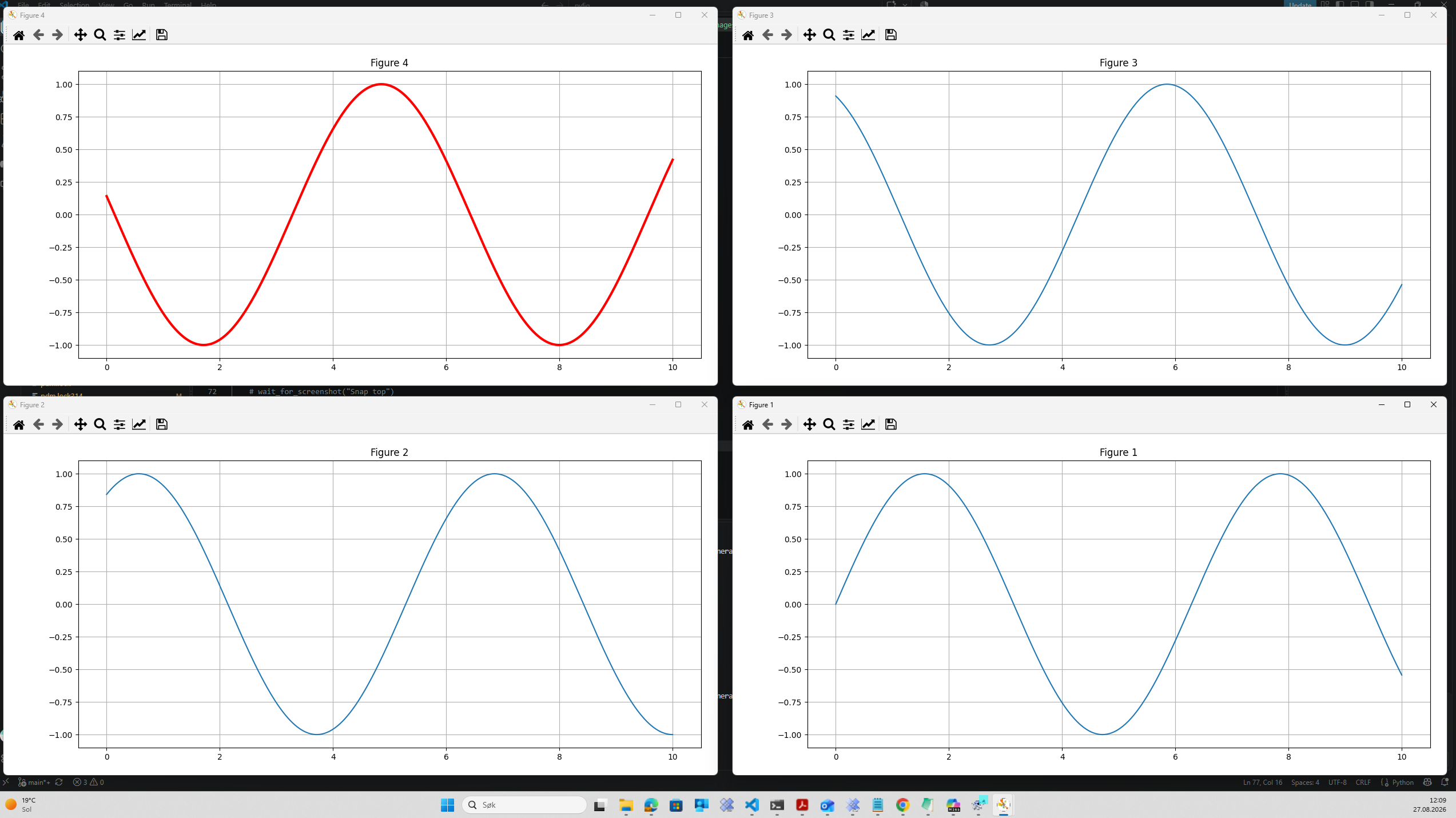
Tile all open figures
Arrange all open figures in a non-overlapping grid:
from pyfig import fig

fig.tile()
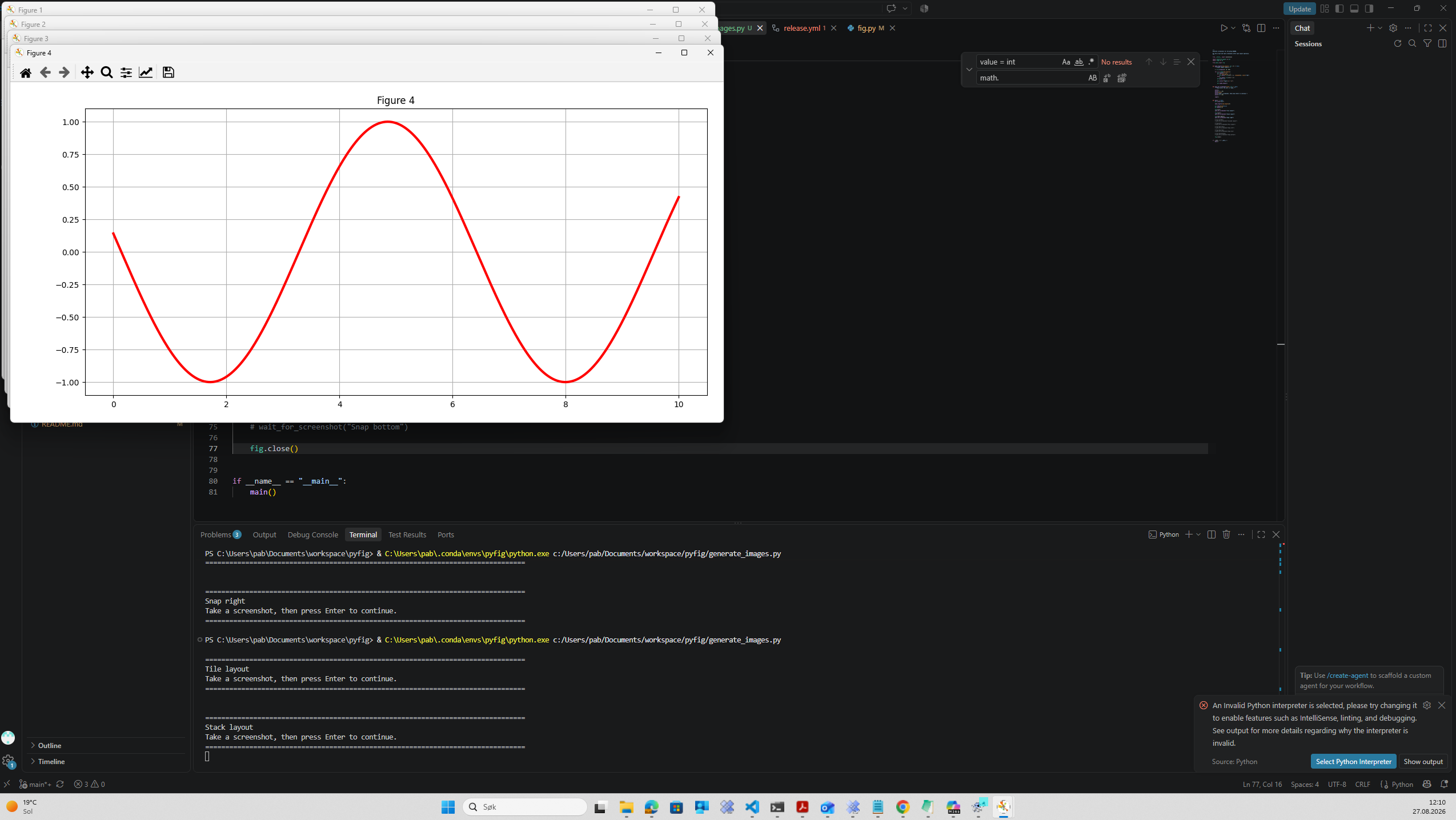
Stack all open figures with partial overlap
Arrange figures with a staircase-style overlap:
from pyfig import fig

fig.stack()
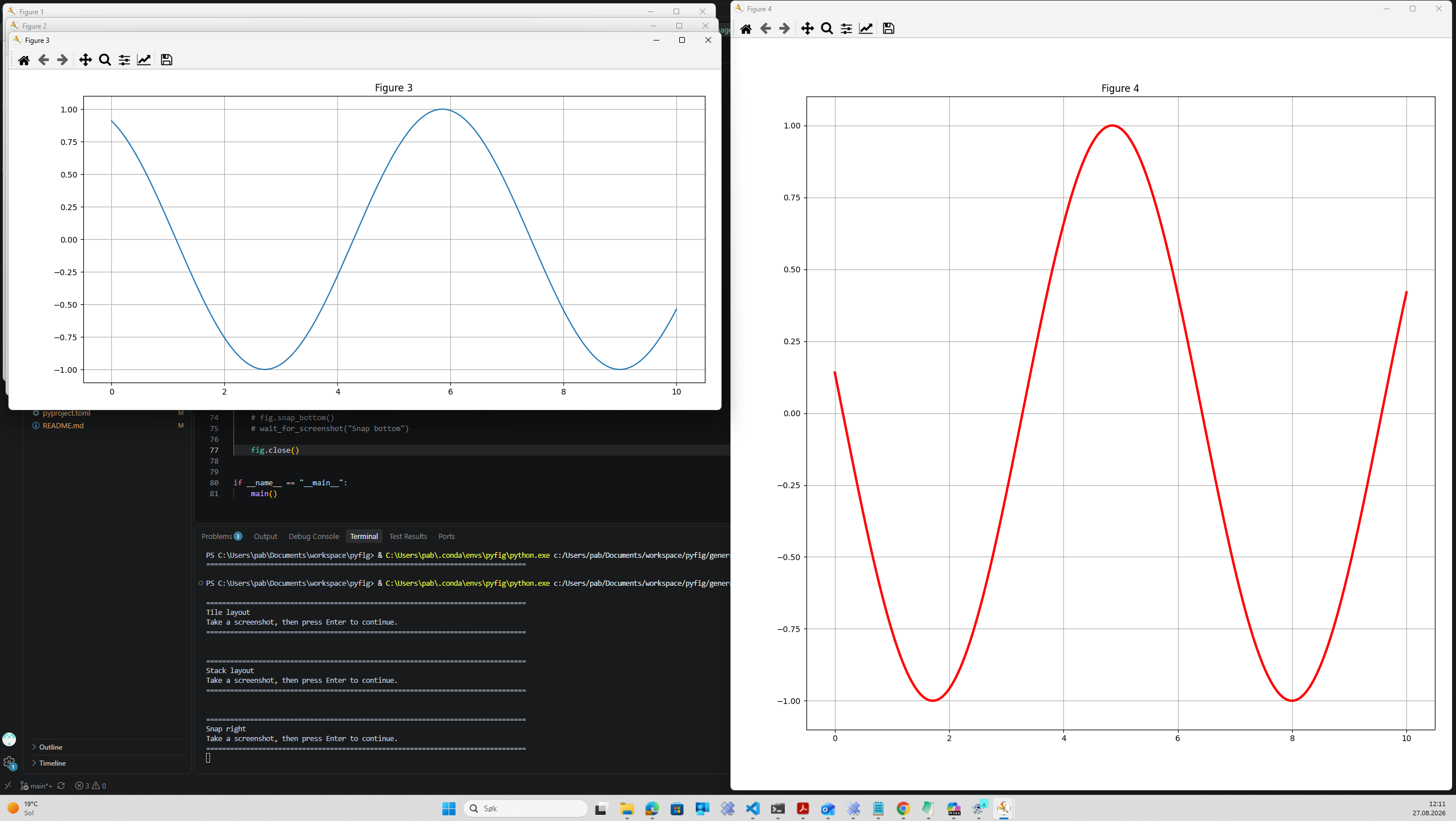
Snap a figure to the right side of the screen
Snap figure number four to the right half of the screen.
fig.snap_right(4)
Features
The screenshots above demonstrate only a subset of the functionality available in pyfig.
Window management
fig.maximize()
fig.minimize()
fig.restore()
fig.hide()
Layout management
fig.tile()
fig.stack()
fig.pile()
fig.cascade()
Screen snapping
fig.snap_left()
fig.snap_right()
fig.snap_top()
fig.snap_bottom()
Figure selection
fig.close(1, 2)
fig.keep(3)
Interactive cycling
fig.cycle()
fig.cycle(pairs=2)
fig.cycle(interval=1.0)
Requirements
- Windows
- Python 3.10+
- pywin32
Installation
Matplotlib support
pip install pyfig[plot]
Core package
pip install pyfig
wxPython support
pip install pyfig[wx]
Everything
pip install pyfig[plot,wx]
Quick Check
After installation, verify that pyfig is working:
import pyfig

pyfig.test()
Quick Start
Create some figures:
import matplotlib.pyplot as plt

for i in range(1, 5):
    plt.figure(i)
Arrange them:
from pyfig import fig

fig.tile()
Stack them:
fig.stack()
Pile them:
fig.pile()
Maximize a figure:
fig.maximize(4)
Close all figures:
fig.close()
Selecting Figures
By default, functions operate on all open figures:
fig.tile()
You can also target specific figures:
fig.maximize(4)
fig.snap_right(4)
or multiple figures:
fig.stack(1, 2, 3)
fig.tile([1, 2, 3, 4])
Examples
Tile all open figures
import matplotlib.pyplot as plt
from pyfig import fig

for i in range(1, 5):
    plt.figure(i)

fig.tile()

# Tile figures in pairs
fig.tile(pairs=2)
Keep only selected figures
fig.keep(1, 3)
Snap a figure to the right side of the screen
fig.snap_right(4)
Center all figures
fig.center()
Cycle through open figures
fig.cycle(interval=1.0)
Cycle through figures in pairs
fig.cycle(pairs=2)
Public API
All functionality is available through the pyfig.fig module:
Window operations
close()
hide()
restore()
minimize()
maximize()
keep()
cycle()
Layout operations
tile()
stack()
pile()
cascade()
center()
set_size()
Screen snapping
snap_left()
snap_right()
snap_top()
snap_bottom()
Information functions
find_all_figure_numbers()
find_figure_handles()

get_window_position_and_size()
get_screen_position_and_size()
Configuration
set_prefer_wx()
wxPython Support
If wxPython is installed, pyfig can provide a GUI dialog for figure cycling.
Enable it by setting the environment variable:
set FIG_USE_WX=1
or programmatically:
from pyfig import fig

fig.set_prefer_wx(True)
Without wxPython, pyfig automatically falls back to a console-based interface.
Testing
pyfig includes a convenience function for running its test suite.
Run all tests:
import pyfig

pyfig.test()
Run with additional pytest options:
import pyfig

pyfig.test("-v")
Show available pytest options:
import pyfig

pyfig.test("--help")
For development, tests may also be executed directly using PDM:
pdm run tests
or:
pdm all-tests
License
BSD License.
See the LICENSE file for details.
1 maintainer

Release files for pyfig 1.0.2
For a detailed explanation of source distributions (sdists) and built distributions (wheels), please see the package formats documentation.
Source distribution (sdist)
| File | Size | Uploaded | |
|---|---|---|---|
| pyfig-1.0.2.tar.gz | 19.4 kB | Details |
Built distribution (wheel)
| File | Interpreter | ABI | Platform | Reset |
|---|---|---|---|---|
| pyfig-1.0.2-py3-none-any.whl | Python 3 | none | any | Details |
Total release size: 37.8 kB
Release files / pyfig-1.0.2.tar.gz
| Download URL | pyfig-1.0.2.tar.gz |
|---|---|
| Size | 19.4 kB |
| Tags | Source |
|
SHA-256 checksum How to use checksums |
6908f8a163f3aa834bdd5201de3bfa4f07a15e61f0120589b5e15c3897b552a4
|
|
BLAKE2b-256 checksum How to use checksums |
012f0be8c17faaaf5e5f5fb6ef3dcfbac9c696a988a49bf67c5a0c770d390d6f
|
| Upload date | |
|
Uploaded using Trusted Publishing? What is trusted publishing? |
Yes |
| Uploaded via |
pdm/2.28.2 CPython/3.14.7 Windows/2025Server
|
Release files / pyfig-1.0.2-py3-none-any.whl
| Download URL | pyfig-1.0.2-py3-none-any.whl |
|---|---|
| Size | 18.4 kB |
| Tags | Python 3 |
|
SHA-256 checksum How to use checksums |
ed6fdd8563272ca2aee07a9195a8f03e875fe8a489201fe8398710968d076bab
|
|
BLAKE2b-256 checksum How to use checksums |
a251688dc81c21095742121c7f7a2e0e3f6c67b91b2821afc9c6ec9776b9ac6a
|
| Upload date | |
|
Uploaded using Trusted Publishing? What is trusted publishing? |
Yes |
| Uploaded via |
pdm/2.28.2 CPython/3.14.7 Windows/2025Server
|














