
PyFLX






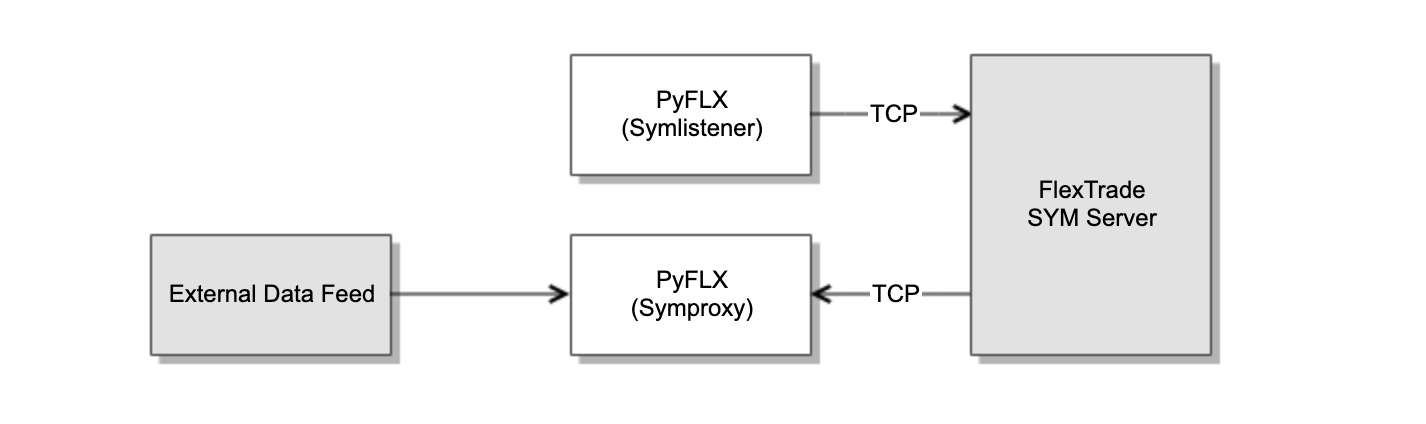
Provides Python market data API access to FlexTrade SYM. PyFLX has two market data Python classes - Symlistener (client) for consuming market data from FlexTrade market data server and Symproxy (publisher or feeder) for publising custom tick data to FlexTrade market data server.
Installation
Install from PyPI using pip:
pip install pyflx
Example
import pyflx
import time

def onData(symbol, data={}):
    print("[onData] symbol:{}, data:{}".format(symbol, data))

sl = pyflx.Symlistener()
sl.onData(onData)
while True:
    try:
        if sl.connect('192.168.1.123', 7600):
            sl.subscribe('XAU/USD')
            sl.loop()
        time.sleep(5)
    except KeyboardInterrupt:
        exit(0)
    except Exception as e:
        print(e)
See symlistener.py and symproxy.py for example codes.
API
Symlistener Class
pyflx.Symlistener()
Create an instance of Symlistener client.
>> sl = pyflx.Symlistener()
Symlistener.connect(ip_address, port)
ip_address: str
port: int
➥return: bool
Connect to a SYM server on a specified port number. Return true if successful or false if not able to connect to the server.
>> sl.connect('192.168.1.123', 7600)
Symlistener.subscribe(symbol)
symbol: str
Subscribe to market data of the symbol.
>> sl.subscribe('XAU/USD')
Symlistener.subscribeAll()
Subscribe to market data of all symbols.
>> sl.subscribeAll()
Symlistener.unsubscribe(symbol)
symbol: str
Unsubscribe to market data of the symbol.
>> sl.unsubscribe('XAU/USD')
Symlistener.subscribeAll()
Unsubscribe to market data of all symbols.
>> sl.unsubscribeAll()
Symlistener.loop()
Enter an event loop and listens for callbacks .
>> sl.loop()
Symlistener.onData(symbol, data)
symbol: str
data: dict
A callback onData, if assigned, is called upon receiving messages from SYM server.
>> def onData(symbol, data):
>>     print("[onData] symbol:{}, data:{}".format(symbol, data))
>>
>> sl = pyflx.Symlistener()
>> sl.onData(onData)
Symproxy Class
pyflx.Symproxy()
Create an instance of Symproxy server.
>> sp = pyflx.Symproxy()
Symproxy.initialize(port)
port: int
Listens to an incoming connection request on a port.
>> sp.initialize(7600)
Symproxy.getFd()
➥return: int
Returns either client or a binding socket.
>> sp.getFd()
Symproxy.select()
➥return: int
Looks for events on a socket.
>> sp.select()
Symproxy.checkSocket()
Process checks requests and callbacks will be triggered.
>> sp.checkSocket()
Symproxy.publish(symbol, data)
symbol: str
data: dict
Publishes market data tick update to a SYM server. See Data Format.
>> sp.publish('XAU/USD', {0:1420, 1:1421.5, 512:1000, 513:2000, 1032:'USD', 1541:'U'})
Symproxy.onLogon(username, password)
username: str
password: str
A callback onLogon, if assigned, is called upon receiving a logon message from a client.
>> def onLogon(username, password):
>>     print("[onLogon] username:{}, password:{}".format(username, password))
>>
>> sp = pyflx.Symproxy()
>> sp.initialize(7600)
>> sp.onLogon(onLogon)
>> sp.onSubscribe(onSubscribe)
>> sp.onUnsubscribe(onUnsubscribe)
Symproxy.onSubscribe(symbol)
symbol: str
A callback onSubscribe, if assigned, is called upon receiving a symbol subscription message from a client.
Symproxy.onUnsubscribe(symbol)
symbol: str
A callback onUnsubscribe, if assigned, is called upon receiving a symbol unsubscription message from a client.
Data Format
| Tag | Type | Description |
|---|---|---|
| 0 | float | Bid |
| 1 | float | Ask |
| 2 | float | VWAP |
| 3 | float | Last traded price |
| 8 | float | Today's high |
| 9 | float | Today's low |
| 10 | float | Today's open |
| 11 | float | Previous day's close |
| 17 | float | Today's close |
| 18 | float | Volume |
| 512 | int | Bid size |
| 513 | int | Ask size |
| 514 | int | Trade size |
| 518 | int | Update time |
| 519 | int | Last trade time |
| 1024 | str | Symbol |
| 1032 | str | Traded currency |
| 1541 | str | Bid tick directionU - upD - down |
| 1545 | str | Ask tick directionU - upD - down |
Support
- Report an issue in issue tracker
Changelog
1.3.0
- 6 April 2020
- New: Closes clien connection and rebinds to binding port with
Symproxy.closeClient()
1.2.0
- 7 August 2019
- Support for Python 2.7
- Symlistener class
- Symproxy class
1 maintainer

Release files for pyflx 1.3.0
For a detailed explanation of source distributions (sdists) and built distributions (wheels), please see the package formats documentation.
Built distribution (wheel)
| File | Interpreter | ABI | Platform | Reset |
|---|---|---|---|---|
| pyflx-1.3.0-cp27-none-manylinux1_x86_64.whl | CPython 2.7 | none | Linux glibc 2.5+ x86-64 | Details |
Release files / pyflx-1.3.0-cp27-none-manylinux1_x86_64.whl
| Download URL | pyflx-1.3.0-cp27-none-manylinux1_x86_64.whl |
|---|---|
| Size | 2.2 MB |
| Tags | CPython 2.7 Linux glibc 2.5+ x86-64 |
|
SHA-256 checksum How to use checksums |
1c6e0a3be54a2268784642f38ad667d7ac883b5cf2b503c6d8a99c479b6c8fff
|
|
BLAKE2b-256 checksum How to use checksums |
9c29aac5b95605f2c6a2d852b5395cc0765ae72e5983ace8499de2de374d555d
|
| Upload date | |
|
Uploaded using Trusted Publishing? What is trusted publishing? |
No |
| Uploaded via |
twine/1.11.0 pkginfo/1.4.2 requests/2.19.1 setuptools/44.0.0 requests-toolbelt/0.8.0 tqdm/4.23.0 CPython/2.7.6
|














