







pyfolio is a Python library for performance and risk analysis of financial portfolios. It accepts returns, positions, and transactions from your own backtester, with optional integration for Zipline.
Maintenance and new development
Pyfolio Reloaded is in minimal maintenance. Further work is limited to critical bug fixes, security issues, and essential compatibility updates. All new feature development focuses on the current ML4T libraries, including ML4T Diagnostic. For new projects, we recommend evaluating Diagnostic through its migration guide, which includes a runnable portfolio example and explains differences between the workflows. See the Diagnostic documentation for its supported APIs.
Trading Strategy Analysis with pyfolio
At the core of pyfolio are various tear sheets that combine various individual plots and summary statistics to provide a comprehensive view of the performance of a trading algorithm.
Here's an example of a simple tear sheet analyzing a strategy executed with the Zipline backtesting engine:
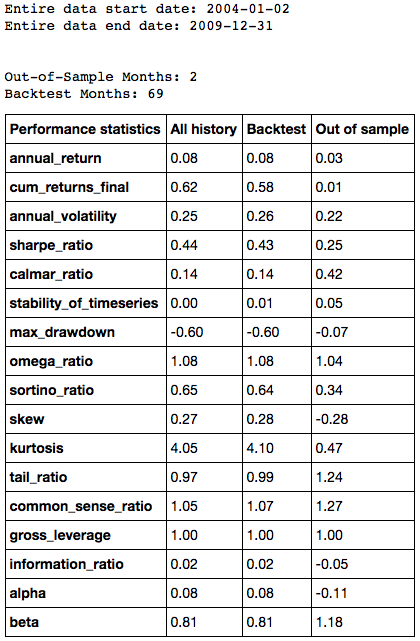
Performance Metrics
The tear sheet presents performance and risk metrics for the strategy separately during the backtest and out-of-sample periods:
Performance Plots
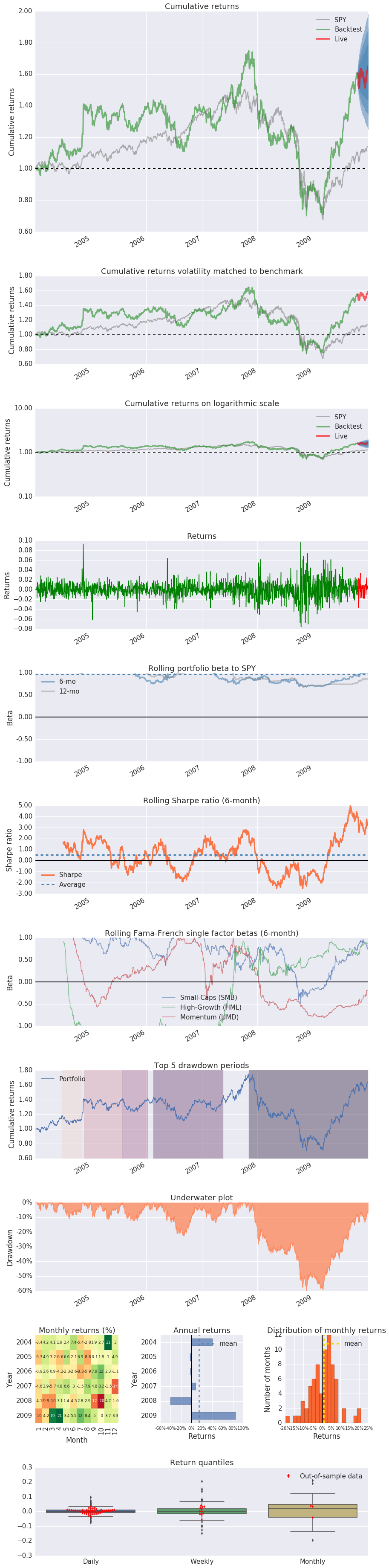
In addition, it visualizes how several risk and return metrics behave over time:
Installation
Pyfolio 0.10.0 and this source version support Python 3.11-3.15. Python 3.9 and 3.10 are retired. Existing release artifacts retain their original Python requirements. See the Python support schedule.
This source version supports pandas 3.0 and 3.1 on Python 3.11-3.15, alongside the existing pandas 1.5/2.x combinations where supported by the interpreter. Pandas 3.2 and later are not yet qualified. Published 0.10.0 permits pandas 3.0 only on Python 3.15.
Pandas 3.1 requires NumPy 2.0.2 or newer on Python 3.11-3.13. The dependency resolver applies its requirements alongside the Python-specific floors below.
When sharing an environment with Zipline, its dependency constraints also apply. Zipline Reloaded 3.2.0 requires pandas below 3.0; use a compatible pandas 2.x environment for that integration. Pyfolio itself does not require Zipline.
Python 3.14 requires pandas 2.3.3 or newer and NumPy 2.3.3 or newer. Python 3.15 requires pandas 3.0.6 and NumPy 2.5.4 or newer; pandas 2.3.3 crashes during date-range construction in the stable CPython 3.15 Linux qualification. The dependency markers select the appropriate combination. Bottleneck currently builds from source on Python 3.15, so that installation needs a C compiler.
To install a published Pyfolio release into a supported environment, run:
pip install pyfolio-reloaded
The Conda channel contains historical releases:
conda install -c ml4t pyfolio-reloaded
The frozen Conda 0.9.4 recipe and existing channel artifacts are preserved. That recipe does not build this source version, and its publishing workflow is retired.
Development
Clone this repository, then create an isolated environment and install the declared extras:
uv venv --python 3.11
uv pip install -e '.[test,docs,dev]'
uv run pre-commit install
Usage
A good way to get started is to run the pyfolio examples in a Jupyter notebook. To do this, you first want to start a Jupyter notebook server:
jupyter notebook
From the notebook list page, navigate to the pyfolio examples directory and open a notebook. Execute the code in a notebook cell by clicking on it and hitting Shift+Enter.
Questions?
If you find a bug, feel free to open an issue in this repository.
You can also join our community.
Support
Please open an issue for support.
Contributing
Read the contribution guide before submitting an issue or pull request. This library accepts bug, security and compatibility fixes.
If you'd like to contribute, a great place to look is the issues marked with help-wanted.
For a list of core developers and outside collaborators, see the GitHub contributors list.
1 maintainer

Metadata
1 maintainer
Release files for pyfolio-reloaded 0.10.2
For a detailed explanation of source distributions (sdists) and built distributions (wheels), please see the package formats documentation.
Source distribution (sdist)
| File | Size | Uploaded | Provenance | Actions |
|---|---|---|---|---|
| pyfolio_reloaded-0.10.2.tar.gz | 13.2 MB | Without provenance | Details for pyfolio_reloaded-0.10.2.tar.gz |
Built distribution (wheel)
| File | Interpreter | ABI | Platform | Actions Reset |
|---|---|---|---|---|
| pyfolio_reloaded-0.10.2-py3-none-any.whl | Python 3 | none | any | Details for pyfolio_reloaded-0.10.2-py3-none-any.whl |
Total release size: 19.4 MB
Release files / pyfolio_reloaded-0.10.2.tar.gz
| Download URL | pyfolio_reloaded-0.10.2.tar.gz |
|---|---|
| Size | 13.2 MB |
| Tags | Source |
|
SHA-256 checksum How to use checksums |
afad5b8b166a6fa32fbc598045dad793ea14f07bd06c03273d624a61425bccb1
|
|
BLAKE2b-256 checksum How to use checksums |
9c121eae44268d1db394bb12d1359126cd2b609978c77e0ff61e5842be2a1ab2
|
| Upload date | |
|
Uploaded using Trusted Publishing? What is trusted publishing? |
No |
| Uploaded via |
twine/7.0.0 CPython/3.13.16
|
Release files / pyfolio_reloaded-0.10.2-py3-none-any.whl
| Download URL | pyfolio_reloaded-0.10.2-py3-none-any.whl |
|---|---|
| Size | 6.2 MB |
| Tags | Python 3 |
|
SHA-256 checksum How to use checksums |
6a099ed59483fe4d2cf9cfc73a71193dfa91efafb9f03dcaf01d6507de82e0de
|
|
BLAKE2b-256 checksum How to use checksums |
13c1cfdded7d7f783b2e2d6967f575f536598e462477a25752eebe9ab92ab2a7
|
| Upload date | |
|
Uploaded using Trusted Publishing? What is trusted publishing? |
No |
| Uploaded via |
twine/7.0.0 CPython/3.13.16
|
Security for pyfolio-reloaded 0.10.2
Provenance
Provenance describes where a file came from. On PyPI, provenance is shared via attestations, which provide a verifiable record of the build or publishing details. View details, limitations and caveats.
No provenance found
None of the files in this release were uploaded with provenance metadata.
A note on package security
PyPI is a repository for distributing packages, not a service for auditing them. While third-party security researchers and our staff do their best to detect and remove malicious packages, PyPI cannot guarantee the quality, security or suitability of any given package.
To learn more about protecting yourself from malicious actors, visit our package security documentation.














