
Performance and risk analysis of financial portfolios with Python

Project description









pyfolio is a Python library for performance and risk analysis of financial portfolios that works well with the Zipline open source backtesting library.
Trading Strategy Analysis with pyfolio
At the core of pyfolio are various tear sheets that combine various individual plots and summary statistics to provide a comprehensive view of the performance of a trading algorithm.
Here's an example of a simple tear sheet analyzing a strategy executed with the Zipline backtesting engine:
Performance Metrics
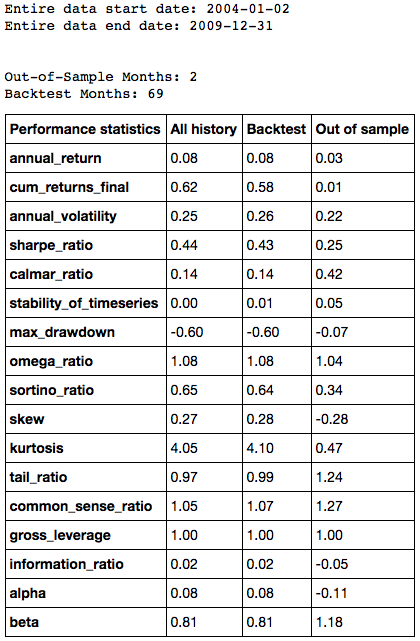
The tear sheet presents performance and risk metrics for the strategy separately during the backtest and out-of-sample periods:
Performance Plots
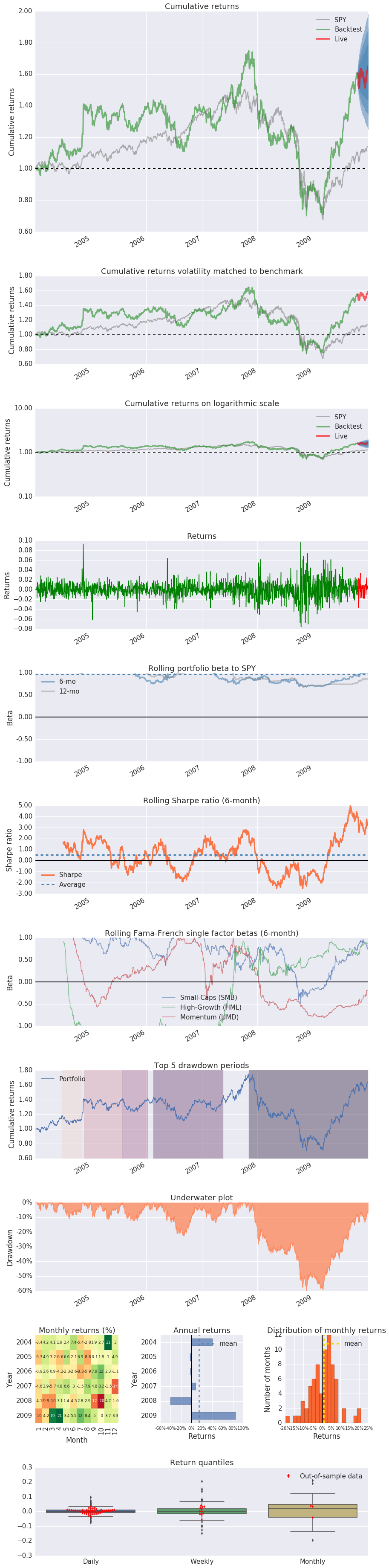
In addition, it visualizes how several risk and return metrics behave over time:
Installation
To install pyfolio, run:
pip install pyfolio-reloaded
or
conda install -c ml4t pyfolio-reloaded
Development
For development, you may want to use a virtual environment to avoid dependency conflicts between pyfolio and other Python projects you have.
To get set up with a virtual env, run:
mkvirtualenv pyfolio
Next, clone this git repository and run python -m pip install .[all] and edit the library files directly.
Usage
A good way to get started is to run the pyfolio examples in a Jupyter notebook. To do this, you first want to start a Jupyter notebook server:
jupyter notebook
From the notebook list page, navigate to the pyfolio examples directory and open a notebook. Execute the code in a notebook cell by clicking on it and hitting Shift+Enter.
Questions?
If you find a bug, feel free to open an issue in this repository.
You can also join our community.
Support
Please open an issue for support.
Contributing
If you'd like to contribute, a great place to look is the issues marked with help-wanted.
For a list of core developers and outside collaborators, see the GitHub contributors list.
Release history Release notifications | RSS feed


Download files
Download the file for your platform. If you're not sure which to choose, learn more about installing packages.
Source Distribution
Built Distribution
Filter files by name, interpreter, ABI, and platform.
If you're not sure about the file name format, learn more about wheel file names.
Copy a direct link to the current filters
File details
Details for the file pyfolio_tej-2.0.4.tar.gz.
File metadata
- Download URL: pyfolio_tej-2.0.4.tar.gz
- Upload date:
- Size: 88.4 kB
- Tags: Source
- Uploaded using Trusted Publishing? No
- Uploaded via: twine/6.2.0 CPython/3.9.23
File hashes
| Algorithm | Hash digest | |
|---|---|---|
| SHA256 |
2e836b5d956e97045c56ecf15bff1bf22be1d2652cb79d9a7576d11b444605d5
|
|
| MD5 |
43e2dcedcfba88aa0e67fb67ebc5f4b9
|
|
| BLAKE2b-256 |
043ac97430d8c6b033a1046d8603671c9b7b151f38d48e30e79b995643cd383f
|
File details
Details for the file pyfolio_tej-2.0.4-py3-none-any.whl.
File metadata
- Download URL: pyfolio_tej-2.0.4-py3-none-any.whl
- Upload date:
- Size: 74.4 kB
- Tags: Python 3
- Uploaded using Trusted Publishing? No
- Uploaded via: twine/6.2.0 CPython/3.9.23
File hashes
| Algorithm | Hash digest | |
|---|---|---|
| SHA256 |
4ee7b8f4514d557c84b8ac880c61c3bd1182c46c61fb259e56ca9ead38110b9f
|
|
| MD5 |
c0e4f0c2e2061892c1016769159527c0
|
|
| BLAKE2b-256 |
18c852c30f7a5142c5126cd0db8dc75e1d9968123ce4c14af2c39835ed7b559e
|






