
FreeProxy: Collecting free proxies from internet.

Project description










📚 Documentation
https://freeproxy.readthedocs.io/
⚡ Live Proxies (最新免费高质量代理)
https://charlespikachu.github.io/freeproxy/

学习收获更多有趣的内容, 欢迎关注微信公众号:Charles的皮卡丘
✨ What's New
- 2026-04-22: Released pyfreeproxy v0.4.6 — Added two new free proxy nodes: Geonix and ProxyVerity.
- 2026-04-08: Released pyfreeproxy v0.4.5 — Fix compatibility issues with Python 3.10; add support for two new high-quality free proxy sources: "pubproxy.com" and "floppydata.com".
- 2026-04-08: Released pyfreeproxy v0.4.4 — Added two high-quality free proxy sources, "freevpnnode.com" and "trustytech.io"; fixed some potential bugs in setup; and improved IDE support.
📘 Introduction
🌍 FreeProxy continuously discovers, verifies, and updates free proxy lists for HTTP, HTTPS, SOCKS4, and SOCKS5. With flexible filtering by geography, anonymity, speed, and more, it helps you quickly find proxies that match your needs. If you find this project useful, please consider giving it a ⭐ to support development and stay updated.
🌐 Supported Proxy Sources
🎮 Playground
Here are some projects built on top of pyfreeproxy,
| Project | WeChat Article | Project Location |
|---|---|---|
| ICU996 | 用数万条数据带大家看看到底是哪些人在反对996~ | click |
📦 Install
You have three installation methods to choose from,
# from pip
pip install pyfreeproxy
# from github repo method-1
pip install git+https://github.com/CharlesPikachu/freeproxy.git@master
# from github repo method-2
git clone https://github.com/CharlesPikachu/freeproxy.git
cd freeproxy
python setup.py install
Please note that some proxy sources need to be crawled using DrissionPage, such as IP3366ProxiedSession.
If DrissionPage cannot find a suitable browser in the current environment, it will automatically download the latest compatible beta version of Google Chrome for the current system.
So if you notice that the program is downloading a browser, there is no need to be overly concerned.
🚀 Quick Start
Scrape proxies from multiple sources
After installing freeproxy, you can run a script to:
- scrape proxies from multiple sources,
- print basic statistics for each source,
- save all retrieved proxies into a JSON file.
Example code (scrape + summarize + save):
import json, random
from tqdm import tqdm
from freeproxy.modules import BaseProxiedSession, ProxyInfo, BuildProxiedSession, printtable, colorize

'''settings'''
SOURCES = ["ProxiflyProxiedSession", "KuaidailiProxiedSession", "QiyunipProxiedSession", "ProxylistProxiedSession"]
TITLES = ["Source", "Retrieved Example", "HTTP", "HTTPS", "SOCKS4", "SOCKS5", "Chinese IP", "Elite", "Total"]

'''scrape'''
def scrape(src: str) -> list[ProxyInfo]:
    try:
        sess: BaseProxiedSession = BuildProxiedSession({"max_pages": 1, "type": src, "disable_print": False})
        return sess.refreshproxies()
    except Exception:
        return []

'''stats'''
def stats(proxies: list[ProxyInfo]) -> dict:
    return {
        "http":   sum(p.protocol.lower() == "http"   for p in proxies),
        "https":  sum(p.protocol.lower() == "https"  for p in proxies),
        "socks4": sum(p.protocol.lower() == "socks4" for p in proxies),
        "socks5": sum(p.protocol.lower() == "socks5" for p in proxies),
        "cn":     sum(bool(p.in_chinese_mainland) for p in proxies),
        "elite":  sum(p.anonymity.lower() == "elite" for p in proxies),
        "total":  len(proxies),
        "ex":     (random.choice(proxies).proxy if proxies else "NULL"),
    }

'''row'''
def row(src: str, s: dict) -> list:
    ex = colorize(s["ex"], "green") if s["total"] else "NULL"
    return [
        src.removesuffix("ProxiedSession"),
        ex,
        colorize(s["http"], "number"),
        colorize(s["https"], "number"),
        colorize(s["socks4"], "number"),
        colorize(s["socks5"], "number"),
        colorize(s["cn"], "number"),
        colorize(s["elite"], "number"),
        colorize(s["total"], "number"),
    ]

'''main'''
def main():
    free_proxies, items = {}, []
    for src in tqdm(SOURCES):
        proxies = scrape(src)
        items.append(row(src, stats(proxies)))
        free_proxies[src] = [p.todict() for p in proxies]
    print("The proxy distribution for each source you specified is as follows:")
    printtable(titles=TITLES, items=items, terminal_right_space_len=1)
    json.dump(free_proxies, open("free_proxies.json", "w"), indent=2)

'''tests'''
if __name__ == "__main__":
    main()
Example output (terminal):
C:\Users\Charles\Desktop>python test.py
KuaidailiProxiedSession >>> adding country_code: 37it [00:05,  6.57it/s]                 | 1/4 [00:18<00:56, 18.95s/it]
100%|████████████████████████████████████████████████████████████████████████████████████| 4/4 [00:28<00:00,  7.17s/it]
The proxy distribution for each source you specified is as follows:
+-----------+-------------------------------+------+-------+--------+--------+------------+-------+-------+
|   Source  |       Retrieved Example       | HTTP | HTTPS | SOCKS4 | SOCKS5 | Chinese IP | Elite | Total |
+-----------+-------------------------------+------+-------+--------+--------+------------+-------+-------+
|  Proxifly |   http://195.231.69.203:443   | 5112 |   0   |  1043  |  477   |     48     |  2157 |  6632 |
| Kuaidaili |   http://113.45.158.25:3128   |  20  |   13  |   0    |   0    |     19     |   33  |   33  |
|  Qiyunip  |   https://114.103.88.18:8089  |  6   |   9   |   0    |   0    |     15     |   14  |   15  |
| Proxylist | socks4://184.181.217.206:4145 | 420  |   59  |  182   |  156   |     54     |  699  |  817  |
+-----------+-------------------------------+------+-------+--------+--------+------------+-------+-------+
All proxies are saved to free_proxies.json in the current directory, e.g.:
{
  "KuaidailiProxiedSession": [
    {
      "source": "KuaidailiProxiedSession",
      "protocol": "http",
      "ip": "58.216.109.17",
      "port": "800",
      "country_code": "CN",
      "in_chinese_mainland": true,
      "anonymity": "elite",
      "delay": 124,
      "test_timeout": 5,
      "test_url": "http://www.baidu.com",
      "test_headers": {
        "User-Agent": "Mozilla/5.0 (Windows NT 10.0; Win64; x64) AppleWebKit/537.36 (KHTML, like Gecko) Chrome/124.0.0.0 Safari/537.36"
      },
      "failed_connection_default_timeout": 3600000,
      "created_at": "2025-12-03T12:43:25.018208",
      "extra": {}
    }
  ],
  "ProxiflyProxiedSession": [],
  "QiyunipProxiedSession": [],
  "ProxylistProxiedSession": []
}
Tip: Increase max_pages to fetch more proxies from each source.
List supported proxy sources
To list all proxy sources supported by your current freeproxy version:
python -c "from freeproxy.modules import ProxiedSessionBuilder; print(ProxiedSessionBuilder.REGISTERED_MODULES.keys())"
Example output:
{
  'ProxiflyProxiedSession':      ProxiflyProxiedSession,      'FreeproxylistProxiedSession': FreeproxylistProxiedSession,
  'IP89ProxiedSession':          IP89ProxiedSession,          'ProxyEliteProxiedSession':    ProxyEliteProxiedSession,
  'IP3366ProxiedSession':        IP3366ProxiedSession,        'KuaidailiProxiedSession':     KuaidailiProxiedSession,
  'KxdailiProxiedSession':       KxdailiProxiedSession,       'ProxydailyProxiedSession':    ProxydailyProxiedSession,
  'ProxydbProxiedSession':       ProxydbProxiedSession,       'ProxyhubProxiedSession':      ProxyhubProxiedSession,
  'ProxylistProxiedSession':     ProxylistProxiedSession,     'QiyunipProxiedSession':       QiyunipProxiedSession,
  'SpysoneProxiedSession':       SpysoneProxiedSession,       'Tomcat1235ProxiedSession':    Tomcat1235ProxiedSession,
  'DatabayProxiedSession':       DatabayProxiedSession,       'FineProxyProxiedSession':     FineProxyProxiedSession,
  'IPLocateProxiedSession':      IPLocateProxiedSession,      'JiliuipProxiedSession':       JiliuipProxiedSession,
  'TheSpeedXProxiedSession':     TheSpeedXProxiedSession,     'GeonodeProxiedSession':       GeonodeProxiedSession,
  'FreeProxyDBProxiedSession':   FreeProxyDBProxiedSession,   'ProxyScrapeProxiedSession':   ProxyScrapeProxiedSession,
  'SCDNProxiedSession':          SCDNProxiedSession,          'GoodIPSProxiedSession':       GoodIPSProxiedSession,
  'SixSixDailiProxiedSession':   SixSixDailiProxiedSession,   'DpangestuwProxiedSession':    DpangestuwProxiedSession,
  'ProxyNovaProxiedSession':     ProxyNovaProxiedSession,     'ProxyShareProxiedSession':    ProxyShareProxiedSession,
  'OpenProxyListProxiedSession': OpenProxyListProxiedSession, 'IPRoyalProxiedSession':       IPRoyalProxiedSession,
  'ADVFPProxiedSession':         ADVFPProxiedSession,         'RoundProxiesProxiedSession':  RoundProxiesProxiedSession,
  'SocksListProxiedSession':     SocksListProxiedSession,     'ProxiwareProxiedSession':     ProxiwareProxiedSession,
  'ProxyFreeOnlyProxiedSession': ProxyFreeOnlyProxiedSession, 'TrustyTechProxiedSession':    TrustyTechProxiedSession,
  'FreeVPNNodeProxiedSession':   FreeVPNNodeProxiedSession,   'FloppyDataProxiedSession':    FloppyDataProxiedSession,
  'PubProxyProxiedSession':      PubProxyProxiedSession,      'ProxyVerityProxiedSession':   ProxyVerityProxiedSession,
  'GeonixProxiedSession':        GeonixProxiedSession,
}
Apply stricter filtering
By default, freeproxy:
- validates proxy format,
- de-duplicates results,
- does not aggressively filter by geography/anonymity/speed unless you specify rules.
You can enforce stricter filtering by passing filter_rule.
Common fields in filter_rule:
country_code: e.g.,['CN'],['US']anonymity:elite,anonymous,transparent(string or list)protocol:http,https,socks4,socks5(string or list)max_tcp_ms: maximum TCP connect latency (ms)max_http_ms: maximum HTTP request latency totest_url(ms)
Example A: only mainland China proxies
from freeproxy.modules.proxies import IP3366ProxiedSession

sess = IP3366ProxiedSession(filter_rule={"country_code": ["CN"]})
sess.refreshproxies()
print(sess.getrandomproxy(proxy_format="freeproxy"))
Example B: US + elite anonymity
from freeproxy.modules.proxies import SpysoneProxiedSession

sess = SpysoneProxiedSession(filter_rule={"anonymity": ["elite"], "country_code": ["US"]})
sess.refreshproxies()
print(sess.getrandomproxy(proxy_format="freeproxy"))
Example C: constrain protocol + speed
from freeproxy.modules.proxies import FreeproxylistProxiedSession

sess = FreeproxylistProxiedSession(
    filter_rule={
        "protocol": ["http", "https"],
        "max_tcp_ms": 10000,
        "max_http_ms": 10000,
    }
)
sess.refreshproxies()
print(sess.getrandomproxy(proxy_format="freeproxy"))
Note (performance): max_tcp_ms / max_http_ms may significantly slow down crawling when too many proxies are scraped, because each proxy requires additional testing.
In general, it’s better to crawl first, then run a separate post-test script if you need strict speed constraints.
Unified client: ProxiedSessionClient
ProxiedSessionClient provides a unified interface across proxy sources and behaves like a requests.Session with an automatically maintained proxy pool.
- It keeps a proxy pool where all proxies satisfy your
filter_rule. - Each
.get()/.post()consumes at least one proxy. - When the pool is low, it automatically replenishes proxies by scraping again.
Minimal example:
from freeproxy.freeproxy import ProxiedSessionClient

proxy_sources = ["KuaidailiProxiedSession"]
init_proxied_session_cfg = {"filter_rule": {"country_code": ["CN", "US"]}}
client = ProxiedSessionClient(
    proxy_sources=proxy_sources, init_proxied_session_cfg=init_proxied_session_cfg,
)
headers = {
    "User-Agent": "Mozilla/5.0 (Windows NT 10.0; Win64; x64) AppleWebKit/537.36 (KHTML, like Gecko) Chrome/98.0.4758.102 Safari/537.36"
}
resp = client.get("https://space.bilibili.com/406756145", headers=headers)
print(resp.text)
Quiet mode (suppress logs):
from freeproxy import freeproxy

client = freeproxy.ProxiedSessionClient(
    proxy_sources=["ProxydbProxiedSession"], disable_print=True,
)
Init arguments:
proxy_sources (list[str]): proxy sources to use.init_proxied_session_cfg (dict): session config; supports:max_pages: pages to fetch per sourcefilter_rule: filtering rules described above- plus standard
requests.Sessionoptions
disable_print (bool): suppress proxy usage logs.max_tries (int): max attempts per.get()/.post()call.
Example: filter scraped proxies via the unified client
from freeproxy.freeproxy import ProxiedSessionClient

client = ProxiedSessionClient(
    proxy_sources=["ProxyScrapeProxiedSession", "ProxylistProxiedSession"],
    init_proxied_session_cfg={
        "max_pages": 2,
        "filter_rule": {
            "country_code": ["CN"],
            "anonymity": ["elite"],
            "protocol": ["http", "https"],
        },
    },
    disable_print=False,
    max_tries=20,
)
headers = {
    'User-Agent': 'Mozilla/5.0 (Windows NT 10.0; Win64; x64) AppleWebKit/537.36 (KHTML, like Gecko) Chrome/143.0.0.0 Safari/537.36',
}
resp = client.get("https://www.baidu.com/", timeout=10, headers=headers)
print(resp.text)
resp = client.get("https://httpbin.org/ip", timeout=5)
print(resp.json())
resp = client.get("https://httpbin.org/anything", timeout=15)
print(resp.json())
print("origin:", resp.json().get("origin"))
print("X-Forwarded-For:", resp.json()["headers"].get("X-Forwarded-For"))
print("Forwarded:", resp.json()["headers"].get("Forwarded"))
Final note: you can refer to freeproxy’s source code to unlock more features, the overall codebase is small and easy to navigate.
⭐ Recommended Projects
| Project | ⭐ Stars | 📦 Version | ⏱ Last Update | 🛠 Repository |
|---|---|---|---|---|
| 🎵 Musicdl 轻量级无损音乐下载器 |
 |
 |
 |
🛠 Repository |
| 🎬 Videodl 轻量级高清无水印视频下载器 |
 |
 |
 |
🛠 Repository |
| 🖼️ Imagedl 轻量级海量图片搜索下载器 |
 |
 |
 |
🛠 Repository |
| 🌐 FreeProxy 全球海量高质量免费代理采集器 |
 |
|
 |
🛠 Repository |
| 🌐 MusicSquare 简易音乐搜索下载和播放网页 |
 |
|
 |
🛠 Repository |
| 🌐 FreeGPTHub 真正免费的GPT统一接口 |
 |
 |
 |
🛠 Repository |
📚 Citation
If you use this project in your research, please cite the repository.
@misc{freeproxy2022,
    author = {Zhenchao Jin},
    title = {FreeProxy: Collecting free proxies from internet},
    year = {2022},
    publisher = {GitHub},
    journal = {GitHub repository},
    howpublished = {\url{https://github.com/CharlesPikachu/freeproxy}},
}
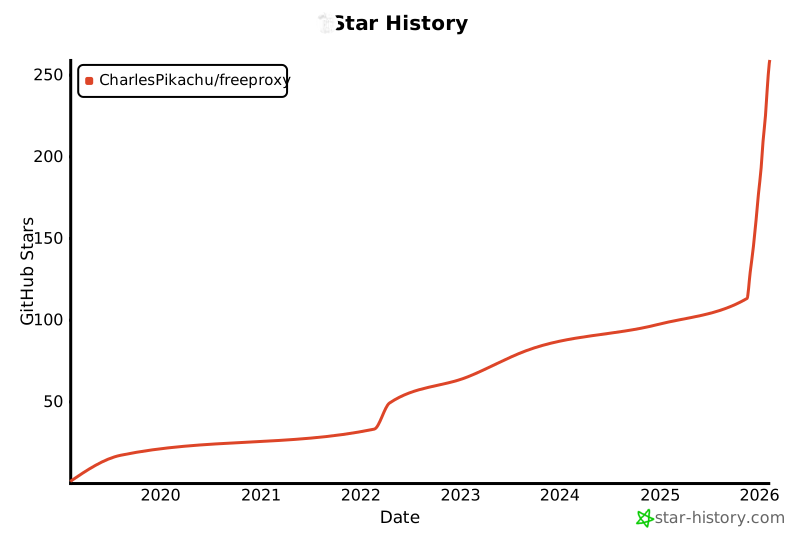
🌟 Star History
☕ Appreciation (赞赏 / 打赏)
| WeChat Appreciation QR Code (微信赞赏码) | Alipay Appreciation QR Code (支付宝赞赏码) |
|---|---|
 |
 |
📱 WeChat Official Account (微信公众号):
Charles的皮卡丘 (Charles_pikachu)

Release history Release notifications | RSS feed


Download files
Download the file for your platform. If you're not sure which to choose, learn more about installing packages.
Source Distribution
Built Distribution
Filter files by name, interpreter, ABI, and platform.
If you're not sure about the file name format, learn more about wheel file names.
Copy a direct link to the current filters
File details
Details for the file pyfreeproxy-0.4.6.tar.gz.
File metadata
- Download URL: pyfreeproxy-0.4.6.tar.gz
- Upload date:
- Size: 65.0 kB
- Tags: Source
- Uploaded using Trusted Publishing? No
- Uploaded via: twine/6.2.0 CPython/3.12.12
File hashes
| Algorithm | Hash digest | |
|---|---|---|
| SHA256 |
850766301aaef39d378023a445a6b2ae25f47f7a8b9d01882dd97f95fa894fd9
|
|
| MD5 |
033c68a4dc3bbc07f82bdc6f05fad3d1
|
|
| BLAKE2b-256 |
97e89dabb122234a4352b2be953236de0117e7b8fa66c67924a1e00f56cf197b
|
File details
Details for the file pyfreeproxy-0.4.6-py3-none-any.whl.
File metadata
- Download URL: pyfreeproxy-0.4.6-py3-none-any.whl
- Upload date:
- Size: 91.5 kB
- Tags: Python 3
- Uploaded using Trusted Publishing? No
- Uploaded via: twine/6.2.0 CPython/3.12.12
File hashes
| Algorithm | Hash digest | |
|---|---|---|
| SHA256 |
a414dd9db8550cc2b516e039dcb6d2f96ad2ffff480f80b55df060c2161f9377
|
|
| MD5 |
7e621186c2293389e218c45f297556d6
|
|
| BLAKE2b-256 |
40d305abebb80686fff41eca88dfa92ae9680bb80ca83f36d79cf40fa84d59f3
|






