
py_gamepad
Python 3 module that allows you to control your gamepad
Supports Python 3 only, becaus of typehintings and some other cool Python 3 things.
*3.4+ actually, anyway, 3.10 is out, there's literally no reason to use the old versions-
Usage
Since I needed to use this thing in my project with some UI and.. things, I've designed it with multithreading support (actually, this is the only option lol) so no need to worry for this, just import needed gamepad, fire listen method and you are good to go.
Here's an example:
# main.py

from time import sleep

from pygamepad.gamepads import Gamepad


def main():
    gamepad = Gamepad()
    gamepad.listen()  # And that's it

    # Now you can read gamepad values in the main thread
    try:
        while True:
            print("START button value:", gamepad.buttons.BTN_START.value)
            sleep(0.01)
    except (KeyboardInterrupt, SystemExit):
        # Kill gamepad's listening thread
        gamepad.stop_listening()
        # And exit from the program
        exit()


if __name__ == "__main__":
    main()
Q&A
Ok, how do I know without opening whole module script which gamepad buttons I can use?
Since module uses typehinting literally everywhere you just can write gamepad.buttons and autocomplete will show you all of existing buttons.
Alternatively you may just open Gamepad class and see all the button in its Buttons subclass.
Screenshots
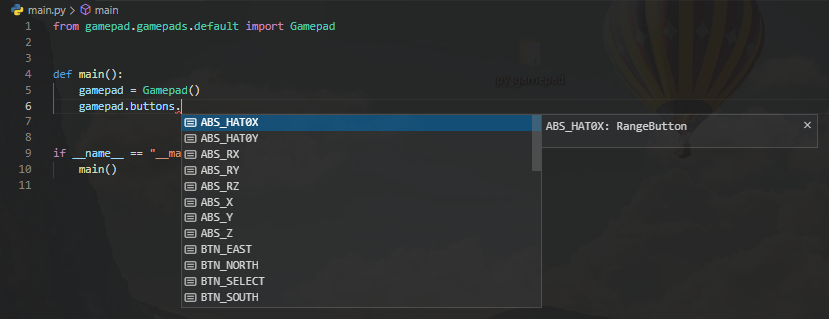
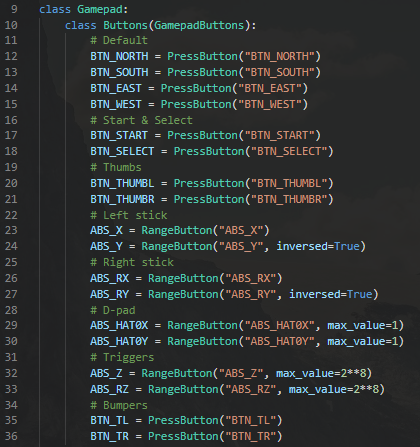
What gamepads does it support? Defender X7 and Xbox 360 for sure. Well, I only own Defender X7 gamepad so I tested it in x-input mode so there's no gyroscope and touch capabilities, BUT you can contribute your changes :)
Since people may use like any kind of gamepads (Chinese especially) it may not work out of the box or some buttons may be swapped and etc., in that case you can inherit from default gamepad class (pygamepad.gamepads.default.Gamepad) and alter some things for your case.
I had to do so for my Defender X7 gamepad because Start and Select buttons were swapped for some reason (it uses inputs module under the hood and for some reason 0x13a and 0x13b buttons are swapped or idk), so I changed Start to Select and Select to Start using special ButtonOverrides subclass where you can.. well.. you've guessed it, override default button mappings:
# pygamepad/gamepads/defenderx7.py

from gamepad.buttons import PressButton
from .default import Gamepad


class DefenderGamepad(Gamepad):
    class ButtonOverrides:
        BTN_START = PressButton("BTN_SELECT")
        BTN_SELECT = PressButton("BTN_START")
1 maintainer

Release files for pygamepad 0.2
For a detailed explanation of source distributions (sdists) and built distributions (wheels), please see the package formats documentation.
Source distribution (sdist)
| File | Size | Uploaded | |
|---|---|---|---|
| pygamepad-0.2.tar.gz | 17.3 kB | Details |
Release files / pygamepad-0.2.tar.gz
| Download URL | pygamepad-0.2.tar.gz |
|---|---|
| Size | 17.3 kB |
| Tags | Source |
|
SHA-256 checksum How to use checksums |
e446480f06f01f826188a4be72aa40e0f31723296be74f688b3c3da9bffed6d9
|
|
BLAKE2b-256 checksum How to use checksums |
01f9b49d66001ec502de5e84a3fa0e4b3e16d9fda7f7868e7efb4ac0a4483989
|
| Upload date | |
|
Uploaded using Trusted Publishing? What is trusted publishing? |
No |
| Uploaded via |
twine/3.8.0 pkginfo/1.8.2 readme-renderer/34.0 requests/2.27.1 requests-toolbelt/0.9.1 urllib3/1.26.8 tqdm/4.63.0 importlib-metadata/4.11.3 keyring/23.5.0 rfc3986/2.0.0 colorama/0.4.4 CPython/3.10.2
|













