


Package |
Description |
|---|---|
Navigate and subset NHDPlus (MR and HR) using web services |
|
Access topographic data through National Map’s 3DEP web service |
|
Access NWIS, NID, WQP, eHydro, NLCD, CAMELS, and SSEBop databases |
|
Access daily, monthly, and annual climate data via Daymet |
|
Access daily climate data via GridMET |
|
Access hourly NLDAS-2 data via web services |
|
A collection of tools for computing hydrological signatures |
|
High-level API for asynchronous requests with persistent caching |
|
Send queries to any ArcGIS RESTful-, WMS-, and WFS-based services |
|
Utilities for manipulating geospatial, (Geo)JSON, and (Geo)TIFF data |
PyGeoOGC: Retrieve Data from RESTful, WMS, and WFS Services









Features
PyGeoOGC is a part of HyRiver software stack that is designed to aid in hydroclimate analysis through web services. This package provides general interfaces to web services that are based on ArcGIS RESTful, WMS, and WFS. Although all these web services have limits on the number of features per request (e.g., 1000 object IDs for a RESTful request or 8 million pixels for a WMS request), PyGeoOGC, first, divides the large requests into smaller chunks, and then returns the merged results.
Moreover, under the hood, PyGeoOGC uses AsyncRetriever for making requests asynchronously with persistent caching. This improves the reliability and speed of data retrieval significantly. AsyncRetriever caches all request/response pairs and upon making an already cached request, it will retrieve the responses from the cache if the server’s response is unchanged.
You can control the request/response caching behavior and verbosity of the package by setting the following environment variables:
HYRIVER_CACHE_NAME: Path to the caching SQLite database for asynchronous HTTP requests. It defaults to ./cache/aiohttp_cache.sqlite
HYRIVER_CACHE_NAME_HTTP: Path to the caching SQLite database for HTTP requests. It defaults to ./cache/http_cache.sqlite
HYRIVER_CACHE_EXPIRE: Expiration time for cached requests in seconds. It defaults to one week.
HYRIVER_CACHE_DISABLE: Disable reading/writing from/to the cache. The default is false.
HYRIVER_SSL_CERT: Path to a SSL certificate file.
For example, in your code before making any requests you can do:
import os

os.environ["HYRIVER_CACHE_NAME"] = "path/to/aiohttp_cache.sqlite"
os.environ["HYRIVER_CACHE_NAME_HTTP"] = "path/to/http_cache.sqlite"
os.environ["HYRIVER_CACHE_EXPIRE"] = "3600"
os.environ["HYRIVER_CACHE_DISABLE"] = "true"
os.environ["HYRIVER_SSL_CERT"] = "path/to/cert.pem"
There is also an inventory of URLs for some of these web services in form of a class called ServiceURL. These URLs are in four categories: ServiceURL().restful, ServiceURL().wms, ServiceURL().wfs, and ServiceURL().http. These URLs provide you with some examples of the services that PyGeoOGC supports. If you have success using PyGeoOGC with a web service please consider submitting a request to be added to this URL inventory. You can get all the URLs in the ServiceURL class by just printing it print(ServiceURL()).
PyGeoOGC has three main classes:
ArcGISRESTful: This class can be instantiated by providing the target layer URL. For example, for getting Watershed Boundary Data we can use ServiceURL().restful.wbd. By looking at the web service’s website we see that there are nine layers. For example, 1 for 2-digit HU (Region), 6 for 12-digit HU (Subregion), and so on. We can pass the URL to the target layer directly, like this f"{ServiceURL().restful.wbd}/6" or as a separate argument via layer.
Afterward, we request for the data in two steps. First, we need to get the target object IDs using oids_bygeom (within a geometry), oids_byfield (specific field IDs), or oids_bysql (any valid SQL 92 WHERE clause) class methods. Then, we can get the target features using get_features class method. The returned response can be converted into a geopandas.GeoDataFrame using json2geodf function from PyGeoUtils.
WMS: Instantiation of this class requires at least 3 arguments: service URL, layer name(s), and output format. Additionally, target CRS and the web service version can be provided. Upon instantiation, we can use getmap_bybox method class to get the target raster data within a bounding box. The box can be in any valid CRS and if it is different from the default CRS, EPSG:4326, it should be passed using box_crs argument. The service response can be converted into a xarray.Dataset using gtiff2xarray function from PyGeoUtils.
WFS: Instantiation of this class is similar to WMS. The only difference is that only one layer name can be passed. Upon instantiation there are three ways to get the data:
getfeature_bybox: Get all the target features within a bounding box in any valid CRS.
getfeature_byid: Get all the target features based on the IDs. Note that two arguments should be provided: featurename, and featureids. You can get a list of valid feature names using get_validnames class method.
getfeature_byfilter: Get the data based on any valid CQL filter.
You can convert the returned response of this function to a GeoDataFrame using json2geodf function from PyGeoUtils package.
PyGeoOGC also includes several utilities:
streaming_download for downloading large files in parallel and in chunks, efficiently.
traverse_json for traversing a nested JSON object.
match_crs for reprojecting a geometry or bounding box to any valid CRS.
You can find some example notebooks here.
Furthermore, you can also try using PyGeoOGC without installing it on your system by clicking on the binder badge. A Jupyter Lab instance with the HyRiver stack pre-installed will be launched in your web browser, and you can start coding!
Moreover, requests for additional functionalities can be submitted via issue tracker.
Citation
If you use any of HyRiver packages in your research, we appreciate citations:
@article{Chegini_2021,
    author = {Chegini, Taher and Li, Hong-Yi and Leung, L. Ruby},
    doi = {10.21105/joss.03175},
    journal = {Journal of Open Source Software},
    month = {10},
    number = {66},
    pages = {1--3},
    title = {{HyRiver: Hydroclimate Data Retriever}},
    volume = {6},
    year = {2021}
}
Installation
You can install PyGeoOGC using pip:
$ pip install pygeoogcAlternatively, PyGeoOGC can be installed from the conda-forge repository using Conda or Mamba:
$ conda install -c conda-forge pygeoogcQuick start
We can access NHDPlus HR via RESTful service, National Wetlands Inventory from WMS, and FEMA National Flood Hazard via WFS. The output for these functions are of type requests.Response that can be converted to GeoDataFrame or xarray.Dataset using PyGeoUtils.
Let’s start the National Map’s NHDPlus HR web service. We can query the flowlines that are within a geometry as follows:
from pygeoogc import ArcGISRESTful, WFS, WMS, ServiceURL
import pygeoutils as geoutils
from pynhd import NLDI

basin_geom = NLDI().get_basins("01031500").geometry[0]

hr = ArcGISRESTful(ServiceURL().restful.nhdplushr, 2, outformat="json")

resp = hr.get_features(hr.oids_bygeom(basin_geom, 4326))
flowlines = geoutils.json2geodf(resp)
Note oids_bygeom has three additional arguments: sql_clause, spatial_relation, and distance. We can use sql_clause for passing any valid SQL WHERE clauses and spatial_relation for specifying the target predicate such as intersect, contain, cross, etc. The default predicate is intersect (esriSpatialRelIntersects). Additionally, we can use distance for specifying the buffer distance from the input geometry for getting features.
We can also submit a query based on IDs of any valid field in the database. If the measure property is desired you can pass return_m as True to the get_features class method:
oids = hr.oids_byfield("PERMANENT_IDENTIFIER", ["103455178", "103454362", "103453218"])
resp = hr.get_features(oids, return_m=True)
flowlines = geoutils.json2geodf(resp)
Additionally, any valid SQL 92 WHERE clause can be used. For more details look here. For example, let’s limit our first request to only include catchments with areas larger than 0.5 sqkm.
oids = hr.oids_bygeom(basin_geom, geo_crs=4326, sql_clause="AREASQKM > 0.5")
resp = hr.get_features(oids)
catchments = geoutils.json2geodf(resp)
A WMS-based example is shown below:
wms = WMS(
    ServiceURL().wms.fws,
    layers="0",
    outformat="image/tiff",
    crs=3857,
)
r_dict = wms.getmap_bybox(
    basin_geom.bounds,
    1e3,
    box_crs=4326,
)
wetlands = geoutils.gtiff2xarray(r_dict, basin_geom, 4326)
Query from a WFS-based web service can be done either within a bounding box or using any valid CQL filter.
wfs = WFS(
    ServiceURL().wfs.fema,
    layer="public_NFHL:Base_Flood_Elevations",
    outformat="esrigeojson",
    crs=4269,
)
r = wfs.getfeature_bybox(basin_geom.bounds, box_crs=4326)
flood = geoutils.json2geodf(r.json(), 4269, 4326)

layer = "wmadata:huc08"
wfs = WFS(
    ServiceURL().wfs.waterdata,
    layer=layer,
    outformat="application/json",
    version="2.0.0",
    crs=4269,
)
r = wfs.getfeature_byfilter(f"huc8 LIKE '13030%'")
huc8 = geoutils.json2geodf(r.json(), 4269, 4326)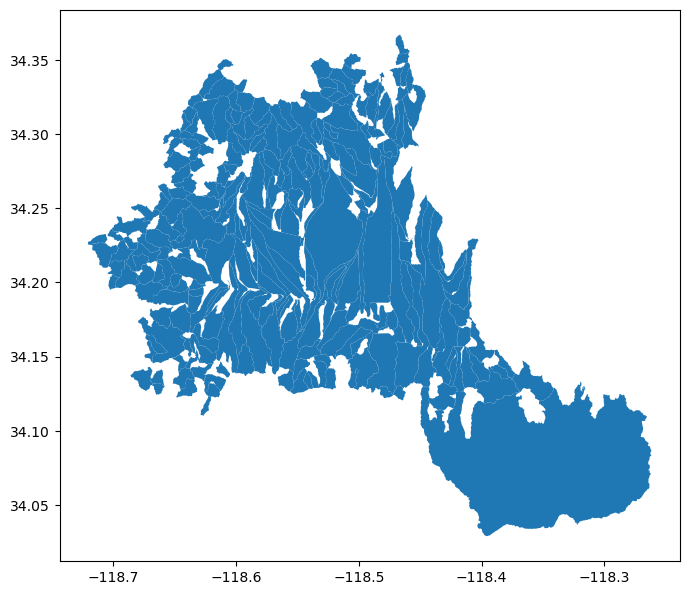
Contributing
Contributions are appreciated and very welcomed. Please read CONTRIBUTING.rst for instructions.
1 maintainer

Metadata
1 maintainer
Release files for pygeoogc 0.19.4
For a detailed explanation of source distributions (sdists) and built distributions (wheels), please see the package formats documentation.
Source distribution (sdist)
| File | Size | Uploaded | |
|---|---|---|---|
| pygeoogc-0.19.4.tar.gz | 55.1 kB | Details |
Built distribution (wheel)
| File | Interpreter | ABI | Platform | Reset |
|---|---|---|---|---|
| pygeoogc-0.19.4-py3-none-any.whl | Python 3 | none | any | Details |
Total release size: 90.1 kB
Release files / pygeoogc-0.19.4.tar.gz
| Download URL | pygeoogc-0.19.4.tar.gz |
|---|---|
| Size | 55.1 kB |
| Tags | Source |
|
SHA-256 checksum How to use checksums |
bb6a55d4584393faa5a6c648b0cc56bd22ba699f4b877e7ff65ffad0e4e21faa
|
|
BLAKE2b-256 checksum How to use checksums |
05f428b54f36d56a578682d2d624cf82ec93fbc7013893aea82cc21149aedefc
|
| Upload date | |
|
Uploaded using Trusted Publishing? What is trusted publishing? |
Yes |
| Uploaded via |
twine/6.1.0 CPython/3.12.9
|
Provenance
Provenance describes where a file came from. On PyPI, provenance is shared via attestations, which provide a verifiable record of the build or publishing details. View details, limitations and caveats.


PyPI Publish Attestation
PyPI verified that this artifact, at this checksum, originated from the publisher listed below.
Signed by GitHub Actions, verified by PyPI on May 23, 2025.
Transparency logRelease files / pygeoogc-0.19.4-py3-none-any.whl
| Download URL | pygeoogc-0.19.4-py3-none-any.whl |
|---|---|
| Size | 35.0 kB |
| Tags | Python 3 |
|
SHA-256 checksum How to use checksums |
a113015c11e039526223e279823544ded574a8bd9ae4f1bf179dd3b00fc8dd5c
|
|
BLAKE2b-256 checksum How to use checksums |
a0ddbaf0fb0f1e78a26e2c924c4caeae1fbde555a296f0133d3b9e6e62c42979
|
| Upload date | |
|
Uploaded using Trusted Publishing? What is trusted publishing? |
Yes |
| Uploaded via |
twine/6.1.0 CPython/3.12.9
|
Provenance
Provenance describes where a file came from. On PyPI, provenance is shared via attestations, which provide a verifiable record of the build or publishing details. View details, limitations and caveats.
PyPI Publish Attestation
PyPI verified that this artifact, at this checksum, originated from the publisher listed below.
Signed by GitHub Actions, verified by PyPI on May 23, 2025.
Transparency log













