
PyGMC






PyGMC is a Python API for Geiger–Müller Counters (GMCs) / Geiger Counters. It has just one dependency (pyserial) and works on multiple operating systems: Windows, OSX, Linux. PyGMC aims to be a minimalistic interface - lowering the installation requirements and allowing the user to build their own tools on top of a stable package.
Installation
pip install pygmc
conda install conda-forge::pygmc
Conda PyGMC version may lag latest PyPI version.
Example Usage
Jupyter Notebook

Auto discover connected GMC, auto identify baudrate, and auto select correct device.
import pygmc

gc = pygmc.connect()

ver = gc.get_version()
print(ver)

cpm = gc.get_cpm()
print(cpm)
Connect to specified GMC device with exact USB port/device/com.
import pygmc

gc = pygmc.GMC320('/dev/ttyUSB0')

cpm = gc.get_cpm()
print(cpm)
Read device history into DataFrame
import pandas as pd
import pygmc

gc = pygmc.GMC320('/dev/ttyUSB0')

history = gc.get_history_data()
df = pd.DataFrame(history[1:], columns=history[0])
| datetime | count | unit | mode | reference_datetime | notes |
|---|---|---|---|---|---|
| 2023-04-19 20:37:18 | 11 | CPM | every minute | 2023-04-19 20:36:18 | |
| 2023-04-19 20:38:18 | 20 | CPM | every minute | 2023-04-19 20:36:18 | |
| 2023-04-19 20:39:18 | 19 | CPM | every minute | 2023-04-19 20:36:18 | |
| 2023-04-19 20:40:18 | 23 | CPM | every minute | 2023-04-19 20:36:18 | |
| 2023-04-19 20:41:18 | 20 | CPM | every minute | 2023-04-19 20:36:18 |
Devices
| Device | Brand | Notes |
|---|---|---|
| GMC-300S ✔️✔️ | GQ Electronics | A little picky |
| GMC-300E+ / GMC-300E Plus | GQ Electronics | |
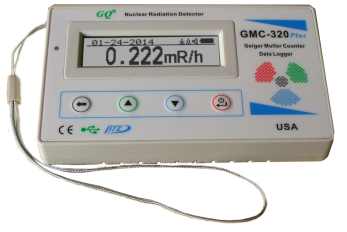
| GMC-320+ / GMC-320 Plus ✔️✔️ | GQ Electronics | Works smoothly |
| GMC-320S | GQ Electronics | |
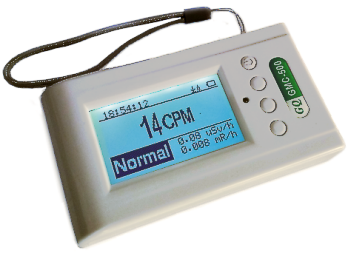
| GMC-500 | GQ Electronics | |
| GMC-500+ / GMC-500 Plus ✔️✔️ | GQ Electronics | Works smoothly |
| GMC-600 | GQ Electronics | |
| GMC-600+ / GMC-600 Plus ✔️✔️ | GQ Electronics | |
| GMC-800 ✔️✔️ | GQ Electronics | *Finally Working |
| GMC-SE ✔️ | GQ Electronics | RFC1201 |
✔️✔️=physically confirmed works
✔️=user confirmed works
*Incorrect documentation caused incorrect implementation with pygmc<=0.10.0

Contributors
Notes
- Alternative Python projects for GQ GMC:
- GeigerLog
- gq-gmc-control
- gmc
- Device website GQ Electronics Seattle, WA
- Not affiliated in any way.
Known Issues
- Ubuntu Issue
- Ubuntu requires fixing a bug to be able to connect to any GQ GMC device.
USB devices use VID (vendor ID) and PID (Divice ID)... It is common for unrelated devices to use a common manufacture for their USB interface. The issue with Ubuntu is that it assumes1A86:7523is a "Braille" device (for the blind) and, ironically, blindly treats it as such. - This causes the GQ GMC device to not connect.
- Ubuntu requires fixing a bug to be able to connect to any GQ GMC device.
- Ubuntu fix
- The fix is to comment out the
udevrule that does this. The text file may be in two places./usr/lib/udev/85-brltty.rules/usr/lib/udev/rules.d/85-brltty.rules
- Find the line below and comment it out.
ENV{PRODUCT}=="1a86/7523/*", ENV{BRLTTY_BRAILLE_DRIVER}="bm", GOTO="brltty_usb_run"
- We see Ubuntu assumes
1A86:7523is aBaum [NLS eReader Zoomax (20 cells)]device.
- The fix is to comment out the
1 maintainer

Release files for pygmc 0.14.2
For a detailed explanation of source distributions (sdists) and built distributions (wheels), please see the package formats documentation.
Source distribution (sdist)
| File | Size | Uploaded | |
|---|---|---|---|
| pygmc-0.14.2.tar.gz | 40.3 kB | Details |
Built distribution (wheel)
| File | Interpreter | ABI | Platform | Reset |
|---|---|---|---|---|
| pygmc-0.14.2-py3-none-any.whl | Python 3 | none | any | Details |
Total release size: 83.3 kB
Release files / pygmc-0.14.2.tar.gz
| Download URL | pygmc-0.14.2.tar.gz |
|---|---|
| Size | 40.3 kB |
| Tags | Source |
|
SHA-256 checksum How to use checksums |
502a86cac43ea4d2247eb0fe1b54773c99232eb473b9d5f918cbffd012821fe5
|
|
BLAKE2b-256 checksum How to use checksums |
7f02a77eff51a9b67395897bbf237df089056d647c6327e08e68065dd106b646
|
| Upload date | |
|
Uploaded using Trusted Publishing? What is trusted publishing? |
No |
| Uploaded via |
twine/6.2.0 CPython/3.9.25
|
Release files / pygmc-0.14.2-py3-none-any.whl
| Download URL | pygmc-0.14.2-py3-none-any.whl |
|---|---|
| Size | 43.0 kB |
| Tags | Python 3 |
|
SHA-256 checksum How to use checksums |
40d402d2cd6c4fb02139c91efe65a8c3a2667f28ad65657675285626166f315d
|
|
BLAKE2b-256 checksum How to use checksums |
d04ea8d5d4c087a23b678aac6db2165ebd57ece60ca3f5763bfaa1f45831b0ed
|
| Upload date | |
|
Uploaded using Trusted Publishing? What is trusted publishing? |
No |
| Uploaded via |
twine/6.2.0 CPython/3.9.25
|














