
pygmsh







Gmsh is a powerful mesh generation tool with a scripting language that is notoriously hard to write.
The goal of pygmsh is to combine the power of Gmsh with the versatility of Python and to provide useful abstractions from the Gmsh scripting language so you can create complex geometries more easily.
Built-in
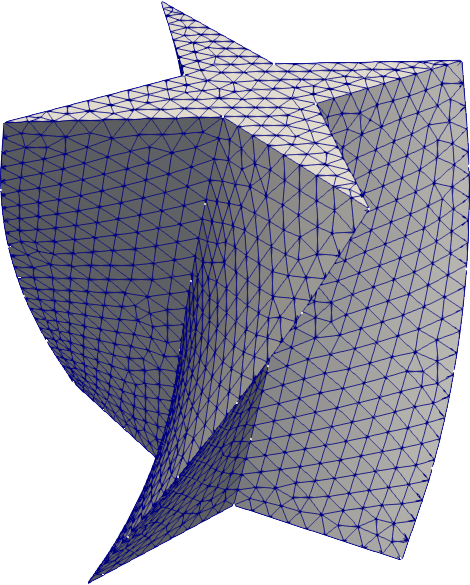
To create the above mesh, simply do
import pygmsh
import numpy as np

geom = pygmsh.built_in.Geometry()

# Draw a cross.
poly = geom.add_polygon([
    [ 0.0,  0.5, 0.0],
    [-0.1,  0.1, 0.0],
    [-0.5,  0.0, 0.0],
    [-0.1, -0.1, 0.0],
    [ 0.0, -0.5, 0.0],
    [ 0.1, -0.1, 0.0],
    [ 0.5,  0.0, 0.0],
    [ 0.1,  0.1, 0.0]
    ],
    lcar=0.05
    )

axis = [0, 0, 1]

geom.extrude(
    poly,
    translation_axis=axis,
    rotation_axis=axis,
    point_on_axis=[0, 0, 0],
    angle=2.0 / 6.0 * np.pi
    )

points, cells, point_data, cell_data, field_data = pygmsh.generate_mesh(geom)
to retrieve all points and cells of the mesh for the specified geometry. To store the mesh, you can use meshio; for example
import meshio
meshio.write('test.vtu', points, cells, cell_data=cell_data)
The output file can be visualized with various tools, e.g., ParaView.
You will find the above mesh in the directory `test/ <https://github.com/nschloe/pygmsh/tree/master/test/>`__ along with other small examples.
OpenCASCADE
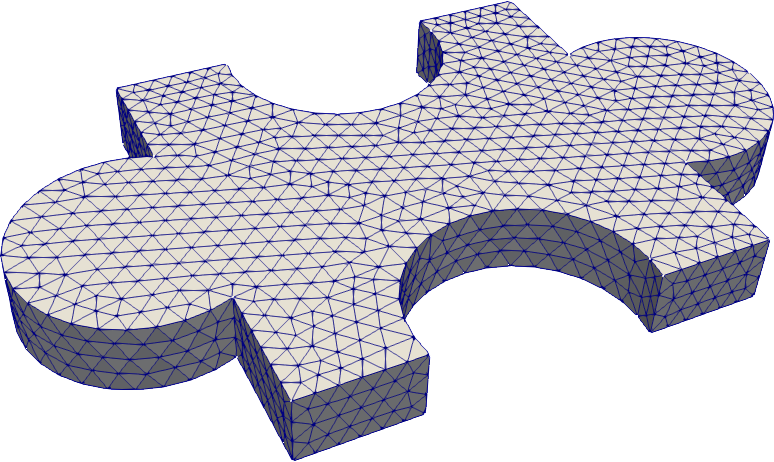
As of version 3.0, Gmsh supports OpenCASCADE, allowing for a CAD-style geometry specification.
Example:
import pygmsh

geom = pygmsh.opencascade.Geometry(
  characteristic_length_min=0.1,
  characteristic_length_max=0.1,
  )

rectangle = geom.add_rectangle([-1.0, -1.0, 0.0], 2.0, 2.0)
disk1 = geom.add_disk([-1.2, 0.0, 0.0], 0.5)
disk2 = geom.add_disk([+1.2, 0.0, 0.0], 0.5)
union = geom.boolean_union([rectangle, disk1, disk2])

disk3 = geom.add_disk([0.0, -0.9, 0.0], 0.5)
disk4 = geom.add_disk([0.0, +0.9, 0.0], 0.5)
flat = geom.boolean_difference([union], [disk3, disk4])

geom.extrude(flat, [0, 0, 0.3])

points, cells, point_data, cell_data, field_data = pygmsh.generate_mesh(geom)
Installation
pygmsh is available from the Python Package Index, so simply type
pip install -U pygmsh
to install or upgrade.
Usage
Just
import pygmsh as pg
and make use of all the goodies the module provides. The documentation and the examples under `test/ <https://github.com/nschloe/pygmsh/tree/master/test/>`__ might inspire you.
Testing
To run the pygmsh unit tests, check out this repository and type
pytest
Building Documentation
Docs are built using Sphinx.
To build run
sphinx-build -b html doc doc/_build
Distribution
To create a new release
bump the __version__ number,
publish to PyPi and GitHub:
$ make publish
License
pygmsh is published under the MIT license.
1 maintainer

Metadata
1 maintainer
Release files for pygmsh 4.1.2
For a detailed explanation of source distributions (sdists) and built distributions (wheels), please see the package formats documentation.
Built distribution (wheel)
| File | Interpreter | ABI | Platform | Actions Reset |
|---|---|---|---|---|
| pygmsh-4.1.2-py2.py3-none-any.whl | Python 3, Python 2 | none | any | Details for pygmsh-4.1.2-py2.py3-none-any.whl |
Release files / pygmsh-4.1.2-py2.py3-none-any.whl
| Download URL | pygmsh-4.1.2-py2.py3-none-any.whl |
|---|---|
| Size | 31.4 kB |
| Tags | Python 2 Python 3 |
|
SHA-256 checksum How to use checksums |
30825f5223b0a4614b34487263c19a64e6a80deca7f38869f2e1688dfe4d9a38
|
|
BLAKE2b-256 checksum How to use checksums |
5e917dc5b1ef127b60abe5dea246f4e3fe3292de3022ef22fa92b89fc670d67a
|
| Upload date | |
|
Uploaded using Trusted Publishing? What is trusted publishing? |
No |
Security for pygmsh 4.1.2
Provenance
Provenance describes where a file came from. On PyPI, provenance is shared via attestations, which provide a verifiable record of the build or publishing details. View details, limitations and caveats.
No provenance found
None of the files in this release were uploaded with provenance metadata.
A note on package security
PyPI is a repository for distributing packages, not a service for auditing them. While third-party security researchers and our staff do their best to detect and remove malicious packages, PyPI cannot guarantee the quality, security or suitability of any given package.
To learn more about protecting yourself from malicious actors, visit our package security documentation.














