


Package |
Description |
|---|---|
Navigate and subset NHDPlus (MR and HR) using web services |
|
Access topographic data through National Map’s 3DEP web service |
|
Access NWIS, NID, WQP, eHydro, NLCD, CAMELS, and SSEBop databases |
|
Access daily, monthly, and annual climate data via Daymet |
|
Access daily climate data via GridMET |
|
Access hourly NLDAS-2 data via web services |
|
A collection of tools for computing hydrological signatures |
|
High-level API for asynchronous requests with persistent caching |
|
Send queries to any ArcGIS RESTful-, WMS-, and WFS-based services |
|
Utilities for manipulating geospatial, (Geo)JSON, and (Geo)TIFF data |
PyGridMET: Daily climate data through GridMET









Features
PyGridMET is a part of HyRiver software stack that is designed to aid in hydroclimate analysis through web services. This package provides access to daily climate data over contermonious US (CONUS) from GridMET database using NetCDF Subset Service (NCSS). Both single pixel (using get_bycoords function) and gridded data (using get_bygeom) are supported which are returned as pandas.DataFrame and xarray.Dataset, respectively.
Both get_bygeom and get_bycoords functions save the intermediate files returned by the web service in a local cache folder (./cache in the current directory). The cache folder is created automatically when the functions are called for the first time. The cache folder is used to store the intermediate files to avoid re-downloading them. These two functions allow modifying the web service calls via two options:
conn_timeout: Sets the connection timeout in seconds. The default value is 5 minutes. This can be increaseed for larger requests. If running these functions fails with a connection timeout error, try increasing this value.
validate_filesize: If True, the functions compares the file size of the previously cached files in the ./cache folder, if they exist, with their size on the remote server. If the sizes do not match, the cached files are removed and they will be re-download. By default this is set to False since the files on the server rarely change. So, if a request has already been cached there shouldn’t be a need for re-donwloading them from scratch. However, if you suspect that the files on the server have changed or the functions fails to process the cached files, you can set this to True or manually delete the cached files in the ./cache folder.
You can find some example notebooks here. You can also try using PyGridMET without installing it on your system by clicking on the binder badge. A Jupyter Lab instance with the HyRiver stack pre-installed will be launched in your web browser, and you can start coding!
Moreover, requests for additional functionalities can be submitted via issue tracker.
Citation
If you use any of HyRiver packages in your research, we appreciate citations:
@article{Chegini_2021,
    author = {Chegini, Taher and Li, Hong-Yi and Leung, L. Ruby},
    doi = {10.21105/joss.03175},
    journal = {Journal of Open Source Software},
    month = {10},
    number = {66},
    pages = {1--3},
    title = {{HyRiver: Hydroclimate Data Retriever}},
    volume = {6},
    year = {2021}
}
Installation
You can install PyGridMET using pip as follows:
$ pip install pygridmetAlternatively, PyGridMET can be installed from the conda-forge repository using Conda:
$ conda install -c conda-forge pygridmetQuick start
You can use PyGridMET using command-line or as a Python library. The commanda-line provides access to two functionality:
Getting gridded climate data: You must create a geopandas.GeoDataFrame that contains the geometries of the target locations. This dataframe must have four columns: id, start, end, geometry. The id column is used as filenames for saving the obtained climate data to a NetCDF (.nc) file. The start and end columns are starting and ending dates of the target period. Then, you must save the dataframe as a shapefile (.shp) or geopackage (.gpkg) with CRS attribute.
Getting single pixel climate data: You must create a CSV file that contains coordinates of the target locations. This file must have at four columns: id, start, end, lon, and lat. The id column is used as filenames for saving the obtained climate data to a CSV (.csv) file. The start and end columns are the same as the geometry command. The lon and lat columns are the longitude and latitude coordinates of the target locations.
$ pygridmet -h
Usage: pygridmet [OPTIONS] COMMAND [ARGS]...

Command-line interface for PyGridMET.

Options:
-h, --help  Show this message and exit.

Commands:
coords    Retrieve climate data for a list of coordinates.
geometry  Retrieve climate data for a dataframe of geometries.
The coords sub-command is as follows:
$ pygridmet coords -h
Usage: pygridmet coords [OPTIONS] FPATH

Retrieve climate data for a list of coordinates.

FPATH: Path to a csv file with four columns:
    - ``id``: Feature identifiers that gridmet uses as the output netcdf filenames.
    - ``start``: Start time.
    - ``end``: End time.
    - ``lon``: Longitude of the points of interest.
    - ``lat``: Latitude of the points of interest.
    - ``snow``: (optional) Separate snowfall from precipitation, default is ``False``.

Examples:
    $ cat coords.csv
    id,lon,lat,start,end
    california,-122.2493328,37.8122894,2012-01-01,2014-12-31
    $ pygridmet coords coords.csv -v pr -v tmmn

Options:
-v, --variables TEXT  Target variables. You can pass this flag multiple
                        times for multiple variables.
-s, --save_dir PATH   Path to a directory to save the requested files.
                        Extension for the outputs is .nc for geometry and .csv
                        for coords.
--disable_ssl         Pass to disable SSL certification verification.
-h, --help            Show this message and exit.
And, the geometry sub-command is as follows:
$ pygridmet geometry -h
Usage: pygridmet geometry [OPTIONS] FPATH

Retrieve climate data for a dataframe of geometries.

FPATH: Path to a shapefile (.shp) or geopackage (.gpkg) file.
This file must have four columns and contain a ``crs`` attribute:
    - ``id``: Feature identifiers that gridmet uses as the output netcdf filenames.
    - ``start``: Start time.
    - ``end``: End time.
    - ``geometry``: Target geometries.
    - ``snow``: (optional) Separate snowfall from precipitation, default is ``False``.

Examples:
    $ pygridmet geometry geo.gpkg -v pr -v tmmn

Options:
-v, --variables TEXT  Target variables. You can pass this flag multiple
                        times for multiple variables.
-s, --save_dir PATH   Path to a directory to save the requested files.
                        Extension for the outputs is .nc for geometry and .csv
                        for coords.
--disable_ssl         Pass to disable SSL certification verification.
-h, --help            Show this message and exit.
Now, let’s see how we can use PyGridMET as a library.
PyGridMET offers two functions for getting climate data; get_bycoords and get_bygeom. The arguments of these functions are identical except the first argument where the latter should be polygon and the former should be a coordinate (a tuple of length two as in (x, y)). The input geometry or coordinate can be in any valid CRS (defaults to EPSG:4326). The dates argument can be either a tuple of length two like (start_str, end_str) or a list of years like [2000, 2005]. It is noted that both functions have a snow flag for separating snow from precipitation using Martinez and Gupta (2010) method.
We can get a dataframe of available variables and their info by calling GridMET().gridmet_table:
Variable |
Abbr |
Unit |
|---|---|---|
Precipitation |
pr |
mm |
Maximum Relative Humidity |
rmax |
% |
Minimum Relative Humidity |
rmin |
% |
Specific Humidity |
sph |
kg/kg |
Surface Radiation |
srad |
W/m2 |
Wind Direction |
th |
Degrees Clockwise from north |
Minimum Air Temperature |
tmmn |
K |
Maximum Air Temperature |
tmmx |
K |
Wind Speed |
vs |
m/s |
Burning Index |
bi |
Dimensionless |
Fuel Moisture (100-hr) |
fm100 |
% |
Fuel Moisture (1000-hr) |
fm1000 |
% |
Energy Release Component |
erc |
Dimensionless |
Reference Evapotranspiration (Alfalfa) |
etr |
mm |
Reference Evapotranspiration (Grass) |
pet |
mm |
Vapor Pressure Deficit |
vpd |
kPa |
from pynhd import NLDI
import pygridmet as gridmet

geometry = NLDI().get_basins("01031500").geometry[0]

var = ["pr", "tmmn"]
dates = ("2000-01-01", "2000-06-30")

daily = gridmet.get_bygeom(geometry, dates, variables=var, snow=True)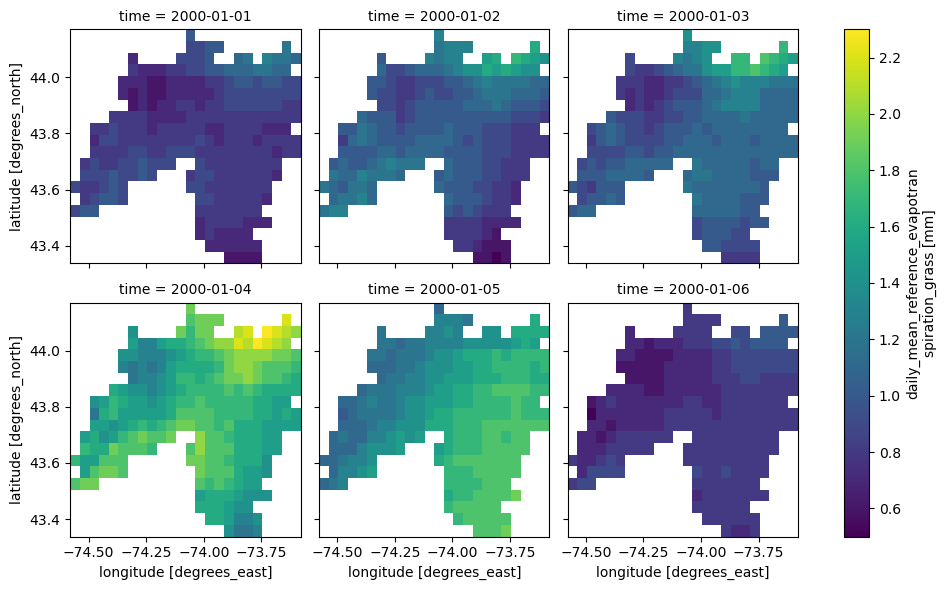
If the input geometry (or coordinate) is in a CRS other than EPSG:4326, we should pass it to the functions.
coords = (-1431147.7928, 318483.4618)
crs = 3542
dates = ("2000-01-01", "2006-12-31")
data = gridmet.get_bycoords(coords, dates, variables=var, loc_crs=crs)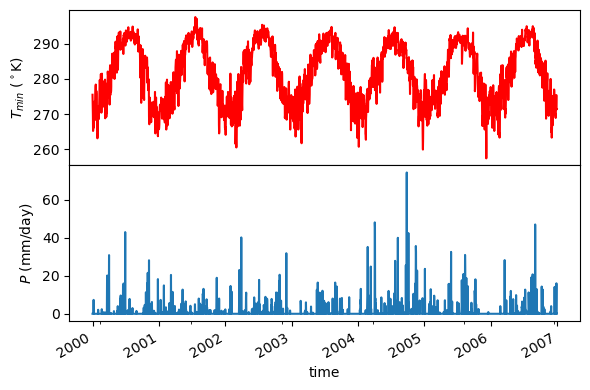
Additionally, the get_bycoords function accepts a list of coordinates and by setting the to_xarray flag to True it can return the results as a xarray.Dataset instead of a pandas.DataFrame:
coords = [(-94.986, 29.973), (-95.478, 30.134)]
idx = ["P1", "P2"]
clm_ds = gridmet.get_bycoords(coords, range(2000, 2021), coords_id=idx, to_xarray=True)
Contributing
Contributions are very welcomed. Please read CONTRIBUTING.rst file for instructions.
1 maintainer

Metadata
1 maintainer
Release files for pygridmet 0.19.4
For a detailed explanation of source distributions (sdists) and built distributions (wheels), please see the package formats documentation.
Source distribution (sdist)
| File | Size | Uploaded | |
|---|---|---|---|
| pygridmet-0.19.4.tar.gz | 36.6 kB | Details |
Built distribution (wheel)
| File | Interpreter | ABI | Platform | Reset |
|---|---|---|---|---|
| pygridmet-0.19.4-py3-none-any.whl | Python 3 | none | any | Details |
Total release size: 62.0 kB
Release files / pygridmet-0.19.4.tar.gz
| Download URL | pygridmet-0.19.4.tar.gz |
|---|---|
| Size | 36.6 kB |
| Tags | Source |
|
SHA-256 checksum How to use checksums |
85c6ed53cb8b64dbb1b85128b416b1e93702aa87826064e15fc6ca6ac93557d2
|
|
BLAKE2b-256 checksum How to use checksums |
e23b0987274bc0a9251df140386405eccbe58028561aa05886717ff37ec918a1
|
| Upload date | |
|
Uploaded using Trusted Publishing? What is trusted publishing? |
Yes |
| Uploaded via |
twine/6.1.0 CPython/3.12.9
|
Provenance
Provenance describes where a file came from. On PyPI, provenance is shared via attestations, which provide a verifiable record of the build or publishing details. View details, limitations and caveats.


PyPI Publish Attestation
PyPI verified that this artifact, at this checksum, originated from the publisher listed below.
Signed by GitHub Actions, verified by PyPI on May 10, 2025.
Transparency logRelease files / pygridmet-0.19.4-py3-none-any.whl
| Download URL | pygridmet-0.19.4-py3-none-any.whl |
|---|---|
| Size | 25.4 kB |
| Tags | Python 3 |
|
SHA-256 checksum How to use checksums |
688c15aa78506aae29057ea978b54fce8a3c50be169f42438ec3571909a5d177
|
|
BLAKE2b-256 checksum How to use checksums |
3fa07cbce68f66e7d65d5e89b9a9a0381b2de78005e92559a44337ebc3240e8d
|
| Upload date | |
|
Uploaded using Trusted Publishing? What is trusted publishing? |
Yes |
| Uploaded via |
twine/6.1.0 CPython/3.12.9
|
Provenance
Provenance describes where a file came from. On PyPI, provenance is shared via attestations, which provide a verifiable record of the build or publishing details. View details, limitations and caveats.
PyPI Publish Attestation
PyPI verified that this artifact, at this checksum, originated from the publisher listed below.
Signed by GitHub Actions, verified by PyPI on May 10, 2025.
Transparency log













