
Pyhn
Hacker News in your terminal.
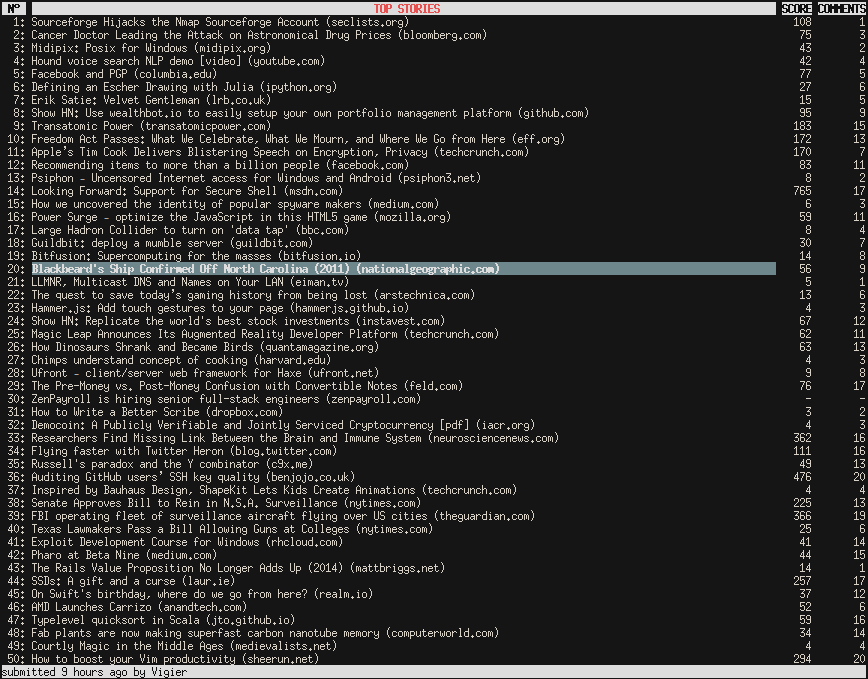
Pyhn reads from the official Hacker News API (the public, read-only JSON API hosted on Firebase), so there is no HTML scraping. Results are cached locally, and each section is fetched concurrently and streamed into the list as it arrives, so the first page shows up almost immediately.
Features
- Official Hacker News API (no scraping)
- Progressive, streaming load with skeleton placeholders
- Concurrent item fetching
- Local cache manager
- Top, Newest, Best, Ask, Show, Show Newest and Jobs stories
- Customize all the colors
- Customize all the keybindings
- Default vim-like keybindings
- Auto refresh support
- Plays nice with tmux and screen (over ssh too!)
- Open stories in your web browser
- Mouse support
- Python 3.10+
- MIT license
Installation
Pyhn requires Python 3.10 or newer. It is a command-line app, so the
recommended installs put it in an isolated environment on your PATH.
With uv (recommended):
uv tool install pyhn
With pipx:
pipx install pyhn
pyhn is available in the AUR.
Usage
Use help for all key bindings:
- h, ?: Print help popup
Configuration
By default, the configuration file is in $HOME/.pyhn/config. It is created
with the defaults below on first run; you can set key bindings, colors and more.
This is an example file:
[keybindings]
page_up = ctrl u
page_down = ctrl d
first_story = g
last_story = G
up = k
down = j
refresh = r
show_comments_link = c
open_comments_link = C
show_story_link = s
open_story_link = S,enter
show_submitter_link = u
open_submitter_link = U
reload_config = ctrl R
newest_stories = n
top_stories = t
best_stories = b
show_stories = d
show_newest_stories = D
ask_stories = a
jobs_stories = J

[interface]
show_score = true
show_comments = true
show_published_time = false

[settings]
extra_page = 3
cache = /home/youruser/.pyhn/cache
cache_age = 5
browser_cmd = __default__
# Refresh interval in minutes (default: 5, minimum: 1)
refresh_interval = 5

[colors]
body = default||standout
focus = yellow,bold||underline
footer = black|light gray
footer-error = dark red,bold|light gray
header = dark gray,bold|white|
title = dark red,bold|light gray
help = black|dark cyan|standout
skeleton = dark gray|default
domain = dark blue|default
Settings
extra_pagehow many extra pages of stories to load (30 stories per page)cache_ageminutes after whichCacheManagerconsiders the cache outdatedbrowser_cmdcommand used to open links (__url__is replaced by the link)refresh_intervalminutes between auto refreshes (minimum 1)
The [interface] section toggles the optional score, comment-count and
published-time columns.
Examples:
browser_cmd = lynx __url__
browser_cmd = __default__
browser_cmd = w3m __url__
browser_cmd = echo "[INFO] Open with w3m: __url__" >> /tmp/pyhn.log && w3m __url__
Key bindings
You can set different key bindings for the same action with a comma separator.
Take a look at the urwid input
manual.
Colors
Color options are written as foreground|background|monochrome. The background
and monochrome parts are optional (e.g. yellow,bold||underline leaves the
background at the terminal default).
foreground
- colors: 'default' (use the terminal's default foreground), 'black', 'dark red', 'dark green', 'brown', 'dark blue', 'dark magenta', 'dark cyan', 'light gray', 'dark gray', 'light red', 'light green', 'yellow', 'light blue', 'light magenta', 'light cyan', 'white'
- settings: 'bold', 'underline', 'blink', 'standout'
background
- colors: 'default' (use the terminal's default background), 'black', 'dark red', 'dark green', 'brown', 'dark blue', 'dark magenta', 'dark cyan', 'light gray'
monochrome
- settings: 'bold', 'underline', 'blink', 'standout'
For more information take a look at the urwid
manual.
License
1 maintainer

Metadata
1 maintainer
Release files for pyhn 0.4.0
For a detailed explanation of source distributions (sdists) and built distributions (wheels), please see the package formats documentation.
Source distribution (sdist)
| File | Size | Uploaded | Provenance | |
|---|---|---|---|---|
| pyhn-0.4.0.tar.gz | 31.0 kB | Without provenance | Details |
Built distribution (wheel)
| File | Interpreter | ABI | Platform | Reset |
|---|---|---|---|---|
| pyhn-0.4.0-py3-none-any.whl | Python 3 | none | any | Details |
Total release size: 55.6 kB
Release files / pyhn-0.4.0.tar.gz
| Download URL | pyhn-0.4.0.tar.gz |
|---|---|
| Size | 31.0 kB |
| Tags | Source |
|
SHA-256 checksum How to use checksums |
335e510f04227bf2a0cfd9898a19c284e28db047d631fe784d5f5d497289c16a
|
|
BLAKE2b-256 checksum How to use checksums |
b7b864a6ebf94bb441bf7bbafa8dad5ea336aa68863ec87768d3a225f523e2cf
|
| Upload date | |
|
Uploaded using Trusted Publishing? What is trusted publishing? |
No |
| Uploaded via |
twine/6.2.0 CPython/3.10.20
|
Release files / pyhn-0.4.0-py3-none-any.whl
| Download URL | pyhn-0.4.0-py3-none-any.whl |
|---|---|
| Size | 24.5 kB |
| Tags | Python 3 |
|
SHA-256 checksum How to use checksums |
f3302273cc58bd5874a48cd331988e13dfb438c611d72480ee45fdc0177b8a0d
|
|
BLAKE2b-256 checksum How to use checksums |
00819ec2b7b4229d0538471e4f4ac8b6e04ecbb5e870d25bdc9c6952ca04446c
|
| Upload date | |
|
Uploaded using Trusted Publishing? What is trusted publishing? |
No |
| Uploaded via |
twine/6.2.0 CPython/3.10.20
|
Security for pyhn 0.4.0
Provenance
Provenance describes where a file came from. On PyPI, provenance is shared via attestations, which provide a verifiable record of the build or publishing details. View details, limitations and caveats.
No provenance found
None of the files in this release were uploaded with provenance metadata.
A note on package security
PyPI is a repository for distributing packages, not a service for auditing them. While third-party security researchers and our staff do their best to detect and remove malicious packages, PyPI cannot guarantee the quality, security or suitability of any given package.
To learn more about protecting yourself from malicious actors, visit our package security documentation.














