
pyibt
pyibt is a Python module that extends the functionality of the ECCELES Electrophysiology Suite with a simple and intuitive API for the analysis and visualization of electrophysiology data in Python.
ECCELES is an online electrophysiology acquisition program developed for the IGOR Pro data analysis platform (WaveMetrics) that allows for conducting and and analyzing highly customizable and flexible electrophysiological experiments. ELLECES however requires a very specific computing environment to run correctly, requires proprietary software (Igor Pro), and has a limited ability to implement automated and repetitive analyses.
pyibt was developed to read the custom binary files generated by ECCELES (ibt files) and provide a simple API to interact with the data stored with them. At its core, pyibt provides an easy access to ibt data to facilitate custom analysis in Python. However, pyibt also includes a set of native methods to quickly and easily plot and analyze ephys data. Please see the examples below to learn how to get started with pyibt.
Loading data
from pyibt.read_ibt import Read_IBT
ibt = Read_IBT('demo.ibt')
Accessing file information
print('ibt file name:', ibt.name)
print('Number of sweeps:', len(ibt.sweeps))
ibt file name: demo
Number of sweeps: 28
Accessing sweep data
sweep = ibt.sweeps[0]
print('Recording mode:', sweep.rec_mode)
print('Sweep data:', sweep.data)
print('Recording mode:', sweep.y_label)
print('Sweep time:', sweep.time)
print('Recording mode:', sweep.x_label)
print('Sweep command:', sweep.command)
Recording mode: current clamp
Sweep data: [-63.18666667 -62.98666667 -62.89333333 ... -62.98666667 -62.98666667 -63.18666667]
Recording mode: Membrane Potential (mV)
Sweep time: [0.0000e+00 2.0000e-05 4.0000e-05 ... 9.9994e-01 9.9996e-01 9.9998e-01]
Recording mode: Time (seconds)
Sweep command: [0. 0. 0. ... 0. 0. 0.]
Quick plot functions
fig = plt.figure(figsize=(8, 7))
ax1 = fig.add_subplot(211)
ax1 = ibt.plot_sweep(sweep_num=16, ax=ax1)

ax2 = fig.add_subplot(212)
ax2 = ibt.plot_command(sweep_num=16, ax=ax2)
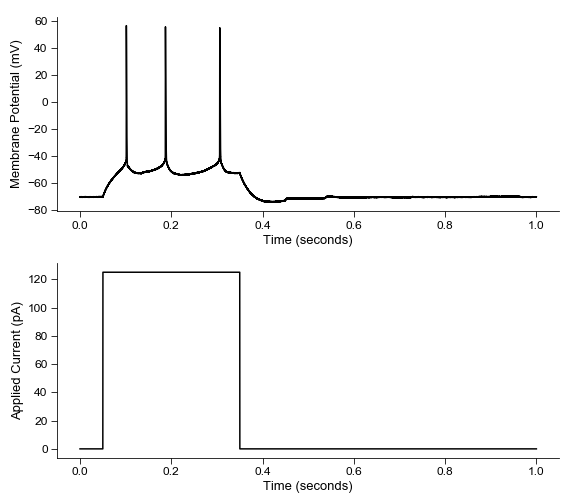
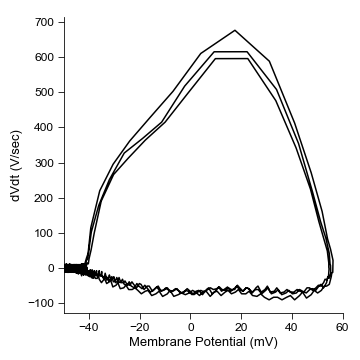
fig = plt.figure(figsize=(5, 5))
ax=ibt.plot_sweep_phase_plane(sweep_num=16)
ax.set_xlim(-50, 60)
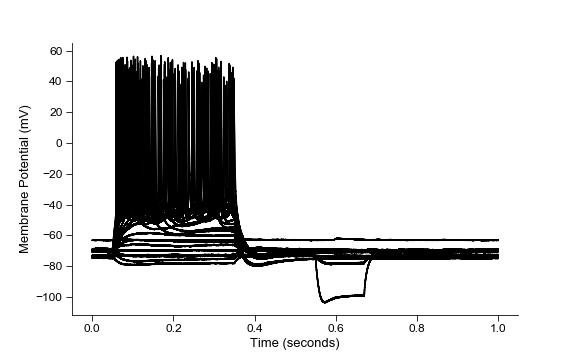
fig=plt.figure(figsize=(8,5))
ax=ibt.plot_all_sweeps()
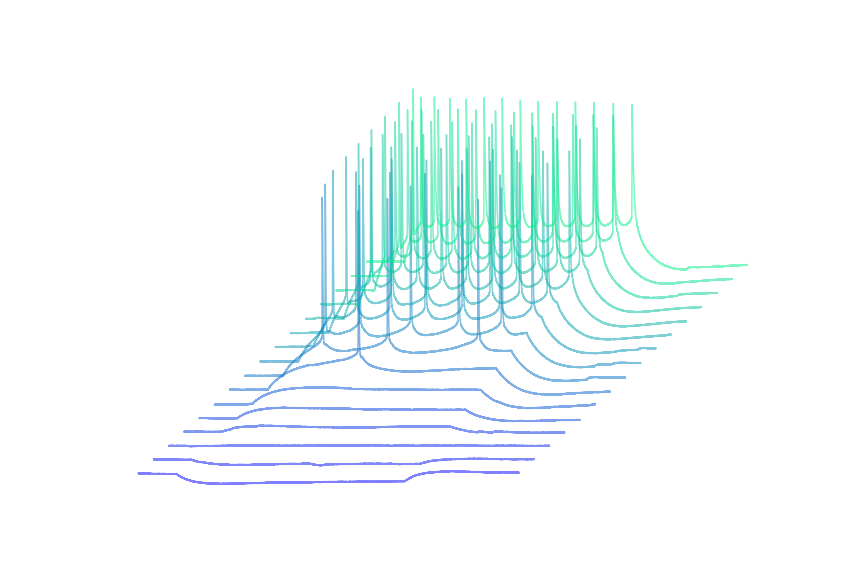
Get Creative
sweeps = ibt.sweeps[9:25]
cm = plt.get_cmap("winter")
colors = [cm(i/len(sweeps)) for i, x in enumerate(sweeps)]

plt.figure(figsize=(12, 8))
for i, sweep in enumerate(sweeps):
    num_pnts = int(0.5/sweep.dx)
    x = sweep.time[:num_pnts] + 0.02 * i
    y = sweep.data[:num_pnts] + 10 * i
    plt.plot(x, y, color=colors[i], alpha=0.5)
plt.gca().axis('off')
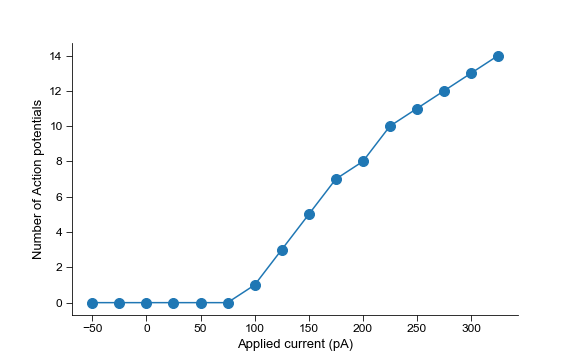
Automatic detection of action potentials
command = 4
sweeps = ibt.sweeps[9:25]

num_APs = []
current = []
for sweep  in sweeps:
    num_APs.append(len(sweep.spike_times_during_command(command)))
    current.append(sweep.commands[4]['value'])

fig=plt.figure(figsize=(8, 5))
plt.plot(current, num_APs, '-o', markersize=10)
plt.ylabel('Number of Action potentials')
plt.xlabel('Applied current (pA)')
plt.savefig('example_plots/FI_curve.png')
import numpy as np

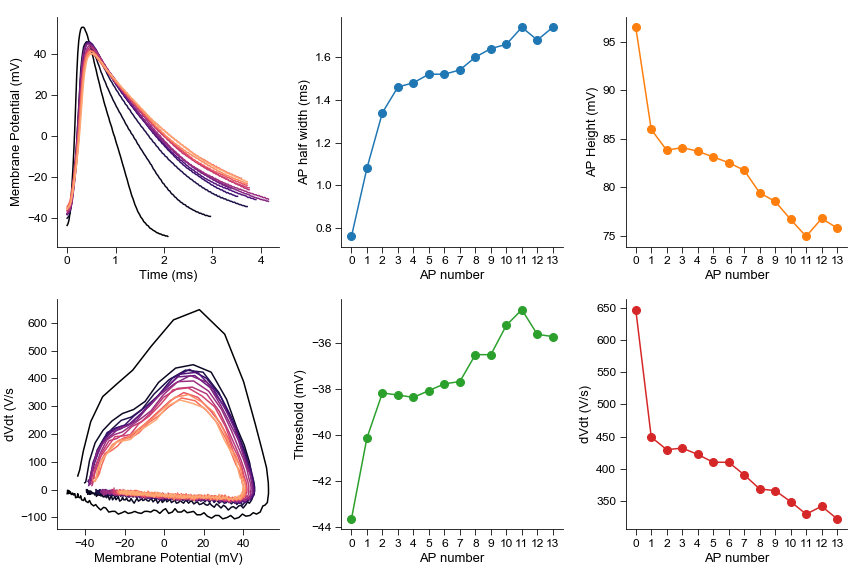
sweep = ibt.sweeps[25]
spikes = sweep.spike_properties()

spike_num = [x for x in range(len(spikes))]
spike_height = [spike['height'] for spike in spikes]
spike_width = [spike['half_width'] for spike in spikes]
spike_thresh = [spike['thresh'] for spike in spikes]
spike_dVdt = [spike['peak_dVdt'] for spike in spikes]

fig = plt.figure(figsize=(12, 8))

ax1 = fig.add_subplot(231)
ax1.set_ylabel('Membrane Potential (mV)')
ax1.set_xlabel('Time (ms)')

ax4 = fig.add_subplot(234)
ax4.set_ylabel('dVdt (V/s')
ax4.set_xlabel('Membrane Potential (mV)')

cm=plt.cm.magma
colors = [cm(i/len(sweeps)) for i, x in enumerate(sweeps)]
for i, spike in enumerate(spikes):
    ax1.plot(spike['time'] * 1000, spike['Vm'], color=colors[i])

    dVdt = np.gradient(spike['Vm'], spike['time'])/1000
    ax4.plot(spike['Vm'], dVdt, color=colors[i])

ax2 = fig.add_subplot(232)
ax2.set_ylabel('AP half width (ms)')
ax2.set_xlabel('AP number')
ax2.set_xticks(spike_num)
ax2.plot(spike_num,spike_width, '-o', markersize=8, color='tab:blue')

ax3 = fig.add_subplot(233, sharex=ax2)
ax3.set_ylabel('AP Height (mV)')
ax3.set_xlabel('AP number')
ax3.plot(spike_num,spike_height, '-o', markersize=8, color='tab:orange')

ax2 = fig.add_subplot(235, sharex=ax2)
ax2.set_ylabel('Threshold (mV)')
ax2.set_xlabel('AP number')
ax2.plot(spike_num,spike_thresh, '-o', markersize=8, color='tab:green')

ax3 = fig.add_subplot(236, sharex=ax2)
ax3.set_ylabel('dVdt (V/s)')
ax3.set_xlabel('AP number')
ax3.plot(spike_num,spike_dVdt, '-o', markersize=8, color='tab:red')
Details of the ibt file structure can be found here
pyibt was inspired by the pyABF module written by Scott Harden for Axon Binary Format (ABF) files.
Author
Perry Spratt
PhD Candidate, Bender Lab
University of California, San Francisco
perrywespratt@gmail.com
1 maintainer

Metadata
1 maintainer
Release files for pyibt 0.0.2
For a detailed explanation of source distributions (sdists) and built distributions (wheels), please see the package formats documentation.
Source distribution (sdist)
| File | Size | Uploaded | |
|---|---|---|---|
| pyibt-0.0.2.tar.gz | 11.7 kB | Details |
Built distribution (wheel)
| File | Interpreter | ABI | Platform | Reset |
|---|---|---|---|---|
| pyibt-0.0.2-py3-none-any.whl | Python 3 | none | any | Details |
Total release size: 22.7 kB
Release files / pyibt-0.0.2.tar.gz
| Download URL | pyibt-0.0.2.tar.gz |
|---|---|
| Size | 11.7 kB |
| Tags | Source |
|
SHA-256 checksum How to use checksums |
a36b4b77cd3b8357ccf32d1e4d765aadbb352424d53e8464b8d33565ecdeeafa
|
|
BLAKE2b-256 checksum How to use checksums |
78e0e62fc511b852371c6964afbdafd72100e387e27eefcfa4813c9519f627c6
|
| Upload date | |
|
Uploaded using Trusted Publishing? What is trusted publishing? |
No |
| Uploaded via |
twine/3.1.1 pkginfo/1.5.0.1 requests/2.22.0 setuptools/45.0.0 requests-toolbelt/0.9.1 tqdm/4.41.1 CPython/3.6.4
|
Release files / pyibt-0.0.2-py3-none-any.whl
| Download URL | pyibt-0.0.2-py3-none-any.whl |
|---|---|
| Size | 10.9 kB |
| Tags | Python 3 |
|
SHA-256 checksum How to use checksums |
99c403bfca81d43cf8ea5ba35c632c4d94e973b5ed9a8c083f5ea710b7dc0bd7
|
|
BLAKE2b-256 checksum How to use checksums |
708f787b3f2e6d09591deea36c9bd6782b6a7b4d1734cbd8a95cc03c100841a0
|
| Upload date | |
|
Uploaded using Trusted Publishing? What is trusted publishing? |
No |
| Uploaded via |
twine/3.1.1 pkginfo/1.5.0.1 requests/2.22.0 setuptools/45.0.0 requests-toolbelt/0.9.1 tqdm/4.41.1 CPython/3.6.4
|














