
pylitterbot








Python package for controlling Whisker connected self-cleaning litter boxes and feeders.
This is an unofficial API for controlling various Whisker automated robots. It currently supports Litter-Robot 3 (with connect), Litter-Robot 4 and Feeder-Robot.
Disclaimer
This API is experimental and was reverse-engineered by monitoring network traffic and decompiling source code from the Whisker app since no public API is currently available at this time. It may cease to work at any time. Use at your own risk.
Installation
Install using pip
pip install pylitterbot
To include the MCP server for AI assistant integration:
pip install pylitterbot[mcp]
Alternatively, clone the repository and run
uv sync
Usage
import asyncio

from pylitterbot import Account

# Set email and password for initial authentication.
username = "Your username"
password = "Your password"


async def main():
    # Create an account.
    account = Account()

    try:
        # Connect to the API and load robots.
        await account.connect(username=username, password=password, load_robots=True)

        # Print robots associated with account.
        print("Robots:")
        for robot in account.robots:
            print(robot)
    finally:
        # Disconnect from the API.
        await account.disconnect()


if __name__ == "__main__":
    asyncio.run(main())
which will output something like:
Name: Litter-Robot Name, Serial: LR3C012345, id: a0123b4567cd8e
If you only want to discover specific robot families, pass the classes you want to query when you create the account or when you load robots:
from pylitterbot import Account, LitterRobot4, LitterRobot5

...

account = Account(robot_types=[LitterRobot4, LitterRobot5])

await account.connect(
    username=username,
    password=password,
    load_robots=True,
)
To start a clean cycle
await robot.start_cleaning()
If no exception occurred, your Litter-Robot should now perform a clean cycle.
Currently the following methods are available in the Robot class:
- refresh()
- start_cleaning()
- reset_settings()
- set_panel_lockout()
- set_night_light()
- set_power_status()
- set_sleep_mode()
- set_wait_time()
- set_name()
- get_activity_history()
- get_insight()
MCP Server
pylitterbot includes an optional MCP (Model Context Protocol) server that lets AI assistants like Claude monitor and control your robots through natural language.
Installation
pip install pylitterbot[mcp]
Running
pylitterbot-mcp
or
python -m pylitterbot.mcp
Claude Desktop configuration
Add this to your Claude Desktop config (claude_desktop_config.json):
{
  "mcpServers": {
    "litter-robot": {
      "command": "python",
      "args": ["-m", "pylitterbot.mcp"],
      "env": {
        "LITTER_ROBOT_USERNAME": "your@email.com",
        "LITTER_ROBOT_PASSWORD": "your_password"
      }
    }
  }
}
Note: The configuration above stores credentials in plaintext. Ensure appropriate file permissions on your config file (owner-only read/write) and avoid committing it to version control.
Available tools
Status and info: get_robots, get_robot_status, get_activity_history, get_insight, get_pets
Commands: start_cleaning, reset_robot, give_snack, set_power_status
Settings: set_name, set_night_light, set_night_light_brightness, set_night_light_mode, set_panel_lockout, set_wait_time, set_sleep_mode
Compound operations that combine multiple API calls:
| Tool | Description |
|---|---|
fleet_overview |
Prioritized status across all robots with alerts |
clean_all_ready |
Start cleaning on all robots in READY state |
sync_settings |
Copy one robot's settings to all others of the same model |
pet_usage_report |
Activity data across all robots with pet info |
maintenance_forecast |
Estimate when each robot needs emptying |
household_digest |
Time-bounded summary of all activity |
troubleshooting_report |
Diagnostic bundle for a robot with errors |
robot_comparison |
Compare settings and metrics across robots |
Contributing
Thank you for your interest in contributing! Please see CONTRIBUTING.md for how to get started.
TODO
- Add support for Litter-Robot 5 cameras
❤️ Support Me
I maintain this python project in my spare time. If you find it useful, consider supporting development:
- 💜 Sponsor me on GitHub
- ☕ Buy me a coffee / beer
- 💸 PayPal (direct support)
- ⭐ Star this project
- 📦 If you’d like to support in other ways, such as donating hardware for testing, feel free to reach out to me
If you don't already own a Litter-Robot, please consider using my referral link to purchase your own robot and save $50!
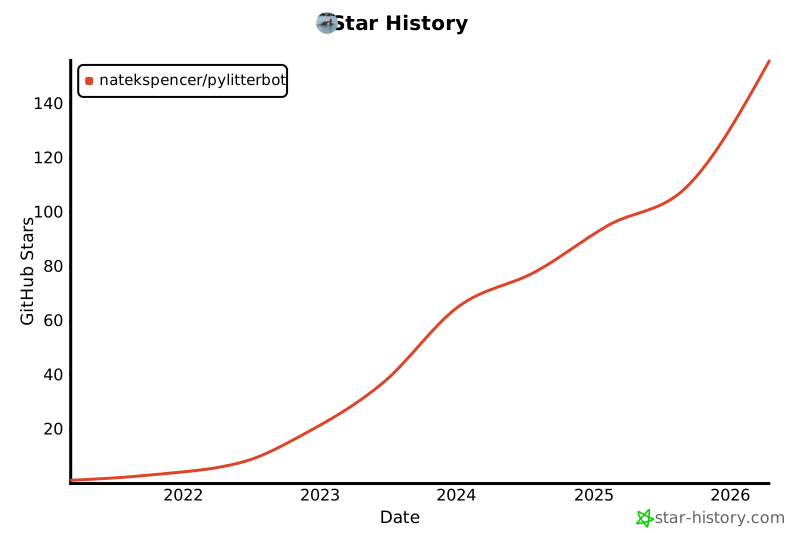
📈 Star History
1 maintainer

Metadata
1 maintainer
Release files for pylitterbot 2025.7.0
For a detailed explanation of source distributions (sdists) and built distributions (wheels), please see the package formats documentation.
Source distribution (sdist)
| File | Size | Uploaded | Provenance | Actions |
|---|---|---|---|---|
| pylitterbot-2025.7.0.tar.gz | 69.6 kB | Without provenance | Details for pylitterbot-2025.7.0.tar.gz |
Built distribution (wheel)
| File | Interpreter | ABI | Platform | Actions Reset |
|---|---|---|---|---|
| pylitterbot-2025.7.0-py3-none-any.whl | Python 3 | none | any | Details for pylitterbot-2025.7.0-py3-none-any.whl |
Total release size: 156.0 kB
Release files / pylitterbot-2025.7.0.tar.gz
| Download URL | pylitterbot-2025.7.0.tar.gz |
|---|---|
| Size | 69.6 kB |
| Tags | Source |
|
SHA-256 checksum How to use checksums |
fcdc4c0cbd88e98cdeba9a2963ccea89e9522223840380ca5a029fb4ca28a13e
|
|
BLAKE2b-256 checksum How to use checksums |
a0333f50b29bbea6dda5260b878aea8464328872f35afa360393b0cd91455193
|
| Upload date | |
|
Uploaded using Trusted Publishing? What is trusted publishing? |
Yes |
| Uploaded via |
uv/0.13.0 {"installer":{"name":"uv","version":"0.13.0","subcommand":["publish"]},"python":null,"implementation":{"name":null,"version":null},"distro":{"name":"Ubuntu","version":"24.04","id":"noble","libc":null},"system":{"name":null,"release":null},"cpu":null,"openssl_version":null,"setuptools_version":null,"rustc_version":null,"ci":true}
|
Release files / pylitterbot-2025.7.0-py3-none-any.whl
| Download URL | pylitterbot-2025.7.0-py3-none-any.whl |
|---|---|
| Size | 86.4 kB |
| Tags | Python 3 |
|
SHA-256 checksum How to use checksums |
756ba77b12c9706b3ba5e8987f822a22bf0cb8c5dfa3953f0a3237799e8b5956
|
|
BLAKE2b-256 checksum How to use checksums |
661634b51de3e83b9a5261fac0e25afd8535caaad4b03dab3c7b384a5c77fad3
|
| Upload date | |
|
Uploaded using Trusted Publishing? What is trusted publishing? |
Yes |
| Uploaded via |
uv/0.13.0 {"installer":{"name":"uv","version":"0.13.0","subcommand":["publish"]},"python":null,"implementation":{"name":null,"version":null},"distro":{"name":"Ubuntu","version":"24.04","id":"noble","libc":null},"system":{"name":null,"release":null},"cpu":null,"openssl_version":null,"setuptools_version":null,"rustc_version":null,"ci":true}
|
Security for pylitterbot 2025.7.0
Provenance
Provenance describes where a file came from. On PyPI, provenance is shared via attestations, which provide a verifiable record of the build or publishing details. View details, limitations and caveats.
No provenance found
None of the files in this release were uploaded with provenance metadata.
A note on package security
PyPI is a repository for distributing packages, not a service for auditing them. While third-party security researchers and our staff do their best to detect and remove malicious packages, PyPI cannot guarantee the quality, security or suitability of any given package.
To learn more about protecting yourself from malicious actors, visit our package security documentation.














