
pympristui (TUI MPRIS2 Control)
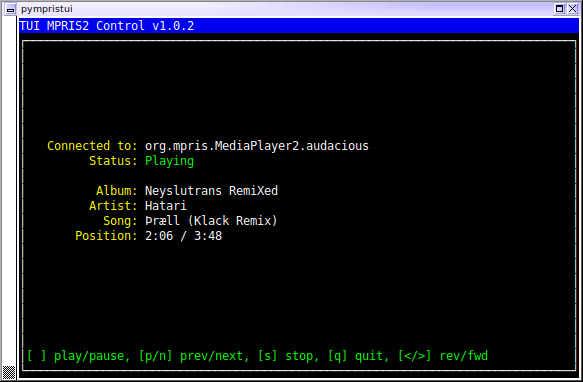
This is a tiny little Python script to act as a TUI (Terminal User Interface) to an MPRIS2-enabled media player. MPRIS is a D-Bus-based interface which many Linux-based media players support, which allows external applications to control some aspects of media playback. This is most often used to provide little audio applets for desktop environments, or to allow web-based control of a media player. This app is intended to provide some basic controls when (for instance) SSHed in to a machine that's running an MPRIS-compatible media player.
This app has been tested in Python 3.9+, and requires:
- dbus-python (tested on 1.2.16)
- mpris2 (tested on 1.0.2)
- urwid (tested on 2.1.2)
It attempts to connect to the Audacious Media Player by default; to connect to another app instead, you'll have to specify a commandline arg.
Installation
I'd recommend using a virtual environment to run the app. Change to a directory where you want to store your venv, and create/activate it with:
$ python -m venv mpris2
$ . mpris2/bin/activate
You should have an (mpris2) prefix on your shell prompt to indicate the
venv is active. Obviously feel free to name it whatever you like.
pip Installation
At this point, you can just install using:
$ pip install pympristui
A pympristui.py script should now be available on your $PATH.
Manual Installation
Otherwise, check out the project from git, or download and uncompress an archive from github. Then, switch over to this project's dir and install dependencies, either through:
$ pip install -r requirements.txt
or by hand:
$ pip install dbus-python mpris2 urwid
Then run it direct from the CLI (or copy the script anywhere you like):
$ ./pympristui.py
Usage
It's a very basic app. By default it tries to find an MPRIS interface for
the media player Audacious. If that's not found (or if that's not what you
want to use), you can use the -p/--program arg to specify another string
to search for. The string matching here is extremely basic; it'll just pick
the first advertised interface name which matches the string you specify. If
the specified string isn't found (or if Audacious isn't running, when no -p
has been specified), you'll get a list of all available MPRIS interfaces found
on your system, on the commandline, with output like:
Available Player URIs:
 - org.mpris.MediaPlayer2.firefox.instance319681
 - org.mpris.MediaPlayer2.audacious
To use that -p/--program argument to connect to that Firefox instance, for
instance:
$ ./pympristui.py -p firefox
$ ./pympristui.py --program firefox
Using instance319681 or even 319681 would also match that Firefox instance.
Once it's started, the app just provides the simple controls pause/play/stop, next/previous track, and seeking, along with the basic information about what's being played currently. It only accepts keyboard input, with the following keybinds:
space- play/pausen- next trackp- previous track<- Seek 10 seconds back>- Seek 10 seconds forwards- stopq- quit
Note that the "quit" key only quits the control app itself; the actual app playing audio will continue to run as usual.
Limitations/TODO
- I'd originally intended to provide support for MPRIS2's TrackList interface, but it turns out the Audacious doesn't provide that, so I didn't look into it any further. As such, control in the app is limited to play/pause/stop, next, and prev. There's no tracklist visibility, or ability to hop around with any control other than next/prev.
- I didn't implement volume control.
- The onscreen text just updates every second, so there'll often be a noticeable (though brief) lag between hitting a command and having the info update onscreen. The commands should be executed immediately, though.
- This has only been tested against Audacious. If other MPRIS servers behave differently (like maybe not including a total track time or something), this might have problems.
License
All code in this project is licensed under the zlib/libpng license. A copy is provided in COPYING.txt.
Changelog
v1.0.7 - February 1, 2026
- Updated requirements to more recent versions of dbus-python and urwid. The urwid update in particular is necessary for Python 3.14 compat. (No actual code changes to pympristui, though.)
v1.0.6 - March 9, 2022
- More user-friendly messages when no MPRIS players can be found
- More user-friendly message when DBus error is encountered
- Added
-V/--versionargument
v1.0.5 - June 15, 2021
- Bah, one more case where missing MPRIS tags would crash the app
v1.0.4 - June 9, 2021
- Fixed a couple more cases where missing MPRIS tags would crash the app
v1.0.3 - May 7, 2021
- Fixed handling of cases where some tags (such as album) aren't present
v1.0.2 - March 3, 2021
- Added forward/reverse seeking
v1.0.1 - February 26, 2021
- Use blue coloration for
Pausednotification - Include version number in app header
- Fix up
--helpoutput a bit
v1.0.0 - February 24, 2021
- Initial release
1 maintainer

Metadata
1 maintainer
Release files for pympristui 1.0.7
For a detailed explanation of source distributions (sdists) and built distributions (wheels), please see the package formats documentation.
Source distribution (sdist)
| File | Size | Uploaded | |
|---|---|---|---|
| pympristui-1.0.7.tar.gz | 7.7 kB | Details |
Built distribution (wheel)
| File | Interpreter | ABI | Platform | Reset |
|---|---|---|---|---|
| pympristui-1.0.7-py3-none-any.whl | Python 3 | none | any | Details |
Total release size: 22.0 kB
Release files / pympristui-1.0.7.tar.gz
| Download URL | pympristui-1.0.7.tar.gz |
|---|---|
| Size | 7.7 kB |
| Tags | Source |
|
SHA-256 checksum How to use checksums |
87a6ae288c29bcc5b3e9d7e8dd42acf886c87b47cb8351d85ff37c23a610a056
|
|
BLAKE2b-256 checksum How to use checksums |
f04860cdd45d695a17c40c0f236992ef35e3585f028bdb667f010edbc6b0d9c7
|
| Upload date | |
|
Uploaded using Trusted Publishing? What is trusted publishing? |
No |
| Uploaded via |
twine/6.2.0 CPython/3.14.2
|
Release files / pympristui-1.0.7-py3-none-any.whl
| Download URL | pympristui-1.0.7-py3-none-any.whl |
|---|---|
| Size | 14.4 kB |
| Tags | Python 3 |
|
SHA-256 checksum How to use checksums |
9d0ef3cefcd49cfc7dd3b04fbba808f2fcbcd251f0b047b46c00c7c1b6e8af98
|
|
BLAKE2b-256 checksum How to use checksums |
40106d892d12bc3daa617aefe0a76e04acce6c5b725c821a88cae83fc77cc92e
|
| Upload date | |
|
Uploaded using Trusted Publishing? What is trusted publishing? |
No |
| Uploaded via |
twine/6.2.0 CPython/3.14.2
|














