





pypette (to be read as pipette) is a module which makes building pipelines ridiculously simple, allowing users to control the flow with minimal instructions.
Features
Ridiculously simple interface.
Ability to view pipeline structure within the comfort of a terminal.
Run pipeline in exception resilient way if needed.
Create dependencies on pipelines easily.
Generate a easy to view/understand report within the comfort of a terminal.
Setup
Using pip
pip install pypetteDirectly from the repository
git clone https://github.com/csurfer/pypette.git
python pypette/setup.py install
Documentation
Detailed documentation can be found at https://csurfer.github.io/pypette
Structures
Job
The basic unit of execution, say a python method or a callable.
from pypette import Job

def print_hello():
    print("Hello!")

def print_hello_msg(msg):
    print("Hello " + msg + "!")

# Job without arguments
j1 = Job(print_hello)

# Job with arguments specified as argument list
j2 = Job(print_hello_msg, args=("pypette is simple",))

# Job with arguments specified as key word arguments
j3 = Job(print_hello_msg, kwargs={"msg":"pypette is simple"})
BashJob
The basic unit of execution, which runs a bash command.
from pypette import BashJob

# Job with bash commands
b1 = BashJob(['ls', '-l'])
b2 = BashJob(['pwd'])
Pipe
Structure to specify the flow in which the jobs need to be executed. The whole interface consists of only 4 methods.
from pypette import Pipe

# 1. Create a new Pipe
p = Pipe('TestPipe')

# 2. Add jobs to execute. (Assuming job_list is a list of python/bash jobs)

# To run the jobs in job_list in order one after the other where each job
# waits for the job before it to finish.
p.add_jobs(job_list)

# To run the jobs in job_list parallelly and run the next step only after
# all jobs in job list finish.
p.add_jobs(job_list, run_in_parallel=True)

# Add jobs in a builder format.
p.add_stage(job1).add_stage(job2) # To add jobs in series.
p.add_stage(job1, job2) # To add jobs in parallel.
Building complex pipelines
Jobs submitted to pipeline should be callables i.e. structures which can be run. This means python methods, lambdas etc qualify.
What about Pipe itself?
Of course, it is a callable and you can submit a pipe object to be run along with regular jobs. This way you can build small pipelines which achieve a specific task and then combine them to create more complex pipelines.
from pypette import BashJob, Job, Pipe

def welcome():
    print("Welcome user!")

def havefun():
    print("Have fun!")

def goodbye():
    print("Goodbye!")

# Build a simple pipeline
p1 = Pipe('Fun')
p1.add_jobs([
    Job(havefun),
])

# Include simple pipeline into a complicated pipeline
p2 = Pipe('Overall')
p2.add_jobs([
    Job(welcome),
    p1,
    Job(goodbye),
    BashJob(['ls', '-l']),
    BashJob(['pwd'])
])

p2.run() # This first runs welcome, then runs p1 pipeline then runs goodbye.
Example pipeline
An example pipeline and its code are included in examples folder.
Visualizing the pipeline using graph()
Pipeline objects have a method called graph() which helps visualize the pipeline within the comfort of your terminal. The graph is recursive in nature and it visualizes everything that will be run if we call run() on the pipe object.
Visualizing the top-level pipeline in examples/basic.py led to the following visualization.
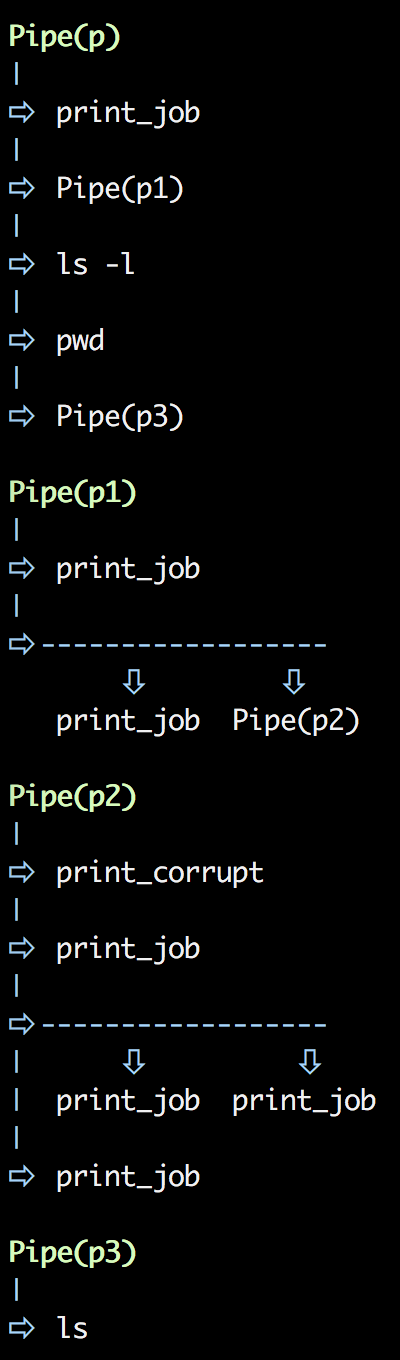
Running the entire pipeline.
The only thing you need to do at this point to run the entire pipeline is to call run() on your pipeline object.
Reporting the entire pipeline.
The only thing you need to do at this point to get the report of entire pipeline is to call report() on your pipeline object.
Contributing
Bug Reports and Feature Requests
Please use issue tracker for reporting bugs or feature requests.
Development
Pull requests are most welcome. Kindly follow the steps suggested below:
Checkout the repository.
Make your changes and add/update relavent tests.
Install `poetry` using `pip install poetry`.
Run `poetry install` to create project’s virtual environment.
Run tests using `poetry run tox` (Any python versions which you don’t have checked out will fail this). Fix failing tests and repeat.
Make documentation changes that are relavant.
Install `pre-commit` using `pip install pre-commit` and run `pre-commit run –all-files` to do lint checks.
Generate documentation using `poetry run sphinx-build -b html docs/ docs/_build/html`.
Generate `requirements.txt` for automated testing using `poetry export –dev –without-hashes -f requirements.txt > requirements.txt`.
Commit the changes and raise a pull request.
Buy the developer a cup of coffee!
If you found the utility helpful you can buy me a cup of coffee using

1 maintainer

Metadata
1 maintainer
Release files for pypette 0.0.12
For a detailed explanation of source distributions (sdists) and built distributions (wheels), please see the package formats documentation.
Source distribution (sdist)
| File | Size | Uploaded | |
|---|---|---|---|
| pypette-0.0.12.tar.gz | 11.6 kB | Details |
Built distribution (wheel)
| File | Interpreter | ABI | Platform | Reset |
|---|---|---|---|---|
| pypette-0.0.12-py3-none-any.whl | Python 3 | none | any | Details |
Total release size: 21.6 kB
Release files / pypette-0.0.12.tar.gz
| Download URL | pypette-0.0.12.tar.gz |
|---|---|
| Size | 11.6 kB |
| Tags | Source |
|
SHA-256 checksum How to use checksums |
594ff550090b036bd9fe2b788ddbf948d45c318abed2e7e2de8967745a2dc927
|
|
BLAKE2b-256 checksum How to use checksums |
afc60014e4c9d7846795d58d891ab1fbc1cd1cd59aa1948fdd6eb86b1b688d35
|
| Upload date | |
|
Uploaded using Trusted Publishing? What is trusted publishing? |
No |
| Uploaded via |
poetry/1.1.8 CPython/3.8.10 Linux/5.11.0-25-generic
|
Release files / pypette-0.0.12-py3-none-any.whl
| Download URL | pypette-0.0.12-py3-none-any.whl |
|---|---|
| Size | 10.0 kB |
| Tags | Python 3 |
|
SHA-256 checksum How to use checksums |
6abebee3980accace463698dfb8c23848a5cd5d2b5802524d57891ff197df148
|
|
BLAKE2b-256 checksum How to use checksums |
d55b0dcad6d6dd072fb779180d2b7a43628829c6a84a41dcd279252ebc90b499
|
| Upload date | |
|
Uploaded using Trusted Publishing? What is trusted publishing? |
No |
| Uploaded via |
poetry/1.1.8 CPython/3.8.10 Linux/5.11.0-25-generic
|














