
Quantum Entanglement in Python






Version
The releases of pyqentangle 2.x.x are incompatible with previous releases.
The releases of pyqentangle 3.x.x are incompatible with previous releases.
The releases of pyqentangle 5.x.x are incompatible with previous releases.
Since release 3.1.0, the support for Python 2 was decomissioned.
Installation
This package can be installed using pip.
>>> pip install pyqentangle
To use it, enter
>>> import pyqentangle
>>> import numpy as np
Schmidt Decomposition for Discrete Bipartite States
We first express the bipartite state in terms of a tensor. For example, if the state is |01>+|10>, then express it as
>>> tensor = np.array([[0., np.sqrt(0.5)], [np.sqrt(0.5), 0.]])
To perform the Schmidt decompostion, just enter:
>>> pyqentangle.DiscreteSchmidtDecomposer(tensor).modes()
[DiscreteSchmidtMode(schmidt_coef=np.float64(0.7071067811865476), mode1=array([ 0., -1.]), mode2=array([-1., -0.])),
 DiscreteSchmidtMode(schmidt_coef=np.float64(0.7071067811865476), mode1=array([-1.,  0.]), mode2=array([-0., -1.]))]
In the returned list, for each element, there are the Schmidt coefficient, the component for first subsystem, and that for the second subsystem.
Schmidt Decomposition for Continuous Bipartite States
We can perform Schmidt decomposition on continuous systems too. For example, define the following normalized wavefunction:
>>> bipartite_wavefcn = pyqentangle.core.wavefunctions.AnalyticMultiDimWaveFunction(
        lambda x: np.exp(-0.5 * (x[0] + x[1]) ** 2) * np.exp(-(x[0] - x[1]) ** 2) * np.sqrt(np.sqrt(8.) / np.pi)
    )
Then perform the Schmidt decomposition,
>>> modes = pyqentangle.ContinuousSchmidtDecomposer(bipartite_wavefcn, -10., 10., -10., 10., keep=10).modes()
>>> modes
[ContinuousSchmidtMode(schmidt_coef=np.float64(0.9851714310094161), wavefunction1=<pyqentangle.core.wavefunctions.InterpolatingWaveFunction object at 0x7fa6dd9a0f50>, wavefunction2=<pyqentangle.core.wavefunctions.InterpolatingWaveFunction object at 0x7fa6dd0d4f80>),
 ContinuousSchmidtMode(schmidt_coef=np.float64(0.1690286950361957), wavefunction1=<pyqentangle.core.wavefunctions.InterpolatingWaveFunction object at 0x7fa8582d7dd0>, wavefunction2=<pyqentangle.core.wavefunctions.InterpolatingWaveFunction object at 0x7fa6dd15e350>),
 ContinuousSchmidtMode(schmidt_coef=np.float64(0.029000739207759557), wavefunction1=<pyqentangle.core.wavefunctions.InterpolatingWaveFunction object at 0x7fa6dd0d2cf0>, wavefunction2=<pyqentangle.core.wavefunctions.InterpolatingWaveFunction object at 0x7fa6dd0d1240>),
 ContinuousSchmidtMode(schmidt_coef=np.float64(0.004975740210361184), wavefunction1=<pyqentangle.core.wavefunctions.InterpolatingWaveFunction object at 0x7fa6dd4393d0>, wavefunction2=<pyqentangle.core.wavefunctions.InterpolatingWaveFunction object at 0x7fa6dd4394f0>),
 ContinuousSchmidtMode(schmidt_coef=np.float64(0.0008537020544076699), wavefunction1=<pyqentangle.core.wavefunctions.InterpolatingWaveFunction object at 0x7fa6dd439550>, wavefunction2=<pyqentangle.core.wavefunctions.InterpolatingWaveFunction object at 0x7fa6dd439670>),
 ContinuousSchmidtMode(schmidt_coef=np.float64(0.0001464721160848057), wavefunction1=<pyqentangle.core.wavefunctions.InterpolatingWaveFunction object at 0x7fa6dd4396d0>, wavefunction2=<pyqentangle.core.wavefunctions.InterpolatingWaveFunction object at 0x7fa6dd4397f0>),
 ContinuousSchmidtMode(schmidt_coef=np.float64(2.5130642101174655e-05), wavefunction1=<pyqentangle.core.wavefunctions.InterpolatingWaveFunction object at 0x7fa6dd439850>, wavefunction2=<pyqentangle.core.wavefunctions.InterpolatingWaveFunction object at 0x7fa6dd439970>),
 ContinuousSchmidtMode(schmidt_coef=np.float64(4.311736522271967e-06), wavefunction1=<pyqentangle.core.wavefunctions.InterpolatingWaveFunction object at 0x7fa6dd4399d0>, wavefunction2=<pyqentangle.core.wavefunctions.InterpolatingWaveFunction object at 0x7fa6dd439af0>),
 ContinuousSchmidtMode(schmidt_coef=np.float64(7.397770324567384e-07), wavefunction1=<pyqentangle.core.wavefunctions.InterpolatingWaveFunction object at 0x7fa6dd439b50>, wavefunction2=<pyqentangle.core.wavefunctions.InterpolatingWaveFunction object at 0x7fa6dd439c70>),
 ContinuousSchmidtMode(schmidt_coef=np.float64(1.2692567250818081e-07), wavefunction1=<pyqentangle.core.wavefunctions.InterpolatingWaveFunction object at 0x7fa6dd439cd0>, wavefunction2=<pyqentangle.core.wavefunctions.InterpolatingWaveFunction object at 0x7fa6dd439df0>)]
where it describes the ranges of x1 and x2 respectively, and keep=10 specifies only top 10 Schmidt modes are kept.
Then we can read the Schmidt coefficients:
>>> from matplotlib import pyplot as plt
>>> [mode.schmidt_coef for mode in modes]
[np.float64(0.9851714310094161),
 np.float64(0.1690286950361957),
 np.float64(0.029000739207759557),
 np.float64(0.004975740210361184),
 np.float64(0.0008537020544076699),
 np.float64(0.0001464721160848057),
 np.float64(2.5130642101174655e-05),
 np.float64(4.311736522271967e-06),
 np.float64(7.397770324567384e-07),
 np.float64(1.2692567250818081e-07)]
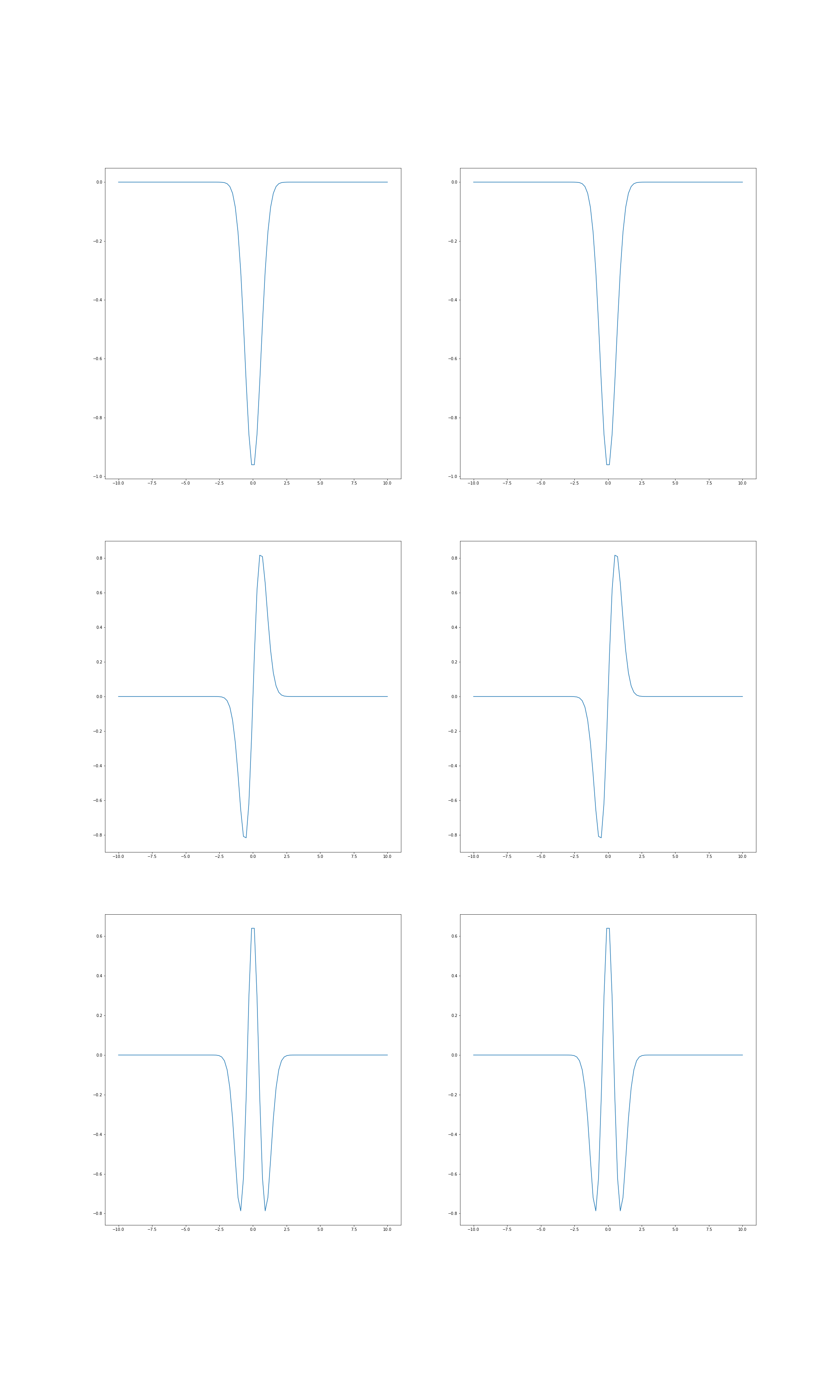
The Schmidt functions can be plotted:
>>> xarray = np.linspace(-10., 10., 100)

    plt.subplot(3, 2, 1)
    plt.plot(xarray, modes[0].wavefunction1(xarray))
    plt.subplot(3, 2, 2)
    plt.plot(xarray, modes[0].wavefunction2(xarray))

    plt.subplot(3, 2, 3)
    plt.plot(xarray, modes[1].wavefunction1(xarray))
    plt.subplot(3, 2, 4)
    plt.plot(xarray, modes[1].wavefunction2(xarray))

    plt.subplot(3, 2, 5)
    plt.plot(xarray, modes[2].wavefunction1(xarray))
    plt.subplot(3, 2, 6)
    plt.plot(xarray, modes[2].wavefunction2(xarray))
Useful Links
- Study of Entanglement in Quantum Computers: https://datawarrior.wordpress.com/2017/09/20/a-first-glimpse-of-rigettis-quantum-computing-cloud/
- Github page: https://github.com/stephenhky/pyqentangle
- PyPI page: https://pypi.python.org/pypi/pyqentangle/
- Documentation: http://pyqentangle.readthedocs.io/
- RQEntangle: https://CRAN.R-project.org/package=RQEntangle (corresponding R library)
Reference
- Artur Ekert, Peter L. Knight, "Entangled quantum systems and the Schmidt decomposition", Am. J. Phys. 63, 415 (1995).
Acknowledgement
1 maintainer

Metadata
1 maintainer
Release files for pyqentangle 5.0.3
For a detailed explanation of source distributions (sdists) and built distributions (wheels), please see the package formats documentation.
Source distribution (sdist)
| File | Size | Uploaded | |
|---|---|---|---|
| pyqentangle-5.0.3.tar.gz | 23.5 kB | Details |
Built distribution (wheel)
| File | Interpreter | ABI | Platform | Reset |
|---|---|---|---|---|
| pyqentangle-5.0.3-py3-none-any.whl | Python 3 | none | any | Details |
Total release size: 46.0 kB
Release files / pyqentangle-5.0.3.tar.gz
| Download URL | pyqentangle-5.0.3.tar.gz |
|---|---|
| Size | 23.5 kB |
| Tags | Source |
|
SHA-256 checksum How to use checksums |
e789c3b97b7bc9c388a435c8d23c2ae3b1f2a5b91085f8dd7b74ee3421bcbe14
|
|
BLAKE2b-256 checksum How to use checksums |
0817406eefca782e966bc60a412c97897fd4292e54dc0442b0cdb1ddadbd8a7f
|
| Upload date | |
|
Uploaded using Trusted Publishing? What is trusted publishing? |
No |
| Uploaded via |
twine/7.0.0 CPython/3.13.14
|
Release files / pyqentangle-5.0.3-py3-none-any.whl
| Download URL | pyqentangle-5.0.3-py3-none-any.whl |
|---|---|
| Size | 22.4 kB |
| Tags | Python 3 |
|
SHA-256 checksum How to use checksums |
4199bcf21e4512de9512e2127d8731304f1594f5719f8dbd2bfac4cbca4b885d
|
|
BLAKE2b-256 checksum How to use checksums |
924357865405de4eb8787d3cc0dbdf04a5dea56bdbe3a94422551ef4f9e6b1fa
|
| Upload date | |
|
Uploaded using Trusted Publishing? What is trusted publishing? |
No |
| Uploaded via |
twine/7.0.0 CPython/3.13.14
|














