
PyQt Toast


A fully customizable and modern toast notification library for PyQt and PySide
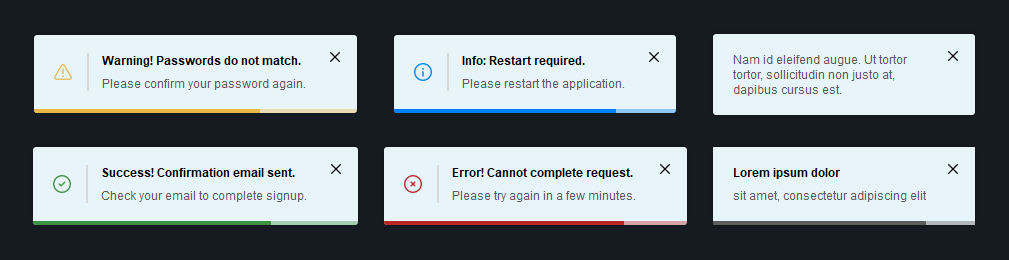
Features
- Supports showing multiple toasts at the same time
- Supports queueing of toasts
- Supports 7 different positions
- Supports multiple screens
- Supports positioning relative to widgets
- Modern and fully customizable UI
- Works with
PyQt5,PyQt6,PySide2, andPySide6
Installation
pip install pyqt-toast-notification
Usage
Import the Toast class, instantiate it, and show the toast notification with the show() method:
from PyQt6.QtWidgets import QMainWindow, QPushButton
from pyqttoast import Toast, ToastPreset


class Window(QMainWindow):
    def __init__(self):
        super().__init__(parent=None)

        # Add button and connect click event
        self.button = QPushButton(self)
        self.button.setText('Show toast')
        self.button.clicked.connect(self.show_toast)

    # Shows a toast notification every time the button is clicked
    def show_toast(self):
        toast = Toast(self)
        toast.setDuration(5000)  # Hide after 5 seconds
        toast.setTitle('Success! Confirmation email sent.')
        toast.setText('Check your email to complete signup.')
        toast.applyPreset(ToastPreset.SUCCESS)  # Apply style preset
        toast.show()
IMPORTANT:
An instance ofToastcan only be shown once. If you want to show another one, even if the content is exactly the same, you have to create another instance.
Customization
- Setting the position of the toasts (static):
Toast.setPosition(ToastPosition.BOTTOM_MIDDLE) # Default: ToastPosition.BOTTOM_RIGHT
AVAILABLE POSITIONS:
BOTTOM_LEFT,BOTTOM_MIDDLE,BOTTOM_RIGHT,TOP_LEFT,TOP_MIDDLE,TOP_RIGHT,CENTER
- Setting whether the toasts should always be shown on the main screen (static):
Toast.setAlwaysOnMainScreen(True) # Default: False
- Positioning the toasts relative to a widget instead of a screen (static):
Toast.setPositionRelativeToWidget(some_widget) # Default: None
- Setting a limit on how many toasts can be shown at the same time (static):
Toast.setMaximumOnScreen(5) # Default: 3
If you try to show more toasts than the maximum amount on screen, they will get added to a queue and get shown as soon as one of the currently showing toasts is closed.
- Setting the vertical spacing between the toasts (static):
Toast.setSpacing(20) # Default: 10
- Setting the x and y offset of the toast position (static):
Toast.setOffset(30, 55) # Default: 20, 45
- Making the toast show forever until it is closed:
toast.setDuration(0) # Default: 5000
- Enabling or disabling the duration bar:
toast.setShowDurationBar(False) # Default: True
- Adding an icon:
toast.setIcon(ToastIcon.SUCCESS)  # Default: ToastIcon.INFORMATION
toast.setShowIcon(True)           # Default: False

# Or setting a custom icon:
toast.setIcon(QPixmap('path/to/your/icon.png'))

# If you want to show the icon without recoloring it, set the icon color to None:
toast.setIconColor(None)  # Default: #5C5C5C
AVAILABLE ICONS:
SUCCESS,WARNING,ERROR,INFORMATION,CLOSE
- Setting the icon size:
toast.setIconSize(QSize(14, 14)) # Default: QSize(18, 18)
- Enabling or disabling the icon separator:
toast.setShowIconSeparator(False) # Default: True
- Setting the close button alignment:
toast.setCloseButtonAlignment(ToastButtonAlignment.MIDDLE) # Default: ToastButtonAlignment.TOP
AVAILABLE ALIGNMENTS:
TOP,MIDDLE,BOTTOM
- Enabling or disabling the close button:
toast.setShowCloseButton(False) # Default: True
- Customizing the duration of the fade animations (milliseconds):
toast.setFadeInDuration(100)   # Default: 250
toast.setFadeOutDuration(150)  # Default: 250
- Enabling or disabling duration reset on hover:
toast.setResetDurationOnHover(False) # Default: True
- Making the corners rounded:
toast.setBorderRadius(3) # Default: 0
- Setting custom colors:
toast.setBackgroundColor(QColor('#292929'))       # Default: #E7F4F9
toast.setTitleColor(QColor('#FFFFFF'))            # Default: #000000
toast.setTextColor(QColor('#D0D0D0'))             # Default: #5C5C5C
toast.setDurationBarColor(QColor('#3E9141'))      # Default: #5C5C5C
toast.setIconColor(QColor('#3E9141'))             # Default: #5C5C5C
toast.setIconSeparatorColor(QColor('#585858'))    # Default: #D9D9D9
toast.setCloseButtonIconColor(QColor('#C9C9C9'))  # Default: #000000
- Setting custom fonts:
# Init font
font = QFont('Times', 10, QFont.Weight.Bold)

# Set fonts
toast.setTitleFont(font)  # Default: QFont('Arial', 9, QFont.Weight.Bold)
toast.setTextFont(font)   # Default: QFont('Arial', 9)
- Applying a style preset:
toast.applyPreset(ToastPreset.ERROR)
AVAILABLE PRESETS:
SUCCESS,WARNING,ERROR,INFORMATION,SUCCESS_DARK,WARNING_DARK,ERROR_DARK,INFORMATION_DARK
- Setting toast size constraints:
# Minimum and maximum size
toast.setMinimumWidth(100)
toast.setMaximumWidth(350)
toast.setMinimumHeight(50)
toast.setMaximumHeight(120)

# Fixed size (not recommended)
toast.setFixedSize(QSize(350, 80))
Other customization options:
| Option | Description | Default |
|---|---|---|
setFixedScreen() |
Fixed screen where the toasts will be shown (static) | None |
setMovePositionWithWidget() |
Whether the toasts should move with widget if positioned relative to a widget | True |
setIconSeparatorWidth() |
Width of the icon separator that separates the icon and text section | 2 |
setCloseButtonIcon() |
Icon of the close button | ToastIcon.CLOSE |
setCloseButtonIconSize() |
Size of the close button icon | QSize(10, 10) |
setCloseButtonSize() |
Size of the close button | QSize(24, 24) |
setStayOnTop() |
Whether the toast stays on top of other windows even when they are focused | True |
setTextSectionSpacing() |
Vertical spacing between the title and the text | 8 |
setMargins() |
Margins around the whole toast content | QMargins(20, 18, 10, 18) |
setIconMargins() |
Margins around the icon | QMargins(0, 0, 15, 0) |
setIconSectionMargins() |
Margins around the icon section (the area with the icon and the icon separator) | QMargins(0, 0, 15, 0) |
setTextSectionMargins() |
Margins around the text section (the area with the title and the text) | QMargins(0, 0, 15, 0) |
setCloseButtonMargins() |
Margins around the close button | QMargins(0, -8, 0, -8) |
Demo
https://github.com/niklashenning/pyqt-toast/assets/58544929/f4d7f4a4-6d69-4087-ae19-da54b6da499d
The demos for PyQt5, PyQt6, and PySide6 can be found in the demo folder.
Tests
Installing the required test dependencies PyQt6, pytest, and coveragepy:
pip install PyQt6 pytest coverage
To run the tests with coverage, clone this repository, go into the main directory and run:
coverage run -m pytest
coverage report --ignore-errors -m
License
This software is licensed under the MIT license.
1 maintainer

Metadata
1 maintainer
Release files for pyqt-toast-notification 1.3.3
For a detailed explanation of source distributions (sdists) and built distributions (wheels), please see the package formats documentation.
Source distribution (sdist)
| File | Size | Uploaded | |
|---|---|---|---|
| pyqt-toast-notification-1.3.3.tar.gz | 40.6 kB | Details |
Built distribution (wheel)
| File | Interpreter | ABI | Platform | Reset |
|---|---|---|---|---|
| pyqt_toast_notification-1.3.3-py3-none-any.whl | Python 3 | none | any | Details |
Total release size: 81.9 kB
Release files / pyqt-toast-notification-1.3.3.tar.gz
| Download URL | pyqt-toast-notification-1.3.3.tar.gz |
|---|---|
| Size | 40.6 kB |
| Tags | Source |
|
SHA-256 checksum How to use checksums |
595dbf4b9edee77329e2514255d9a9415ff5d70708c50790db0fee207d323a29
|
|
BLAKE2b-256 checksum How to use checksums |
96312953091ccc0432c6b238f01031f845f35ffe65e0f0dbb77ceda5a31978dc
|
| Upload date | |
|
Uploaded using Trusted Publishing? What is trusted publishing? |
No |
| Uploaded via |
twine/5.0.0 CPython/3.11.3
|
Release files / pyqt_toast_notification-1.3.3-py3-none-any.whl
| Download URL | pyqt_toast_notification-1.3.3-py3-none-any.whl |
|---|---|
| Size | 41.3 kB |
| Tags | Python 3 |
|
SHA-256 checksum How to use checksums |
65ba011f536aa728f0b3ad3a452ab2b578a17f6e0e3468d6f1dc97f5b1cd4d15
|
|
BLAKE2b-256 checksum How to use checksums |
843a7614af8234f36a38476ae62599ba666b2bda66a71605323a4dbadcf94776
|
| Upload date | |
|
Uploaded using Trusted Publishing? What is trusted publishing? |
No |
| Uploaded via |
twine/5.0.0 CPython/3.11.3
|














