
PyQt CountUp




A simple numerical data animation library for PyQt and PySide labels inspired by countUp.js
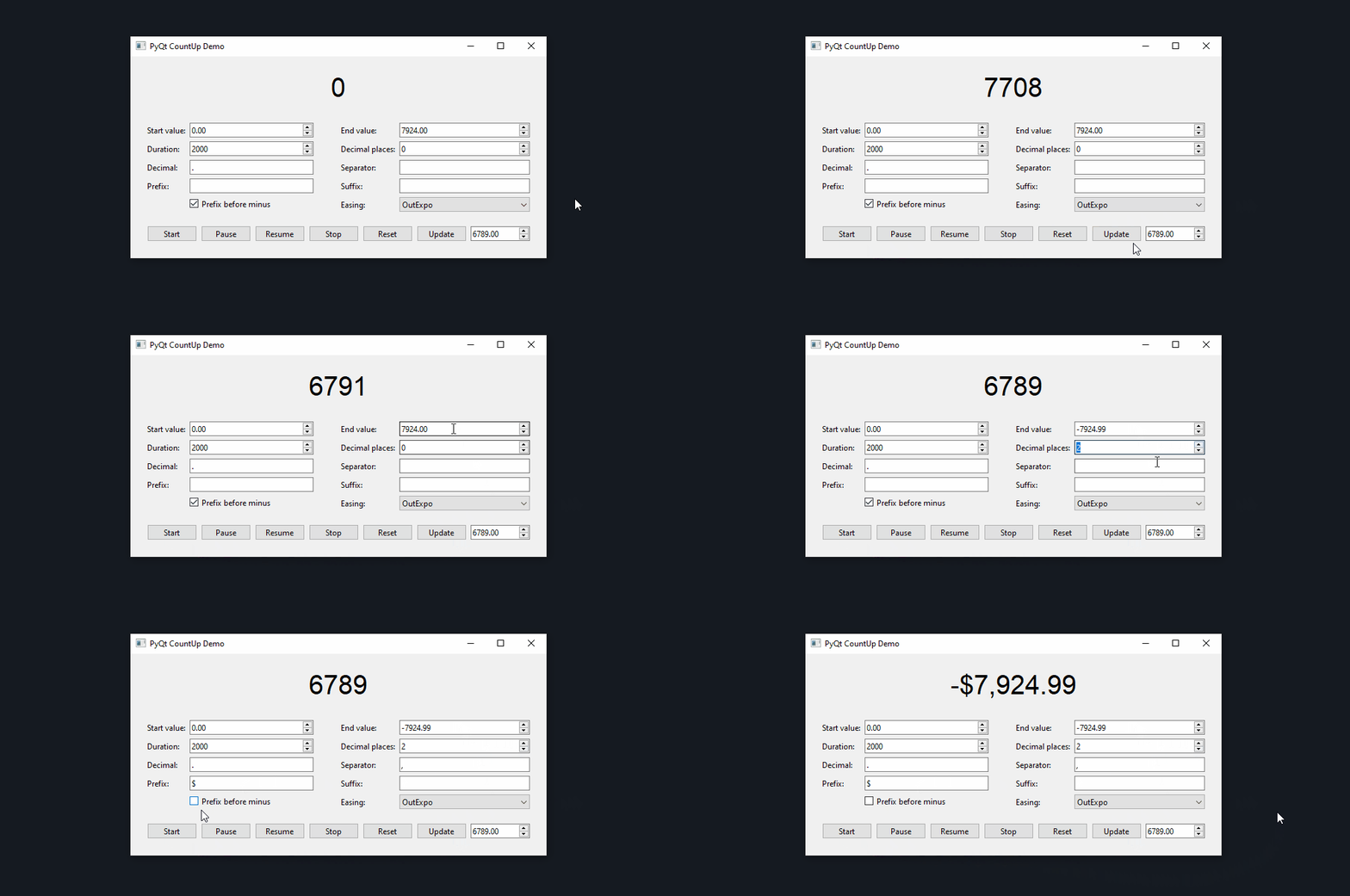
Features
- Customizable decimal places
- Customizable decimal separator and thousands separator
- Customizable prefix and suffix
- Supports 41 different easing curves
- Works with
PyQt5,PyQt6,PySide2, andPySide6
Installation
pip install pyqtcountup
Usage
Import the CountUp class, instantiate it with a label, and start the animation by calling the start() method:
from PyQt6.QtWidgets import QMainWindow, QLabel
from pyqtcountup import CountUp


class Window(QMainWindow):
    def __init__(self):
        super().__init__(parent=None)

        # Create label to show the animation on
        countup_label = QLabel(self)

        # Init and start animation with duration of 2.5 seconds
        countup = CountUp(countup_label)
        countup.setStartValue(1000)
        countup.setEndValue(7241)
        countup.setDuration(2500)
        countup.start()
Use the update() method to update the end value of a running animation (can also be used if the animation is already finished):
# Start animation with 2500 as end value
countup.setEndValue(2500)
countup.start()

# Update end value of the animation to be 1500
countup.update(1500)
To pause and resume an animation, use the pause() and resume() methods:
# Temporarily stop the animation with the option to resume it
countup.pause()

# Resume the animation at the point where it was stopped
countup.resume()
NOTE:
Only paused animations can be resumed, so callingresume()after using thestop()method will not work.
If you want to stop an animation completely, you can use the stop() method:
countup.stop()
If you want to stop the animation and also reset the label to the start value, you can use the reset() method:
countup.reset()
To check if the animation is currently running or paused, use the isRunning() and isPaused() methods:
# True if the animation is currently running, otherwise False
is_running = countup.isRunning()

# True if the animation is currently paused and can be resumed, otherwise False
is_paused = countup.isPaused()
Customization
- Setting the start and end values of the animation:
countup.setStartValue(-1000)
countup.setEndValue(2500)

# Alternatively
countup.setStartEndValues(-1000, 2500)
- Setting the duration of the animation:
countup.setDuration(2500) # 2500 milliseconds = 2.5 seconds
- Customizing the formatting of the number:
countup.setDecimalPlaces(2)  # Default: 0
countup.setDecimal(',')      # Default: '.'
countup.setSeparator('.')    # Default: ''
EXAMPLE:
The value1052formatted with two decimal places,,as the decimal, and.as the separator would be1.052,00
- Adding a prefix and a suffix:
countup.setPrefix('~')   # Default: ''
countup.setSuffix('€')  # Default: ''
EXAMPLE:
The value100formatted with~as the prefix and€as the suffix would be shown as~100€
- Making the prefix show between the minus and the number for negative values:
countup.setPrefixBeforeMinus(False) # Default: True
EXAMPLE:
The value100formatted with$as the prefix andsetPrefixBeforeMinus(False)would be shown as-$100instead of$-100
- Customizing the easing of the animation:
countup.setEasing(QEasingCurve.Type.OutCubic)  # Default: QEasingCurve.Type.OutExpo

# Using no easing (same as QEasingCurve.Type.Linear)
countup.setEasing(None)
AVAILABLE EASING CURVES:
Linear,InQuad,OutQuad,InOutQuad,OutInQuad,InCubic,OutCubic,InOutCubic,OutInCubic,InQuart,OutQuart,InOutQuart,OutInQuart,InQuint,OutQuint,InOutQuint,OutInQuint,InSine,OutSine,InOutSine,OutInSine,InExpo,OutExpo,InOutExpo,OutInExpo,InCirc,OutCirc,InOutCirc,OutInCirc,InElastic,OutElastic,InOutElastic,OutInElastic,InBack,OutBack,InOutBack,OutInBack,InBounce,OutBounce,InOutBounce,OutInBounce
You can find visualizations of these easing curves in the PyQt documentation.
Examples for PyQt5, PyQt6, and PySide6 can be found in the demo folder.
Tests
Installing the required test dependencies PyQt6, pytest, and coveragepy:
pip install PyQt6 pytest coverage
To run the tests with coverage, clone this repository, go into the main directory and run:
coverage run -m pytest
coverage report --ignore-errors -m
License
This software is licensed under the MIT license.
1 maintainer

Release files for pyqtcountup 1.0.0
For a detailed explanation of source distributions (sdists) and built distributions (wheels), please see the package formats documentation.
Source distribution (sdist)
| File | Size | Uploaded | |
|---|---|---|---|
| pyqtcountup-1.0.0.tar.gz | 8.6 kB | Details |
Built distribution (wheel)
| File | Interpreter | ABI | Platform | Reset |
|---|---|---|---|---|
| pyqtcountup-1.0.0-py3-none-any.whl | Python 3 | none | any | Details |
Total release size:15.8 kB
Release files / pyqtcountup-1.0.0.tar.gz
| Download URL | pyqtcountup-1.0.0.tar.gz |
|---|---|
| Size | 8.6 kB |
| Tags | Source |
|
SHA-256 checksum How to use checksums |
bf00cd8ad8e8c050a2f2c106bd2ee170167f48627658a6e6d6f901bf70c3ebf3
|
|
BLAKE2b-256 checksum How to use checksums |
b93dfa88e21085b96292da6fef86309b8382d4acc5924a69e7d064ed60e54a8b
|
| Upload date | |
|
Uploaded using Trusted Publishing? What is trusted publishing? |
No |
| Uploaded via |
twine/5.0.0 CPython/3.11.3
|
Release files / pyqtcountup-1.0.0-py3-none-any.whl
| Download URL | pyqtcountup-1.0.0-py3-none-any.whl |
|---|---|
| Size | 7.2 kB |
| Tags | Python 3 |
|
SHA-256 checksum How to use checksums |
c442f817680774beb65553d55c760ba393e59e16e165a7d95fbf641b2ba06c8e
|
|
BLAKE2b-256 checksum How to use checksums |
b722d4fbf58c6e4e25e79dba90d4ef0eda448374384334135006bb76205cd479
|
| Upload date | |
|
Uploaded using Trusted Publishing? What is trusted publishing? |
No |
| Uploaded via |
twine/5.0.0 CPython/3.11.3
|













