
## New Release of Version 0.2
After 2 years of getting dusty pySmithPlot now got some new features and bug fixes. Here is a short changelog:
Support for Python 3
improved grid generation algorithm
plot() now also handles also single numbers and purely real data
plot() can now interpolate lines between points or generate an equidistant spacing
changed handling of input data and renormalization; now the actual datatype (S,Z,Y-Parameter) can be specified when calling plot()
changed behaviour for normalization and placement of the label
added some parameter checks
removed default matplotlib settings
renamed some parameters to improve consistency
fixed issues with Unicode symbols
fixed issues with grid generation
fixed issues with axis label display and placement
There are still some plans for the future and they hopefully don’t take another two years:
[ ] support for Admittance Charts
[ ] support for contour() plots
[ ] zoom and ‘cut out’ function
[ ] special handling of other matplotlib.patch objects like arrows
[ ] …
## Features
pySmithPlot is a matplotlib extension providing a projection class for creating high quality Smith Charts with Python. The generated plots blend seamless into matplotlib’s style and support almost the full range of customization options.
This Library allows the fully automatic generation of Smith Charts with various customizable parameters and well selected default values. It also provides the following modifications and extensions:
circle shaped drawing area with labels placed around
plot() accepts real and complex numbers as well as numpy.ndarray’s
lines can be automatically interpolated to improve the optical appearance
data ranges can be interpolated to an equidistant spacing
start/end markers of lines can be modified and rotate tangential
gridlines are 3-point arcs to improve space efficiency of exported plots
‘fancy’ option for adaptive grid generation
own tick locators for nice axis labels
For making a Smith Chart plot, it is sufficient to import smithplot and create a new subplot with projection set to ‘smith’. (Requires matplotlib version 1.2)
A short example can be found in the testbenches directory and started with:
python3 smith_short_test.py
For more details and documentation, take a look into smithplot/smithaxes.py.
testbenches/smith_full_test.py runs various testbenches and gives a comparison for almost all parameters. These are the generated sample plots:
 [Grid Styles - PDF](https://github.com/vMeijin/pySmithPlot/wiki/images/examples/sample_grid_styles.pdf)
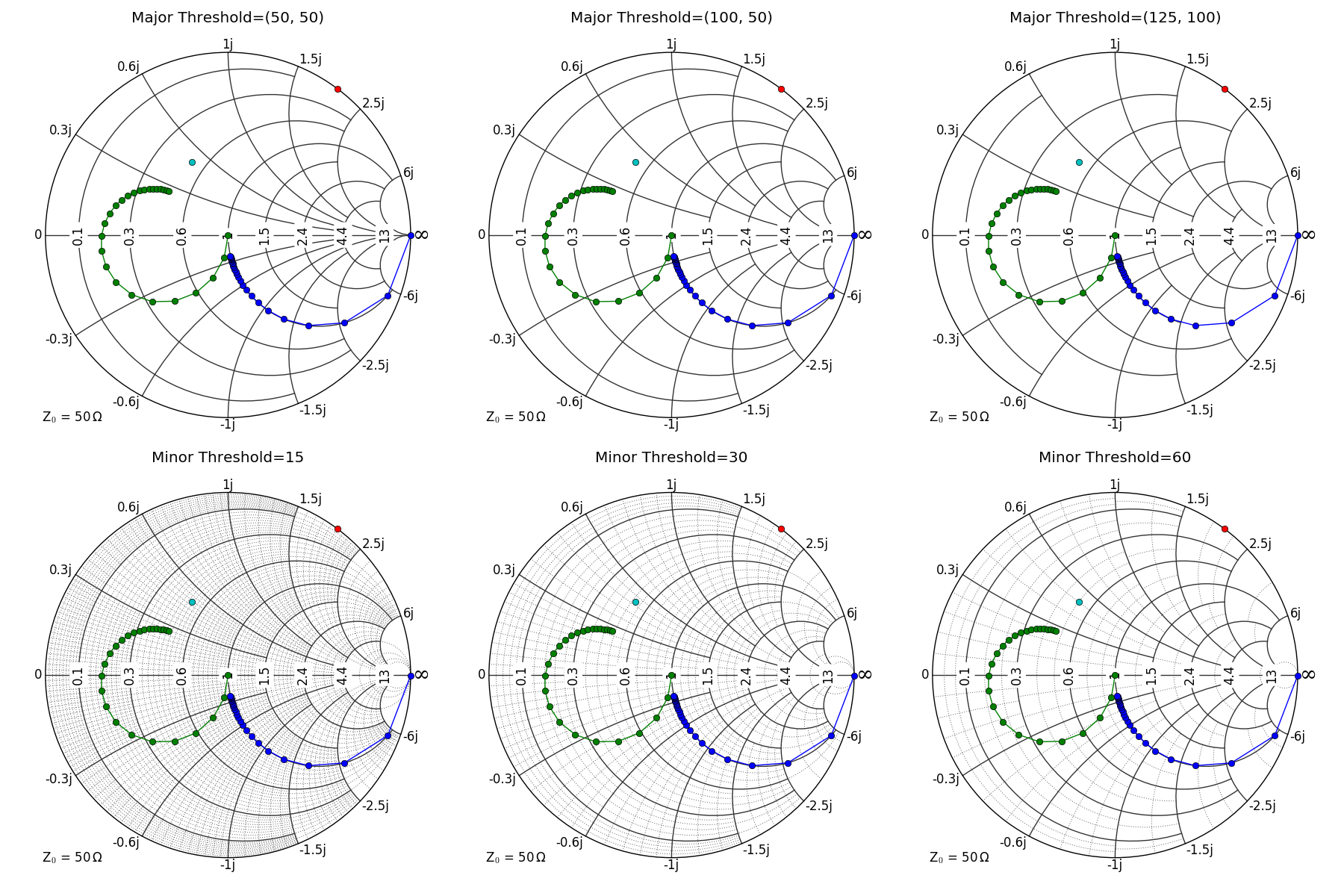 [Fancy Threshold - PDF](https://github.com/vMeijin/pySmithPlot/wiki/images/examples/sample_fancy_grid.pdf)
 [Grid Locators - PDF](https://github.com/vMeijin/pySmithPlot/wiki/images/examples/sample_grid_locators.pdf)
 [Marker Modification - PDF](https://github.com/vMeijin/pySmithPlot/wiki/images/examples/sample_markers.pdf)
 [Interpolation - PDF](https://github.com/vMeijin/pySmithPlot/wiki/images/examples/sample_interpolation.pdf)
 [Normalize - PDF](https://github.com/vMeijin/pySmithPlot/wiki/images/examples/sample_normalize.pdf)
 [Miscellaneous - PDF](https://github.com/vMeijin/pySmithPlot/wiki/images/examples/sample_miscellaneous.pdf)
1 maintainer

Metadata
1 maintainer
Release files for pysmithplot-fork 0.2.1
For a detailed explanation of source distributions (sdists) and built distributions (wheels), please see the package formats documentation.
Source distribution (sdist)
| File | Size | Uploaded | Provenance | |
|---|---|---|---|---|
| pysmithplot_fork-0.2.1.tar.gz | 17.4 kB | Without provenance | Details |
Built distribution (wheel)
| File | Interpreter | ABI | Platform | Reset |
|---|---|---|---|---|
| pysmithplot_fork-0.2.1-py3-none-any.whl | Python 3 | none | any | Details |
Total release size: 35.7 kB
Release files / pysmithplot_fork-0.2.1.tar.gz
| Download URL | pysmithplot_fork-0.2.1.tar.gz |
|---|---|
| Size | 17.4 kB |
| Tags | Source |
|
SHA-256 checksum How to use checksums |
4a11146f53f825d2b5859379fad3fac02b0242b7aef1dcb7d284c3366e851bd6
|
|
BLAKE2b-256 checksum How to use checksums |
9a954e09c1d90da71a5a3045f64f4ba690faa6cf96e2acd7ef7c3c4fd7b86d35
|
| Upload date | |
|
Uploaded using Trusted Publishing? What is trusted publishing? |
No |
| Uploaded via |
twine/4.0.2 CPython/3.11.2
|
Release files / pysmithplot_fork-0.2.1-py3-none-any.whl
| Download URL | pysmithplot_fork-0.2.1-py3-none-any.whl |
|---|---|
| Size | 18.2 kB |
| Tags | Python 3 |
|
SHA-256 checksum How to use checksums |
ee948886eab976c680e48e5b0cf61dfd46af3027c8ae1245c2e0182bde8c42a9
|
|
BLAKE2b-256 checksum How to use checksums |
8579ef0ccf4efe4ee5869fa0dd437a22e895d0de6a74483e42b41dd5c92ff3c6
|
| Upload date | |
|
Uploaded using Trusted Publishing? What is trusted publishing? |
No |
| Uploaded via |
twine/4.0.2 CPython/3.11.2
|
Security for pysmithplot-fork 0.2.1
Provenance
Provenance describes where a file came from. On PyPI, provenance is shared via attestations, which provide a verifiable record of the build or publishing details. View details, limitations and caveats.
No provenance found
None of the files in this release were uploaded with provenance metadata.
A note on package security
PyPI is a repository for distributing packages, not a service for auditing them. While third-party security researchers and our staff do their best to detect and remove malicious packages, PyPI cannot guarantee the quality, security or suitability of any given package.
To learn more about protecting yourself from malicious actors, visit our package security documentation.



















