
pyspread



pyspread is a non-traditional spreadsheet that is based on and written in the programming language Python.
It is released under the GPL v3. LICENSE
- Homepage: https://pyspread.gitlab.io/
- Repository: https://gitlab.com/pyspread/pyspread
- API Docs: https://pyspread.gitlab.io/pyspread/
Installation
It is recommended to install pyspread as a package that is provided for your operating system. The table below shows for which operating systems, pyspread is available in which version.
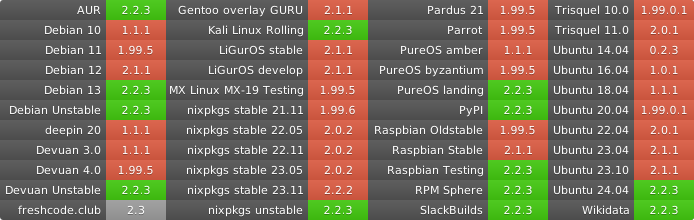
If pyspread is unavailable or outdated for your operating system, you can install it using one of the three methods below.
When using pip, a Python virtual environment (venv) is recommended. Some operating systems may nudge your towards this. pipx could be a solution if venv is no option for you.
Furthermore, note that the QtSvg extensions for PyQT are required. For some operating systems, they are packaged separately from PyQt. Please make sure QtSvg is installed on your system before using pip.
With pip
pip install pyspread
From git
It is assumed that python3 and git are installed.
Get sources and enter dir
git clone https://gitlab.com/pyspread/pyspread.git
# or
git clone git@gitlab.com:pyspread/pyspread.git
# then
cd pyspread
Install dependencies and pyspread
pip3 install -r requirements.txt
# or if pip3 is not present
pip install -r requirements.txt
# next
python3 setup.py install
Getting the bleeding edge version from the code repository
Note that there may unfixed bugs if you use the latest repository version.
You may want to check the CI, which comprises unit tests at
https://gitlab.com/pyspread/pyspread/pipelines.
Get the latest tarball or zip at https://gitlab.com/pyspread/pyspread or
clone the git repo at https://gitlab.com/pyspread/pyspread.git
Starting pyspread
With an installation via pip, distutils or your OS's installer, simply run
$ pyspread
from any directory.
In order to start pyspread without installation directly from the cloned repository or the extracted tarball or zip, run
$ ./pyspread/pyspread.py
or
$ python -m pyspread
inside the top directory.
Contact
For user questions or user feedback please use the delta chat channel pyspread-users.
Contribute
Issues
For contributions, patches, development discussions and ideas please create an issue using the pyspread issue tracker on gitlab.
Code
Commit your changes, push them into your fork and send a merge request. The fork documentation page gives an overview how to do this in gitlab.
You can find more more details about code organization here
2 maintainers


Metadata
2 maintainers
Release files for pyspread 2.5
For a detailed explanation of source distributions (sdists) and built distributions (wheels), please see the package formats documentation.
Source distribution (sdist)
| File | Size | Uploaded | Provenance | |
|---|---|---|---|---|
| pyspread-2.5.tar.gz | 2.4 MB | Without provenance | Details |
Built distribution (wheel)
| File | Interpreter | ABI | Platform | Reset |
|---|---|---|---|---|
| pyspread-2.5-py3-none-any.whl | Python 3 | none | any | Details |
Total release size: 4.1 MB
Release files / pyspread-2.5.tar.gz
| Download URL | pyspread-2.5.tar.gz |
|---|---|
| Size | 2.4 MB |
| Tags | Source |
|
SHA-256 checksum How to use checksums |
772999a3a5e26f56273a76366bbc63f489fe88b0cae12f266d7c7760be6680ce
|
|
BLAKE2b-256 checksum How to use checksums |
a1503c54979f56abc4c67f975d0849df4a947b7bd200dd6a0221b3b0a403414c
|
| Upload date | |
|
Uploaded using Trusted Publishing? What is trusted publishing? |
No |
| Uploaded via |
twine/6.1.0 CPython/3.13.5
|
Release files / pyspread-2.5-py3-none-any.whl
| Download URL | pyspread-2.5-py3-none-any.whl |
|---|---|
| Size | 1.7 MB |
| Tags | Python 3 |
|
SHA-256 checksum How to use checksums |
3c2ff048a28be9337da34906e47e43facb4152a0feed7de48728dfd8a00c7c19
|
|
BLAKE2b-256 checksum How to use checksums |
122a7de1d7237833824f70e0289e9173ce2ca7fe28f7307a6125cdc2a4cba7b8
|
| Upload date | |
|
Uploaded using Trusted Publishing? What is trusted publishing? |
No |
| Uploaded via |
twine/6.1.0 CPython/3.13.5
|
Security for pyspread 2.5
Provenance
Provenance describes where a file came from. On PyPI, provenance is shared via attestations, which provide a verifiable record of the build or publishing details. View details, limitations and caveats.
No provenance found
None of the files in this release were uploaded with provenance metadata.
A note on package security
PyPI is a repository for distributing packages, not a service for auditing them. While third-party security researchers and our staff do their best to detect and remove malicious packages, PyPI cannot guarantee the quality, security or suitability of any given package.
To learn more about protecting yourself from malicious actors, visit our package security documentation.














