
A pytest plugin to record HTTP(S) requests with stack trace.
Verified details
These details have been verified by PyPIProject links
GitHub Statistics
Maintainers

Project description
pytest-httpdbg
A pytest plugin for recording HTTP(S) requests and saving them in your test report.
installation
pip install pytest-httpdbg
Allure report
If you use the allure-pytest plugin to generate an Allure report, you can use pytest-httpdbg to include HTTP request traces in your test report without any code modifications.
All you need to do is add the --httpdbg-allure option to your pytest command line:
pytest ../httpdbg-docs/examples/ --alluredir=./allure-results --httpdbg-allure
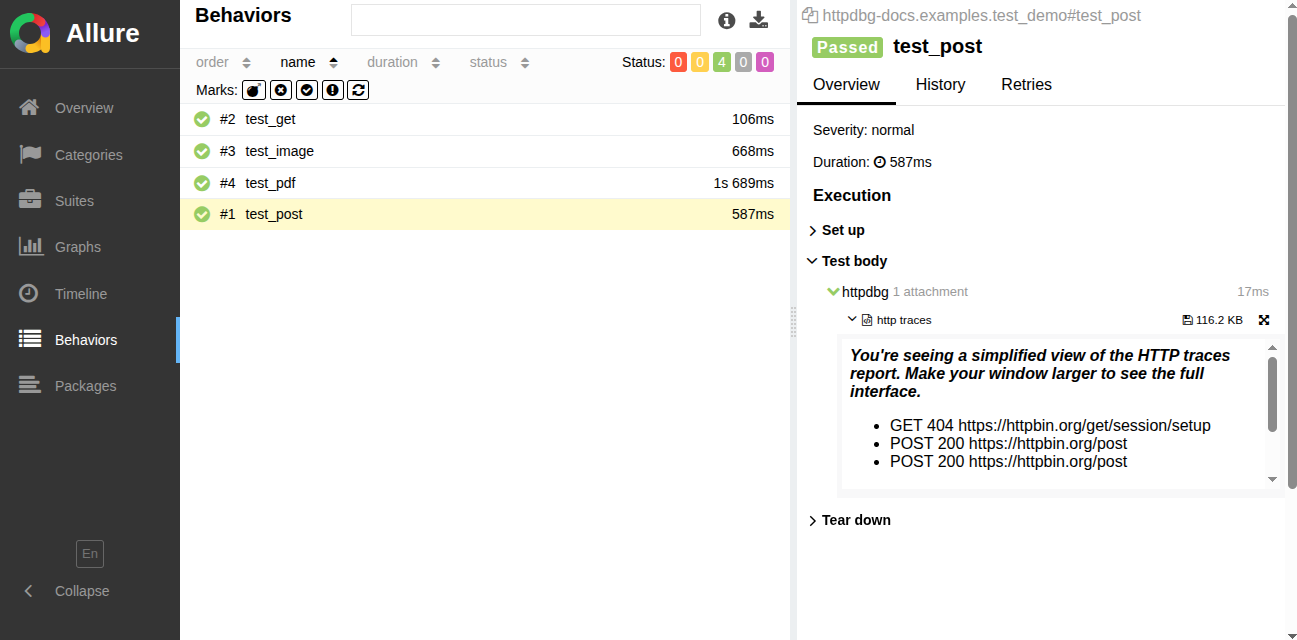
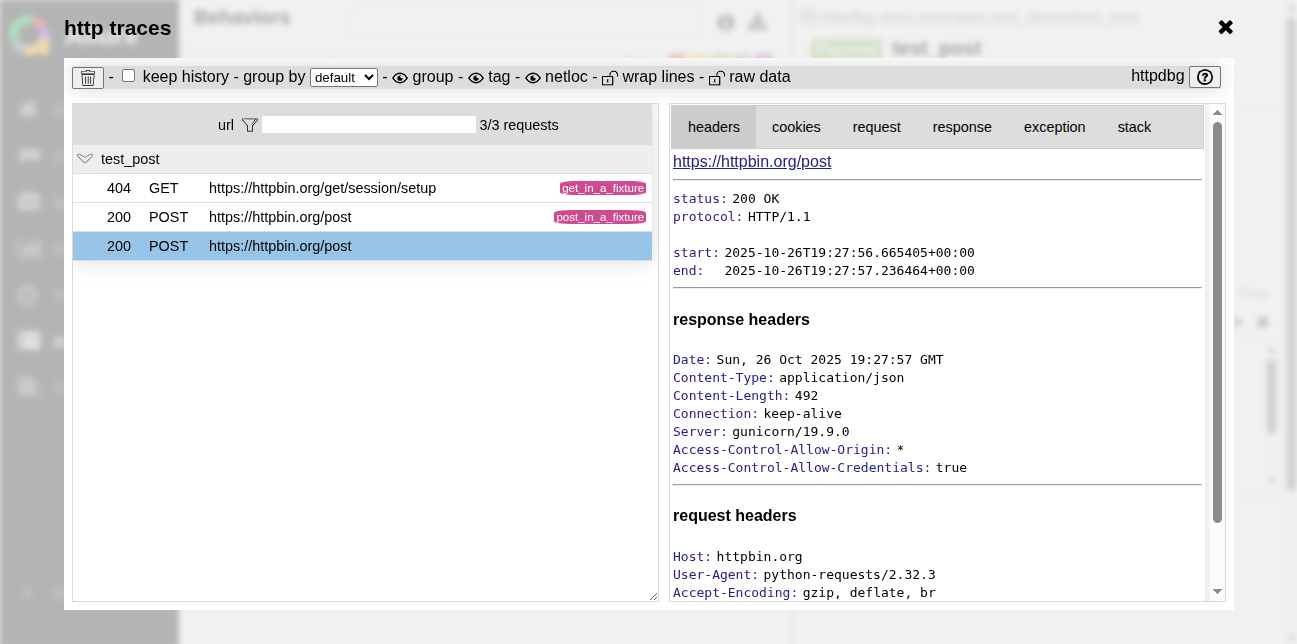
If an HTTP request is made by the test (or within a fixture, during the setup or teardown phase), a HTTP traces report will be saved in the Allure report under a step called httpdbg.
compact mode
full mode
Custom test report
You can add HTTP traces to any test report of your choice. To do this, you can use the HTTP traces saved by the plugin in Markdown format.
When a test finishes (including the teardown step), a log file in Markdown format is generated. The path to this log file is stored in the test item when the test starts (before the setup step), even if the file does not yet exist.
pytest-html
You can copy the following code in your top-level conftest.py to include the logs into your pytest-html report.
import os

import pytest

from pytest_httpdbg import httpdbg_record_filename


@pytest.hookimpl(hookwrapper=True)
def pytest_runtest_makereport(item, call):
    pytest_html = item.config.pluginmanager.getplugin("html")
    outcome = yield
    report = outcome.get_result()
    extras = getattr(report, "extras", [])

    if call.when == "call":
        if httpdbg_record_filename in item.stash:
            extras.append(
                pytest_html.extras.url(
                    os.path.basename(item.stash[httpdbg_record_filename]),
                    name="HTTPDBG",
                )
            )
            report.extras = extras
This example works if you use the same directory for the html test report file and the httpdbg logs.
pytest demo/ --httpdbg --httpdbg-dir report --html=report/report.html
If this is not the case, you must adapt it to your configuration.
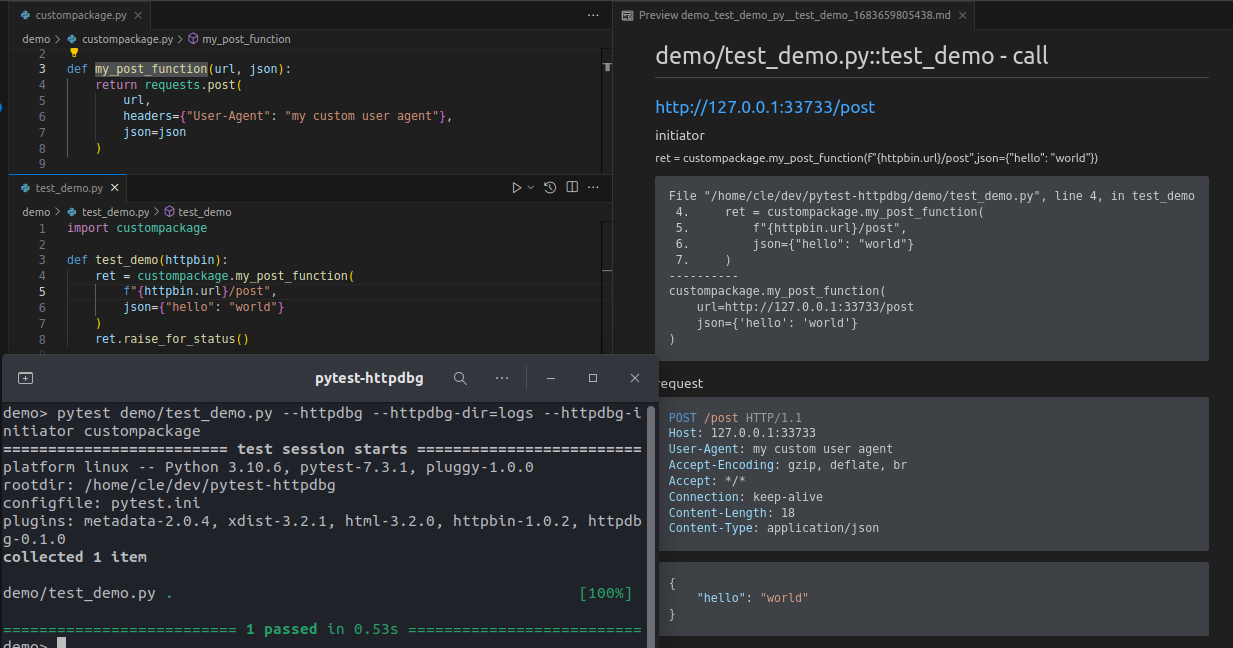
pytest command line options
reporting:

  --httpdbg                                 record HTTP(S) requests
  --httpdbg-dir=HTTPDBG_DIR                 save httpdbg traces in a directory
  --httpdbg-no-clean                        do not clean the httpdbg directory

  --httpdbg-allure                          save HTTP(S) traces into the allure report
  --httpdbg-only-on-failure                 save the HTTP requests only if the test failed

  --httpdbg-initiator=HTTPDBG_INITIATOR     add a new initiator (package) for httpdbg
httpdbg
This plugin is based on the httpdbg Python tool. You can use it to trace all HTTP requests in your tests and view them in a more detailed user interface using the pyhttpdbg command.
pyhttpdbg -m pytest -v examples/
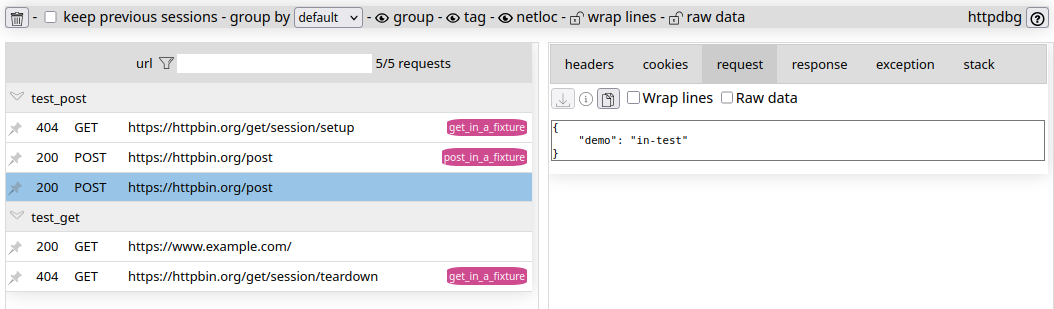
documentation
https://httpdbg.readthedocs.io/en/latest/test/#pytest-httpdbg
Project details
Verified details
These details have been verified by PyPIProject links
GitHub Statistics
Maintainers
Release history Release notifications | RSS feed


Download files
Download the file for your platform. If you're not sure which to choose, learn more about installing packages.
Source Distribution
Built Distribution
Filter files by name, interpreter, ABI, and platform.
If you're not sure about the file name format, learn more about wheel file names.
Copy a direct link to the current filters
File details
Details for the file pytest_httpdbg-0.10.2.tar.gz.
File metadata
- Download URL: pytest_httpdbg-0.10.2.tar.gz
- Upload date:
- Size: 10.0 kB
- Tags: Source
- Uploaded using Trusted Publishing? Yes
- Uploaded via: twine/6.1.0 CPython/3.13.7
File hashes
| Algorithm | Hash digest | |
|---|---|---|
| SHA256 |
b3662f4265a4b044865da9602a953534793dc0c39a7397aa36b586d5c5673dc3
|
|
| MD5 |
29db845ec303b2626d74b5155eb295b1
|
|
| BLAKE2b-256 |
382dc04d11b72bd1f23f23320400c2551a832063b8008dadd25247662ed46f7f
|
Provenance
The following attestation bundles were made for pytest_httpdbg-0.10.2.tar.gz:
Publisher:
build.yml on cle-b/pytest-httpdbg
-
Statement:
-
Statement type:
https://in-toto.io/Statement/v1 -
Predicate type:
https://docs.pypi.org/attestations/publish/v1 -
Subject name:
pytest_httpdbg-0.10.2.tar.gz -
Subject digest:
b3662f4265a4b044865da9602a953534793dc0c39a7397aa36b586d5c5673dc3 - Sigstore transparency entry: 1192019120
- Sigstore integration time:
-
Permalink:
cle-b/pytest-httpdbg@c8d54caf56d690c9c7caed29c75788d5f97a3ab7 -
Branch / Tag:
refs/tags/v0.10.2 - Owner: https://github.com/cle-b
-
Access:
public
-
Token Issuer:
https://token.actions.githubusercontent.com -
Runner Environment:
github-hosted -
Publication workflow:
build.yml@c8d54caf56d690c9c7caed29c75788d5f97a3ab7 -
Trigger Event:
push
-
Statement type:
File details
Details for the file pytest_httpdbg-0.10.2-py3-none-any.whl.
File metadata
- Download URL: pytest_httpdbg-0.10.2-py3-none-any.whl
- Upload date:
- Size: 9.4 kB
- Tags: Python 3
- Uploaded using Trusted Publishing? Yes
- Uploaded via: twine/6.1.0 CPython/3.13.7
File hashes
| Algorithm | Hash digest | |
|---|---|---|
| SHA256 |
93f33b6a0c0c4ab9b6f4cd5fbb4390b84970bedcfe76a730813d56aa1354c63e
|
|
| MD5 |
2cfcd805b83c9e0cd4790f9cda9ecaf3
|
|
| BLAKE2b-256 |
0f9a31c6b2626ea24a5fca855eeb70dc05e794e63b49e415ace2aa6a24b0f857
|
Provenance
The following attestation bundles were made for pytest_httpdbg-0.10.2-py3-none-any.whl:
Publisher:
build.yml on cle-b/pytest-httpdbg
-
Statement:
-
Statement type:
https://in-toto.io/Statement/v1 -
Predicate type:
https://docs.pypi.org/attestations/publish/v1 -
Subject name:
pytest_httpdbg-0.10.2-py3-none-any.whl -
Subject digest:
93f33b6a0c0c4ab9b6f4cd5fbb4390b84970bedcfe76a730813d56aa1354c63e - Sigstore transparency entry: 1192019126
- Sigstore integration time:
-
Permalink:
cle-b/pytest-httpdbg@c8d54caf56d690c9c7caed29c75788d5f97a3ab7 -
Branch / Tag:
refs/tags/v0.10.2 - Owner: https://github.com/cle-b
-
Access:
public
-
Token Issuer:
https://token.actions.githubusercontent.com -
Runner Environment:
github-hosted -
Publication workflow:
build.yml@c8d54caf56d690c9c7caed29c75788d5f97a3ab7 -
Trigger Event:
push
-
Statement type:






