
Team Formation Python Library
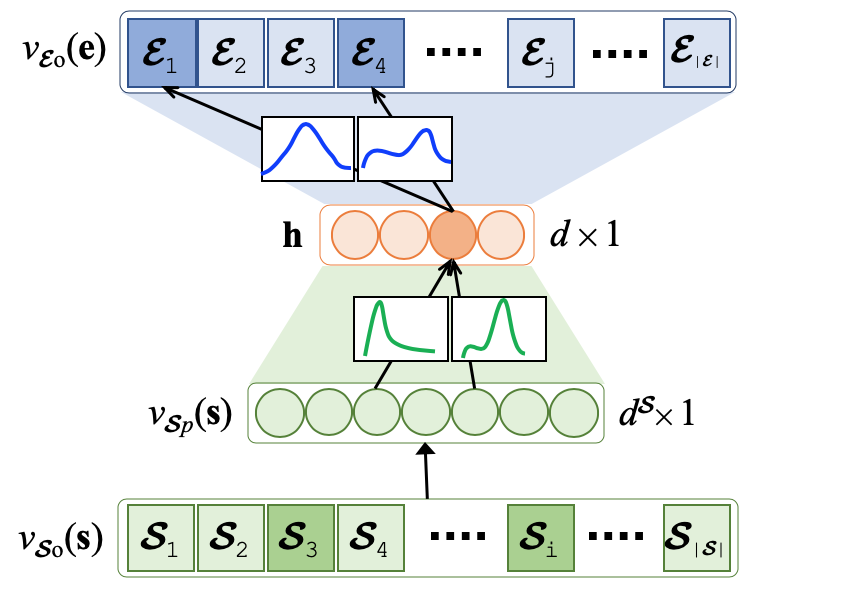
The Team Formation PyPI Tensorflow Python Library focuses on the composition of teams of experts that collectively cover a set of required skills based on their historical collaboration network and expertise. Prior works are primarily based on the shortest path between experts on the expert collaboration network,and suffer from three major shortcomings: (1) they are computationally expensive due to the complexity of finding paths on large network structures; (2) they use a small portion of the entire historical collaboration network to reduce the search space; hence, may form sub-optimal teams; (3) they fall short in sparse networks where the majority of the experts have only participated in a few teams in the past. Instead of forming a large network of experts, we propose to learn relationships among experts and skills through a variational Bayes neural architecture wherein:
- we consider all past team compositions as training instances to predict future teams;
- we bring scalability for large networks of experts due to the neural architecture;
- we address sparsity by incorporating uncertainty on the neural network’s parameters which yields a richer representation and more accurate team composition.
The PyPI python library implements the above-mentioned functionality by pipe-lining its architecture into stages that use classes and functions to maintain a fluid data flow. The pipeline consists of 5 stages that are as follows: (1) team formation layer instantiation; (2) dictionaries/embeddings generation; (3) train/test dataset split; (4) VAE learning; and, (5) performance evaluation. We empirically demonstrate how our proposed model outperforms the state-of-the-art approaches in terms of effectiveness and efficiency based on a large DBLP dataset.
Getting Started
These instructions will get you the Team Formation PyPI library installed on your machine and you will be able to use its features in a python compiler.
Prerequisites
These are the python libraries you need to pre-install before using this package.
Python 3.6 (or higher)
Tensorflow 1.15.0 (GPU preferred)
Keras 2.0.0
gensim
NLTK 3.5
scikit-learn
sklearn
Dataset
We choose DBLP as the benchmark. However, you can use your own database in similar fashion to perform team formation.
Preprocessing
Before starting the project you would need to preprocess your dataset to create the author-skill and team-skill mappings.
Output files
Output directory stores following data inside:
- Model snapshots
- Predictions
- Evaluation results
At the end of running session of each model, user will be asked wether if he/she wants to save the model or not. In case of approval model weights and configs will be saved in output folder. They will be accesible for next use. Also, after running a model, predictions for the test set will be saved into the output folder for the futhur comparison. You can find final evaluation results for each model in ".csv" individualy. They will be stored in folder.
Evaluation
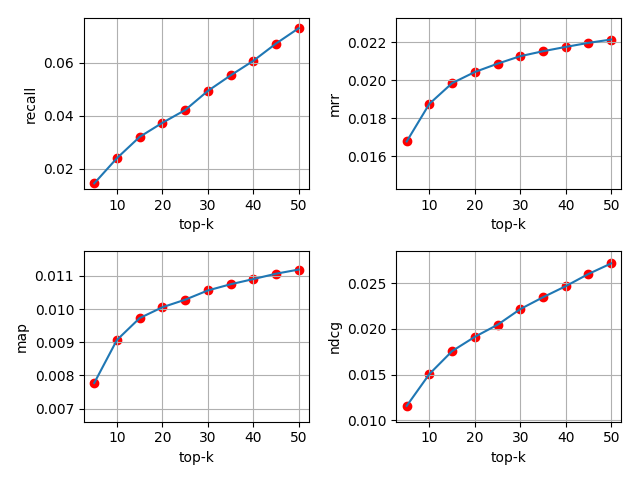
Evaluation of predicted files is done using the following metrics:
- Recall @k
- NDCG @k
- MAP @k
- MRR @k
The following diagram is a performance evaluation on the DBLP dataset.
End-to-end library dataflow
The following data flow can be tested and run using the script in example.py
    # Create an instance of the TeamFormationSession
TFL = TeamFormationSession(database_name, database_path, embeddings_save_path)
# 1 - Generate dictionaries and embedding files
TFL.generate_embeddings()
# 2 - Create vectors to associate ids, teams, and skills
TFL.generate_t2v_dataset()
# 3 - Split the dataset into train and test sets
TFL.train_test_split_data()
# 4 - Pass the data through the VAE
TFL.run_VAE()
# 5 - Evaluate the results and compute correlation with another model
TFL.evaluate_results("output/predictions/S_VAE_O_output.csv", "output/predictions/correlation_baseline_output.csv", 50,
                     True)
Contributing
This branch is submitted as a public library package on the PyPI API.
1 maintainer

Metadata
1 maintainer
Release files for pytfl 1.0.1
For a detailed explanation of source distributions (sdists) and built distributions (wheels), please see the package formats documentation.
Source distribution (sdist)
| File | Size | Uploaded | Provenance | |
|---|---|---|---|---|
| pytfl-1.0.1.tar.gz | 24.8 MB | Without provenance | Details |
Built distribution (wheel)
| File | Interpreter | ABI | Platform | Reset |
|---|---|---|---|---|
| pytfl-1.0.1-py3-none-any.whl | Python 3 | none | any | Details |
Total release size: 49.6 MB
Release files / pytfl-1.0.1.tar.gz
| Download URL | pytfl-1.0.1.tar.gz |
|---|---|
| Size | 24.8 MB |
| Tags | Source |
|
SHA-256 checksum How to use checksums |
7fc8c6c60ab953c5f118403554472c1ad5c88d875e7b6ae4d7ea0adf8aa69f50
|
|
BLAKE2b-256 checksum How to use checksums |
1046759094be93b474947a874fc38b43e202f99110c7512acf7e799cf34b46db
|
| Upload date | |
|
Uploaded using Trusted Publishing? What is trusted publishing? |
No |
| Uploaded via |
twine/3.4.1 importlib_metadata/4.5.0 pkginfo/1.5.0.1 requests/2.24.0 requests-toolbelt/0.9.1 tqdm/4.47.0 CPython/3.8.3
|
Release files / pytfl-1.0.1-py3-none-any.whl
| Download URL | pytfl-1.0.1-py3-none-any.whl |
|---|---|
| Size | 24.9 MB |
| Tags | Python 3 |
|
SHA-256 checksum How to use checksums |
7ba4279f9747f57434d5c23f5c02ae6abab82e1d7a9c07437c176a0ccff43796
|
|
BLAKE2b-256 checksum How to use checksums |
776fef7a2cbe3d5b0011f4894f365530176173390c6ac96e1713e5fc89eda92d
|
| Upload date | |
|
Uploaded using Trusted Publishing? What is trusted publishing? |
No |
| Uploaded via |
twine/3.4.1 importlib_metadata/4.5.0 pkginfo/1.5.0.1 requests/2.24.0 requests-toolbelt/0.9.1 tqdm/4.47.0 CPython/3.8.3
|
Security for pytfl 1.0.1
Provenance
Provenance describes where a file came from. On PyPI, provenance is shared via attestations, which provide a verifiable record of the build or publishing details. View details, limitations and caveats.
No provenance found
None of the files in this release were uploaded with provenance metadata.
A note on package security
PyPI is a repository for distributing packages, not a service for auditing them. While third-party security researchers and our staff do their best to detect and remove malicious packages, PyPI cannot guarantee the quality, security or suitability of any given package.
To learn more about protecting yourself from malicious actors, visit our package security documentation.














