







pytimetk — the time-series toolkit for people who build stuff
Time series easier, faster, more fun.
Please ⭐ us on GitHub (it takes 2‑seconds and makes a huge difference).
Why pytimetk?
- Single API, multiple engines. Every helper works on
pandasandPolars(many run on NVIDIA cudf/GPU as well). - Productivity first. Visualization, aggregation, feature engineering, anomaly detection, and regime modeling in a couple of lines.
- Performance obsessed. Vectorized Polars support, GPU acceleration (beta), and feature-store style caching.
The toolkit at a glance
| Workflow | pytimetk API | Superpower | Docs |
|---|---|---|---|
| Visualization & diagnostics | plot_timeseries, plot_stl_diagnostics, plot_time_series_boxplot, theme_plotly_timetk |
Interactive Plotly charts, STL faceting, distribution-aware plots, Plotly theming helper | Visualization guide |
| Time-aware aggregations | summarize_by_time, apply_by_time, pad_by_time(fillna=…) |
Resample, roll up, and now fill padded rows with a single scalar | Selectors & periods guide |
| Feature engineering | augment_timeseries_signature, augment_rolling, augment_wavelet, feature_store |
Calendar signatures, GPU-ready rolling windows, wavelets, reusable feature sets | Feature engineering reference |
| Anomaly workflows | anomalize, plot_anomalies, plot_anomalies_decomp, plot_anomalies_cleaned |
Detect → diagnose → visualize anomalies without switching libraries | Anomaly docs |
| Finance & regimes | augment_regime_detection (✨ regime_backends extra), augment_macd, … |
HMM-based regime detection with hmmlearn or pomegranate, dozens of indicators | Finance module |
| Polars-native workflows | .tk accessor on pl.DataFrame, engine="polars" on heavy helpers |
Plot, summarize, and engineer features without ever leaving Polars | Polars guide |
| Production extras (beta) | Feature store, MLflow integration, GPU acceleration | Cache expensive transforms, log metadata, or flip a switch for RAPIDS | Production docs |
Installation
Install the latest stable version of pytimetk using pip:
pip install pytimetk
Alternatively you can install the development version:
pip install --upgrade --force-reinstall git+https://github.com/business-science/pytimetk.git
60‑second tour
import numpy as np
import pandas as pd
import pytimetk as tk
from pytimetk.utils.selection import contains

sales = tk.load_dataset("bike_sales_sample", parse_dates=["order_date"])

# 1. Summaries in one line (Polars engine for speed)
monthly = (
    sales.groupby("category_1")
    .summarize_by_time(
        date_column="order_date",
        value_column="total_price",
        freq="MS",
        agg_func=["sum", "mean"],
        engine="polars",
    )
)

# 2. Visualize straight from Polars/pandas
monthly.plot_timeseries(
    date_column="order_date",
    value_column=contains("sum"),
    color_column="category_1",
    title="Revenue by Category",
    plotly_dropdown=True,
)

# 3. Fill gaps + detect anomalies
hourly = (
    sales.groupby(["category_1", "order_date"], as_index=False)
    .agg(total_price=("total_price", "sum"))
    .groupby("category_1")
    .pad_by_time(date_column="order_date", freq="1H", fillna=0)
)

anomalies = (
    hourly.groupby("category_1")
    .anomalize("order_date", "total_price")
    .plot_anomalies(date_column="order_date", plotly_dropdown=True)
)
Fresh in the latest releases
- New data visualizations Discover new time series plots like Time Series Box Plots, Regression Plots, Seasonal and Decomposition plots in our upgraded Guide 01.
- Selectors + natural periods guide. Learn how to point at columns with
contains()/starts_with()and specify periods like"2 weeks"or"45 minutes". → Guide 08 - Polars everywhere. Dedicated Polars guide plus
.tkaccessor coverage for plotting, feature engineering, and gap filling. - GPU + Feature Store (beta). Run rolling stats using our RAPIDS cudf guide or cache/track expensive feature sets with metadata and MLflow hooks in our new Feature Store guide.
Guides & docs
| Topic | Why read it? |
|---|---|
| Quick Start | Load data, plot, summarize, and forecast-ready features in ~5 minutes. |
| Visualization Guide | Deep dive into plot_timeseries, STL diagnostics, anomaly plots, and Plotly theming. |
| Polars Guide | How to keep data in Polars while still using pytimetk plotting/feature APIs. |
| Selectors & Human Durations | Column selectors, natural-language periods, and new padding/future-frame tricks. |
| Production / GPU | Feature store beta, caching, MLflow logging, and NVIDIA RAPIDS setup. |
| API Reference | Full catalogue of helpers by module. |
Quickstart snippet
import pandas as pd
import pytimetk as tk

df = tk.load_dataset("bike_sales_sample", parse_dates=["order_date"])

(df.groupby("category_2")
   .summarize_by_time(
       date_column="order_date",
       value_column="total_price",
       freq="MS",
       agg_func=["mean", "sum"],
       engine="polars",
   ))
Feature Store & Caching (Beta)
⚠️ Beta: The Feature Store APIs and on-disk format may change before general availability. We’d love feedback and bug reports.
Persist expensive feature engineering steps once and reuse them everywhere. Register a transform, build it on a dataset, and reload it in any notebook or job with automatic versioning, metadata, and cache hits.
import pandas as pd
import pytimetk as tk

df = tk.load_dataset("bike_sales_sample", parse_dates=["order_date"])

store = tk.FeatureStore()

store.register(
    "sales_signature",
    lambda data: tk.augment_timeseries_signature(
        data,
        date_column="order_date",
        engine="pandas",
    ),
    default_key_columns=("order_id",),
    description="Calendar signatures for sales orders.",
)

result = store.build("sales_signature", df)
print(result.from_cache)  # False first run, True on subsequent builds
- Supports local disk or any
pyarrowfilesystem (e.g.,s3://,gs://) via theartifact_uriparameter, plus optional file-based locking for concurrent jobs. - Optional MLflow helpers capture feature versions and artifacts with your experiments for reproducible pipelines.
🏆 More Coming Soon...
We are in the early stages of development. But it's obvious the potential for pytimetk now in Python. 🐍
- Please ⭐ us on GitHub (it takes 2-seconds and means a lot).
- To make requests, please see our Project Roadmap GH Issue #2. You can make requests there.
- Want to contribute? See our contributing guide here.
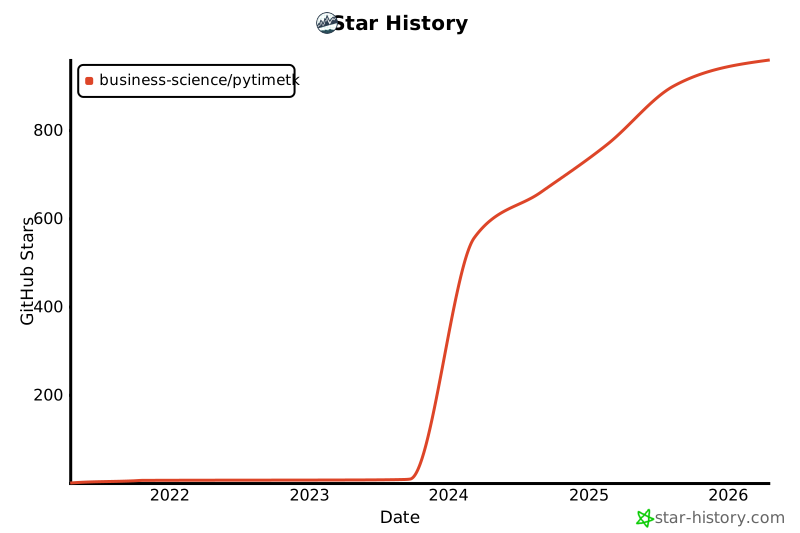
⭐️ Star History
1 maintainer

Metadata
1 maintainer
Release files for pytimetk 2.5.3
For a detailed explanation of source distributions (sdists) and built distributions (wheels), please see the package formats documentation.
Source distribution (sdist)
| File | Size | Uploaded | Provenance | Actions |
|---|---|---|---|---|
| pytimetk-2.5.3.tar.gz | 4.2 MB | Without provenance | Details for pytimetk-2.5.3.tar.gz |
Built distribution (wheel)
| File | Interpreter | ABI | Platform | Actions Reset |
|---|---|---|---|---|
| pytimetk-2.5.3-py3-none-any.whl | Python 3 | none | any | Details for pytimetk-2.5.3-py3-none-any.whl |
Total release size: 8.7 MB
Release files / pytimetk-2.5.3.tar.gz
| Download URL | pytimetk-2.5.3.tar.gz |
|---|---|
| Size | 4.2 MB |
| Tags | Source |
|
SHA-256 checksum How to use checksums |
c04a327051dd69f4623958614406a9dbe2dbb714a5bc2dd8f239e7262ad42d38
|
|
BLAKE2b-256 checksum How to use checksums |
b85fe93d5e08e7ea00bd605e832df96ba264cf45c66ced93e8f0fe64bbba6262
|
| Upload date | |
|
Uploaded using Trusted Publishing? What is trusted publishing? |
No |
| Uploaded via |
poetry/2.0.1 CPython/3.12.7 Darwin/25.6.0
|
Release files / pytimetk-2.5.3-py3-none-any.whl
| Download URL | pytimetk-2.5.3-py3-none-any.whl |
|---|---|
| Size | 4.4 MB |
| Tags | Python 3 |
|
SHA-256 checksum How to use checksums |
5c529b513bb0813f141de22b30f613d74c350f5a606a1399b0bf935e76947da9
|
|
BLAKE2b-256 checksum How to use checksums |
efd0d28ba9ac826f73af230fc2c8b6ce49d039b9a5e152d65c1a011c474580c9
|
| Upload date | |
|
Uploaded using Trusted Publishing? What is trusted publishing? |
No |
| Uploaded via |
poetry/2.0.1 CPython/3.12.7 Darwin/25.6.0
|
Security for pytimetk 2.5.3
Provenance
Provenance describes where a file came from. On PyPI, provenance is shared via attestations, which provide a verifiable record of the build or publishing details. View details, limitations and caveats.
No provenance found
None of the files in this release were uploaded with provenance metadata.
A note on package security
PyPI is a repository for distributing packages, not a service for auditing them. While third-party security researchers and our staff do their best to detect and remove malicious packages, PyPI cannot guarantee the quality, security or suitability of any given package.
To learn more about protecting yourself from malicious actors, visit our package security documentation.














