
Vault




Vault is a simple Python password manager. It allows you to securely save secrets with a simple CLI interface.
Features
Secrets are stored in an encrypted SQLite database with SQLCipher
Within the database, each password and notes are encrypted with a unique salt using AES-256 encryption with pycryptodome
Master key is hashed with a unique salt
Possibility to create an unlimited number of vaults
Clipboard cleared automatically
Automatic vault locking after inactivity
Password suggestions with password-generator-py
Import / Export in Json
Basic usage
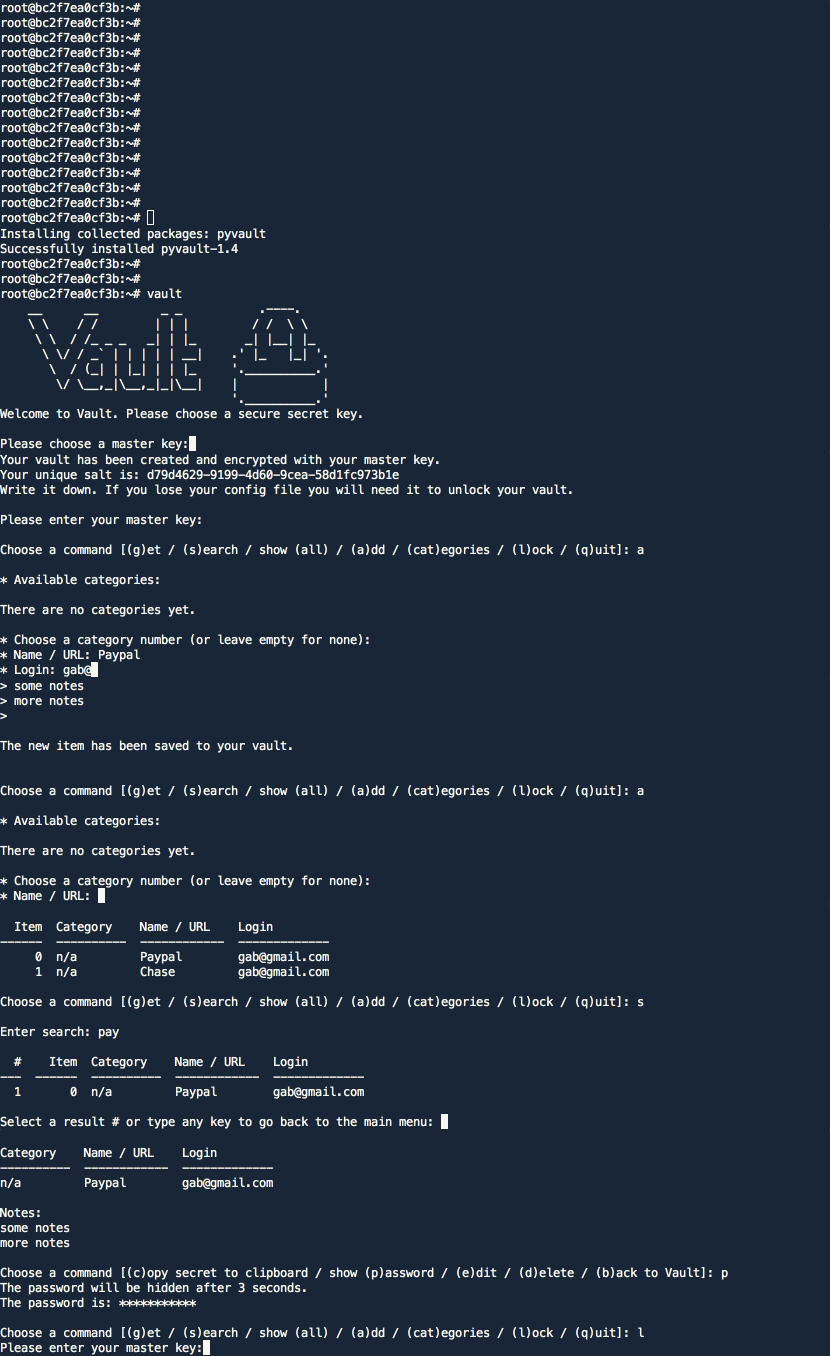
Demo
Installation and setup
Vault 2.x requires sqlcipher to be installed on your machine.
MacOS
On MacOS, you can install sqlcipher with brew:
brew install sqlcipher

# Install sqlcipher3
SQLCIPHER_VERSION="0.5.3"
pip3 install sqlcipher3==$SQLCIPHER_VERSION

# If you are getting an error "Failed to build sqlcipher3", you would need to fix the build flags:
SQLCIPHER_PATH="$(brew --cellar sqlcipher)/$(brew list --versions sqlcipher | tr ' ' '\n' | tail -1)"
C_INCLUDE_PATH=$SQLCIPHER_PATH/include LIBRARY_PATH=$SQLCIPHER_PATH/lib pip3 install sqlcipher3==$SQLCIPHER_VERSION
Then install the vault:
pip3 install pyvault

# Run setup
vault
Ubuntu / Debian
On Ubuntu/Debian, you can install sqlcipher with apt:
sudo apt update
sudo apt install -y gcc python3-dev libsqlcipher-dev xclip
Then install the vault:
pip3 install pyvault

# Run setup
vault
Using Docker
# Pull the image
docker pull gabfl/vault

# Create local directory
mkdir ~/.vault

# Launch image
docker run -v ~/.vault:/root/.vault -ti gabfl/vault
Cloning the project
# Clone project
git clone https://github.com/gabfl/vault && cd vault

# Installation
pip3 install .

# Run setup
vault
Advanced settings:
usage: vault [-h] [-t [CLIPBOARD_TTL]] [-p [HIDE_SECRET_TTL]]
             [-a [AUTO_LOCK_TTL]] [-v VAULT_LOCATION] [-c CONFIG_LOCATION]
             [-k] [-i IMPORT_ITEMS] [-x EXPORT] [-f [{json}]] [-e]

optional arguments:
  -h, --help            show this help message and exit
  -t [CLIPBOARD_TTL], --clipboard_TTL [CLIPBOARD_TTL]
                        Set clipboard TTL (in seconds, default: 15)
  -p [HIDE_SECRET_TTL], --hide_secret_TTL [HIDE_SECRET_TTL]
                        Set delay before hiding a printed password (in
                        seconds, default: 15)
  -a [AUTO_LOCK_TTL], --auto_lock_TTL [AUTO_LOCK_TTL]
                        Set auto lock TTL (in seconds, default: 900)
  -v VAULT_LOCATION, --vault_location VAULT_LOCATION
                        Set vault path
  -c CONFIG_LOCATION, --config_location CONFIG_LOCATION
                        Set config path
  -k, --change_key      Change master key
  -i IMPORT_ITEMS, --import_items IMPORT_ITEMS
                        File to import credentials from
  -x EXPORT, --export EXPORT
                        File to export credentials to
  -f [{json}], --file_format [{json}]
                        Import/export file format (default: 'json')
  -e, --erase_vault     Erase the vault and config file
1 maintainer

Metadata
1 maintainer
Release files for pyvault 2.4.5
For a detailed explanation of source distributions (sdists) and built distributions (wheels), please see the package formats documentation.
Source distribution (sdist)
| File | Size | Uploaded | |
|---|---|---|---|
| pyvault-2.4.5.tar.gz | 22.3 kB | Details |
Built distribution (wheel)
| File | Interpreter | ABI | Platform | Reset |
|---|---|---|---|---|
| pyvault-2.4.5-py2.py3-none-any.whl | Python 2, Python 3 | none | any | Details |
Total release size: 50.8 kB
Release files / pyvault-2.4.5.tar.gz
| Download URL | pyvault-2.4.5.tar.gz |
|---|---|
| Size | 22.3 kB |
| Tags | Source |
|
SHA-256 checksum How to use checksums |
e5ccaa30268d6775cd741f7809c8160f6b7f932c68f9370173a531474d9f72f6
|
|
BLAKE2b-256 checksum How to use checksums |
1da826dd97b9c3bce192fec9df872d56ee38fc66a9d52ab678fc02a4ddcd4cf5
|
| Upload date | |
|
Uploaded using Trusted Publishing? What is trusted publishing? |
No |
| Uploaded via |
twine/4.0.2 CPython/3.11.9
|
Release files / pyvault-2.4.5-py2.py3-none-any.whl
| Download URL | pyvault-2.4.5-py2.py3-none-any.whl |
|---|---|
| Size | 28.5 kB |
| Tags | Python 2 Python 3 |
|
SHA-256 checksum How to use checksums |
666d6d70c543a7e044baaab75d2a52b4b5b230e89251be3107d9fc2fd4450d3e
|
|
BLAKE2b-256 checksum How to use checksums |
7de3b89c4d46fda0cd9aaf11cbfc43de0eaac0c35299bfc34e11aa2ba7e36cfd
|
| Upload date | |
|
Uploaded using Trusted Publishing? What is trusted publishing? |
No |
| Uploaded via |
twine/4.0.2 CPython/3.11.9
|














