
Interactyive python viewers
Verified details
These details have been verified by PyPIProject links
GitHub Statistics
Maintainers

Project description
PyViewer
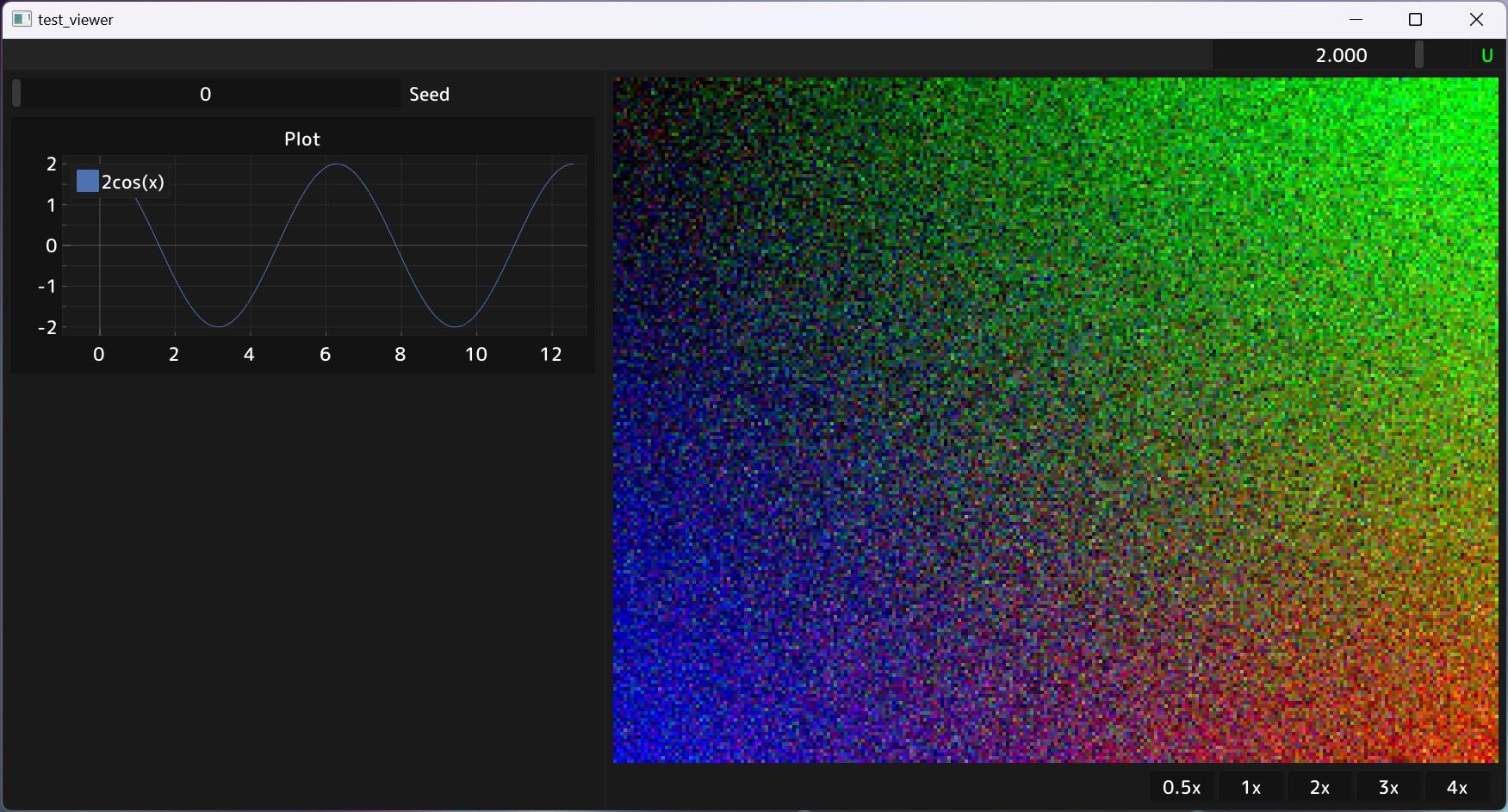
Pyviewer is a python library for easily visualizing NumPy arrays and PyTorch tensors.
Components
single_image_viewer.py
A viewer for showing single fullscreen images or line plots without other UI elements. Runs in a separate process and remains interactive even if the main process is suspended (e.g. in a debugger). Great for interactively looking at intermediate values of complex ML/CG/CV pipelines.
Usage:
from pyviewer import single_image_viewer as siv
siv.draw(img_chw=np.random.randn(3,64,64))
siv.plot(np.sin(2*np.pi*np.linspace(0, 1, 10_000)))
toolbar_viewer.py
A viewer that shows ImGui UI elemets on the left, and a large image on the right. Runs in the main process, but supports visualizing torch tensors directly from GPU memory (unlike single_image_viewer).
Other features
- Makes use of imgui-bundle to provide plotting support and other extras
- Dynamically rescalable user interface
- Window resizing to integer multiple of content resolution
- Pan and zoom of the main image
Installation
Install with pip install pyviewer.
Pre-built wheels available for CPython 3.11+
Usage
See examples/demo.py for a usage example.
API highlights
PannableArea::screen_to_uv_xform
Maps absolute screen coordinates (e.g. imgui.get_mouse_pos()) to transformed image UVs, useful for picking etc.
PannableArea::uv_to_screen_xform
Maps image UVs to absolute screen coordinates. Useful when combined with imgui's draw lists.
PannableArea::get_visible_box_image()
Returns the top-left and bottom-right UV coordinates of the currently visible image region.
PannableArea::get_hovered_uv_image()
Returns the image UVs that lie under the mouse cursor.
PannableArea::get_hovered_uv_canvas()
Returns the canvas UVs that lie under the mouse cursor. Differs from the image UVs in case of non-matching image and window aspect ratios.
from pyviewer.single_image_viewer import draw; draw(img_chw=...)
One-liner that opens a new viewer (unless already open) and draws the provided image. Runs in a separate process and thus works even when execution is halted by e.g. a debugger.
Project details
Verified details
These details have been verified by PyPIProject links
GitHub Statistics
Maintainers
Release history Release notifications | RSS feed


Download files
Download the file for your platform. If you're not sure which to choose, learn more about installing packages.
Source Distribution
Built Distribution
Filter files by name, interpreter, ABI, and platform.
If you're not sure about the file name format, learn more about wheel file names.
Copy a direct link to the current filters
File details
Details for the file pyviewer-2.0.2.tar.gz.
File metadata
- Download URL: pyviewer-2.0.2.tar.gz
- Upload date:
- Size: 1.9 MB
- Tags: Source
- Uploaded using Trusted Publishing? Yes
- Uploaded via: twine/6.1.0 CPython/3.12.9
File hashes
| Algorithm | Hash digest | |
|---|---|---|
| SHA256 |
41742ee121d16124e140ca54f86e25b1ca948bf9241be7866c0064639df6d60a
|
|
| MD5 |
13305fd659b9b537005b65c88dc01a39
|
|
| BLAKE2b-256 |
04ec4bd0718772fe2d4bd9bfc4a2f7c193b24a8910824a3cb92c0464342796a0
|
Provenance
The following attestation bundles were made for pyviewer-2.0.2.tar.gz:
Publisher:
publish.yml on harskish/pyviewer
-
Statement:
-
Statement type:
https://in-toto.io/Statement/v1 -
Predicate type:
https://docs.pypi.org/attestations/publish/v1 -
Subject name:
pyviewer-2.0.2.tar.gz -
Subject digest:
41742ee121d16124e140ca54f86e25b1ca948bf9241be7866c0064639df6d60a - Sigstore transparency entry: 207350386
- Sigstore integration time:
-
Permalink:
harskish/pyviewer@f6f762ee3812168db701dfc2613b30a14d03eeaf -
Branch / Tag:
refs/tags/v2.0.2 - Owner: https://github.com/harskish
-
Access:
public
-
Token Issuer:
https://token.actions.githubusercontent.com -
Runner Environment:
github-hosted -
Publication workflow:
publish.yml@f6f762ee3812168db701dfc2613b30a14d03eeaf -
Trigger Event:
release
-
Statement type:
File details
Details for the file pyviewer-2.0.2-py3-none-any.whl.
File metadata
- Download URL: pyviewer-2.0.2-py3-none-any.whl
- Upload date:
- Size: 1.9 MB
- Tags: Python 3
- Uploaded using Trusted Publishing? Yes
- Uploaded via: twine/6.1.0 CPython/3.12.9
File hashes
| Algorithm | Hash digest | |
|---|---|---|
| SHA256 |
47adaa03c75bd1be3d47fa7adbfa3e6a6aa01bc5efa9bf89a62437767f8676e5
|
|
| MD5 |
0613e2b852135612d82511c0f047f5d4
|
|
| BLAKE2b-256 |
3531def8aecb61e2695e9fa6d88aa4f9e0c482a33c61a07a2fbc0f4d67690917
|
Provenance
The following attestation bundles were made for pyviewer-2.0.2-py3-none-any.whl:
Publisher:
publish.yml on harskish/pyviewer
-
Statement:
-
Statement type:
https://in-toto.io/Statement/v1 -
Predicate type:
https://docs.pypi.org/attestations/publish/v1 -
Subject name:
pyviewer-2.0.2-py3-none-any.whl -
Subject digest:
47adaa03c75bd1be3d47fa7adbfa3e6a6aa01bc5efa9bf89a62437767f8676e5 - Sigstore transparency entry: 207350387
- Sigstore integration time:
-
Permalink:
harskish/pyviewer@f6f762ee3812168db701dfc2613b30a14d03eeaf -
Branch / Tag:
refs/tags/v2.0.2 - Owner: https://github.com/harskish
-
Access:
public
-
Token Issuer:
https://token.actions.githubusercontent.com -
Runner Environment:
github-hosted -
Publication workflow:
publish.yml@f6f762ee3812168db701dfc2613b30a14d03eeaf -
Trigger Event:
release
-
Statement type:






