
PyVista
Deployment |
||
Build Status |
||
Metrics |
||
Activity |
||
Citation |
||
License |
||
Community |
||
Formatter |
||
Affiliated |
||

















3D plotting and mesh analysis through a streamlined interface for the Visualization Toolkit (VTK)
PyVista is:
Pythonic VTK: a high-level API to the Visualization Toolkit (VTK)
mesh data structures and filtering methods for spatial datasets
3D plotting made simple and built for large/complex data geometries
PyVista is a helper module for the Visualization Toolkit (VTK) that wraps the VTK library through NumPy and direct array access through a variety of methods and classes. This package provides a Pythonic, well-documented interface exposing VTK’s powerful visualization backend to facilitate rapid prototyping, analysis, and visual integration of spatially referenced datasets.
This module can be used for scientific plotting for presentations and research papers as well as a supporting module for other mesh 3D rendering dependent Python modules; see Connections for a list of projects that leverage PyVista.
Share this project on Twitter:

PyVista is a NumFOCUS affiliated project

Highlights
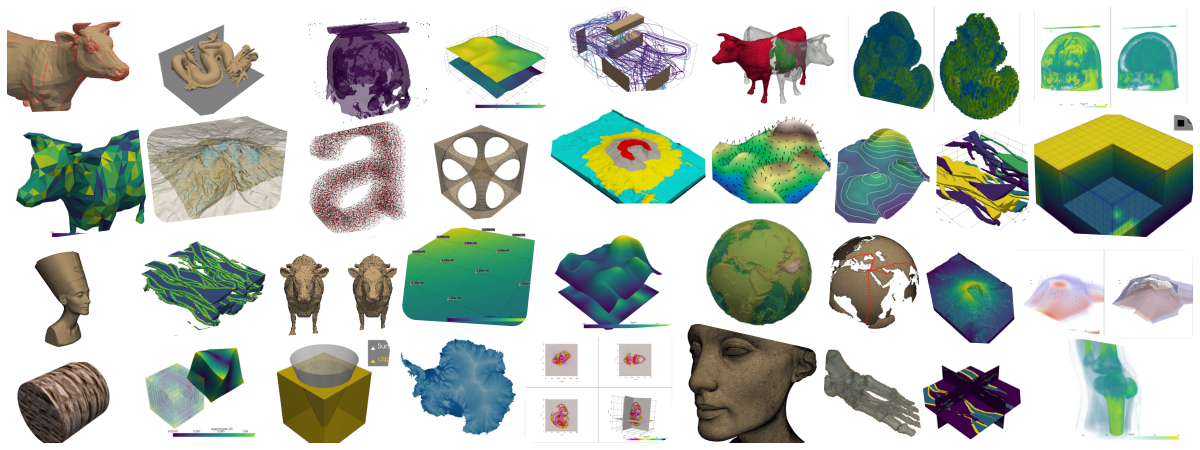
Head over to the Quick Examples page in the docs to explore our gallery of
examples showcasing what PyVista can do. Want to test-drive PyVista?
All of the examples from the gallery are live on MyBinder for you to test
drive without installing anything locally:

Overview of Features
Extensive gallery of examples (see Quick Examples)
Interactive plotting in Jupyter Notebooks with server-side and client-side rendering with trame.
Filtering/plotting tools built for interactivity (see Widgets)
Direct access to mesh analysis and transformation routines (see Filters)
Intuitive plotting routines with matplotlib similar syntax (see Plotting)
Import meshes from many common formats (use pyvista.read()). Support for all formats handled by meshio is built-in.
Export meshes as VTK, STL, OBJ, or PLY (mesh.save()) file types or any formats supported by meshio (pyvista.save_meshio())
Documentation
Refer to the documentation for detailed installation and usage details.
For general questions about the project, its applications, or about software usage, please create a discussion in pyvista/discussions where the community can collectively address your questions. You are also welcome to join us on Slack.
Installation
PyVista can be installed from PyPI using pip on Python >= 3.8:
pip install pyvista
You can also visit PyPI, Anaconda, or GitHub to download the source.
See the Installation for more details regarding optional dependencies or if the installation through pip doesn’t work out.
Connections
PyVista is a powerful tool that researchers can harness to create compelling, integrated visualizations of large datasets in an intuitive, Pythonic manner.
Learn more about how PyVista is used across science and engineering disciplines by a diverse community of users on our Connections page.
Authors
Please take a look at the contributors page and the active list of authors to learn more about the developers of PyVista.
Made with contrib rocks.
Contributing


We absolutely welcome contributions and we hope that our Contributing Guide will facilitate your ability to make PyVista better. PyVista is mostly maintained on a volunteer basis and thus we need to foster a community that can support user questions and develop new features to make this software a useful tool for all users while encouraging every member of the community to share their ideas. To learn more about contributing to PyVista, please see the Contributing Guide and our Code of Conduct.
Citing PyVista
There is a paper about PyVista.
If you are using PyVista in your scientific research, please help our scientific visibility by citing our work.
Sullivan and Kaszynski, (2019). PyVista: 3D plotting and mesh analysis through a streamlined interface for the Visualization Toolkit (VTK). Journal of Open Source Software, 4(37), 1450, https://doi.org/10.21105/joss.01450
BibTex:
@article{sullivan2019pyvista,
  doi = {10.21105/joss.01450},
  url = {https://doi.org/10.21105/joss.01450},
  year = {2019},
  month = {May},
  publisher = {The Open Journal},
  volume = {4},
  number = {37},
  pages = {1450},
  author = {Bane Sullivan and Alexander Kaszynski},
  title = {{PyVista}: {3D} plotting and mesh analysis through a streamlined interface for the {Visualization Toolkit} ({VTK})},
  journal = {Journal of Open Source Software}
}3 maintainers


Metadata
3 maintainers
Release files for pyvista 0.41.0
For a detailed explanation of source distributions (sdists) and built distributions (wheels), please see the package formats documentation.
Source distribution (sdist)
| File | Size | Uploaded | Provenance | Actions |
|---|---|---|---|---|
| pyvista-0.41.0.tar.gz | 1.6 MB | Without provenance | Details for pyvista-0.41.0.tar.gz |
Built distribution (wheel)
| File | Interpreter | ABI | Platform | Actions Reset |
|---|---|---|---|---|
| pyvista-0.41.0-py3-none-any.whl | Python 3 | none | any | Details for pyvista-0.41.0-py3-none-any.whl |
Total release size: 3.2 MB
Release files / pyvista-0.41.0.tar.gz
| Download URL | pyvista-0.41.0.tar.gz |
|---|---|
| Size | 1.6 MB |
| Tags | Source |
|
SHA-256 checksum How to use checksums |
f7cb852a1c881e06cb21660d58ccf73a2cd40bff5015c58e8bdab49c3319b173
|
|
BLAKE2b-256 checksum How to use checksums |
c3774b0b9738eab83d605167f4cff4c08890da4db6d6dee3cdfbb16834e86d05
|
| Upload date | |
|
Uploaded using Trusted Publishing? What is trusted publishing? |
No |
| Uploaded via |
twine/4.0.2 CPython/3.9.17
|
Release files / pyvista-0.41.0-py3-none-any.whl
| Download URL | pyvista-0.41.0-py3-none-any.whl |
|---|---|
| Size | 1.6 MB |
| Tags | Python 3 |
|
SHA-256 checksum How to use checksums |
92e80a52b615fa3a89950bc73586a5e5a2c65c1770e9cd37f131721a3c62ccb0
|
|
BLAKE2b-256 checksum How to use checksums |
78cc3afb276275b5e72b44b2955822ccdcd36f350c709ba2d2c88f8c1f127bde
|
| Upload date | |
|
Uploaded using Trusted Publishing? What is trusted publishing? |
No |
| Uploaded via |
twine/4.0.2 CPython/3.9.17
|
Security for pyvista 0.41.0
Provenance
Provenance describes where a file came from. On PyPI, provenance is shared via attestations, which provide a verifiable record of the build or publishing details. View details, limitations and caveats.
No provenance found
None of the files in this release were uploaded with provenance metadata.
A note on package security
PyPI is a repository for distributing packages, not a service for auditing them. While third-party security researchers and our staff do their best to detect and remove malicious packages, PyPI cannot guarantee the quality, security or suitability of any given package.
To learn more about protecting yourself from malicious actors, visit our package security documentation.














