




qifqif
/kĭf kĭf/ :
adj. inv. arabic slang (كيف) for “it’s all the same”.
n. CLI tool for categorizing qif files. It can make all the difference.
Description
CLI tool to enrich your QIF files transactions with category information, hence cutting down import time from minutes to mere seconds.
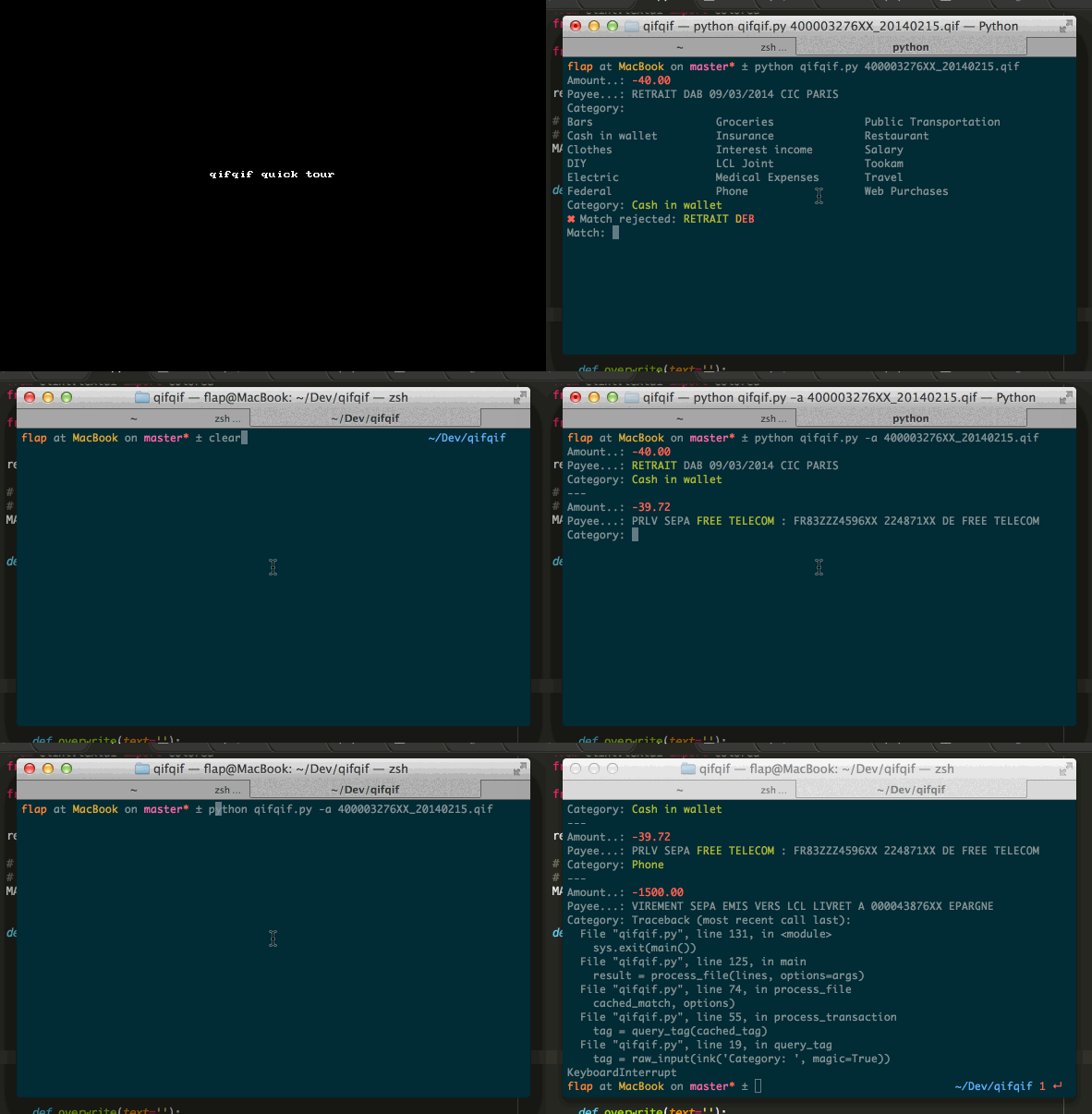
QIF is a format widely used by personal money management software such as GnuCash to import information. Yet, the import process is particularly tedious as it require to manually pair the transactions contained in the file with categories (or “accounts” for double-entry bookkeeping systems).
qifqif augment your qif files by adding a category line for each transaction, that additional information can then be used by accounting software to perform automatic QIF imports. It picks categories by searching for predefined keywords in transactions descriptions lines and by repeating choices you previously made regarding similar transactions.
Features
Quickstart: create categories by importing your existing accounts with qifacc
Blazing fast edits: thanks to well-thought-out defaults and <TAB> completion
Auditing mode: review your transactions one by one
Batch mode (no interactive): for easy integration with scripts
Easy-going workflow: dreading the behemoth task of importing years of accounting from a single file? Don’t be. Go at your own pace and press <Ctrl+C> to exit anytime. On next run, editing will resume right where you left it.
Usage
usage: qifqif.py [-h] [-a | -b] [-c CONFIG] [-d] [-f] [-o DEST] [-v] QIF_FILE

Enrich your .QIF files with tags. See https://github.com/Kraymer/qifqif for
more infos.

positional arguments:
  QIF_FILE              .QIF file to process

optional arguments:
  -h, --help            show this help message and exit
  -a, --audit-mode      pause after each transaction
  -b, --batch-mode      skip transactions that require user input
  -c CONFIG, --config CONFIG
                        configuration filename in json format. DEFAULT:
                        ~/.qifqif.json
  -d, --dry-run         just print instead of writing file
  -f, --force           discard transactions categories if not present in
                        configuration file. Repeat the flag (-ff) to force
                        editing of all transactions.
  -o DEST, --output DEST
                        output filename. DEFAULT: edit input file in-place
  -v, --version         display version information and exit
More infos on the documentation website.
Installation
qiqif is written for Python 2.7+ and Python 3.5+.
Install with pip via pip install qifqif command.
Changelog
Available on Github Releases page.
Feedbacks
Please submit bugs and features requests on the Issue tracker.
1 maintainer

Metadata
1 maintainer
Release files for qifqif 0.8.0
For a detailed explanation of source distributions (sdists) and built distributions (wheels), please see the package formats documentation.
Source distribution (sdist)
| File | Size | Uploaded | Provenance | Actions |
|---|---|---|---|---|
| qifqif-0.8.0.tar.gz | 15.4 kB | Without provenance | Details for qifqif-0.8.0.tar.gz |
Built distribution (wheel)
| File | Interpreter | ABI | Platform | Actions Reset |
|---|---|---|---|---|
| qifqif-0.8.0-py3-none-any.whl | Python 3 | none | any | Details for qifqif-0.8.0-py3-none-any.whl |
Total release size: 29.3 kB
Release files / qifqif-0.8.0.tar.gz
| Download URL | qifqif-0.8.0.tar.gz |
|---|---|
| Size | 15.4 kB |
| Tags | Source |
|
SHA-256 checksum How to use checksums |
f548a527bc63407d9fb28747e1d44ea966ebfe28e1af7dbb7fc2fe385fbe1d8f
|
|
BLAKE2b-256 checksum How to use checksums |
fa3c5280d16bb907f7662ca5e90e6e6f6ac62e71ad6447afe8ce4038c07f3504
|
| Upload date | |
|
Uploaded using Trusted Publishing? What is trusted publishing? |
No |
| Uploaded via |
twine/3.3.0 pkginfo/1.6.1 requests/2.25.1 setuptools/49.2.1 requests-toolbelt/0.9.1 tqdm/4.55.0 CPython/3.9.1
|
Release files / qifqif-0.8.0-py3-none-any.whl
| Download URL | qifqif-0.8.0-py3-none-any.whl |
|---|---|
| Size | 13.9 kB |
| Tags | Python 3 |
|
SHA-256 checksum How to use checksums |
4a17c158dd9085c57d67f53d772a7ecdb3ec039f5174d89d069fe6f8bd8bd6f0
|
|
BLAKE2b-256 checksum How to use checksums |
de9f8455c30e24feb4085c18756b84332cdce01c1be7caca35fbc50fc0276d5c
|
| Upload date | |
|
Uploaded using Trusted Publishing? What is trusted publishing? |
No |
| Uploaded via |
twine/3.3.0 pkginfo/1.6.1 requests/2.25.1 setuptools/49.2.1 requests-toolbelt/0.9.1 tqdm/4.55.0 CPython/3.9.1
|
Security for qifqif 0.8.0
Provenance
Provenance describes where a file came from. On PyPI, provenance is shared via attestations, which provide a verifiable record of the build or publishing details. View details, limitations and caveats.
No provenance found
None of the files in this release were uploaded with provenance metadata.
A note on package security
PyPI is a repository for distributing packages, not a service for auditing them. While third-party security researchers and our staff do their best to detect and remove malicious packages, PyPI cannot guarantee the quality, security or suitability of any given package.
To learn more about protecting yourself from malicious actors, visit our package security documentation.














