





✨Transfer files over WiFi between your computer and your smartphone from the terminal✨

Installation
You will find the most updated version of qr-filetransfer here. But if you want the most stable version, use pip to install it
Pip Install
Global Install
pip3 install qr-filetransfer[extras]
Local Install
pip3 install --user qr-filetransfer[extras]
If you run into problems during the install, try removing the optional [extras] at the end of the command.
Git Install
# clone the repo
$ git clone https://github.com/sdushantha/qr-filetransfer.git

# change the working directory to qr-filetransfer
$ cd qr-filetransfer

# install the requirements
$ pip3 install -r requirements.txt
Usage
usage: qr-filetransfer [-h] [--debug] [--receive] [--port PORT]
                       [--ip_addr {192.168.0.105}] [--auth AUTH]
                       file_path

Transfer files over WiFi between your computer and your smartphone from the
terminal

positional arguments:
  file_path             path that you want to transfer or store the received
                        file.

optional arguments:
  -h, --help            show this help message and exit
  --debug, -d           show the encoded url.
  --receive, -r         enable upload mode, received file will be stored at
                        given path.
  --port PORT, -p PORT  use a custom port
  --ip_addr {192.168.0.105}
                        specify IP address
  --auth AUTH           add authentication, format: username:password
Note: Both devices needs to be connected to the same network
Exiting
To exit the program, just press CTRL+C.
Transfer a single file
$ qr-filetransfer /path/to/file.txt
Transfer a full directory. Note: the directory gets zipped before being transferred
$ qr-filetransfer /path/to/directory/
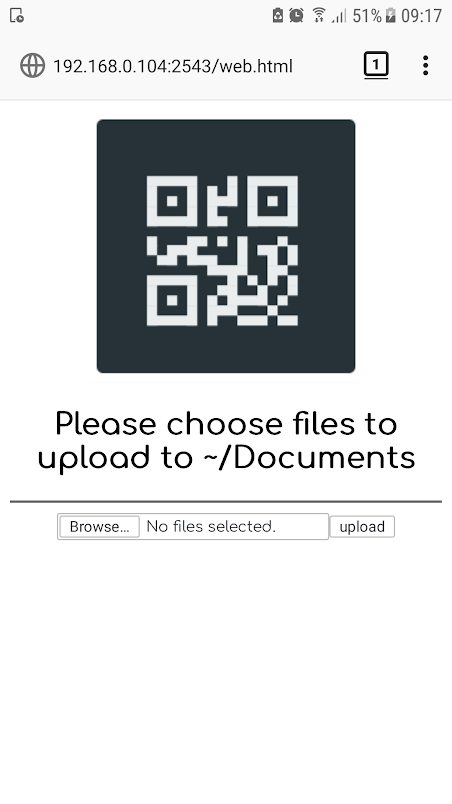
Receive/upload a file from your phone to your computer
$ qr-filetransfer -r /path/to/receive/file/to/
Credits
Inspired by the Go project qr-filetransfer
License
MIT License
Copyright © 2019 Siddharth Dushantha
Active contributer - Yu-Chen Lin
1 maintainer

Metadata
1 maintainer
Release files for qr-filetransfer 2.7
For a detailed explanation of source distributions (sdists) and built distributions (wheels), please see the package formats documentation.
Source distribution (sdist)
| File | Size | Uploaded | Provenance | Actions |
|---|---|---|---|---|
| qr-filetransfer-2.7.tar.gz | 9.0 kB | Without provenance | Details for qr-filetransfer-2.7.tar.gz |
Release files / qr-filetransfer-2.7.tar.gz
| Download URL | qr-filetransfer-2.7.tar.gz |
|---|---|
| Size | 9.0 kB |
| Tags | Source |
|
SHA-256 checksum How to use checksums |
aec885578c3dcfb851fec0a198c1b7e8da0dc1ec276033337e7b36b3b6bf8f41
|
|
BLAKE2b-256 checksum How to use checksums |
8c1735a63d9c7d6209a3d960e8700dbb1f070d4bb030c510c6de2c11601fc547
|
| Upload date | |
|
Uploaded using Trusted Publishing? What is trusted publishing? |
No |
| Uploaded via |
twine/3.1.1 pkginfo/1.5.0.1 requests/2.22.0 setuptools/41.6.0 requests-toolbelt/0.9.1 tqdm/4.41.0 CPython/3.8.0
|
Security for qr-filetransfer 2.7
Provenance
Provenance describes where a file came from. On PyPI, provenance is shared via attestations, which provide a verifiable record of the build or publishing details. View details, limitations and caveats.
No provenance found
None of the files in this release were uploaded with provenance metadata.
A note on package security
PyPI is a repository for distributing packages, not a service for auditing them. While third-party security researchers and our staff do their best to detect and remove malicious packages, PyPI cannot guarantee the quality, security or suitability of any given package.
To learn more about protecting yourself from malicious actors, visit our package security documentation.














