
Qt Stylesheet for PySide6, PySide2 and PyQt5.

Project description
Qt-Material
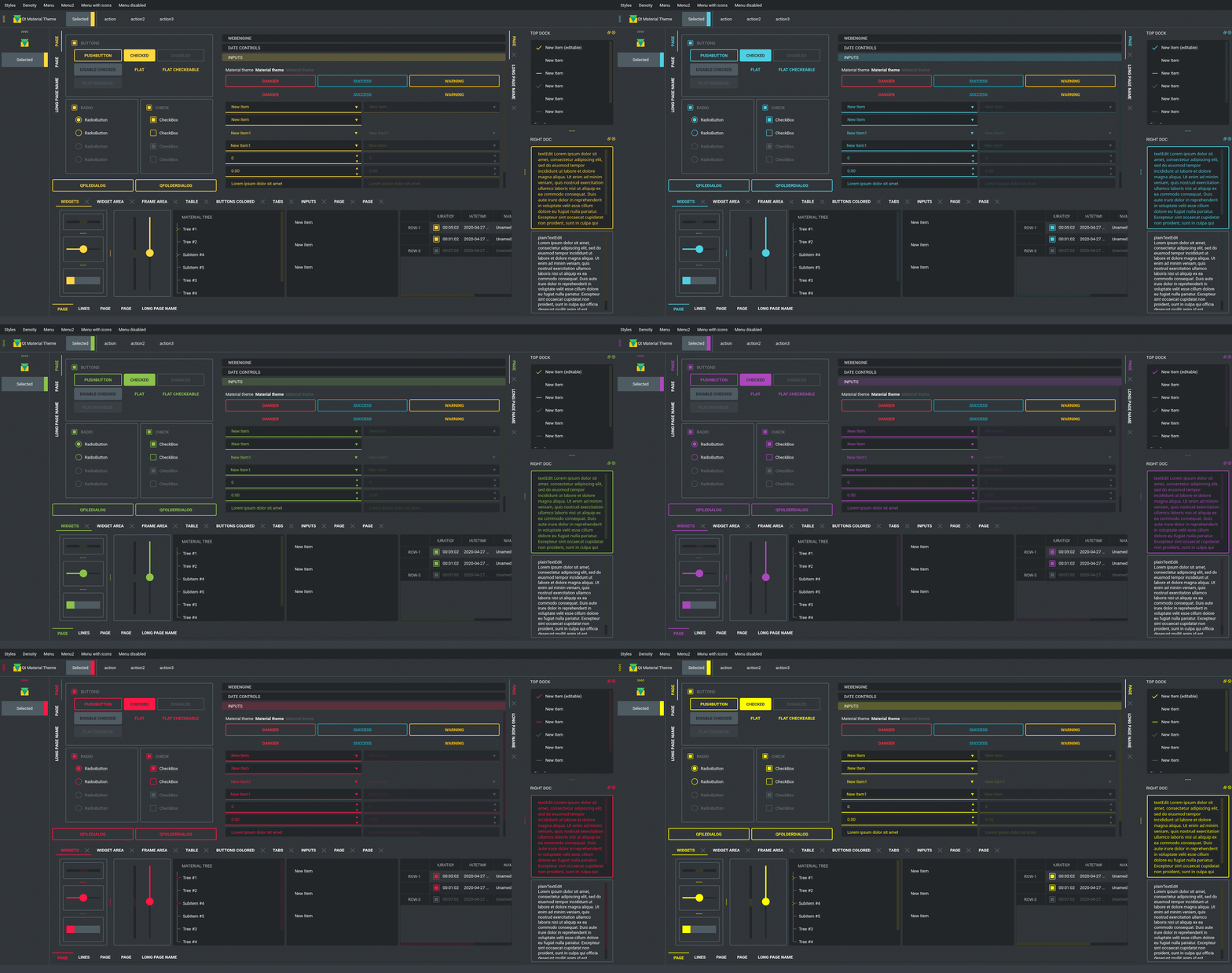
This is another stylesheet for PySide6, PySide2 and PyQt5, which looks like Material Design (close enough).








There is some custom dark themes:
Navigation
- Install
- Usage
- Themes
- Custom colors
- Usage
- Light themes
- Extra colors and custom fonts
- Run examples
- New themes
- Change theme in runtime
Install
pip install qt-material
Usage
import sys
from PySide6 import QtWidgets
# from PySide2 import QtWidgets
# from PyQt5 import QtWidgets
from qt_material import apply_stylesheet

# create the application and the main window
app = QtWidgets.QApplication(sys.argv)
window = QtWidgets.QMainWindow()

# setup stylesheet
apply_stylesheet(app, theme='dark_teal.xml')

# run
window.show()
app.exec_()
Themes
from qt_material import list_themes

list_themes()
WARNING:root:qt_material must be imported after PySide or PyQt!


['dark_amber.xml',
 'dark_blue.xml',
 'dark_cyan.xml',
 'dark_lightgreen.xml',
 'dark_pink.xml',
 'dark_purple.xml',
 'dark_red.xml',
 'dark_teal.xml',
 'dark_yellow.xml',
 'light_amber.xml',
 'light_blue.xml',
 'light_cyan.xml',
 'light_cyan_500.xml',
 'light_lightgreen.xml',
 'light_pink.xml',
 'light_purple.xml',
 'light_red.xml',
 'light_teal.xml',
 'light_yellow.xml']
Custom colors
Color Tool is the best way to generate new themes, just choose colors and export as Android XML, the theme file must look like:
<!--?xml version="1.0" encoding="UTF-8"?-->
<resources>
<color name="primaryColor">#00e5ff</color>
<color name="primaryLightColor">#6effff</color>
<color name="secondaryColor">#f5f5f5</color>
<color name="secondaryLightColor">#ffffff</color>
<color name="secondaryDarkColor">#e6e6e6</color>
<color name="primaryTextColor">#000000</color>
<color name="secondaryTextColor">#000000</color>
</resources>
Save it as my_theme.xml or similar and apply the style sheet from Python.
apply_stylesheet(app, theme='dark_teal.xml')
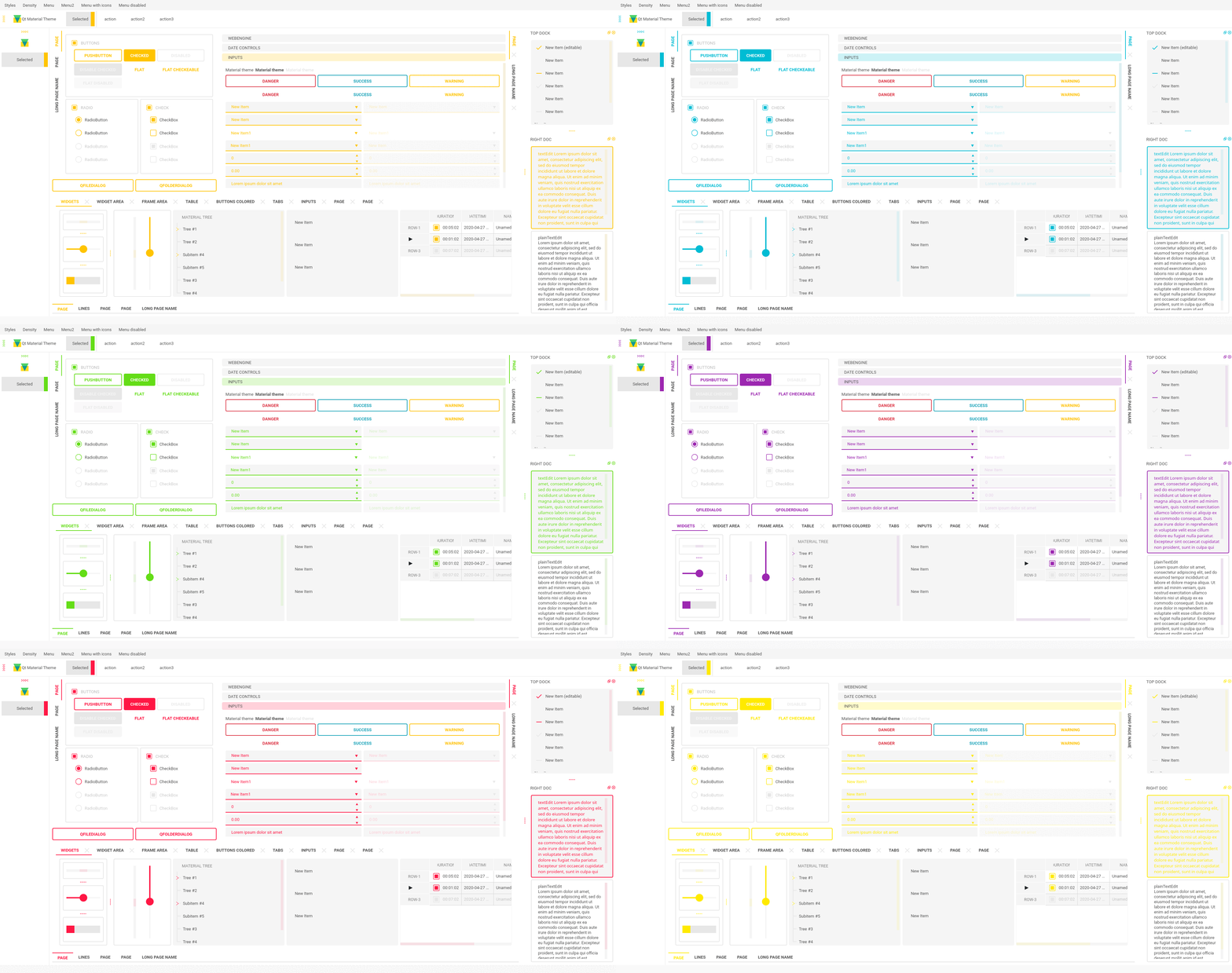
Light themes
Light themes will need to add invert_secondary argument as True.
apply_stylesheet(app, theme='light_red.xml', invert_secondary=True)
Extra colors and custom fonts
There is an extra argument for accent colors and custom fonts.
extra = {

    # Button colors
    'danger': '#dc3545',
    'warning': '#ffc107',
    'success': '#17a2b8',

    # Font
    'font-family': 'Roboto',
}

apply_stylesheet(app, 'light_cyan.xml', invert_secondary=True, extra=extra)
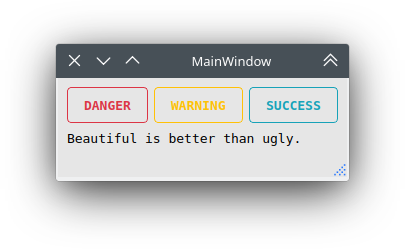
The accent colors are applied to QPushButton with the corresponding class property:
pushButton_danger.setProperty('class', 'danger')
pushButton_warning.setProperty('class', 'warning')
pushButton_success.setProperty('class', 'success')
Run examples
A window with almost all widgets (see the previous screenshots) are available to test all themes and create new ones.
git clone https://github.com/UN-GCPDS/qt-material.git
cd qt-material
python setup.py install
cd test
python main.py --PySide6
New themes
Do you have a custom theme? it looks good? create a pull request in themes folder and share it with all users.
Change theme in runtime
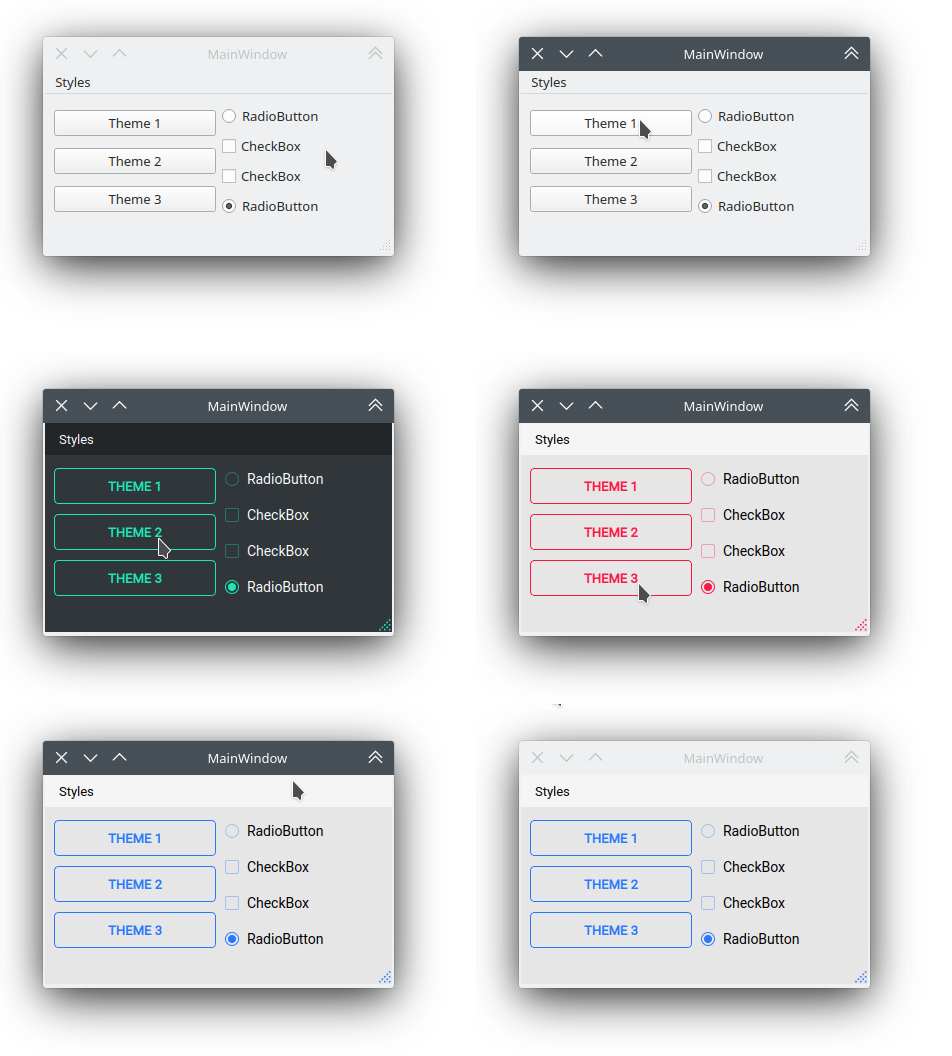
There is a qt_material.QtStyleTools class that must be inherited along to QMainWindow for change themes in runtime using the apply_stylesheet() method.
class RuntimeStylesheets(QMainWindow, QtStyleTools):

    def __init__(self):
        super().__init__()
        self.main = QUiLoader().load('main_window.ui', self)

        self.apply_stylesheet(self.main, 'dark_teal.xml')
        # self.apply_stylesheet(self.main, 'light_red.xml')
        # self.apply_stylesheet(self.main, 'light_blue.xml')
Integrate stylesheets in a menu
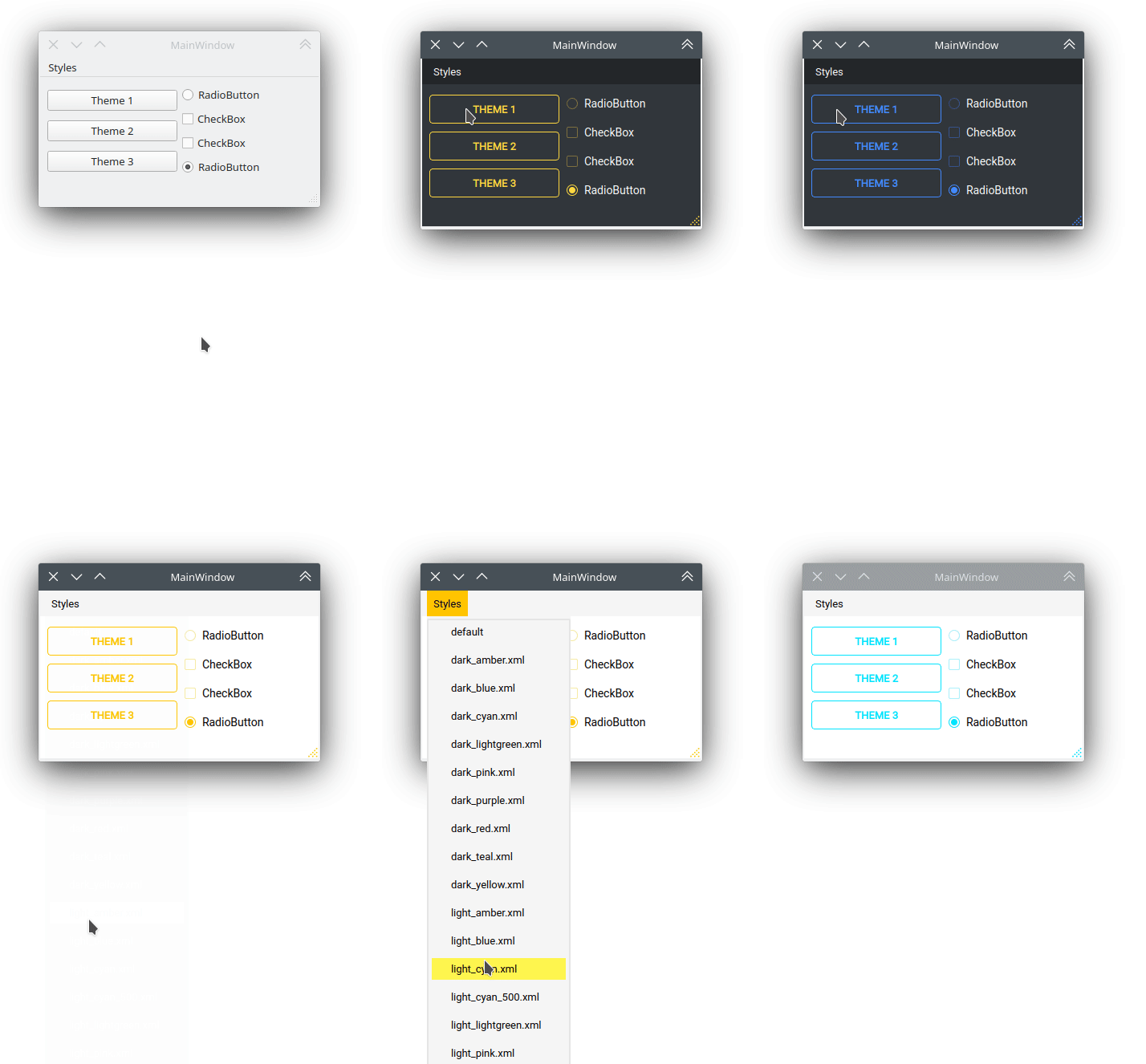
A custom stylesheets menu can be added to a project for switching across all default available themes.
class RuntimeStylesheets(QMainWindow, QtStyleTools):

    def __init__(self):
        super().__init__()
        self.main = QUiLoader().load('main_window.ui', self)

        self.add_menu_theme(self.main, self.main.menuStyles)
Create new themes
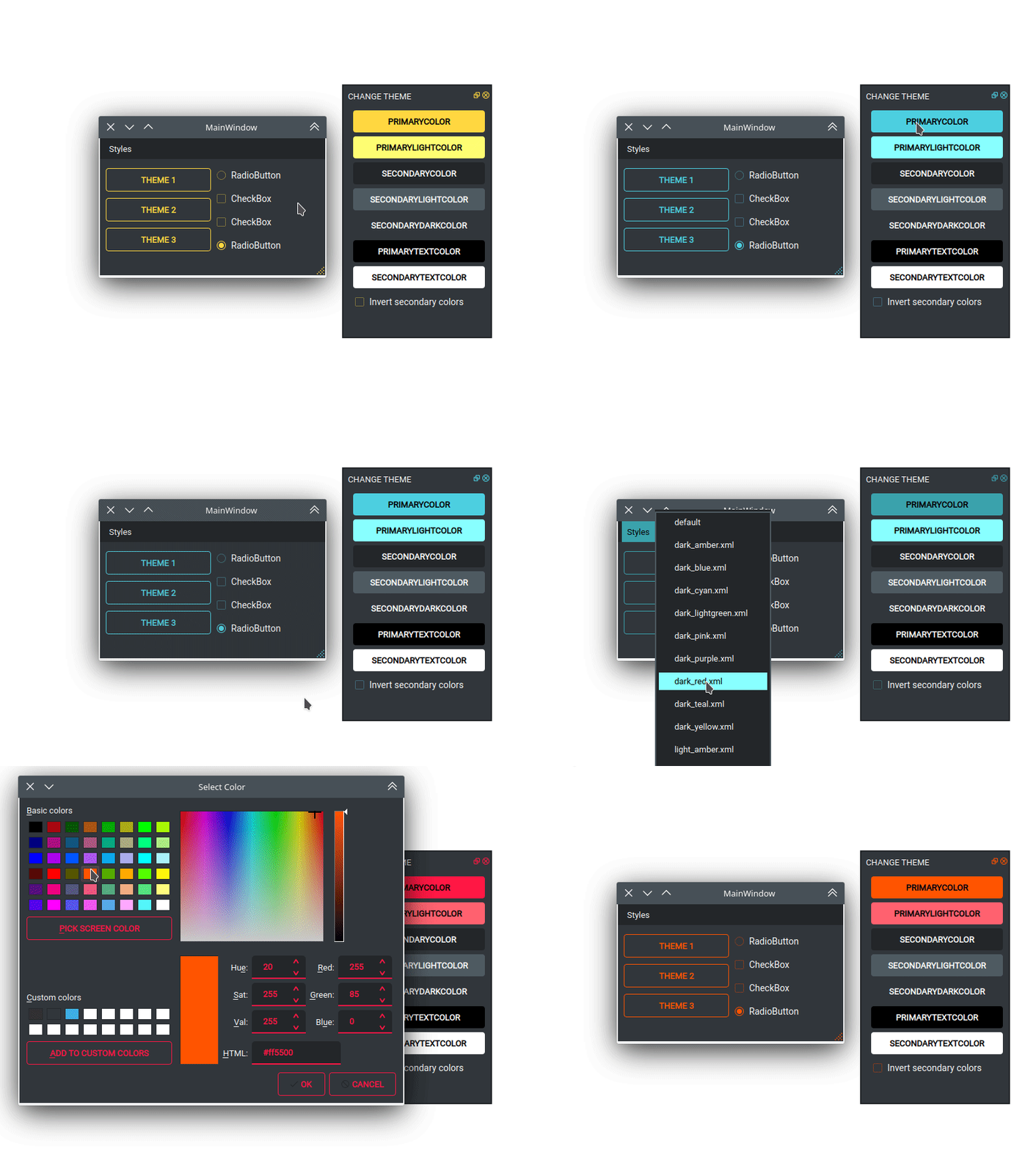
A simple interface is available to modify a theme in runtime, this feature can be used to create a new theme, the theme file is created in the main directory as my_theme.xml
class RuntimeStylesheets(QMainWindow, QtStyleTools):

    def __init__(self):
        super().__init__()
        self.main = QUiLoader().load('main_window.ui', self)

        self.show_dock_theme(self.main)
A full set of examples are available in the exmaples directory
Release history Release notifications | RSS feed


Download files
Download the file for your platform. If you're not sure which to choose, learn more about installing packages.
Source Distribution
Built Distribution
Filter files by name, interpreter, ABI, and platform.
If you're not sure about the file name format, learn more about wheel file names.
Copy a direct link to the current filters
File details
Details for the file qt-material-2.6.tar.gz.
File metadata
- Download URL: qt-material-2.6.tar.gz
- Upload date:
- Size: 1.9 MB
- Tags: Source
- Uploaded using Trusted Publishing? No
- Uploaded via: twine/3.2.0 pkginfo/1.6.1 requests/2.25.1 setuptools/51.0.0 requests-toolbelt/0.9.1 tqdm/4.54.1 CPython/3.9.1
File hashes
| Algorithm | Hash digest | |
|---|---|---|
| SHA256 |
8a2585ce912b1612db4cd76e7db63be35c88d1f2f2128e7530d488c2d025f356
|
|
| MD5 |
27f99b0dc288550eb2d5ad2c93fcb900
|
|
| BLAKE2b-256 |
2100f582b88eb3c00eea42cef5394fab54b0601909eae301e24be1d9f8c6aecf
|
File details
Details for the file qt_material-2.6-py3-none-any.whl.
File metadata
- Download URL: qt_material-2.6-py3-none-any.whl
- Upload date:
- Size: 1.9 MB
- Tags: Python 3
- Uploaded using Trusted Publishing? No
- Uploaded via: twine/3.2.0 pkginfo/1.6.1 requests/2.25.1 setuptools/51.0.0 requests-toolbelt/0.9.1 tqdm/4.54.1 CPython/3.9.1
File hashes
| Algorithm | Hash digest | |
|---|---|---|
| SHA256 |
36a3378db5b13ed5bfb45e1d534d6e5db435d6a622dfe75d9549d92711959b31
|
|
| MD5 |
f2eb270147063bdde7d6f2fe564ebb3e
|
|
| BLAKE2b-256 |
f009f748f5f248502beefba33bbdb15a662c8cb279eda7131544e94f57752ead
|






