
Quack2Tex 🦆
Ever found yourself battling with equations while writing papers in LaTeX, wishing there was a way to just snap a picture and boom—LaTeX code? Well, I did too. After too many late nights and too much coffee, I finally decided to do something about it. The result? Quack2Tex.
Quack2Tex is a handy tool that facilitates turning images of math equations and charts into LaTeX code, quickly and easily!. But it doesn't stop there! It also has cool features like guessing the location from a photo, identifying recipes from food pictures, and explaining code from images. Rendered as a floating menu on your screen, Quack2Tex is always at your fingertips, making it easy to access anytime you need it.
🚀 Features
Certainly! Here's the revised version without emoticons:
-
2025-05-01 – Quack2Tex v1.0.8 is out! 🎉
This update introduces several powerful new features and improvements:
- Voice Input Support: You can now interact with Quack2Tex using voice, in addition to screen, clipboard, and text input.
- Database Persistence: Prompts and responses now can be saved to a local database for future reference.
- Quick Action: Hold the mouse button on the rubber duck icon to quickly trigger actions. These can be customized from the Settings menu.
Important: This release includes a major update to the database schema. To ensure the new features work correctly, you must delete the old database file before running the app. Database location:
~/.quack2tex/quack2tex.dbTo delete it, run:rm ~/.quack2tex/quack2tex.db -
2024-10-18: Quack2Tex v1.0.0 is out! 🎉
- Added functionality for users to customize the rubber-duck menu. A new "Settings" option allows users to create and manage custom actions.
- Action Grouping: Users can now group actions in the settings menu for better organization and streamlined access.
- Multi-Model Selection: Users can now choose which model or combination of models to use for generating outputs, enhancing flexibility and multimodel inference.
- New Input Mode: A "Clipboard" input mode has been introduced, enabling users to use clipboard content as input for selected actions.
-
2024-9-10: Quack2Tex was released! 🎉
- Image to LaTeX: Convert pictures of equations or symbols into LaTeX code—no more manual typing!
- Location Guessing: Upload a photo, and Quack2Tex will try to figure out where it was taken.
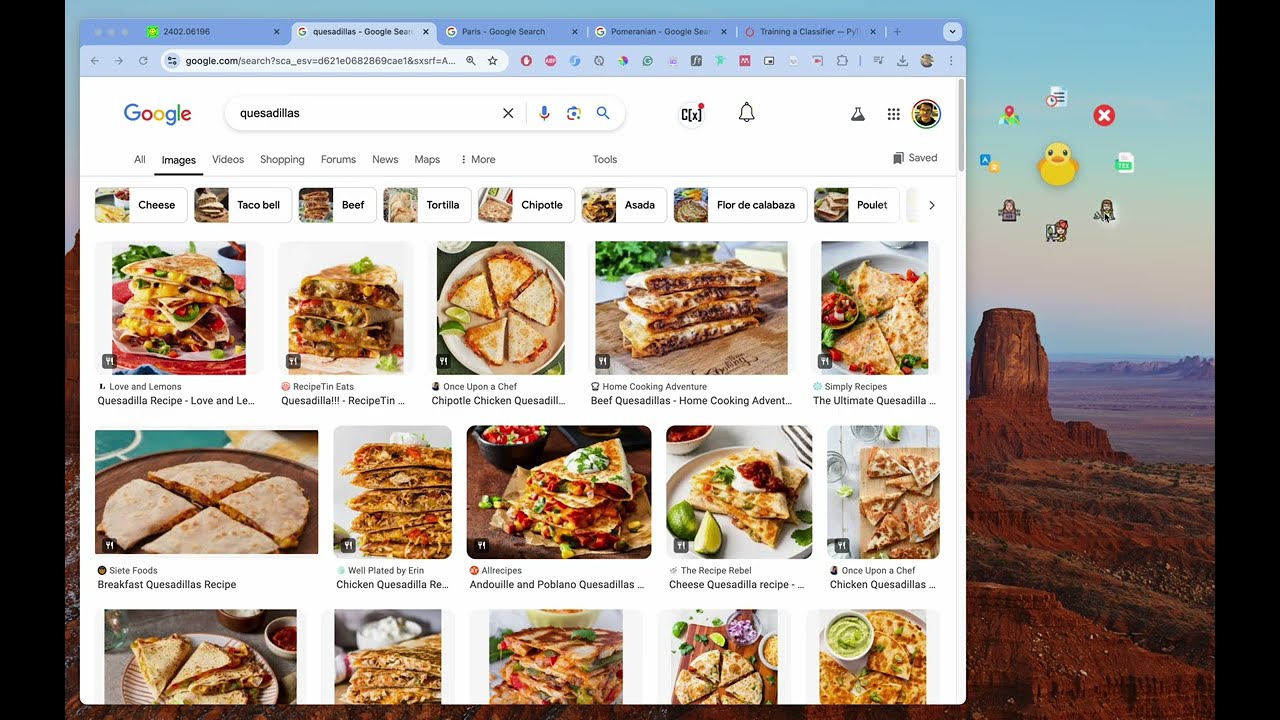
- Recipe Finder: Snap a picture of your meal, and Quack2Tex will tell you what dish it is.
- Code Explainer: Got a screenshot of code? Quack2Tex can explain what it does.
See the video below for a demo of Quack2Tex in action:
🧠 Powered By
Under the hood, Quack2Tex leverages state-of-the-art multimodal models like Gemini, GPT-4o, and Lava to analyze the content in the images. Whether you're converting handwritten notes into LaTeX or identifying the location of a stunning sunset photo, Quack2Tex has you covered.
🔧 Installation
To get started with Quack2Tex, follow these steps:
pip install quack2tex
📚 Usage
You can run Quack2Tex in multiple ways depending on your preference.
🏁 Quick Start (via terminal)
Run the app with your API keys as command-line options:
quack2tex --gemini-api-key <your_gemini_api_key> \
          --openai-api-key <your_openai_api_key> \
          --anthropic-api-key <your_anthropic_api_key> \
          --groq-api-key <your_groq_api_key>
🌱 Alternative: Using Environment Variables
You can set the API keys as environment variables:
export GEMINI_API_KEY=<your_gemini_api_key>
export OPENAI_API_KEY=<your_openai_api_key>
export ANTHROPIC_API_KEY=<your_anthropic_api_key>
export GROQ_API_KEY=<your_groq_api_key>

quack2tex
📄 .env File Support
You can also create a .env file in the root directory with the following contents:
GEMINI_API_KEY=<your_gemini_api_key>
OPENAI_API_KEY=<your_openai_api_key>
ANTHROPIC_API_KEY=<your_anthropic_api_key>
GROQ_API_KEY=<your_groq_api_key>
The app will automatically load these variables using python-dotenv.
🛠️ Help & Options
To explore all available options:
quack2tex --help
🧠 Optional: Using LLava Models via Ollama
Quack2Tex also supports LLava models via the Ollama API. Be sure to have Ollama running and properly configured.
🐍 Running from Python
You can also run the app programmatically. Check out the main.py file for an example:
from dotenv import load_dotenv, find_dotenv
import quack2tex
# Load environment variables
load_dotenv(find_dotenv())
# Run the app
quack2tex.run_app()
Let me know if you'd like to include examples, expected outputs, or Docker support!
📝 Roadmap
- Support clipboard copy to be used in the prompt
- Support gemini, gpt-4o, and lava models
- Allow user add custom actions to the rubber-duck menu
- Persist images and results in a database
- Create window, mac, and linux executables
🤝 Contributing
Want to help make Quack2Tex better? Feel free to contribute by following these steps:
- Fork the repo.
- Create a new branch.
- Make your changes.
- Commit and push your changes.
- Open a Pull Request.
🛠️ Troubleshooting
If you run into any problems, check out the Issues section on GitHub.
📄 License
Quack2Tex is open-source and available under the MIT License—see the LICENSE file for more details.
📧 Contact
Got questions? You can reach out to me at henryruiz22@gmail.com.
1 maintainer

Metadata
1 maintainer
Release files for quack2tex 1.0.9
For a detailed explanation of source distributions (sdists) and built distributions (wheels), please see the package formats documentation.
Source distribution (sdist)
| File | Size | Uploaded | |
|---|---|---|---|
| quack2tex-1.0.9.tar.gz | 4.2 MB | Details |
Built distribution (wheel)
| File | Interpreter | ABI | Platform | Reset |
|---|---|---|---|---|
| quack2tex-1.0.9-py3-none-any.whl | Python 3 | none | any | Details |
Total release size: 8.1 MB
Release files / quack2tex-1.0.9.tar.gz
| Download URL | quack2tex-1.0.9.tar.gz |
|---|---|
| Size | 4.2 MB |
| Tags | Source |
|
SHA-256 checksum How to use checksums |
dc05cf81e5fc72afc77d662cd694126874f8485e51b0a26303ad1a4ff6953b2e
|
|
BLAKE2b-256 checksum How to use checksums |
8eb6833294c3f8c9c1e0d41fb742deab48a20d088068d29cb458e5dd2674b136
|
| Upload date | |
|
Uploaded using Trusted Publishing? What is trusted publishing? |
No |
| Uploaded via |
uv/0.6.2
|
Release files / quack2tex-1.0.9-py3-none-any.whl
| Download URL | quack2tex-1.0.9-py3-none-any.whl |
|---|---|
| Size | 3.9 MB |
| Tags | Python 3 |
|
SHA-256 checksum How to use checksums |
25bc08323d5286d874be6eb3e80a3561eec2afb131dea2c156714437991cd6b4
|
|
BLAKE2b-256 checksum How to use checksums |
c502f5d634fdeb1600998e07a1b03e0c28c5afbdfc5b63831d1d514570f76f5b
|
| Upload date | |
|
Uploaded using Trusted Publishing? What is trusted publishing? |
No |
| Uploaded via |
uv/0.6.2
|














