
QueueAutomator
A Python library that wraps the multiprocessing package. It provides a simple to use API to build queue-based multiprocessing pipelines.
instalation
Run pip install queue-automator (use python >=3.6 )
Summary
QueueAutomator provides a clean decorator API to get started with multiprocessing and queues.
-
This library offers an easy interface to parallelize consecutive tasks that take a long time to finish.
-
As it is build on top of the native python-multiprocessing library, you can run compute intensive tasks without locking the main process
-
All the code that manages queues, spawning and joining processes is already implemented, so you can focus on the task at hand.
How it works:
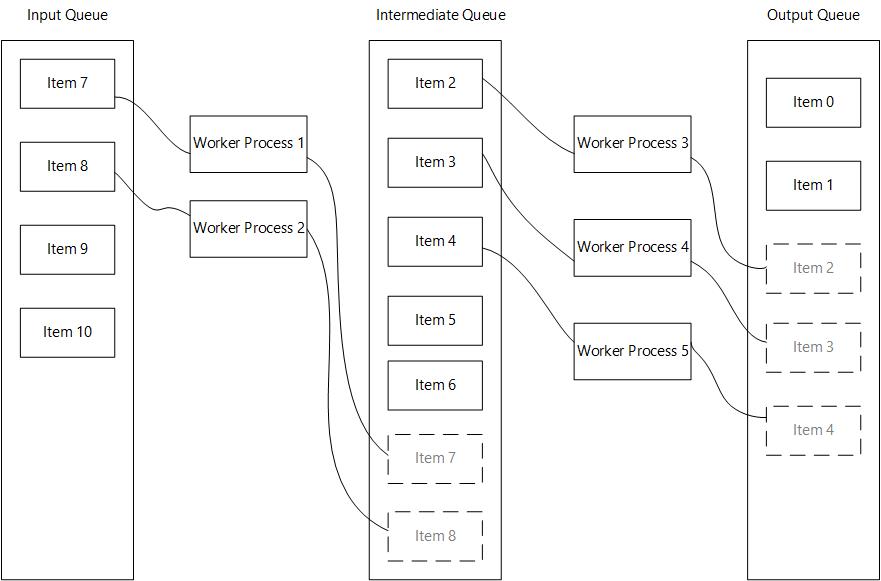
Example
Using only 1 worker function
from queue_automator import QueueAutomator
from time import sleep

# Create an instance of QueueAutomator()
automator = QueueAutomator()

# Register a worker function (if input_queue_name and output_queue_name are not provided
# they will default to 'input' and 'output' respectively). 'input' and 'output'
# are necessary  to mark the start and ending of your pipeline

@automator.register_as_worker_function(process_count=2)
def do_work(item: int) -> int:
    sleep(2)
    result = item*2
    print(f'{item} times two {result}')
    return result

if __name__ == '__main__':
    input_data = range(30)

    # Always set your input data before calling .run()
    automator.set_input_data(input_data)
    results = automator.run()
    print(results)
Using more than 1 worker function
from queue_automator import QueueAutomator
from time import sleep

automator = QueueAutomator()

@automator.register_as_worker_function(output_queue_name='square_queue', process_count=2)
def do_work(item: int) -> int:
    sleep(2)
    result = item*2
    print(f'{item} times two {result}')
    return result

@automator.register_as_worker_function(input_queue_name='square_queue', output_queue_name='cube_queue', process_count=2)
def do_work_2(item: int) -> int:
    sleep(2)
    result = item**2
    print(f'{item} squared {result}')
    return result

@automator.register_as_worker_function(input_queue_name='cube_queue', process_count=2)
def do_work_3(item: int) -> int:
    sleep(2)
    result = item**3
    print(f'{item} cubed {result}')
    return result

# Note that the first and last functions in the pipeline do not need to
# declare the input and output queue names respectively.

if __name__ == '__main__':
    input_data = range(30)

    # Always set your input data before calling .run()
    automator.set_input_data(input_data)
    results = automator.run()
    print(results)
Using the MultiprocessingMaybe interface
from queue_automator.maybe import MultiprocessMaybe


def do_work(item: int) -> int:
    sleep(2)
    result = item*2
    print(f'{item} times two {result}')
    return result


def do_work_2(item: int) -> int:
    sleep(2)
    result = item**2
    print(f'{item} squared {result}')
    return result


def do_work_3(item: int) -> int:
    sleep(2)
    result = item**3
    print(f'{item} cubed {result}')
    return result


if __name__ == '__main__':
    result = MultiprocessMaybe() \
        .insert(range(10)) \
        .then(do_work) \
        .insert(range(10, 20)) \
        .then(do_work_2) \
        .insert(range(20, 30)) \
        .maybe(do_work_3, default=0)

    print(result)
Cautions
As with anything, this is not a silver bullet that gets rid of all problems using python multiprocessing
There are some caveats when using this library:
-
Launching processes in python is an expensive operation, as it spawns a separate instance of the interpreter. The performance gains could be offset by the time it takes to spawn a process
-
Try to keep the number of processes in line with your CPU cores, spawning a ton of them could result in slower performance overall.
-
The input objects of every worker function need to be serializable or pickable. This is a limitation of python multiprocessing. If you are dealing with complex objects try to convert them to a suitable format before processing, or implement the
__reduce__,__repr__or__dict__methods in your classes. -
It is important that you try to keep your worker functions pure, which means that they should not have side effects.
-
The
.run()method should be called from your main entry point or a function that is called at your main entry point, (this is another limitation of python's multiprocessing) -
Try to optimize the number of process depending of how long a task takes, prioritize longer running tasks.
1 maintainer

Metadata
1 maintainer
Release files for queue-automator 0.1.0
For a detailed explanation of source distributions (sdists) and built distributions (wheels), please see the package formats documentation.
Source distribution (sdist)
| File | Size | Uploaded | |
|---|---|---|---|
| queue-automator-0.1.0.tar.gz | 8.5 kB | Details |
Built distribution (wheel)
| File | Interpreter | ABI | Platform | Reset |
|---|---|---|---|---|
| queue_automator-0.1.0-py3-none-any.whl | Python 3 | none | any | Details |
Total release size: 16.6 kB
Release files / queue-automator-0.1.0.tar.gz
| Download URL | queue-automator-0.1.0.tar.gz |
|---|---|
| Size | 8.5 kB |
| Tags | Source |
|
SHA-256 checksum How to use checksums |
b9b3c1704163d68703e4e6a1cb9f6fa85240b78d3eff85f489c8156b6d8faf80
|
|
BLAKE2b-256 checksum How to use checksums |
303364241f7ec23ad00128f5bd7ea7f80b14bbda6a11a778bf795b21b507007d
|
| Upload date | |
|
Uploaded using Trusted Publishing? What is trusted publishing? |
No |
| Uploaded via |
twine/4.0.1 CPython/3.9.15
|
Release files / queue_automator-0.1.0-py3-none-any.whl
| Download URL | queue_automator-0.1.0-py3-none-any.whl |
|---|---|
| Size | 8.1 kB |
| Tags | Python 3 |
|
SHA-256 checksum How to use checksums |
d528aba47897f51a5eeeb91fe84ab47839d600266cfbb1f6012edc78524e3df0
|
|
BLAKE2b-256 checksum How to use checksums |
9b730956df9260905b992c64afbbc1397bd8ac1d94d18e698e9571fae8afe466
|
| Upload date | |
|
Uploaded using Trusted Publishing? What is trusted publishing? |
No |
| Uploaded via |
twine/4.0.1 CPython/3.9.15
|














