
Quick Mail CLI
A command line interface to send mail without any hassle.
Why this tool?
Sending last minute mails using conventional tools can get annoying and tiresome. This CLI helps in such situation since it makes sending mail hassle-free and very quick. Use this tool to send mails quickly without leaving your terminal.
Installation
Install quick-mail from the Python Package Index (PyPi)
$ pip install quick-mail
Or manually from this repository.
$ git clone https://github.com/avikumar15/quick-mail-cli

* add line export PYTHONPATH=/path/to/project/quick-email-cli to ~/.bashrc *

$ cd quick-mail-cli/

* activate virtual environment *

$ pip install -r requirements.txt
$ pip install .
Check installation by running
$ quickmail --version
Usage
To use this:
$ quickmail --help
usage: quickmail [-h] [-v] {clear,init,send,template} ...

A command line interface to send mail without any hassle

positional arguments:
  {clear,init,send,template}
    clear               clear the body of message from local or even the token if
                        --justdoit argument is added
    init                initialise token and set your email id
    send                send the mail
    template            manage templates of mail body

optional arguments:
  -h, --help            show this help message and exit
  -v, --version         print current cli version
Create your OAuth client ID and select app type as Desktop App and download the credentials.json file.
Then run the init command to authenticate gmail, and generate token. This command is required to be run only once.
$ quickmail init <path/to/credentials.json>
Now you are all set. Use the send command to send mail.
$ quickmail send --help
usage: quickmail send [-h] -r RECEIVER -sub SUBJECT [-t TEMPLATE] [-b BODY]
                      [-a ATTACHMENT] [-l]

Use the send command to send mail. Body can be passed as an argument, or typed in
a nano shell. Use optional --lessgo command for sending mail without confirmation

optional arguments:
  -h, --help            show this help message and exit
  -r RECEIVER, --receiver RECEIVER
                        receiver's email address, eg. '-r "xyz@gmail.com"'
  -sub SUBJECT, --subject SUBJECT
                        email's subject, eg. '-sub "XYZ submission"'
  -t TEMPLATE, --template TEMPLATE
                        template of email body, eg. '-t="assignment_template"'
  -b BODY, --body BODY  email's body, eg. '-b "Message Body Comes Here"'
  -a ATTACHMENT, --attachment ATTACHMENT
                        email's attachment path, eg. '~/Desktop/XYZ_Endsem.pdf'
  -l, --lessgo          skip confirmation before sending mail
Body and attachments are optional arguments. Body can be either passed as an argument otherwise it can also be typed in the nano shell (Use -t argument to use a template body). Use the --lessgo (shorthand -l) to skip confirmation of mail, for quicker mail deliveries.
To clear the cli storage, use the clear command. Use --justdoit (shorthand -j) to even remove the credential and token files from project directory, this extra argument would allow you to change your primary email address.
$ quickmail clear --help
usage: quickmail clear [-h] [-j]

Use the clear command to clear all email body that are saved in your home
directories. Additionally, pass --justdoit to remove the credential files as well

optional arguments:
  -h, --help      show this help message and exit
  -j, --justdoit  clear storage including the credentials and token
To manage templates use the template command.
$ quickmail template --help
usage: quickmail template [-h] {add,listall,edit} ...

manage mail templates

positional arguments:
  {add,listall,edit}
    add               add a new template
    listall           list all templates
    edit              edit a particular template

optional arguments:
  -h, --help          show this help message and exit
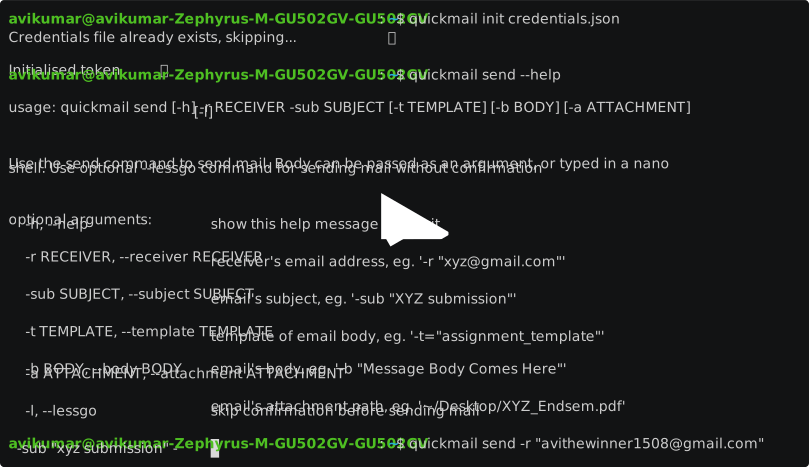
Following is a recording of the terminal session which records the usage of quickmail from init command till send command.
Improvements and Bugs
Found any bugs? Or have any suggestions, feel free to open an issue.
1 maintainer

Release files for quick-mail 1.0.4
For a detailed explanation of source distributions (sdists) and built distributions (wheels), please see the package formats documentation.
Source distribution (sdist)
| File | Size | Uploaded | |
|---|---|---|---|
| quick-mail-1.0.4.tar.gz | 10.0 kB | Details |
Built distribution (wheel)
| File | Interpreter | ABI | Platform | Reset |
|---|---|---|---|---|
| quick_mail-1.0.4-py3-none-any.whl | Python 3 | none | any | Details |
Total release size: 22.9 kB
Release files / quick-mail-1.0.4.tar.gz
| Download URL | quick-mail-1.0.4.tar.gz |
|---|---|
| Size | 10.0 kB |
| Tags | Source |
|
SHA-256 checksum How to use checksums |
753bf1c2367aa21fc87f34425e032b1bc24597020c0dbe404ed51e93371f7257
|
|
BLAKE2b-256 checksum How to use checksums |
1bde64e6b20fe972d5ae176a547b4596e28d239cc459879d696adeed688967d0
|
| Upload date | |
|
Uploaded using Trusted Publishing? What is trusted publishing? |
No |
| Uploaded via |
twine/3.3.0 pkginfo/1.7.0 requests/2.25.0 setuptools/52.0.0 requests-toolbelt/0.9.1 tqdm/4.48.0 CPython/3.8.5
|
Release files / quick_mail-1.0.4-py3-none-any.whl
| Download URL | quick_mail-1.0.4-py3-none-any.whl |
|---|---|
| Size | 12.9 kB |
| Tags | Python 3 |
|
SHA-256 checksum How to use checksums |
f3ce37c2981551f4bf676bdee75b30edfed5a085916bed56420063cd01c051e8
|
|
BLAKE2b-256 checksum How to use checksums |
71456badf61a46d8ad5c8fddc613d434142ad47045c9da944956ddb23fddc3e0
|
| Upload date | |
|
Uploaded using Trusted Publishing? What is trusted publishing? |
No |
| Uploaded via |
twine/3.3.0 pkginfo/1.7.0 requests/2.25.0 setuptools/52.0.0 requests-toolbelt/0.9.1 tqdm/4.48.0 CPython/3.8.5
|














