
Reads to Genes (r2g) GUI


Introduction
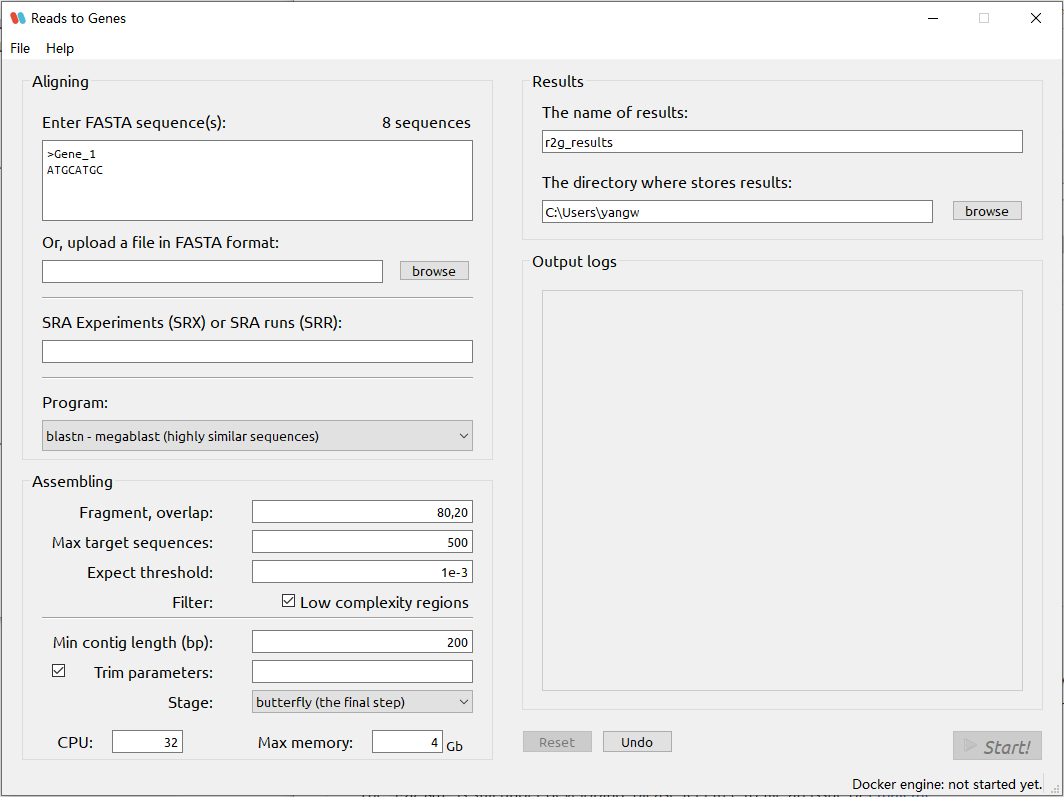
This is the GUI wrapper for Reads to Genes, or r2g, which is a homology-based, computationally lightweight pipeline for discovering genes in the absence of an assembly. The r2g core is hosted on https://github.com/yangwu91/r2g.
The r2g GUI is still under developing, please feel free to file an issue or email me.
Implementation
Install Docker
Please follow the instruction here to download and install Docker based on your operating system before running the r2g GUI. The Docker software is compatible with most common operating systems including Linux, macOS and Windows.
Install r2g GUI
You can choose one of the following methods to install the r2g GUI:
-
Download zipped pre-built binary files (Python 3 environment is NOT required)
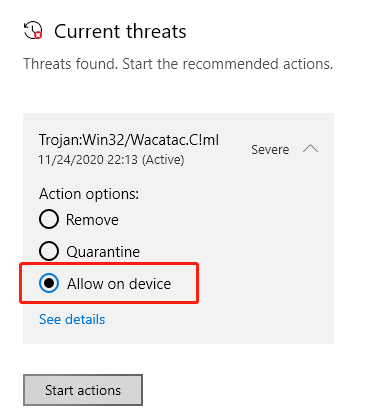
Operating System Size (MB) MD5 Download link Windows 38.1 78f3428a1f3305015f17255ef9536b46 r2g_gui-0.1.1-Windows.zip macOS (Intel Chip) 30.0 1eb540131143e5720713229408a33094 r2g_gui-0.1.1-macOS.zip ⚠️ Please note that Windows Defender will report it as
Trojan:Win32/Wacatac.B!ml, which is false positive. Add ther2g.exeto the excluding list of Windows Defender for further use. Please check out the scanning resuls on https://virustotal.com. Or maybe you can try the other method if the Python 3 environment has been installed on your computer.⚠️ Please note that the executable binary has not been tested on the Apple M1 Chip.
-
Install by PyPI (Python 3 environment is required)
If Python 3 and the
piputility has been installed on your computer, ther2g GUIcan be installed by the command as follows:pip install r2g_gui
Usage
-
Please run the Docker (i.e. Docker Desktop on Windows/macOS or Docker Deamon on Linux) before start the r2g job.
-
Start the
r2g GUI. At the first time, the r2g GUI will pull the latest image of the r2g Docker, which should take a while depending on your network quality.-
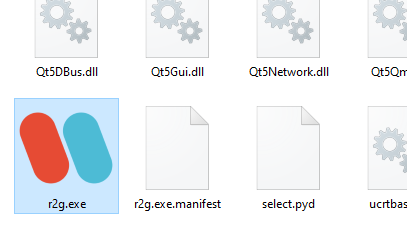
Windows
Unzip the
r2g_gui-*.*.*-Windows.zip, and then double clickr2g.exe. -
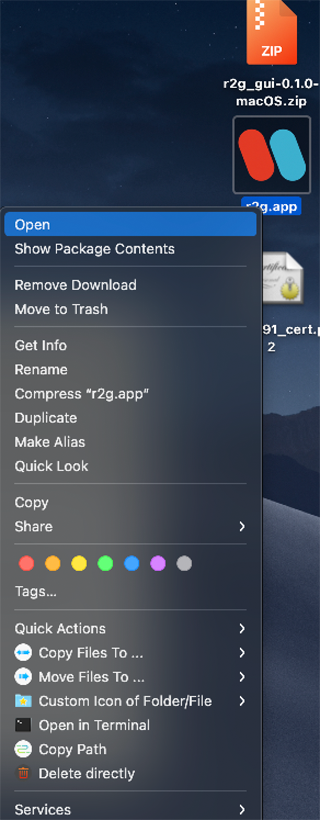
macOS
Unzip the
r2g_gui-*.*.*-macOS.zip. HoldControland clickr2g.app, or right clickr2g.app, then clickopen. -
Other systems with Python 3 environment (installed by PyPI)
Simply typing
r2g.gui.pyin the terminal should call ther2g GUI.
-
-
Fill in the parameters and hit the
Start!button to submit the job. In addition, here is an example configuration. To use it, please clickFile->Import parameters...and then select it, the GUI wrapper will load pre-configured parameters automatically. Hit theStart!button and enjoy!
Tweak parameters
The r2g GUI is the GUI wrapper for the r2g, please check out the detailed usage of r2g to tweak parameters.
1 maintainer

Metadata
1 maintainer
Release files for r2g-gui 0.1.1
For a detailed explanation of source distributions (sdists) and built distributions (wheels), please see the package formats documentation.
Source distribution (sdist)
| File | Size | Uploaded | Provenance | Actions |
|---|---|---|---|---|
| r2g_gui-0.1.1.tar.gz | 520.4 kB | Without provenance | Details for r2g_gui-0.1.1.tar.gz |
Built distribution (wheel)
| File | Interpreter | ABI | Platform | Actions Reset |
|---|---|---|---|---|
| r2g_gui-0.1.1-py3-none-any.whl | Python 3 | none | any | Details for r2g_gui-0.1.1-py3-none-any.whl |
Total release size: 1.0 MB
Release files / r2g_gui-0.1.1.tar.gz
| Download URL | r2g_gui-0.1.1.tar.gz |
|---|---|
| Size | 520.4 kB |
| Tags | Source |
|
SHA-256 checksum How to use checksums |
f128afd23c60fc269ba1d712bd1181688ac9e5319353721faec31736a05de0b1
|
|
BLAKE2b-256 checksum How to use checksums |
dd5d38a7061d0ad2abb19e7e6579f082771e39cf5f58b3196ffa9838d270678e
|
| Upload date | |
|
Uploaded using Trusted Publishing? What is trusted publishing? |
No |
| Uploaded via |
twine/3.4.1 importlib_metadata/3.7.3 pkginfo/1.7.0 requests/2.25.1 requests-toolbelt/0.9.1 tqdm/4.59.0 CPython/3.8.8
|
Release files / r2g_gui-0.1.1-py3-none-any.whl
| Download URL | r2g_gui-0.1.1-py3-none-any.whl |
|---|---|
| Size | 521.1 kB |
| Tags | Python 3 |
|
SHA-256 checksum How to use checksums |
c070e6fe671bcb5b3610c769cdfd5b81f27177619446d887df77aff266e466ba
|
|
BLAKE2b-256 checksum How to use checksums |
cc45a15a07d9020e3de2bd7b7b3a146f60412fd8de2fc4510fedfe05ad02f5ad
|
| Upload date | |
|
Uploaded using Trusted Publishing? What is trusted publishing? |
No |
| Uploaded via |
twine/3.4.1 importlib_metadata/3.7.3 pkginfo/1.7.0 requests/2.25.1 requests-toolbelt/0.9.1 tqdm/4.59.0 CPython/3.8.8
|
Security for r2g-gui 0.1.1
Provenance
Provenance describes where a file came from. On PyPI, provenance is shared via attestations, which provide a verifiable record of the build or publishing details. View details, limitations and caveats.
No provenance found
None of the files in this release were uploaded with provenance metadata.
A note on package security
PyPI is a repository for distributing packages, not a service for auditing them. While third-party security researchers and our staff do their best to detect and remove malicious packages, PyPI cannot guarantee the quality, security or suitability of any given package.
To learn more about protecting yourself from malicious actors, visit our package security documentation.














