
Rafnix Guzmán - Personal Card





👋 Introduction
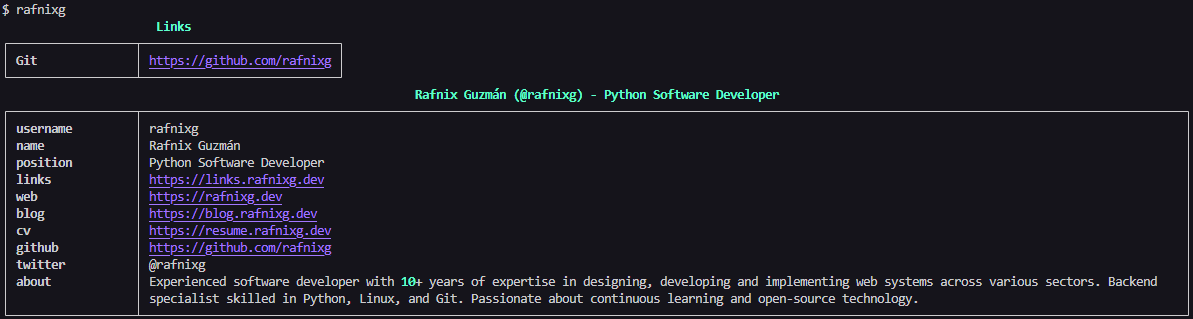
Welcome to Rafnix Guzmán - Personal Card, a Python library that provides a personal card, blog post manager, and resume tools for developers. This library is designed to showcase your personal information, blog posts, and resume in a console-friendly format.
Visit my personal website: rafnixg.dev
🚀 Features
- Personal Card: Display your personal information in a styled console table.
- Blog Posts: Fetch and display your latest blog posts from RSS.
- Resume Tools: Retrieve and display your resume details, including work experience, education, skills, and more.
- Customizable Links: Manage and display your personal links.
🛠 Installation
Install the library using pip:
pip install rafnixg
📖 Usage
Display Personal Card
Run the following command to display your personal card:
rafnixg
Blog Posts
Fetch and display your latest blog posts:
from rafnixg import BlogPosts

blog_posts = BlogPosts()
posts = blog_posts.get_posts()
for post in posts:
    print(post.title, post.link)
Resume Tools
Retrieve and display your resume details:
from rafnixg import Resume

resume = Resume()
resume_data = resume.get_resume()
print(resume_data)
📚 Documentation
Personal Card
The RafnixG class provides a method to display your personal card in the console. It includes attributes like your name, position, and links to your social profiles.
Blog Posts
The BlogPosts class fetches your latest blog posts from RSS. Posts include the title, summary, link, and publication date.
Resume
The Resume class retrieves your resume details from a JSON file hosted online. It includes sections like:
- Basics (name, email, profiles)
- Work experience
- Education
- Skills
- Languages
- References
🧪 Development
To contribute or run the project locally, follow these steps:
-
Clone the repository:
git clone https://github.com/rafnixg/rafnixg-lib.git
cd rafnixg-lib
-
Install dependencies:
pip install -r requirements.txt
-
Run the main script:
python -m rafnixg
-
Run tests:
pytest
📦 Deployment
This library is automatically published to PyPI using GitHub Actions. Every new release triggers a build and deployment workflow.
📄 License
This project is licensed under the MIT License.
🌟 Acknowledgments
- Rich Library for console styling.
- RSS for blog post integration.
- Requests Library for HTTP requests.
🤝 Contributing
Contributions are welcome! Feel free to open issues or submit pull requests to improve this project.
📬 Contact
For any inquiries, reach out to me via:
- Website: rafnixg.dev
- GitHub: rafnixg
- Twitter: @rafnixg
1 maintainer

Metadata
1 maintainer
Release files for rafnixg 1.9.2
For a detailed explanation of source distributions (sdists) and built distributions (wheels), please see the package formats documentation.
Source distribution (sdist)
| File | Size | Uploaded | Provenance | Actions |
|---|---|---|---|---|
| rafnixg-1.9.2.tar.gz | 10.9 kB | Without provenance | Details for rafnixg-1.9.2.tar.gz |
Built distribution (wheel)
| File | Interpreter | ABI | Platform | Actions Reset |
|---|---|---|---|---|
| rafnixg-1.9.2-py3-none-any.whl | Python 3 | none | any | Details for rafnixg-1.9.2-py3-none-any.whl |
Total release size: 21.5 kB
Release files / rafnixg-1.9.2.tar.gz
| Download URL | rafnixg-1.9.2.tar.gz |
|---|---|
| Size | 10.9 kB |
| Tags | Source |
|
SHA-256 checksum How to use checksums |
2a16fda7bde6dc0edc8788540ac6cd6d932fbaba560b0867edea944836349854
|
|
BLAKE2b-256 checksum How to use checksums |
029c3724298af64b4a828f82cce0b51e54d4d6d87324e639d7975015b7303896
|
| Upload date | |
|
Uploaded using Trusted Publishing? What is trusted publishing? |
No |
| Uploaded via |
twine/6.2.0 CPython/3.9.25
|
Release files / rafnixg-1.9.2-py3-none-any.whl
| Download URL | rafnixg-1.9.2-py3-none-any.whl |
|---|---|
| Size | 10.6 kB |
| Tags | Python 3 |
|
SHA-256 checksum How to use checksums |
d6180f66b180b6c49c210f3d8079dbb6ac75da36aa4b5fd8fc13d9cbc1cb4fdb
|
|
BLAKE2b-256 checksum How to use checksums |
b032eea0100f8b711262babb85b8bd83987242de8c8c5905c822f390b224eaf3
|
| Upload date | |
|
Uploaded using Trusted Publishing? What is trusted publishing? |
No |
| Uploaded via |
twine/6.2.0 CPython/3.9.25
|
Security for rafnixg 1.9.2
Provenance
Provenance describes where a file came from. On PyPI, provenance is shared via attestations, which provide a verifiable record of the build or publishing details. View details, limitations and caveats.
No provenance found
None of the files in this release were uploaded with provenance metadata.
A note on package security
PyPI is a repository for distributing packages, not a service for auditing them. While third-party security researchers and our staff do their best to detect and remove malicious packages, PyPI cannot guarantee the quality, security or suitability of any given package.
To learn more about protecting yourself from malicious actors, visit our package security documentation.














