
Real & Artificial Intelligence for Neuroscience – Simple Tracker for Object Recognition Memory

Project description
🌧️ RAINSTORM 🌧️
Real & Artificial Intelligence for Neuroscience – Simple Tracker for Object Recognition Memory
A complete toolkit for analyzing rodent exploratory behavior in object recognition tasks.
RAINSTORM is a comprehensive Python toolkit for analyzing rodent exploratory behavior 🐭. Transform pose-estimation data (e.g., from DeepLabCut or SLEAP) into meaningful behavioral insights through an intuitive workflow that spans from manual annotation to AI-powered automation.
Table of Contents 📋
Features ✨
- 🎯 Frame-by-Frame Behavioral Labeling: A versatile tool for precise manual annotation, it generates training data for your AI models.
- 🔧 Pre & Post-DLC Data Processing: Align video points, clean tracking glitches, and interpolate data for smooth and reliable analysis.
- 📐 Geometric Analysis: Automatically identify object exploration using distance and angle metrics.
- 🧊 Immobility Detection: Label freezing behavior based on motion, a key indicator in memory studies.
- ⚙️ AI-Powered Automatic Labeling: Train and deploy neural networks (including LSTMs) to automatically detect complex exploration patterns.
- 📊 Visual Label Comparison: Easily compare manual, geometric, and AI-generated labels with intuitive visualizations.
Installation 💾
Prerequisites
First, ensure you have the following software installed on your system.
- Miniconda (or Anaconda)
- Visual Studio Code
- Git
[!TIP] First Time Setup: During Miniconda installation, select "Add Conda to PATH" for easier terminal access. Restart your computer after installation to ensure all components are properly configured.
Setup Steps
-
Clone the Repository
Open a terminal (or Miniconda Prompt) and run the following command.
git clone https://github.com/sdhers/rainstorm.git
This will create a
rainstormfolder in your current directory. -
Set Up the Conda Environment
Navigate into the cloned directory and create the dedicated environment from the provided file:
cd rainstorm
conda env create -f rainstorm_venv.yml
Once the environment is ready, you can activate it by running
conda activate rainstorm. -
Launch VS Code & Select Kernel
Launch VS Code from the terminal:
code .In VS Code, ensure the Python extension is installed:
- Go to the Extensions view (
Ctrl+Shift+XorCmd+Shift+Xon macOS). - Search for "Python" and install the official extension from Microsoft.
Open a Jupyter notebook (e.g.,
2a-Prepare_positions.ipynb).- When prompted to select a kernel, choose the
rainstormConda environment from the list ofPython Environments.
- Go to the Extensions view (
You are all set! You can now run the notebooks to explore the RAINSTORM workflow.
Usage 💻
RAINSTORM provides a comprehensive workflow through 7 interactive Jupyter notebooks, plus standalone GUI tools for video processing and behavioral labeling.
Transform your data from raw videos to publication-ready results through our intuitive 7-step workflow:
| Step | Notebook | Purpose | Output |
|---|---|---|---|
| 0 | 0-Video_handling.ipynb |
🎥 Prepare videos | Trimmed, cropped, aligned videos |
| 1 | 1-Behavioral_labeler.ipynb |
✍️ Manual annotation | Frame-by-frame behavioral labels |
| 2a | 2a-Prepare_positions.ipynb |
🧹 Clean tracking data | Filtered, smoothed position files |
| 2b | 2b-Geometric_analysis.ipynb |
📐 Geometric detection | Rule-based behavioral labels |
| 3a | 3a-Create_models.ipynb |
🤖 Train AI models | Custom neural networks |
| 3b | 3b-Automatic_analysis.ipynb |
🧠 AI-powered labeling | Automated behavioral detection |
| 4 | 4-Seize_labels.ipynb |
📊 Results & visualization | Personalized plots & analyses |
Video Handling 🎥
We offer a quick and easy way to prepare videos for pose estimation and behavioral analysis.
Open the file 0-Video_handling.ipynb
- Run the Video Handling app
This app allows you to:
- Trim the video to the desired length.
- Crop the video to the desired size.
- Align videos based on two manually selected points (very useful when batch processing videos with ROIs).
- Run the Draw ROIs app
This app allows you to:
- Draw ROIs and points on the video.
- Select a distance for scaling.
[!TIP] Running DLC on Colab: Use our DeepLabCut pretrained model on Google Colab to process your aligned videos:
- Copy this Google Drive Folder in your own Google Drive.
- Add your own data to the "videos" folder.
- Open the Colab file and follow the instructions to run the model on your data.
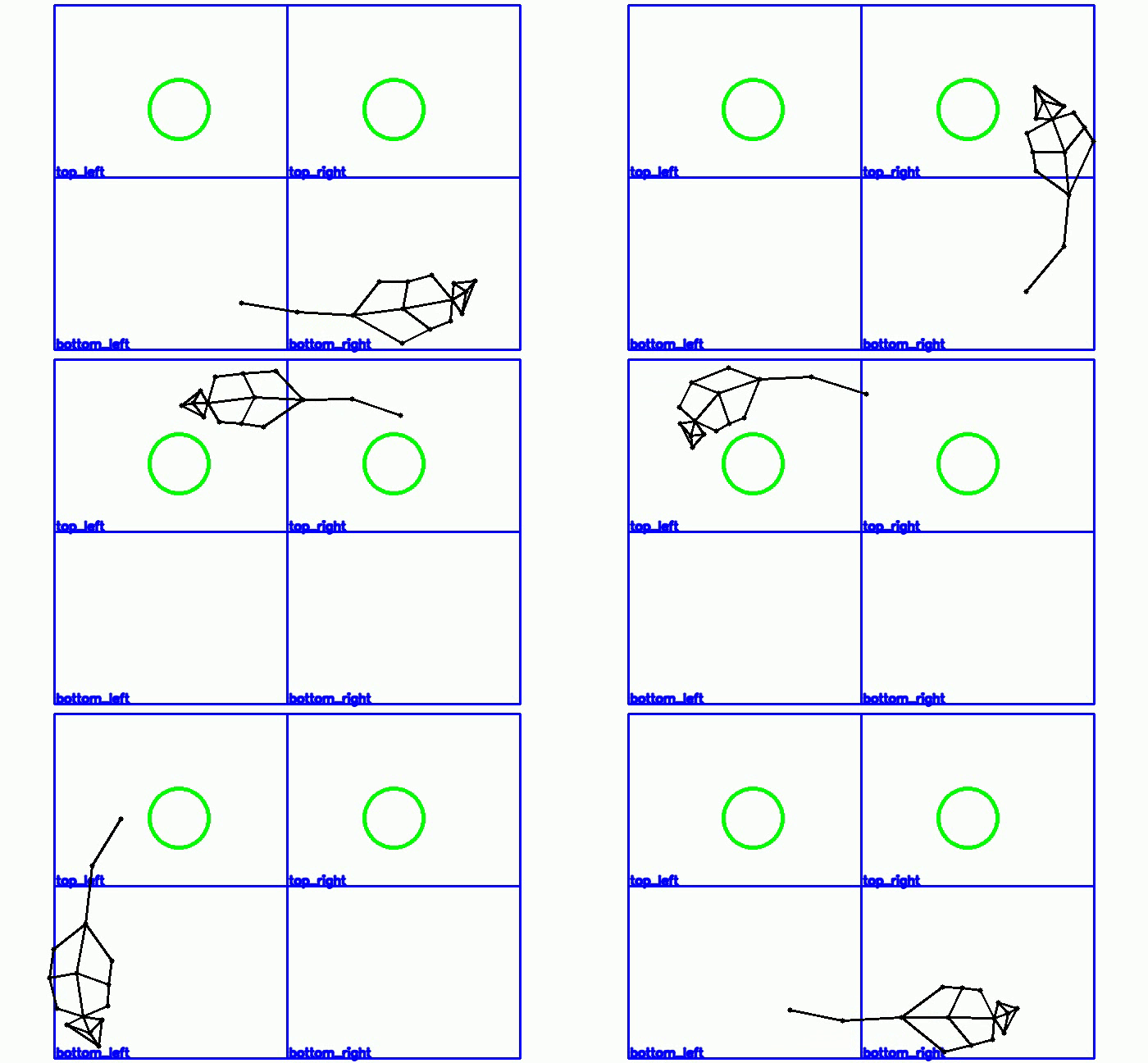
RAINSTORM Behavioral Labeler ✍️
For precise, frame-by-frame annotation, use the RAINSTORM Behavioral Labeler.
Open and run the file 1-Behavioral_labeler.ipynb
-
Select the video you want to label.
-
(Optional) Load a previous labeling
.csvfile.- This allows you to pick up where you left off.
-
Select the behaviors to label and their keys.
- Enter the behaviors you want to score (e.g.,
exp_1,exp_2,freezing,grooming, etc...).
- Enter the behaviors you want to score (e.g.,
[!WARNING] Keys should be unique, single characters, and different from the fixed control keys: (Quit:
q, Zoom In:+, Zoom Out:-, Timeline toogle:t)
- Start Labeling! After pressing 'Start Labeling', the video will load, and you can begin annotating frame by frame using the keys you defined.
The RAINSTORM Pipeline 🔬
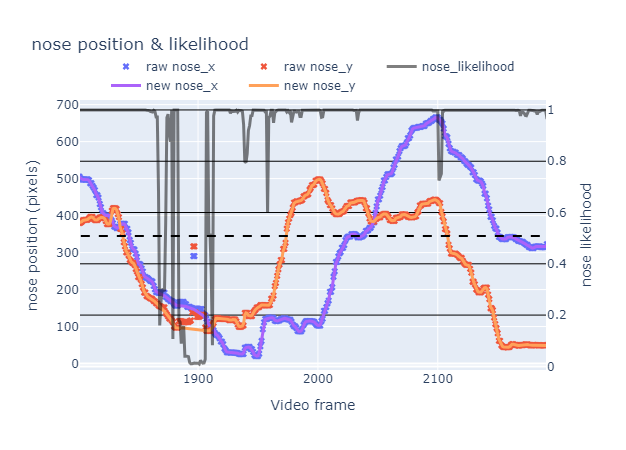
2a-Prepare_positions.ipynb
🧹 Process and clean bodypart position data.
- Filters out frames with low tracking likelihood from DeepLabCut.
- Interpolates and smooths data to correct glitches.
- Output: Clean
.csvfiles ready for analysis.
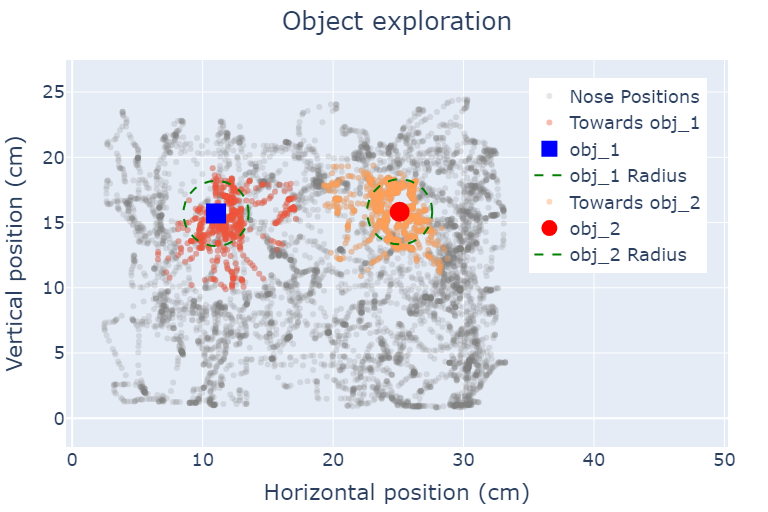
2b-Geometric_analysis.ipynb
📐 Perform geometric labeling of exploration and freezing.
- Applies a simple geometric rule for exploration:
- Distance to object <
2.5 cm - Angle towards object <
45°
- Distance to object <
- Identifies freezing behavior based on lack of movement.
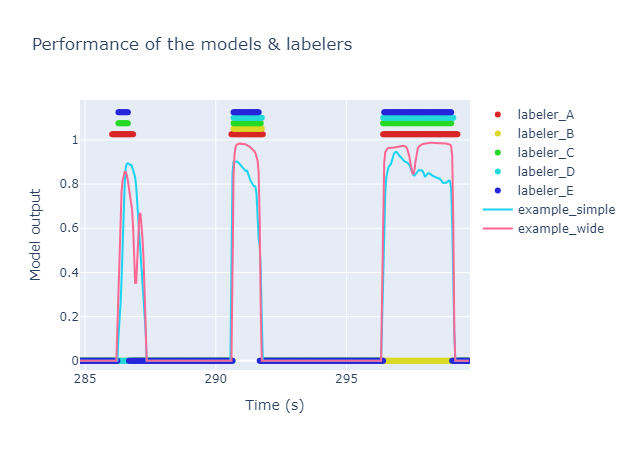
3a-Create_Models.ipynb
⚙️ Train AI models for automatic behavioral labeling.
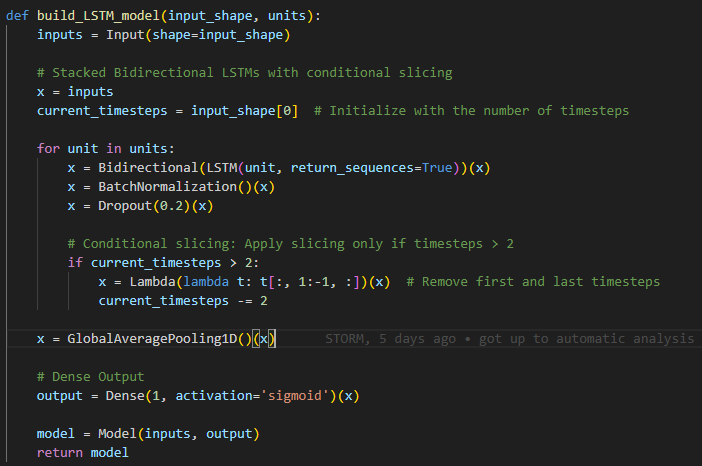
- Uses your manually labeled data to train TensorFlow models.
- Includes an LSTM network (a wide model) that considers temporal sequences for higher accuracy.
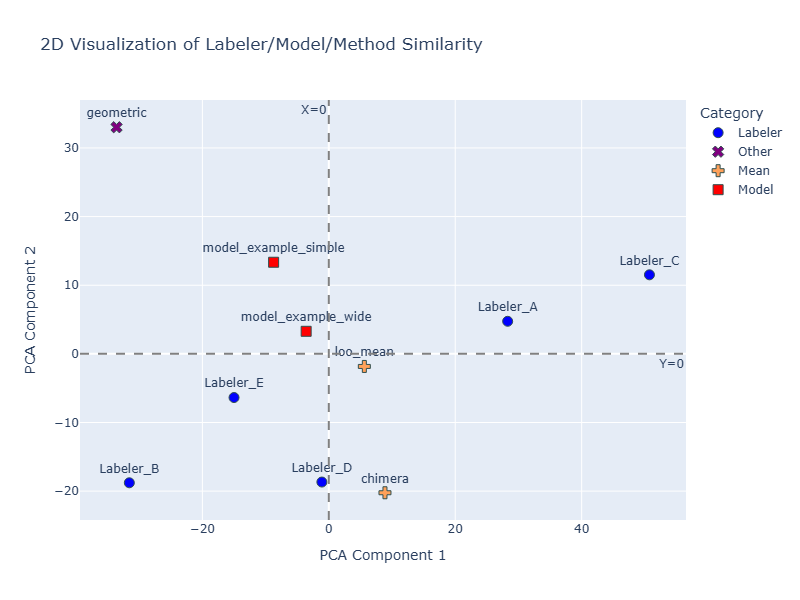
- Evaluates model performance against human labelers using Principal Components Analysis (PCA).
3b-Automatic_analysis.ipynb
🧠 Automate labeling with your trained AI model.
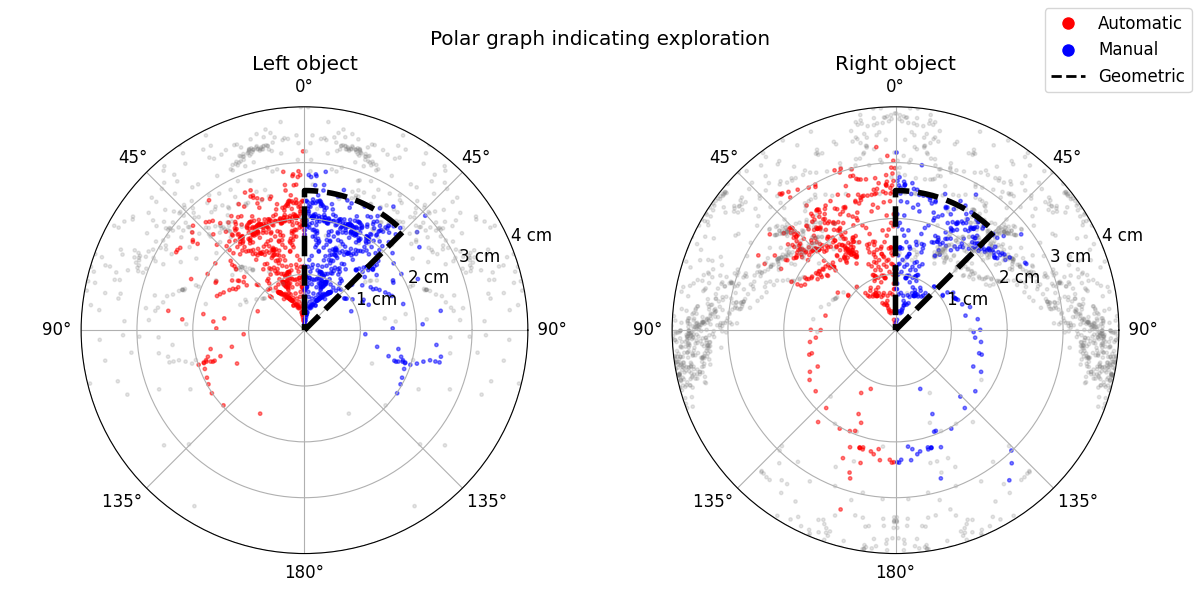
- Applies your best-performing model to label unseen datasets.
- Generates comparative visualizations (like polar graphs) to contrast manual, geometric, and AI-driven labels.
4-Seize_Labels.ipynb
📊 Extract, summarize, and visualize your final data.
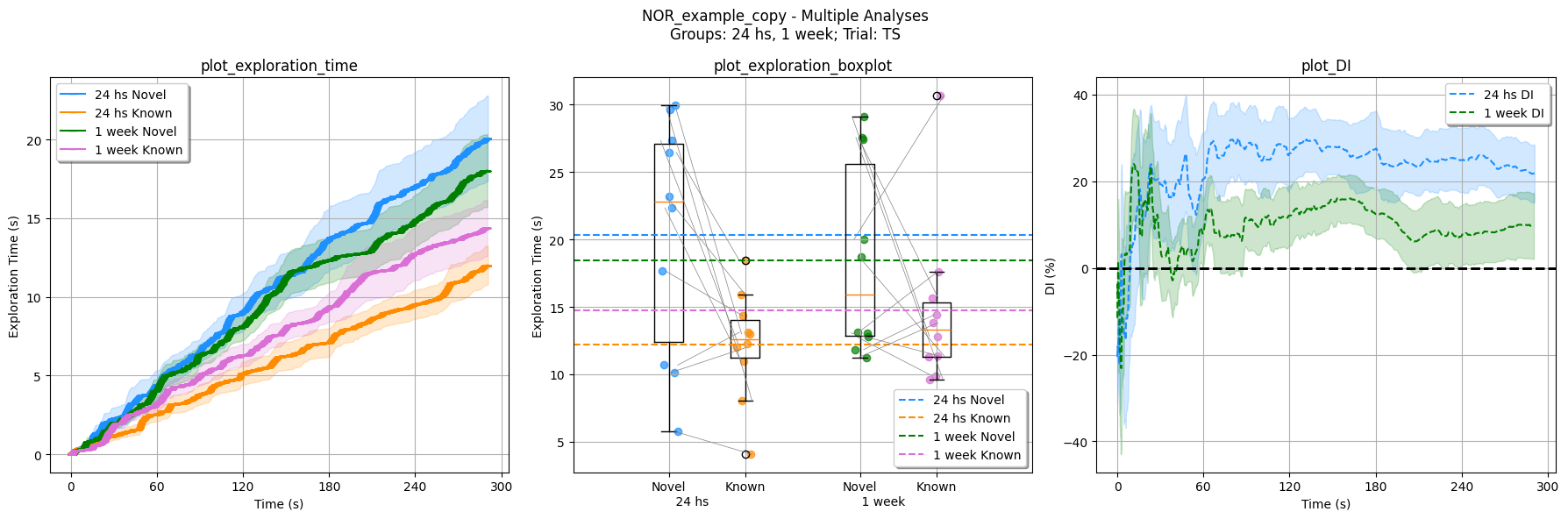
- Calculates key metrics like Discrimination Index.
- Generates publication-ready plots to compare behavior across different experimental groups and sessions.
Citation 📜
If you use RAINSTORM in your research, please cite our work:
D'hers, S., et al. (2025). RAINSTORM: Automated Analysis of Mouse Exploratory Behavior using Artificial Neural Networks. Current Protocols. https://doi.org/10.1002/cpz1.70171
All video recordings were obtained within the Molecular Neurobiology Lab at IFIBYNE (UBA - CONICET).
Contributing 🤝
We welcome contributions from the community! Here's how you can help:
🐛 Report Issues
- Found a bug? Open an issue
- Include your Python version, OS, and a minimal example
💡 Suggest Features
- Have an idea? Start a discussion
- Describe your use case and proposed solution
🔧 Submit Code
- Fork the repository and create a feature branch
- Follow our coding standards and add tests
- Submit a pull request with a clear description
📚 Improve Documentation
- Fix typos, clarify instructions, add examples
- Documentation improvements are always appreciated!
Contact 📫
For research collaborations and academic inquiries:
- Email: sdhers@fbmc.fcen.uba.ar
- Institution: Facultad de Ciencias Exactas y Naturales, Universidad de Buenos Aires
🌟 Stay Updated
- ⭐ Star this repository to stay notified of updates
- 👀 Watch for new releases and features
- 🐦 Follow development progress and announcements
Thanks for exploring RAINSTORM!
Release history Release notifications | RSS feed


Download files
Download the file for your platform. If you're not sure which to choose, learn more about installing packages.
Source Distribution
Built Distribution
Filter files by name, interpreter, ABI, and platform.
If you're not sure about the file name format, learn more about wheel file names.
Copy a direct link to the current filters
File details
Details for the file rainstorm-1.0.12.tar.gz.
File metadata
- Download URL: rainstorm-1.0.12.tar.gz
- Upload date:
- Size: 220.2 kB
- Tags: Source
- Uploaded using Trusted Publishing? No
- Uploaded via: twine/6.1.0 CPython/3.9.21
File hashes
| Algorithm | Hash digest | |
|---|---|---|
| SHA256 |
83cf7224b953e469d8051e2c6bc6e9ad59436253d5663bc4f332c561d612f016
|
|
| MD5 |
327a8f1a982ac3902b8c0269f390086b
|
|
| BLAKE2b-256 |
c3bec886ce678695dc0cc04f1176c299868ec9c5d271298f1d13f8fc73031c17
|
File details
Details for the file rainstorm-1.0.12-py3-none-any.whl.
File metadata
- Download URL: rainstorm-1.0.12-py3-none-any.whl
- Upload date:
- Size: 267.1 kB
- Tags: Python 3
- Uploaded using Trusted Publishing? No
- Uploaded via: twine/6.1.0 CPython/3.9.21
File hashes
| Algorithm | Hash digest | |
|---|---|---|
| SHA256 |
abf4708b598839cd414ac859f116c906451674cc2a7b618dff89dd28bb37d1e4
|
|
| MD5 |
bd6ff75fa30f368dedd8f74a26ec8654
|
|
| BLAKE2b-256 |
7fbf6919728d43c0923ab5b639d44d331547eec307f146ecc0ac4a945fd3e5b1
|






