

Please see the project website for more information.
Python Interface for GPIO Circuits
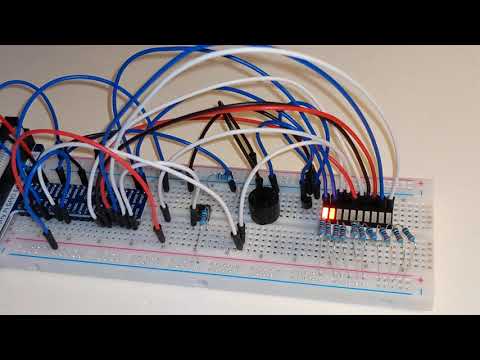
This package provides two related capabilities. First, it provides a high-level, event-driven Python interface for GPIO circuits running on the Raspberry Pi. Sensors, motors, LEDs, switches, and many other components are covered. An example is shown below (click to watch; Python code here):
Remote Control of GPIO Circuits via REST/HTML/JavaScript
Second, this package enables remote control of GPIO circuits via REST APIs invoked from HTML/JavaScript front-ends. Want to control your circuit remotely from your phone? Look no further. This package auto-generates HTML/JavaScript for GPIO circuits based on Material Design for Bootstrap. These HTML/JavaScript elements can be embedded in full web pages for remote control of the circuit. The remote control screen for the Freenove Smart Car is shown below:

The smart car is built from the same components (sensors, motors, LEDs, etc.) listed above, making development quite straightforward. As another example, consider the 3D-printed robotic arm that I designed for the car.
Please see the project website for more information.
Bumping, Tagging, and Releasing Versions with Poetry
We follow semantic versioning and Python Packaging specifications when bumping and releasing.
Prerelease
Prereleases are useful for testing changes prior to an official release. These releases include alpha (a), beta (b),
and release candidate (rc) versions, which are successively mature release phases on the path to an official release.
Bump the minor prerelease (e.g., 0.2.0 → 0.3.0a0):
OLD_VERSION=$(poetry version --short)
poetry version preminor
VERSION=$(poetry version --short)
git commit -a -m "Bump minor prerelease:  ${OLD_VERSION} → ${VERSION}"
git push
Bump the prerelease number within the current prerelease phase (e.g., 0.1.0a0 → 0.1.0a1):
OLD_VERSION=$(poetry version --short)
poetry version prerelease
VERSION=$(poetry version --short)
git commit -a -m "Bump prerelease number:  ${OLD_VERSION} → ${VERSION}"
git push
Bump the prerelease phase (e.g., 0.1.0a1 → 0.1.0b0):
OLD_VERSION=$(poetry version --short)
poetry version prerelease --next-phase
VERSION=$(poetry version --short)
git commit -a -m "Bump prerelease phase:  ${OLD_VERSION} → ${VERSION}"
git push
The prerelease phases progress as alpha (a), beta (b), and release candidate (rc), each time resetting to a
prerelease number of 0. After rc, the prerelease suffix (e.g., rc3) is stripped, leaving the
major.minor.patch release version.
Patch
A patch release fixes one or more issues in a previous release.
Bump the patch version (e.g., 0.1.0b1 → 0.1.1):
OLD_VERSION=$(poetry version --short)
poetry version patch
VERSION=$(poetry version --short)
git commit -a -m "Bump patch:  ${OLD_VERSION} → ${VERSION}"
git push
Minor
A minor release adds functionality in a backwards compatible fashion.
Bump the minor version (e.g., 0.1.0b1 → 0.1.0):
OLD_VERSION=$(poetry version --short)
poetry version minor
VERSION=$(poetry version --short)
git commit -a -m "Bump minor:  ${OLD_VERSION} → ${VERSION}"
git push
Major
A major release adds functionality in a backwards incompatible fashion.
Bump the major version (e.g., 0.1.0a0 → 2.0.0):
OLD_VERSION=$(poetry version --short)
poetry version major
VERSION=$(poetry version --short)
git commit -a -m "Bump major:  ${OLD_VERSION} → ${VERSION}"
git push
Tagging
Tagging the current version enables the publication of a new release to PyPI via GitHub workflow. Tag the current
version (e.g., v2.0.0):
VERSION=$(poetry version --short)
git tag -a -m "version ${VERSION}" "v${VERSION}"
git push --follow-tags
Then create a new release from the tag. Doing this will trigger the publication workflow to run, which builds a new release and uploads it to PyPI.
1 maintainer

Release files for raspberry-py 0.7.0
For a detailed explanation of source distributions (sdists) and built distributions (wheels), please see the package formats documentation.
Source distribution (sdist)
| File | Size | Uploaded | |
|---|---|---|---|
| raspberry_py-0.7.0.tar.gz | 1.4 MB | Details |
Built distribution (wheel)
| File | Interpreter | ABI | Platform | Reset |
|---|---|---|---|---|
| raspberry_py-0.7.0-py3-none-any.whl | Python 3 | none | any | Details |
Total release size: 3.0 MB
Release files / raspberry_py-0.7.0.tar.gz
| Download URL | raspberry_py-0.7.0.tar.gz |
|---|---|
| Size | 1.4 MB |
| Tags | Source |
|
SHA-256 checksum How to use checksums |
cb39216c290ca09d5025733c75cd9c71d117e18793fbfd6b795861804316f459
|
|
BLAKE2b-256 checksum How to use checksums |
ecd6be35c067601fd3a688b8ba89f9ae177a6d5c48ce1117379e20bc24fe736e
|
| Upload date | |
|
Uploaded using Trusted Publishing? What is trusted publishing? |
No |
| Uploaded via |
poetry/2.4.1 CPython/3.11.8 Linux/6.17.0-1018-azure
|
Release files / raspberry_py-0.7.0-py3-none-any.whl
| Download URL | raspberry_py-0.7.0-py3-none-any.whl |
|---|---|
| Size | 1.6 MB |
| Tags | Python 3 |
|
SHA-256 checksum How to use checksums |
c148e8a69e94ccb689c8cc8b886667d8df2ea376b7fc72cc60d4fbf762d5e896
|
|
BLAKE2b-256 checksum How to use checksums |
bf4dca2f755277d7e4acee53e51757eca8f7cd4b4acdfbec0ae586250ec3031c
|
| Upload date | |
|
Uploaded using Trusted Publishing? What is trusted publishing? |
No |
| Uploaded via |
poetry/2.4.1 CPython/3.11.8 Linux/6.17.0-1018-azure
|














