






Raster Vision is an open source Python library and framework for building computer vision models on satellite, aerial, and other large imagery sets (including oblique drone imagery).
It has built-in support for chip classification, object detection, and semantic segmentation with backends using PyTorch.

As a library, Raster Vision provides a full suite of utilities for dealing with all aspects of a geospatial deep learning workflow: reading geo-referenced data, training models, making predictions, and writing out predictions in geo-referenced formats.
As a low-code framework, Raster Vision allows users (who don't need to be experts in deep learning!) to quickly and repeatably configure experiments that execute a machine learning pipeline including: analyzing training data, creating training chips, training models, creating predictions, evaluating models, and bundling the model files and configuration for easy deployment.
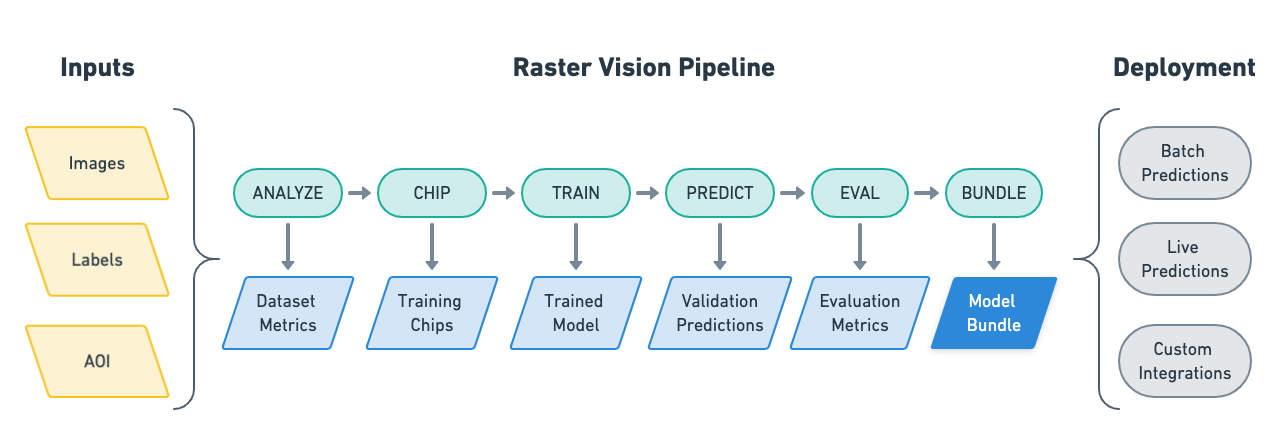
Raster Vision also has built-in support for running experiments in the cloud using AWS Batch as well as AWS Sagemaker.
See the documentation for more details.
Installation
For more details, see the Setup documentation.
Install via pip
You can install Raster Vision directly via pip.
pip install rastervision
Use Pre-built Docker Image
Alternatively, you may use a Docker image. Docker images are published to quay.io (see the tags tab).
We publish a new tag per merge into master, which is tagged with the first 7 characters of the commit hash. To use the latest version, pull the latest suffix, e.g. raster-vision:pytorch-latest. Git tags are also published, with the Github tag name as the Docker tag suffix.
Build Docker Image
You can also build a Docker image from scratch yourself. After cloning this repo, run docker/build, and run then the container using docker/run.
Usage Examples and Tutorials
Non-developers may find it easiest to use Raster Vision as a low-code framework where Raster Vision handles all the complexities and the user only has to configure a few parameters. The Quickstart guide is a good entry-point into this. More advanced examples can be found on the Examples page.
For developers and those looking to dive deeper or combine Raster Vision with their own code, the best starting point is Usage Overview, followed by Basic Concepts and Tutorials.
Contact and Support
You can ask questions and talk to developers (let us know what you're working on!) at:
Contributing
For more information, see Contributing.
We are happy to take contributions! It is best to get in touch with the maintainers about larger features or design changes before starting the work, as it will make the process of accepting changes smoother.
Everyone who contributes code to Raster Vision will be asked to sign a Contributor License Agreement. See Contributing for instructions.
Licenses
Raster Vision is licensed under the Apache 2 license. See license here.
3rd party licenses for all dependecies used by Raster Vision can be found here.
2 maintainers


Metadata
2 maintainers
Release files for rastervision 0.31.1
For a detailed explanation of source distributions (sdists) and built distributions (wheels), please see the package formats documentation.
Source distribution (sdist)
| File | Size | Uploaded | Provenance | Actions |
|---|---|---|---|---|
| rastervision-0.31.1.tar.gz | 4.5 kB | Without provenance | Details for rastervision-0.31.1.tar.gz |
Built distribution (wheel)
| File | Interpreter | ABI | Platform | Actions Reset |
|---|---|---|---|---|
| rastervision-0.31.1-py3-none-any.whl | Python 3 | none | any | Details for rastervision-0.31.1-py3-none-any.whl |
Total release size: 8.4 kB
Release files / rastervision-0.31.1.tar.gz
| Download URL | rastervision-0.31.1.tar.gz |
|---|---|
| Size | 4.5 kB |
| Tags | Source |
|
SHA-256 checksum How to use checksums |
83f81b6ee53b5bfc33b17a1a1d291f08488fc02a244fa5562fda1f3426b75df1
|
|
BLAKE2b-256 checksum How to use checksums |
4ad73e59702dc9f38d4f9d80ae30b88d35b36a932f547108d0ce7d03d683c903
|
| Upload date | |
|
Uploaded using Trusted Publishing? What is trusted publishing? |
No |
| Uploaded via |
twine/5.1.1 CPython/3.11.8
|
Release files / rastervision-0.31.1-py3-none-any.whl
| Download URL | rastervision-0.31.1-py3-none-any.whl |
|---|---|
| Size | 3.9 kB |
| Tags | Python 3 |
|
SHA-256 checksum How to use checksums |
dc9296d12b41342697b5ae08409e27e836934db93cb2c2dd3981d5b8a43ca3f5
|
|
BLAKE2b-256 checksum How to use checksums |
aaf8aa0433044ae5c8d63f0079fcf3d051c0fe585f72a06d10bc842083ca061a
|
| Upload date | |
|
Uploaded using Trusted Publishing? What is trusted publishing? |
No |
| Uploaded via |
twine/5.1.1 CPython/3.11.8
|
Security for rastervision 0.31.1
Provenance
Provenance describes where a file came from. On PyPI, provenance is shared via attestations, which provide a verifiable record of the build or publishing details. View details, limitations and caveats.
No provenance found
None of the files in this release were uploaded with provenance metadata.
A note on package security
PyPI is a repository for distributing packages, not a service for auditing them. While third-party security researchers and our staff do their best to detect and remove malicious packages, PyPI cannot guarantee the quality, security or suitability of any given package.
To learn more about protecting yourself from malicious actors, visit our package security documentation.














