
RE-view
TUI tool to visualize regular expressions in real time.
Screenshots
Simple usage
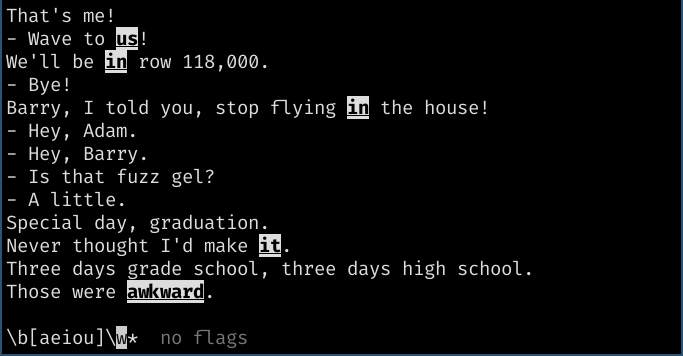
Below is a screenshot of a common use case: you have a file with sample text you want to validate a regex on, and the application shows you where the typed regex will match.
This example matches all words that begin with any of a, e, i, o or u.
Note that it only considers lowercase vowels for this.
Regex flags
You can set or unset any of the flags of the python re module, like multiline.
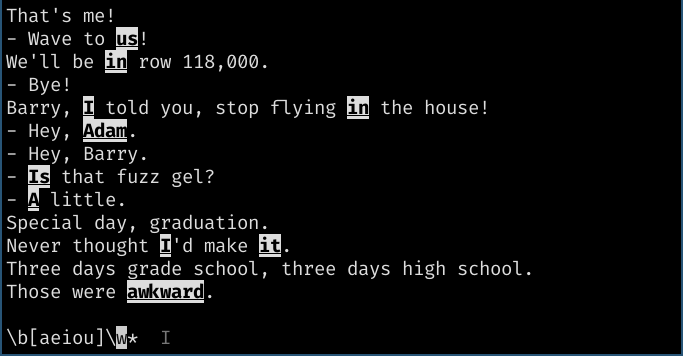
In this and the following examples, the dim uppercase I indicates that
the case-insensitive flag is active.
This example matches all words that begin with a vowel, be it upper or lowercase.
Captures
You can capture specific parts of the match, and the application will highlight the appropriate portion of the text.
For now, only non-named capture groups are available, and only limited to 4 groups (not considering group 0, the whole match). Also, for now it is not possible to customize colors, but it is a planned feature for you colorblind folk. I tried to select a palette that's both (mostly) readable and also compatible with terminals with 16 colors.
Turns out, that's pretty hard! I prioritized the terminal compatibility for now. If you
wish to skip a group, simply add an empty capture (i.e., ()) somewhere in the regex.
Also, colors are grouped in such a way that ones that are similar (as far as I know)
have different statuses of underline or bold, so that's another way to differentiate them.
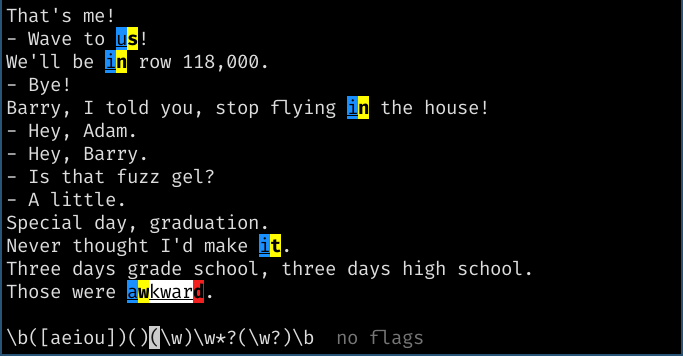
Groups are highlighted as follows:
- 0: (Any non-captured part of match) underlined black-on-white
- 1: Underlined black-on-blue
- 2: Underlined black-on-green
- 3: Bold black-on-yellow
- 4: Bold black-on-red
This example captures a couple of single letters from words beginning with vowels. The empty capture after the first group is to skip color 2 (green).
Errors
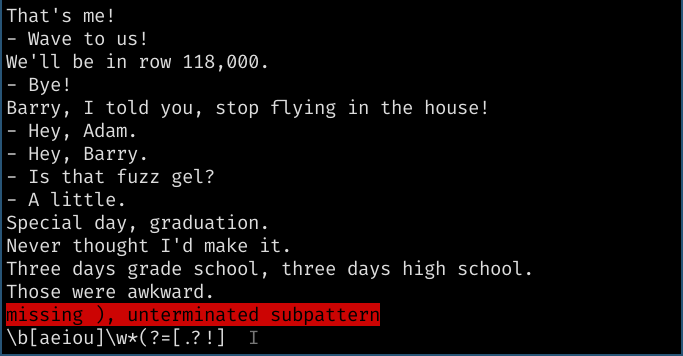
If there's an error in the regex, it will warn you in bright red.
This example shows that no highlights are shown, and a bright red message describing the error is shown above the regex.
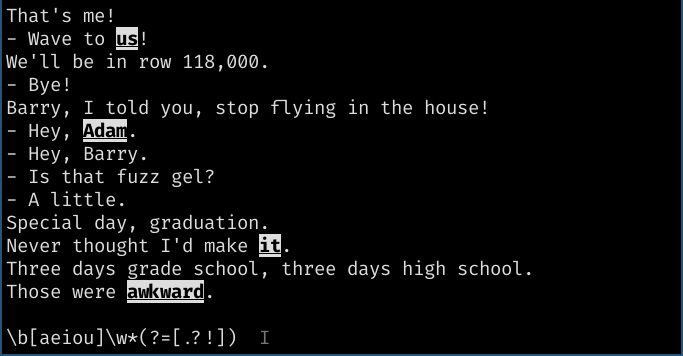
Lookahead
It also accepts lookaheads! In fact, it accepts any feature the re module accepts.
If you don't know what a lookahead (or lookbehind is), don't worry, this is just
and example of what it can do.
This examples matches only words that begin with a vowel (upper or lowercase)
and that precedes either ., ? or !.
When you're done editing
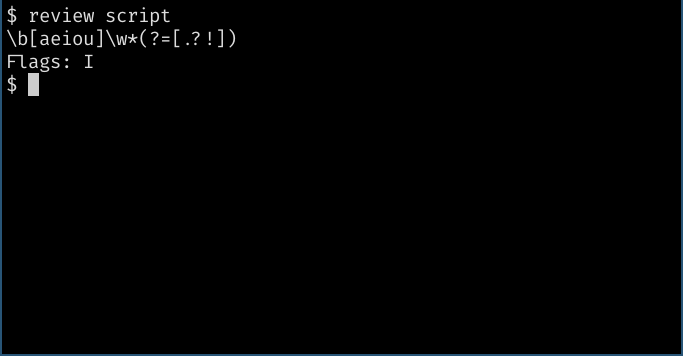
Send SIGTERM (CTRL-C) to stop the application. It will print out the resulting regex
and flags that were active.
This example shows what would happen if you sent SIGTERM to the application in the state
shown by the "Lookahead" example.
Command line usage
review [options] [--] [INPUT_FILE | -]

--help, -h                      show this help message
--regex REGEX, -r REGEX         set starting regex
--flags [FLAGS], -f [FLAGS]     set starting flags, defaults to no flags
    If -f or --flags is passed with no arguments, start program with no active
    flags.

`INPUT_FILE` is the file to be read and displayed to test the regex.
If - (a single dash) is supplied instead of a filename, the text is
read from stdin.
If `INPUT_FILE` is not supplied at all, a randomly generated Lorem-style text
will be used.
Application usage
The window is divided into two parts:
- The lower half displays the current regular expression (regex) being tested.
- The upper half displays text that is highlighted according to the regex typed.
The text displayed in the upper part may be wrapped.
Continuation of long lines start with ">", and do not match ^, even if the
multiline flag is enabled.
If the input text is too large to fit on screen, you may use the up and down
arrows to scroll the text.
If there is a rendering issue, CTRL-L will force a redraw.
You may edit the regex by typing on your keyboard. The arrows, home and end keys move the cursor to edit different parts of the regex. The backspace and delete keys both erase the character before the cursor.
To change the active regex flags, press CTRL-F to enter "flag mode". While in flag mode, the currently active flags are displayed, and you may press any of the given keys to activate or deactivate the corresponding flag.
If you enable a flag that is incompatible with any others, these others will be disabled and the new one will take place.
To exit the application, send SIGTERM (CTRL-C) to the
process. It will write the regex and its flags to stdout.
Python regex reference
1 maintainer

Metadata
1 maintainer
Release files for re-view 0.15.1
For a detailed explanation of source distributions (sdists) and built distributions (wheels), please see the package formats documentation.
Source distribution (sdist)
| File | Size | Uploaded | |
|---|---|---|---|
| re-view-0.15.1.tar.gz | 7.9 kB | Details |
Built distribution (wheel)
| File | Interpreter | ABI | Platform | Reset |
|---|---|---|---|---|
| re_view-0.15.1-py3-none-any.whl | Python 3 | none | any | Details |
Total release size: 28.3 kB
Release files / re-view-0.15.1.tar.gz
| Download URL | re-view-0.15.1.tar.gz |
|---|---|
| Size | 7.9 kB |
| Tags | Source |
|
SHA-256 checksum How to use checksums |
e7b10ef5b0109d6861a5ee1170f2347b19cdc548175d1e45423a4e95c58d4ec4
|
|
BLAKE2b-256 checksum How to use checksums |
82f2911317acb581b44f4a9308cd9ce9b3f4206c5191120164511e11fe57f9ff
|
| Upload date | |
|
Uploaded using Trusted Publishing? What is trusted publishing? |
No |
| Uploaded via |
twine/3.1.1 pkginfo/1.5.0.1 requests/2.22.0 setuptools/41.2.0 requests-toolbelt/0.9.1 tqdm/4.41.1 CPython/3.8.0
|
Release files / re_view-0.15.1-py3-none-any.whl
| Download URL | re_view-0.15.1-py3-none-any.whl |
|---|---|
| Size | 20.5 kB |
| Tags | Python 3 |
|
SHA-256 checksum How to use checksums |
8ff287ccb55c03a6dabbc77f9540a15db1911aeec8fb2bc978a16762edd87693
|
|
BLAKE2b-256 checksum How to use checksums |
aa300a57933705ae00cb9aeb3bd881cea9e80b960674fbd86c8aedc61a799503
|
| Upload date | |
|
Uploaded using Trusted Publishing? What is trusted publishing? |
No |
| Uploaded via |
twine/3.1.1 pkginfo/1.5.0.1 requests/2.22.0 setuptools/41.2.0 requests-toolbelt/0.9.1 tqdm/4.41.1 CPython/3.8.0
|














