
Redrum - Reddit Wallpaper Downloader and Ranker

Redrum is a Reddit wallpaper downloader which scores wallpapers and selects the best based on resolution, aspect ratio, and number of views. It remembers which wallpapers were selected previously so you never see the same image twice.
Install the systemd units to run the script every two hours.
Installation
Install through pip
pip3 install redrum(optional) Install service for automatic wallpaper changing
# copy service files
cp -u systemd/* ~/.config/systemd/user/

# enable and start systemd timer
systemctl --user enable redrum.timer
systemctl --user start redrum.timer

# the service can be triggered manually as well
systemctl --user start redrum
note: If using a python3 virtualenv, change ExecStart in redrum.service to /path/to/venv/bin/redrum
Usage
Redrum creates a config at ~/.config/redrum.ini automatically. You should update this file with your screen resolution and preferred subreddits before executing.
>>> redrum
No previous score cache found at /home/evan/.cache/redrum_cache.json.
Indexing page #0 from subreddit winterporn
Indexing page #1 from subreddit winterporn
Indexing page #2 from subreddit winterporn
...
Selected http://i.imgur.com/3UWbcYG.jpg (EarthPorn) with score 5.21729920261845e-05 out of 5971 images
The probability of selecting this image was 0.009851421028579594
Applying wallpaper
Scoring algorithm
Images are scored in three steps as follows:
Three input scores are calculated for each image in the cache
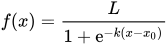
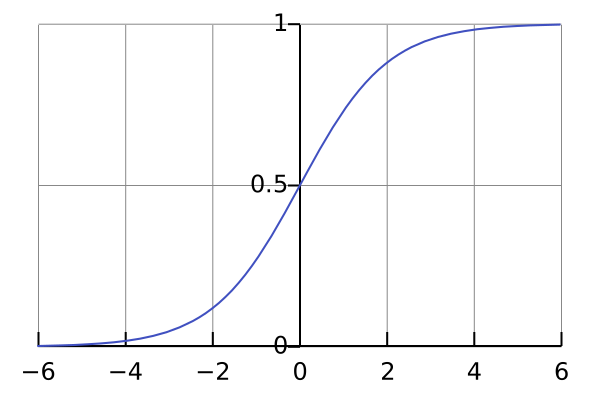
\begin{equation*} pixel_score = [total image pixels] / [total screen pixels] \end{equation*}\begin{equation*} ratio_score = [image x-y ratio] / [screen x-y ratio] or [screen x-y ratio] / [image x-y ratio] (whichever is less than 1) \end{equation*}\begin{equation*} views_score = [# views of this image] / [highest # views of all images] \end{equation*}Each input score is run through a sigmoid function, in this case, the logistic function. This helps to provide stronger differentiation between a good and a bad image than could be afforded with a linear method. The logistic function is defined by its midpoint and the slope at the midpoint, k.
Logistic function with midpoint=0, k=1
In redrum the logistic function has been normalized such that f(0) = 1.
\begin{equation*} ratio_logistic_score = (1 + pow(math.e, -ratio_k * (1 - ratio_off)))/(1 + pow(math.e, -ratio_k * (ratio_score - ratio_cutoff))) views_logistic_score = (1 + pow(math.e, -ratio_k * (1 - ratio_off)))/(1 + pow(math.e, -views_k * (views_score - views_cutoff))) pixel_logistic_score = (1 + pow(math.e, -ratio_k * (1 - ratio_off)))/(1 + pow(math.e, -pixel_k * (pixel_score - pixel_cutoff))) \end{equation*}pixel_score, ratio_score, and views_score each have their own midpoint and k, which can be set in ~/.config/redrum.ini
The three logistic scores are then multiplied to calculate an image’s final_score. This score is used to do a random weighted select of all images in the cache. An image with a final_score that is twice the score of another image is twice as likely to be selected during the random selection.
Tuning the scoring algorithm
You can adjust the scoring algorithm if you aren’t satisfied with the images being selected. redrum_tune allows you to quickly adjust the midpoint and k of the logarithmic function and view its effects on the final_score. You need to run pip install redrum[tune] to install the extra dependencies (matplotlib, numpy).
1 maintainer

Release files for redrum 1.5.3
For a detailed explanation of source distributions (sdists) and built distributions (wheels), please see the package formats documentation.
Source distribution (sdist)
| File | Size | Uploaded | |
|---|---|---|---|
| redrum-1.5.3.tar.gz | 658.1 kB | Details |
Release files / redrum-1.5.3.tar.gz
| Download URL | redrum-1.5.3.tar.gz |
|---|---|
| Size | 658.1 kB |
| Tags | Source |
|
SHA-256 checksum How to use checksums |
a11a8a38682e6f08f79871d2f2b554822f15d092f8b4bf5e189d9873d29a2728
|
|
BLAKE2b-256 checksum How to use checksums |
89912fec208ea0cdf7f161cfdaa78959b809bd3469d51500d307a75f3cd6d688
|
| Upload date | |
|
Uploaded using Trusted Publishing? What is trusted publishing? |
No |
| Uploaded via |
twine/6.1.0 CPython/3.11.8
|














