
refdict


Usage
- Using string as chain keys to realize chain access(including
dict/list/tuple/str). - String can perform as a reference of another item.
Install
pip install refdict
Features
- Using
refdictjust like usingdict/list/tuple/str.- Methods of built-in types:
refdict({}).keys()orrefdict([]).append(123). - Iteration and containment check:
for x in refdict([1, 2, 3]). - Slice and slice assignment:
refdict([1, 2, 3])[:] => [1, 2, 3]. - ...
- Methods of built-in types:
- Chain accessing members using a string.
refdict({'1':{'1':{'1':{'1':'1'}}}})['1.1.1.1'] => 1.
- Using reference string to reference another item.
Description
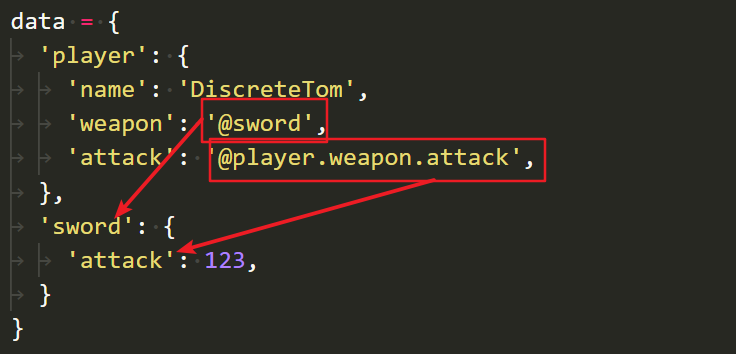
Use reference prefix to turn a string into a reference of another item. The default reference prefix is @. Reference prefix can be changed by the parameter refPrefix of the constructor of refdict.
The [] operator can be used for chain access and reference access. The separator of keys is . by default, and it can be changed by the parameter separator of the constructor.
Here is an example:
data = {
	'player': {
		'name': 'DiscreteTom',
		'items': [
			'@potion.red'
		],
		'weapon': '@sword',
		'attack': '@player.weapon.attack',
		'me': '@player'
	},
	'potion': {
		'red': 'restore your health by 20%',
	},
	'sword': {
		'attack': 123
	},
}
rd = refdict(data)
print(rd['player.items.0']) # => restore your health by 20%
print(rd['player.attack']) # => 123
print(rd['player.items.:']) # => ['@potion.red']
print(rd.text('player.attack')) # => @player.weapon.attack
print('player.weapon' in rd) # => True
Warnings
Recursive references like item: @item will cause infinite loop, including indirect reference.
data = {
	'item': '@item', # => infinite loop!
	'wrapper': {
		'item': '@wrapper.item' # => infinite loop!
	},
	'a': '@b' # => infinite loop!
	'b': '@a' # => infinite loop!
}
FAQ
- Q - Why I can't access the first item of
list/tuple/strusing[1]?- A - Of course you should use
[0]to access the first item, just like usinglist/tuple/str. It's a little bit counter-intuitive but reasonable.
- A - Of course you should use
- Q - Why I got
KeyErrorwhen usingrd['key1.key2']['key3.key4']?- The first
[]operator will return a non-refdict object, so you can't use chain keys in the following[]. To get a sub-refdict, you should use()operator, which means you should userd('key1.key2')['key3.key4'].
- The first
1 maintainer

Metadata
1 maintainer
Release files for refdict 3.3.0
For a detailed explanation of source distributions (sdists) and built distributions (wheels), please see the package formats documentation.
Source distribution (sdist)
| File | Size | Uploaded | Provenance | Actions |
|---|---|---|---|---|
| refdict-3.3.0.tar.gz | 3.9 kB | Without provenance | Details for refdict-3.3.0.tar.gz |
Built distribution (wheel)
| File | Interpreter | ABI | Platform | Actions Reset |
|---|---|---|---|---|
| refdict-3.3.0-py3-none-any.whl | Python 3 | none | any | Details for refdict-3.3.0-py3-none-any.whl |
Total release size: 20.4 kB
Release files / refdict-3.3.0.tar.gz
| Download URL | refdict-3.3.0.tar.gz |
|---|---|
| Size | 3.9 kB |
| Tags | Source |
|
SHA-256 checksum How to use checksums |
810fd8cc805633f7bf46b6be0b04f8405a3de159f9de0129a76959ed357b5c76
|
|
BLAKE2b-256 checksum How to use checksums |
baef01854fed92610a9d88b491d04df4de6d82410b5850036aa0e9ef514a9071
|
| Upload date | |
|
Uploaded using Trusted Publishing? What is trusted publishing? |
No |
| Uploaded via |
twine/1.13.0 pkginfo/1.5.0.1 requests/2.22.0 setuptools/41.0.1 requests-toolbelt/0.9.1 tqdm/4.32.2 CPython/3.7.3
|
Release files / refdict-3.3.0-py3-none-any.whl
| Download URL | refdict-3.3.0-py3-none-any.whl |
|---|---|
| Size | 16.5 kB |
| Tags | Python 3 |
|
SHA-256 checksum How to use checksums |
e894c0047411915da74488b922eb16981a30d0ee83f625e5b535c86fc4e9c075
|
|
BLAKE2b-256 checksum How to use checksums |
5e1f4de580c2bb4b3f5f30950c935e838bf6b10a99fecf15c4e670673ced974d
|
| Upload date | |
|
Uploaded using Trusted Publishing? What is trusted publishing? |
No |
| Uploaded via |
twine/1.13.0 pkginfo/1.5.0.1 requests/2.22.0 setuptools/41.0.1 requests-toolbelt/0.9.1 tqdm/4.32.2 CPython/3.7.3
|
Security for refdict 3.3.0
Provenance
Provenance describes where a file came from. On PyPI, provenance is shared via attestations, which provide a verifiable record of the build or publishing details. View details, limitations and caveats.
No provenance found
None of the files in this release were uploaded with provenance metadata.
A note on package security
PyPI is a repository for distributing packages, not a service for auditing them. While third-party security researchers and our staff do their best to detect and remove malicious packages, PyPI cannot guarantee the quality, security or suitability of any given package.
To learn more about protecting yourself from malicious actors, visit our package security documentation.














