

Read more on the blog: https://swarm.ptsecurity.com/fork-bomb-for-flutter/
reFlutter reverse-engineers Flutter apps by swapping the app's engine for a prebuilt patched one (repack mode) or by instrumenting the app's own engine at runtime (attach mode). What you get:
- Traffic interception — boringssl certificate verification patched to succeed unconditionally, so Burp (or any proxy) sees the traffic; bypasses several Flutter certificate-pinning implementations. No root or certificate installation needed on Android.
- Dump mode — a
dump.dartJSONL with every function's name, class, library, static-ness, parameter count and code offset into the Dart instructions image, ready for Frida hooking or IDA/Ghidra naming (scripts/dump2disasm.py). - Runtime routes where repacking can't reach: a runtime SSL bypass for engines that ship unstripped, and a runtime dumper for Shorebird apps (whose private Dart fork makes patched-engine builds impossible).
- Manual engine patching via a crafted
Dockerfileif you want your own changes.
Supported engines
- Android: arm64, arm32, x64 (x64 assets: Flutter >= 3.41);
- iOS: arm64;
- Release and profile builds, Stable and Beta channels — coverage is keyed by snapshot hash in enginehash.csv;
- Pre-monorepo-merge engines (<= 3.27) are built from the archived flutter/engine repo — the 3.24.x assets ship with the same pipeline.
Install
# Linux, Windows, MacOS
pip3 install reflutter
Quick start
$ reflutter main.apk

Please enter your Burp Suite IP: <input_ip>

SnapshotHash: 8ee4ef7a67df9845fba331734198a953
The resulting apk file: ./release.RE.apk
Please sign the apk file
Sign and align the APK — uber-apk-signer works well:
java -jar uber-apk-signer.jar --allowResign -a release.RE.apk
For an IPA, sign and install the result as usual; the tool prints a reminder.
Options:
-p, --patch-dump— dump mode: the repacked engine emitsdump.dart(JSONL: classes/methods/offsets) on start, and the tool writes a readyfrida.jsnext to the output instead of the proxy instructions. Shorebird apps cannot use-p(their private Dart fork's snapshots don't run in patched engines) — dump those at runtime withscripts/frida-dump.jsinstead (see Shorebird builds).-n, --no-interact— never prompt for a Burp IP (implies127.0.0.1); useful for old engines in CI.-b <Snapshot_Hash>, --build-engine— engine build mode: print the engine commit for a snapshot hash and (when run inside an engine checkout) apply the reFlutter source patches. See Build Engine.
Traffic interception
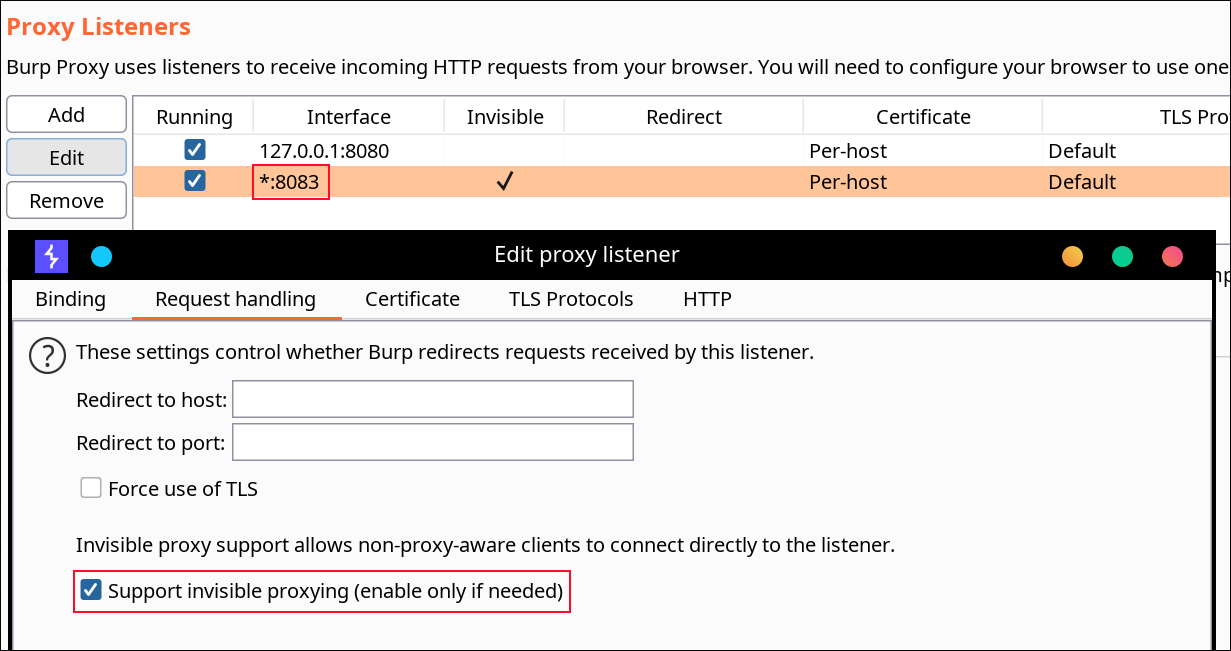
Point the app at a proxy on the same network. Configure the Burp listener:
- Add port:
8083, bind toAll interfaces; - Request handling: Support invisible proxying =
True.
Android — set the device proxy, then install the repacked APK:
adb -s <device> shell "settings put global http_proxy <proxy_ip:port>"
Optionally route everything through Burp with TunProxy.
iOS — install the signed IPA and configure Potatso (or any per-app proxy tool) to use your Burp listener.
⚠️ Proxy routing by era: engines up to and including Flutter 3.24.x (snapshot hash
80a49c7111088100a233b2ae788e1f48) carry a hardcoded proxy IP that gets patched in place. From 3.27.x on, the hardcoded IP is gone — configure the proxy directly on the device as shown above.
Dump mode
Run with -p, start the app, and pull the JSONL dump:
reflutter -p main.apk && java -jar uber-apk-signer.jar --allowResign -a release.RE.apk
adb shell "cat /data/data/<PACKAGE_NAME>/dump.dart" > dump.dart
On iOS the dump lands in the app container; the console log prints the exact path.
file contents (one JSON object per function)
{"method_name":"_handleRequest","offset":"0x00000000000a8740","library_url":"package:anyapp/api/client.dart","class_name":"ApiClient","is_static":"false","parameter_count":"2"}
Offsets are relative to the Dart instructions image start
(_kDartIsolateSnapshotInstructions / _kDartSnapshotText), not the ELF
base. Two ways to use them:
-
Frida — the auto-written
frida.jsresolves the instructions symbol automatically (newer Dart exports_kDartSnapshotText, older_kDartIsolateSnapshotInstructions) and hooks an offset you fill in:frida -U -f <package> -l frida.js
Works across Frida 14–17; prefer recent frida-server (16.x servers predate Android 15+ and cannot inject there — use 17.x).
-
Static analysis — generate naming scripts for IDA and Ghidra:
python3 scripts/dump2disasm.py dump.dart
Runtime routes (no repack)
frida-ssl.js disables TLS verification without repacking at all by
patching boringssl inside the loaded libflutter.so:
frida -U -f <package> -l frida-ssl.js
It resolves the internal-linkage verification function from .symtab, so it
needs an engine that still carries a symbol table: Shorebird engines
(ship unstripped, ~150 MB) and debug/profile builds qualify. Stock
release APKs ship stripped engines — the bucket's symbols.zip is a
separate link whose addresses do not transfer — so for those use reFlutter
repack mode, which swaps in a prebuilt engine with the bypass compiled in.
arm, arm64 and x64 are handled per-ISA; other arches abort without writing
anything. Requires frida-server 17.x on Android 15/16 (16.x kills
system_server there; 17.9.9 verified on API 36).
Shorebird builds
Apps built with Shorebird use a patched Flutter
engine whose snapshot hash differs from the vanilla release it is based on.
reFlutter identifies these automatically (a hash found only in
enginehash_sb.csv
identifies a Shorebird app even when flutter_assets/shorebird.yaml is
absent).
Traffic interception works like any other app — reflutter app.apk/ipa
— but with no engine build behind it: Shorebird's own engine artifact is
fetched from their public bucket, boringssl's certificate-chain verification
is patched to succeed unconditionally (a pure-Python ELF/Mach-O walk —
symbol table to file offset to a per-ISA patch — after which the ~150 MB of
shipped symbols are dropped, since Android's linker only reads program
headers), and the app is repacked with it.
Dump mode runs at runtime instead — our patched engines cannot run
Shorebird snapshots (their code lives in patchable regions understood only
by their private Dart fork's loader — verified empirically), but the engine
Shorebird ships inside the APK is unstripped. scripts/frida-dump.js
hooks the app's own libflutter.so at FunctionDeserializationCluster::PostLoad
— the exact splice point of the engine patch — and replays its JSONL dump
by reading raw Dart object layouts, deriving the instructions-image base at
runtime:
frida -D <device> -f <package> -l scripts/frida-dump.js
adb pull /data/data/<package>/dump.dart .
python3 scripts/dump2disasm.py dump.dart
Requires an arm64 AOT app and the stock, unrepacked engine (repacked
copies are stripped — the script fails loudly there). Offsets use the same
instructions-image convention as engine dumps; names carry the raw
Class@12345 form (strictly more information than the engine patch's
scrubbed names); parameter_count is unreliable on Shorebird snapshots.
Validated live: 6,957 functions, offsets arm64-spot-checked against the
APK's instructions image, consumed downstream by dump2disasm.
Notes: Android requires the engine artifact to carry a symbol table — recent revisions (Aug 2025+) ship with one; some older revisions are stripped and fail loudly. iOS requires a dSYM from the same build; dSYM availability varies by engine revision. The resulting IPA must be re-signed, as the tool's output already instructs.
Profile and Debug builds
Profile apps carry the same snapshot hash as their release counterparts
(verified across engines — the hash covers the VM sources, not the runtime
mode), so they work with the regular release engine assets;
scripts/gen_enginehash.py --profile re-verifies this as new engines ship.
Debug builds are genuinely different (JIT kernel snapshots, no AOT
libapp.so, debug artifacts embed the engine commit rather than a snapshot
hash) — there is nothing to repack, and nothing to dump. For traffic
analysis use frida-ssl.js, which runs on any engine that keeps its symbol
table, debug builds included.
Maintainers
Build Engine
Engines are built with scripts/local-release (macOS; builds the traffic
and dump variants for iOS + Android arm64/arm/x64, verifies every patch
landed, and uploads the release assets), keyed by the snapshot hashes in
enginehash.csv.
The engine commit for a snapshot hash resolves via reflutter -b <Snapshot_Hash>. Pre-monorepo-merge engines (<= 3.27) are fetched from the
archived flutter/engine repo and built with the matching gclient layout —
the era needs a handful of toolchain compatibility patches (dead mirror
pins, a libcxx roll against newer macOS SDKs), all applied automatically by
the build. Backfill past hashes with scripts/backfill '<hash> ...'.
Hash-list refresh
scripts/update-enginehash refreshes the three CSVs — run it manually
whenever you want the lists current; it is incremental and idempotent
(seconds when nothing changed). On an always-on machine you can install a
weekly launchd agent instead:
scripts/install-enginehash-agent # Mondays 04:23; removal command printed
Custom Build
Manual Flutter code patching is supported using Docker:
git clone https://github.com/Impact-I/reFlutter && cd reFlutter
docker build -t reflutter -f Dockerfile .
Run with:
docker run -it -v "$(pwd):/t" -e HASH_PATCH=<Snapshot_Hash> -e COMMIT=<Engine_commit> reflutter
Flags:
-e x64=0/-e arm64=0/-e arm=0: disable that arch's build-e WAIT=300: time in seconds to modify source before build-e HASH_PATCH: snapshot hash fromenginehash.csv-e COMMIT: engine commit hash
2 maintainers


Metadata
2 maintainers
Release files for reflutter 0.9.8
For a detailed explanation of source distributions (sdists) and built distributions (wheels), please see the package formats documentation.
Source distribution (sdist)
| File | Size | Uploaded | Provenance | |
|---|---|---|---|---|
| reflutter-0.9.8.tar.gz | 46.2 kB | Without provenance | Details |
Built distribution (wheel)
| File | Interpreter | ABI | Platform | Reset |
|---|---|---|---|---|
| reflutter-0.9.8-py3-none-any.whl | Python 3 | none | any | Details |
Total release size: 89.2 kB
Release files / reflutter-0.9.8.tar.gz
| Download URL | reflutter-0.9.8.tar.gz |
|---|---|
| Size | 46.2 kB |
| Tags | Source |
|
SHA-256 checksum How to use checksums |
fec99019ce91a95ed9f4c860436e82240c39acd4f8d21a5b67a01f26bf326598
|
|
BLAKE2b-256 checksum How to use checksums |
250cf117490c2730ba5f6029406c8198740319e075ec8a556b200f32c12f8502
|
| Upload date | |
|
Uploaded using Trusted Publishing? What is trusted publishing? |
No |
| Uploaded via |
twine/6.1.0 CPython/3.10.18
|
Release files / reflutter-0.9.8-py3-none-any.whl
| Download URL | reflutter-0.9.8-py3-none-any.whl |
|---|---|
| Size | 43.0 kB |
| Tags | Python 3 |
|
SHA-256 checksum How to use checksums |
0f7bfb052f11976ce9abd9c29c27919f58c998ce6a6c0f9d0e481e3ef637a910
|
|
BLAKE2b-256 checksum How to use checksums |
286f8fa91d766cb16801baf3dcd9502fe00cac395b3182102acda63b6ca720a3
|
| Upload date | |
|
Uploaded using Trusted Publishing? What is trusted publishing? |
No |
| Uploaded via |
twine/6.1.0 CPython/3.10.18
|
Security for reflutter 0.9.8
Provenance
Provenance describes where a file came from. On PyPI, provenance is shared via attestations, which provide a verifiable record of the build or publishing details. View details, limitations and caveats.
No provenance found
None of the files in this release were uploaded with provenance metadata.
A note on package security
PyPI is a repository for distributing packages, not a service for auditing them. While third-party security researchers and our staff do their best to detect and remove malicious packages, PyPI cannot guarantee the quality, security or suitability of any given package.
To learn more about protecting yourself from malicious actors, visit our package security documentation.














