
RegexFinder

This is a 3-day zero-dependency project that finds regular expression for any piece of text
How to install:
pip install regexfinder
How to import:
from regexfinder import RegexFinder
How to use:
Call RegexFinder, type inside the string you want to be regular expressed, and find() !
This module contains some parameters that you have to understand before using properly:
-
descriptive - default is True. This means that the program will generate a regexp based on the format and length of the string, any minor change in format will not work adaptively. If you want a regexp that will work dynamically in other situations, turn this to False and utilize the below parameters as explained.
-
document - paste here the full text if you want to find regexp of string based on actual environment
-
constantPrecedingText - turn this to True if you have inserted a document, to create a regexp that is based on the text before the pattern you want to find, that never changes.
-
constantSucceedingText - turn this to True if you have inserted a document, to create a regexp that is based on the text after the pattern you want to find, that never changes.
-
-
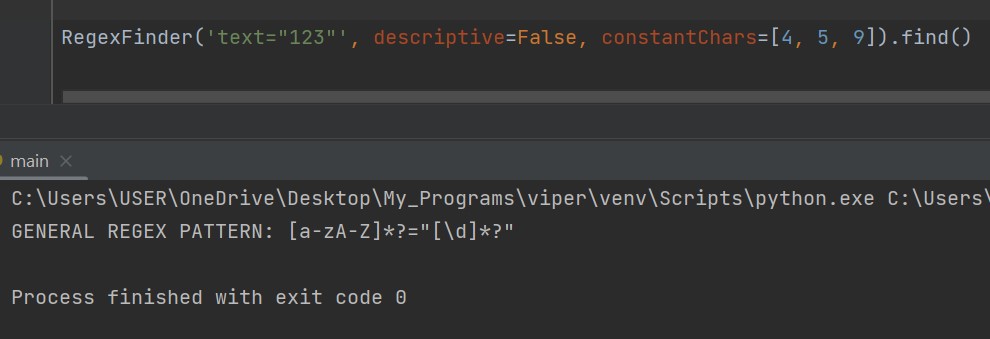
constantChars - To be able to find general regexp for a pattern of a string, you should declare one or more characters which will always appear in string, as constants. For example, if you want to find regexp of this string 'test="123"', which represents a key and a value, you should add as constantChar the '=', and both the ' " ', so the program can grasp from atleast somewhere what's going on and what the objective of the user is. This parameter takes as input list which contains indexes of characters that you want to be declared constant. Index of character starts from 0, as the first char of string, and goes on for the length of it. If you have trouble finding this indexes, call the help() function of this class and it will display the indexes for you. For the above example the input would look like this: constantChars=[4, 5, 9].
Reason for these parameters is that finding and generating Regular Expressions programmatically without A.I is almost impossible, because the code can't deduct the purpose of the regex itself, it doesn't have logic, so the only solution is if you and the program work together, you throw the hints, RegexFinder does the heavy duty.
So if you want a proper RegExp, make sure to do atleast one of these, while descriptive=False:
- add constants to constantChars
- add the document where string is located and specify if the text before or after is constant
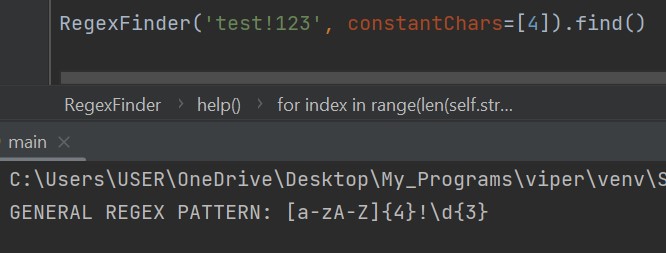
Code illustrations:

For any idea or problem contact me.
1 maintainer

Metadata
1 maintainer
Release files for regexfinder 0.0.3
For a detailed explanation of source distributions (sdists) and built distributions (wheels), please see the package formats documentation.
Source distribution (sdist)
| File | Size | Uploaded | |
|---|---|---|---|
| regexfinder-0.0.3.tar.gz | 5.8 kB | Details |
Built distribution (wheel)
| File | Interpreter | ABI | Platform | Reset |
|---|---|---|---|---|
| regexfinder-0.0.3-py3-none-any.whl | Python 3 | none | any | Details |
Total release size: 11.9 kB
Release files / regexfinder-0.0.3.tar.gz
| Download URL | regexfinder-0.0.3.tar.gz |
|---|---|
| Size | 5.8 kB |
| Tags | Source |
|
SHA-256 checksum How to use checksums |
de55642a0630954bcf58b15f83c97b9e73993a8035968fbae7f1fd26f77db9d2
|
|
BLAKE2b-256 checksum How to use checksums |
1cc8a5ae99867156dc10d547e665512fe00f5903703f0a2120d684f965b9fd38
|
| Upload date | |
|
Uploaded using Trusted Publishing? What is trusted publishing? |
No |
| Uploaded via |
twine/4.0.2 CPython/3.11.2
|
Release files / regexfinder-0.0.3-py3-none-any.whl
| Download URL | regexfinder-0.0.3-py3-none-any.whl |
|---|---|
| Size | 6.1 kB |
| Tags | Python 3 |
|
SHA-256 checksum How to use checksums |
8a274c2f9dd5c023ee0b480c3bcedc8d55074b714ab8e2d8bfc4640ff9cfc0b3
|
|
BLAKE2b-256 checksum How to use checksums |
9c8838829b061dd37d89ebc9d06c785bb49a7683a65791935d7463552aab544c
|
| Upload date | |
|
Uploaded using Trusted Publishing? What is trusted publishing? |
No |
| Uploaded via |
twine/4.0.2 CPython/3.11.2
|














