




Mark regions using with-statements and decorators. Time region hierarchy and get detailed console report as well as Chrome Trace log.
Features
Measure only what you need. See timing for regions you’ve marked and never waste time on looking at things you’re not interested in.
Measure third party libraries. You can mark regions inside arbitrary Python package. Just don’t forget to rollback changes after you’ve done :) Again, only marked regions count. No need to see timings for unfamiliar library internals.
No need to use external tools (like kernprof) to gather profiling data. Profile from within your application and use usual command to run it.
Average region overhead is 3-10 us (Python 3.7, Intel Core i5).
Chrome Trace log generation.
Table or CSV report format.
No dependencies.
Why another Python profiler
While other profilers often focus on some particular granularity (e.g. function or single line), Region Profiler allows user to choose the size of the scope of interest each time, moving from whole function to a subset of lines to a single iteration.
Region Profiler report contains information only about user-defined regions – if we are investigating some complicated framework, we don’t need to time its internals outside of the region that we’re interested in.
In contrary to majority of existing profilers, Region Profiler does not require any special programs/switches (like kernprof) for application start. This tool is very useful for investigating bottlenecks of bigger applications, that has complicated start process (e.g. distributed NN trainer, that is run on a cluster using MPI).
Getting started
Dependencies
Python >= 3.4
Installation
You can install Region Profiler using pip:
pip install region_profiler
or from sources:
git clone https://github.com/metopa/region_profiler.git
cd region_profiler
python setup.py install
Example
Mark some code regions for profiling:
import region_profiler as rp                # <<<<<

class NeuralNet(tfe.Network):
  def __init__(self):
      ...

  def call(self, x):
      with rp.region('NN', asglobal=True):  # <<<<<
          with rp.region('layer 1'):        # <<<<<
              x = self.layer1(x)
          with rp.region('layer 2'):        # <<<<<
              x = self.layer2(x)
          with rp.region('out layer'):      # <<<<<
              x = self.out_layer(x)
          return x

@rp.func()                                  # <<<<<
def loss_fn(inference_fn, inputs, labels):
    ...

@rp.func()                                  # <<<<<
def accuracy_fn(inference_fn, inputs, labels):
    ...

with rp.region('train'):                    # <<<<<
    for step in range(num_steps):
        with rp.region('forward'):          # <<<<<
            batch_loss = loss_fn(neural_net, x_batch, y_batch)
            batch_accuracy = accuracy_fn(neural_net, x_batch, y_batch)
        with rp.region('backward'):         # <<<<<
            optimizer.apply_gradients(grad(neural_net, x_batch, y_batch))
Enable profiling by calling region_profiler.install:
if __name__ == '__main__':
    rp.install(chrome_trace_file='trace.json')
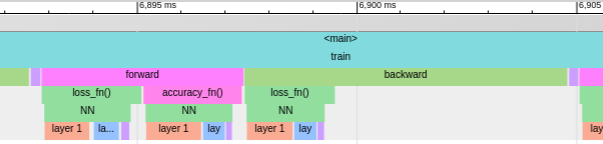
See console report and flame graph in Chrome Trace Viewer:
name                    total  % of total
-------------------  --------  ----------
<main>                12.44 s     100.00%
. train               11.64 s      93.51%
. . backward          7.229 s      58.10%
. . . loss_fn()       2.079 s      16.71%
. . forward           4.142 s      33.29%
. . . loss_fn()       2.134 s      17.15%
. . . accuracy_fn()   1.937 s      15.56%
. . fetch_next       225.2 ms       1.81%
. NN                  5.389 s      43.32%
. . layer 1           3.295 s      26.48%
. . layer 2           1.544 s      12.41%
. . out layer        444.0 ms       3.57%
Documentation
You can find complete API reference here.
The main API consists of these functions:
- region_profiler.install()
This function should be called once to enable profiling and pass some options to the profiler.
- region_profiler.region()
This function returns a context manager that is used to mark a profiling region. Allowed parameters:
name - region name. If omitted, an automatic name in format func() <filename.py:lineno> is used.
as_global - mark region as global.
- region_profiler.func()
Function decorator that wraps the marked function in a region. Allowed parameters:
name - region name. If omitted, an automatic name in format func() is used.
as_global - mark region as global.
- region_profiler.iter_proxy()
Iterable object wrapper. Measures time spent in __next__ on each iteration. This wrapper is useful, when iterating over things like DataLoader. Allowed parameters:
name - region name. If omitted, an automatic name in format func() <filename.py:lineno> is used.
as_global - mark region as global.
License
MIT © Viacheslav Kroilov <slavakroilov@gmail.com>
1 maintainer

Metadata
1 maintainer
Release files for region-profiler 0.9.3
For a detailed explanation of source distributions (sdists) and built distributions (wheels), please see the package formats documentation.
Source distribution (sdist)
| File | Size | Uploaded | |
|---|---|---|---|
| region_profiler-0.9.3.tar.gz | 15.5 kB | Details |
Built distribution (wheel)
| File | Interpreter | ABI | Platform | Reset |
|---|---|---|---|---|
| region_profiler-0.9.3-py3-none-any.whl | Python 3 | none | any | Details |
Total release size: 35.1 kB
Release files / region_profiler-0.9.3.tar.gz
| Download URL | region_profiler-0.9.3.tar.gz |
|---|---|
| Size | 15.5 kB |
| Tags | Source |
|
SHA-256 checksum How to use checksums |
97adaca10647b44940e5bc1592f7d94494db6ab47691ff17ff7c88dd15b64c02
|
|
BLAKE2b-256 checksum How to use checksums |
e16b9117d89b1b75af2bc32993ccf693934d0a29533a5a1c704458921fb1e5db
|
| Upload date | |
|
Uploaded using Trusted Publishing? What is trusted publishing? |
No |
| Uploaded via |
twine/1.13.0 pkginfo/1.5.0.1 requests/2.21.0 setuptools/39.1.0 requests-toolbelt/0.9.1 tqdm/4.31.1 CPython/3.6.7
|
Release files / region_profiler-0.9.3-py3-none-any.whl
| Download URL | region_profiler-0.9.3-py3-none-any.whl |
|---|---|
| Size | 19.6 kB |
| Tags | Python 3 |
|
SHA-256 checksum How to use checksums |
e9fb0eafff4a3690f64caa648d001dc95ba3a2cc4f81d4a10ecb71571d979093
|
|
BLAKE2b-256 checksum How to use checksums |
560c2ab4d71cc17e518d6ec1273440a59eadd073288ace86ec4dc69916c3e58e
|
| Upload date | |
|
Uploaded using Trusted Publishing? What is trusted publishing? |
No |
| Uploaded via |
twine/1.13.0 pkginfo/1.5.0.1 requests/2.21.0 setuptools/39.1.0 requests-toolbelt/0.9.1 tqdm/4.31.1 CPython/3.6.7
|














