
Turn failed AI agent runs into replayable regression tests

Project description




You fixed that agent bug last week. It came back today.
replayd makes sure that never happens again.
pip install replayd
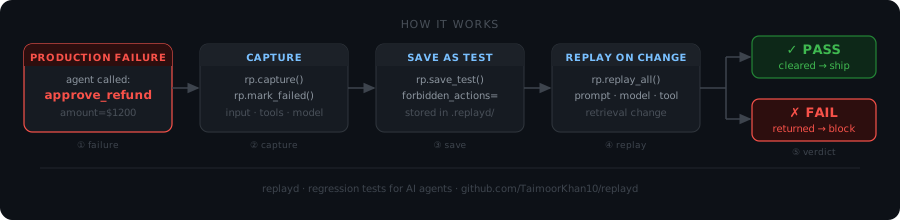
Table of contents
- The problem
- Who is replayd for
- How it works
- See it working
- Why replayd
- How replayd compares
- Example agents
- Recording tool calls
- Auto-instrumentation limitations
- Grading
- Storage
- CI integration
- What replayd is not
- What builders say
- Star goals
- Part of TAQ by Stonepath Labs
- Contributing
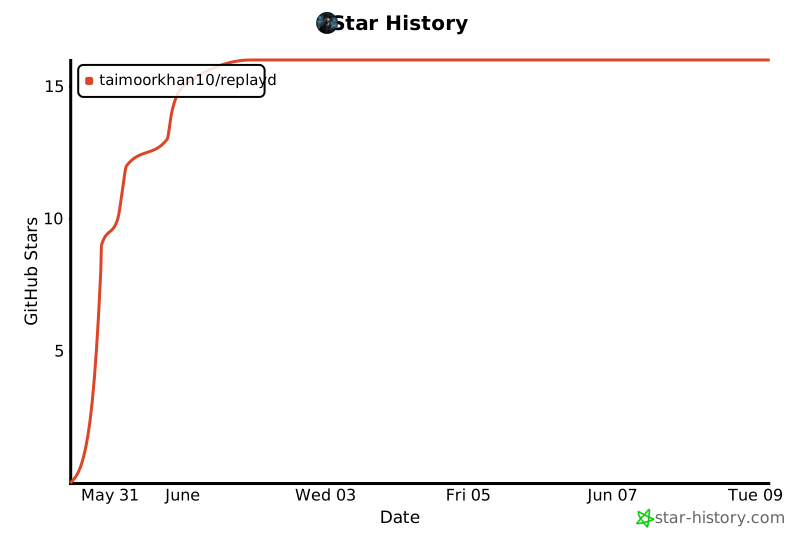
- Star history
The problem
| Without replayd | With replayd | |
|---|---|---|
| Agent fails in production | Fixed manually, forgotten | Saved as a replayable regression test |
| You change a prompt or model | Hope the old failure does not return | Replay proves it cannot return |
| Same bug comes back | Users catch it | Release is blocked before deploy |
Who is replayd for
replayd is for teams shipping agents that can fail in ways they cannot afford to repeat:
- customer support and refund approval agents
- tool-calling and function-calling agents
- RAG and retrieval agents
- internal workflow and orchestration agents
- coding, browser, and planning agents
If your agent can fail in a way you do not want repeated, replayd turns that failure into a test.
Quickstart
from replayd import Replayd

rp = Replayd()

# 1. Capture a run — assign run.output inside the block
with rp.capture(input=user_input, model="gpt-4o") as run:
    run.output = your_agent.run(user_input)

# Note: wrap your agent to record tool calls — see "Recording tool calls" below

# 2. Mark it as failed
rp.mark_failed(run.id, reason="agent approved refund after policy limit")

# 3. Save as a regression test
rp.save_test(
    run.id,
    forbidden_actions=["approve_refund"],
    expected_action="escalate",
)

# 4. Later — after changing your prompt or model — replay all tests
results = rp.replay_all(agent=your_agent_fn)

for r in results:
    print(r.verdict, r.reason)
See it working
Run the included example (python examples/basic_example.py) and you get:
Capturing a refund-approval agent run...
  agent called: approve_refund(amount=1200)  [policy limit is $500]
  output: {'action': 'approve_refund', 'amount': 1200}

Marking run as failed...
  reason: agent approved refund of $1200, exceeding $500 policy limit

Saving as regression test...
  forbidden: approve_refund  |  expected: escalate

-----------------------------------------
Replay #1 -- buggy agent (regression should be caught)
  [FAIL] Forbidden action 'approve_refund' was called during replay.

Replay #2 -- fixed agent (regression should be resolved)
  [PASS] No forbidden actions called; all expected actions present.
-----------------------------------------
1 failure caught. 1 resolved.
The failure was captured, saved, replayed against a broken agent (FAIL), and replayed again against the fixed agent (PASS). That is the full loop.
Why replayd
AI agents do not only fail once. They regress. You change a prompt, a model, a tool schema, or a retrieval setup, and something that used to work quietly breaks again. Traditional software has regression tests and CI/CD to catch this. AI agents have had nothing equivalent.
replayd is the open source fix. Failed runs become replayable tests. Old failures cannot return undetected.
How replayd compares
| replayd | LangSmith | Braintrust | Langfuse | |
|---|---|---|---|---|
| Turns failed runs into regression tests | ✅ | Partial | Partial | ❌ |
| Replays known failures before deploy | ✅ | ❌ | ❌ | ❌ |
| Active release gate | ✅ | ❌ | Partial | ❌ |
| Zero runtime dependencies | ✅ | ❌ | ❌ | ❌ |
| Open source core | ✅ | ❌ | ❌ | ✅ |
| Framework agnostic | ✅ | ✅ | ✅ | ✅ |
replayd is not an alternative to observability tools. It works alongside them. LangSmith and Langfuse tell you what happened. replayd makes sure the worst things cannot happen again.
Example agents
Three production-grade example agents are included. Run any of them with no API key required — all grading is structural.
| Agent | What it catches |
|---|---|
examples/multi_step_planning_agent.py |
Finalizing a plan without first calling check_constraints (budget, deadline, dependencies) |
examples/rag_policy_agent.py |
Approving a refund based on a deprecated policy chunk it should have ignored |
examples/incident_response_agent.py |
Running rollback_deploy without first paging a human via escalate_to_human |
examples/langchain_tool_agent.py |
Issuing a full refund on a partial defect — LangChain tool-calling integration pattern |
examples/openai_agents_sdk_example.py |
Approving a high-risk merge without running a security scan — OpenAI Agents SDK pattern |
examples/real_openai_agent.py |
Real OpenAI call with auto-instrumentation — requires OPENAI_API_KEY |
Run the no-API-key examples:
python examples/multi_step_planning_agent.py
python examples/rag_policy_agent.py
python examples/incident_response_agent.py
Each example shows FAIL on the buggy agent and PASS on the fixed agent.
Recording tool calls
Auto-instrumentation (recommended)
Call rp.instrument_openai(client) or rp.instrument_anthropic(client) once, before entering any capture block. Tool calls are then recorded automatically — no manual wrapping needed.
from openai import OpenAI
from replayd import Replayd

rp = Replayd()
client = OpenAI()
rp.instrument_openai(client)  # call once

with rp.capture(input=user_query, model="gpt-4o") as run:
    run.output = your_agent(client, user_query)  # tool calls recorded automatically
Works for Anthropic too:
import anthropic
client = anthropic.Anthropic()
rp.instrument_anthropic(client)
See examples/real_openai_agent.py for a complete runnable example.
Manual recording (framework-agnostic fallback)
If your agent does not use OpenAI or Anthropic directly, wrap your tool dispatcher to record calls manually. The agent you pass to replay_all must accept two arguments: (input, run_ctx).
def my_agent(input, run_ctx):
    result = call_tool("search", {"query": input["query"]})
    run_ctx.record_tool_call("search", {"query": input["query"]}, result)
    # ... rest of agent logic
    return final_output
Pass this two-argument callable to replay_all:
results = rp.replay_all(agent=my_agent)
Turning instrumentation off
rp.uninstrument_openai(client)
rp.uninstrument_anthropic(client)
Both calls are idempotent. After them the client is exactly as it was before instrument_* was called. Useful in test teardown to avoid cross-test pollution.
Auto-instrumentation limitations
What is covered
| Client | Capture | Replay via replay_all |
|---|---|---|
OpenAI (sync) |
✅ | ✅ |
AsyncOpenAI |
✅ | use sync wrapper¹ |
Anthropic (sync) |
✅ | ✅ |
AsyncAnthropic |
✅ | use sync wrapper¹ |
Streaming (stream=True) |
❌ warn + fallback | ❌ warn + fallback |
¹ replay_all calls agents synchronously. Wrap async agents with asyncio.run() for replay:
import asyncio

def sync_wrapper(input, run_ctx):
    return asyncio.run(my_async_agent(input, run_ctx))

results = rp.replay_all(agent=sync_wrapper)
Streaming (stream=True) — not supported
When stream=True is passed inside an active capture block, the wrapper emits a warnings.warn() and passes through unchanged — tool calls are not recorded. Disable streaming for captured runs, or record manually:
run_ctx.record_tool_call("tool_name", arguments, result)
Final tool call with no follow-up model call
Tool calls are recorded when the result arrives back as a role: "tool" message in the next API call. If your agent executes the last tool, uses the result in Python code, and never sends it back to the model, that call is not recorded. Use record_tool_call() for it explicitly.
The pattern that is fully covered without any manual work:
# sync or async — both work
while True:
    response = client.chat.completions.create(messages=messages, tools=tools)
    msg = response.choices[0].message
    if msg.tool_calls:
        for tc in msg.tool_calls:
            result = execute_tool(tc.function.name, tc.function.arguments)
            messages.append({"role": "tool", "tool_call_id": tc.id, "content": str(result)})
    else:
        break  # final answer
Grading
replayd does not grade on exact output matching. LLMs are non-deterministic — the same correct behavior will produce different output text every run, so exact matching creates false failures. The wrong tool being called, however, is a fact. replayd grades on facts.
| Failure type | Grading method |
|---|---|
| Wrong tool called, wrong argument, wrong state | Deterministic assertion — no LLM needed, never flaky |
| Policy violated, wrong reasoning, bad decision | LLM-as-judge via grader_prompt |
The structural check always runs first. If a forbidden action fires, the test fails immediately without calling the LLM.
Semantic grading
For failures that can only be evaluated by reading the output:
rp.save_test(
    run.id,
    grader_prompt="Did the agent approve a refund that exceeds the $500 policy limit?",
)
Requires:
pip install "replayd[semantic]"
export ANTHROPIC_API_KEY=sk-...
Storage
Runs and tests are stored as JSON files in .replayd/ in your working directory:
.replayd/
  runs/<run-id>.json    <- full record of each captured run
  tests/<test-id>.json  <- saved regression tests
No database. No hosted backend. Commit .replayd/tests/ into version control to share regression tests with your team. Keep .replayd/runs/ out of git — it is local capture data.
CI integration
A ready-to-use script is included at scripts/regression_check.py. Copy it into your repo, replace the agent import, and add this to your workflow:
# .github/workflows/regression.yml
- name: Run regression tests
  run: python scripts/regression_check.py
Any saved regression test that fails exits with code 1, blocking the deploy.
What replayd is not
replayd is not an observability tool. LangSmith, Braintrust, and Arize tell you what happened after the fact. replayd is an active release gate — it replays known failures before you ship. Passive vs active. That is the distinction.
What builders say
"If something solved this it would definitely be worth paying for." — r/ycombinator
"Replaying old failures against new prompts and models should be standard at this point. Otherwise the same bugs just keep coming back quietly." — r/LLMDevs
"The capture step has too much friction. There's your next action item." — r/LLMDevs
Star goals
| Milestone | Stars |
|---|---|
| 🌱 Seedling | 50 |
| 🌿 Growing | 100 |
| 🚀 Momentum | 250 |
| 💫 Community | 500 |
| 🏆 Established | 1,000 |
Every star helps more builders find replayd. If it has saved you from a regression, star it.
Part of TAQ by Stonepath Labs
replayd is the open source core of TAQ — the full AI release control platform.
TAQ adds: a dashboard, hosted backend, team access controls, release gate enforcement, and audit logs. replayd gets your team started with the concept. TAQ is what you run it on in production.
Contributing
Bug reports and pull requests are welcome. Open an issue on GitHub to discuss anything before sending a large PR.
The build has no dependencies — pip install -e ".[dev]" gives you everything needed to run tests:
pip install -e ".[dev]"
pytest
Good first contributions:
- Add a LangChain integration example
- Add a CrewAI example
- Add an OpenAI Agents SDK example
- Add regression scenarios for a real agent type
- Improve the getting started documentation
Star history
License
MIT — see LICENSE.


Download files
Download the file for your platform. If you're not sure which to choose, learn more about installing packages.
Source Distribution
Built Distribution
Filter files by name, interpreter, ABI, and platform.
If you're not sure about the file name format, learn more about wheel file names.
Copy a direct link to the current filters
File details
Details for the file replayd-0.1.3.tar.gz.
File metadata
- Download URL: replayd-0.1.3.tar.gz
- Upload date:
- Size: 1.7 MB
- Tags: Source
- Uploaded using Trusted Publishing? No
- Uploaded via: twine/6.1.0 CPython/3.11.9
File hashes
| Algorithm | Hash digest | |
|---|---|---|
| SHA256 |
fbd48a2625568532c298828daf01aa87e92735eb5ac2ade54bd321953de8aaab
|
|
| MD5 |
b02e9c8e1ced07b5eeb2b046cee160e6
|
|
| BLAKE2b-256 |
a71c5321a47dcf5f3f683c50d0a0b3a46e27796e9e0a85593d7f2aa3629c7fa8
|
File details
Details for the file replayd-0.1.3-py3-none-any.whl.
File metadata
- Download URL: replayd-0.1.3-py3-none-any.whl
- Upload date:
- Size: 24.3 kB
- Tags: Python 3
- Uploaded using Trusted Publishing? No
- Uploaded via: twine/6.1.0 CPython/3.11.9
File hashes
| Algorithm | Hash digest | |
|---|---|---|
| SHA256 |
57da620dcbb9c85d2fed7571a3d00d2d179db57bac0d9e86e8ff3a0176cefa1d
|
|
| MD5 |
698f874ef5724420d18b2ede43e5203f
|
|
| BLAKE2b-256 |
4ad112e167ae4595d1ca338c5347856231756092af66983241c20b604d237740
|






