
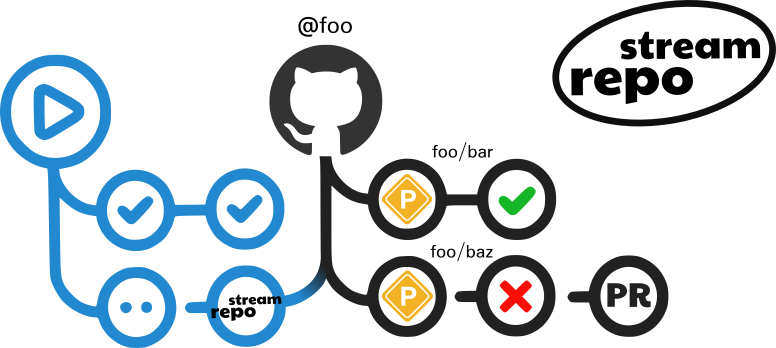
Cron-based remote pre-commit executions by opening pull requests.
- Do you've a lot of old projects that are using deprecated configuration?
- Do you want to test a small change in a lot of projects at the same time without adding them one by one?
Those are the reasons behind repo-stream.



How does it work?
Scans your repositories looking for pre-commit repo-stream hooks and run
pre-commit using another remote configuration file, which location is specified
in this hook. If this execution edits file contents, opens a pull request
against the repository.
So you can use repo-stream to run one-time pre-commit hooks for all your repositories without have to define them inside the configuration of each one.
Usage
-
Create a
repo-streamhook in the pre-commit configuration of your project. If this is found, repo-stream will search a pre-commit configuration file atupdaterunderconfigrepository arguments and will run pre-commit using that configuration against the current repository.- repo: https://github.com/mondeja/repo-stream rev: v1.3.1 hooks: - id: repo-stream args: - -config=https://github.com/<your-username>/repo-stream-config - -updater=upstream
You don't need to specify the extension
.yamlin theupdaterargument. -
Create your
repo-streamconfiguration files repository, for example athttps://github.com/<your-username>/repo-stream-config. -
Create the pre-commit configuration file, following this example would be at
upstream.yaml, for example:repos: - repo: https://github.com/mondeja/pre-commit-hooks rev: v1.5.2 hooks: - id: add-pre-commit-hook args: - -repo=https://github.com/mondeja/pre-commit-hooks - -id=dev-extras-required - -rev=v1.5.2
For more information about this hook see add-a-pre-commit-hook.
-
Create the cron task using some platform like Github Actions:
name: repo-stream update on: schedule: - cron: 0 4 1/7 * * workflow_dispatch: jobs: repo-stream-update: runs-on: ubuntu-latest steps: - uses: actions/checkout@v2 - name: Set up Python uses: actions/setup-python@v2 with: python-version: 3.x - name: Install repo-stream run: pip install repo-stream - name: Run repo-stream update run: repo-stream <your-username> env: GITHUB_TOKEN: ${{ secrets.GH_TOKEN }} GITHUB_USERNAME: <your-username>
GH_TOKENmust be a secret configured for the repository with the Github user token of<your-username>user.- If you want to update other repositories not published under your user, pass
them as parameters of
repo-stream <your-username> <other-username>.
Consult
repo-stream --helpfor documentation about valid arguments.
Usage as Github Action
name: repo-stream update
on:
schedule:
- cron: 0 4 1/7 * *
workflow_dispatch:
jobs:
repo-stream-update:
runs-on: ubuntu-latest
steps:
- uses: actions/setup-python@v2
with:
python-version: 3.x
- uses: mondeja/repo-stream@v1.3.1
with:
usernames: <your-username> <other-username>
args: --dry-run
env:
GITHUB_TOKEN: ${{ secrets.GH_TOKEN }}
GITHUB_USERNAME: <your-username>
Common workflows
Add a pre-commit hook
You can use the pre-commit hook
mondeja/pre-commit-hooks#add-pre-commit-hook to add a
new pre-commit hook to the pre-commit configuration of a project.
Note that this hook only makes sense executed from outside, using a workflow like repo-stream. So repo-stream allows you to create pre-commit hooks for other things than its main workflow mechanism.
For example:
# upstream.yaml
repos:
  - repo: https://github.com/mondeja/pre-commit-hooks
    rev: v1.5.2
    hooks:
      - id: add-pre-commit-hook
        args:
          - -repo=https://github.com/mondeja/pre-commit-hooks
          - -id=dev-extras-required
          - -rev=v1.5.2
This would add the hook dev-extras-required to the
pre-commit configuration of your project, if it isn't already defined.
Current limitations
- Only works with Github repositories.
1 maintainer

Metadata
1 maintainer
Release files for repo-stream 1.3.1
For a detailed explanation of source distributions (sdists) and built distributions (wheels), please see the package formats documentation.
Source distribution (sdist)
| File | Size | Uploaded | Provenance | Actions |
|---|---|---|---|---|
| repo_stream-1.3.1.tar.gz | 14.7 kB | Without provenance | Details for repo_stream-1.3.1.tar.gz |
Built distribution (wheel)
| File | Interpreter | ABI | Platform | Actions Reset |
|---|---|---|---|---|
| repo_stream-1.3.1-py3-none-any.whl | Python 3 | none | any | Details for repo_stream-1.3.1-py3-none-any.whl |
Total release size: 28.6 kB
Release files / repo_stream-1.3.1.tar.gz
| Download URL | repo_stream-1.3.1.tar.gz |
|---|---|
| Size | 14.7 kB |
| Tags | Source |
|
SHA-256 checksum How to use checksums |
3fc63217a6a7716a1497d4cdaa3278abda76515bb4cd8b8a2c3688237ccb10fa
|
|
BLAKE2b-256 checksum How to use checksums |
360383daddde158653b0cd09f29785fc957c3f3f2f3102ca45c5c37e24bbe097
|
| Upload date | |
|
Uploaded using Trusted Publishing? What is trusted publishing? |
No |
| Uploaded via |
twine/3.7.1 importlib_metadata/4.10.0 pkginfo/1.8.2 requests/2.26.0 requests-toolbelt/0.9.1 tqdm/4.62.3 CPython/3.9.9
|
Release files / repo_stream-1.3.1-py3-none-any.whl
| Download URL | repo_stream-1.3.1-py3-none-any.whl |
|---|---|
| Size | 13.9 kB |
| Tags | Python 3 |
|
SHA-256 checksum How to use checksums |
a7a6e0200d86845b2e0d90a703ce4cc566670bb27317ebf8dbe37d33daa19866
|
|
BLAKE2b-256 checksum How to use checksums |
af896d00e896ac465f4694736fa32e867942f0f185c0b6a1b621bd6c2881e95b
|
| Upload date | |
|
Uploaded using Trusted Publishing? What is trusted publishing? |
No |
| Uploaded via |
twine/3.7.1 importlib_metadata/4.10.0 pkginfo/1.8.2 requests/2.26.0 requests-toolbelt/0.9.1 tqdm/4.62.3 CPython/3.9.9
|
Security for repo-stream 1.3.1
Provenance
Provenance describes where a file came from. On PyPI, provenance is shared via attestations, which provide a verifiable record of the build or publishing details. View details, limitations and caveats.
No provenance found
None of the files in this release were uploaded with provenance metadata.
A note on package security
PyPI is a repository for distributing packages, not a service for auditing them. While third-party security researchers and our staff do their best to detect and remove malicious packages, PyPI cannot guarantee the quality, security or suitability of any given package.
To learn more about protecting yourself from malicious actors, visit our package security documentation.














