
request_filters
A sort of software firewall for your django application which provides advances capabilities for blocking or logging requests at runtime. Only for use in wagtail projects - might support django-only in the future.
Supports filtering based on:
- IP
- USER_AGENT
- PATH
- QUERY_STRING
- REFERER
- COUNTRY
- METHOD
- HEADER
Matching based on:
- Absolute (== in most cases. Differs for: IP (Checks subnet if cidr provided), COUNTRY (Checks country code or name as returned by GeoIP2))
- Glob (fnmatch)
- Regex (re)
- In (IP based on cidr, splits most
filter_value's' by comma and checks if the request's value is in the list)
Admin Views
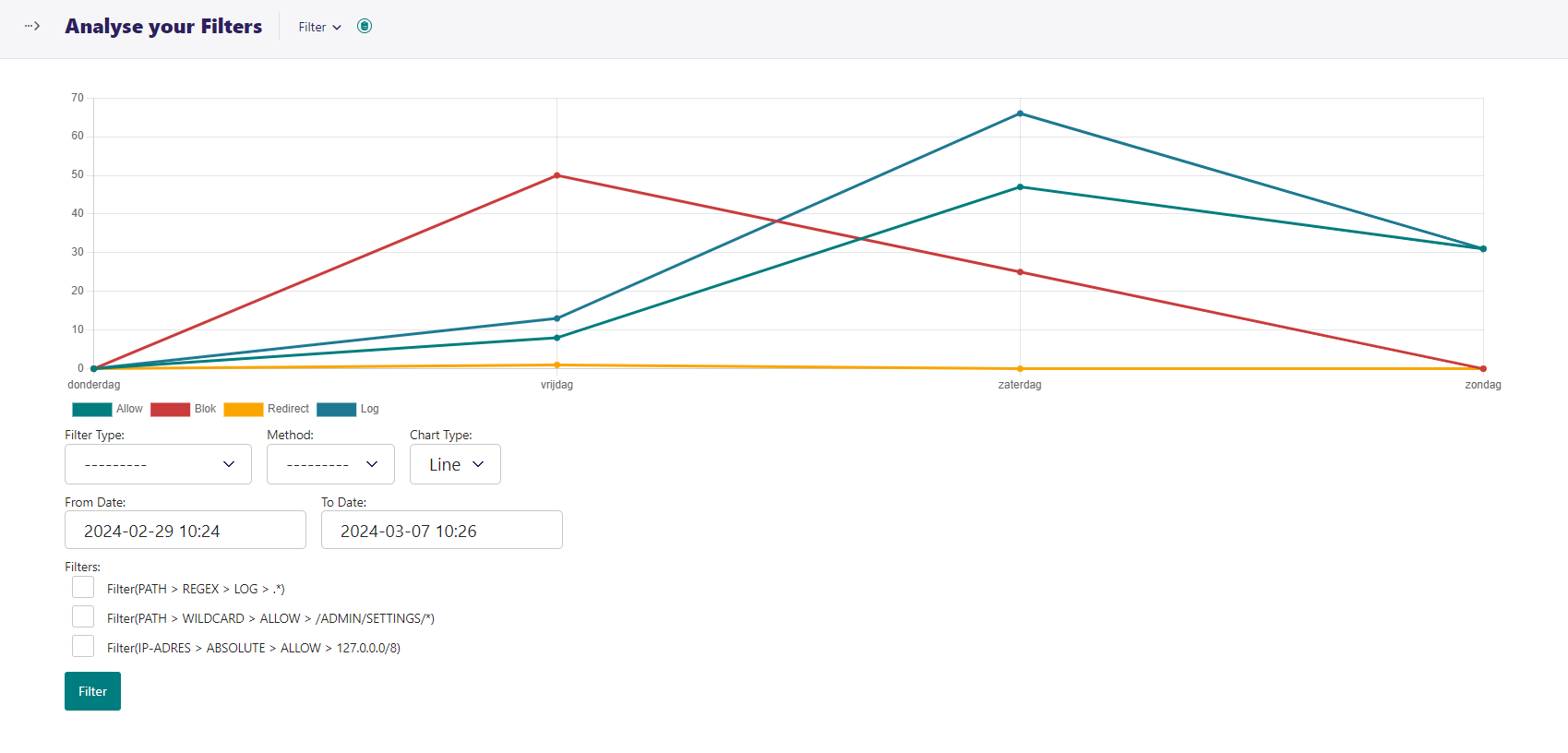
Has a a view to easy analyse the behaviour of filters overall in a chart.
Quick start
-
Add 'request_filters' to your INSTALLED_APPS setting like this:
INSTALLED_APPS = [ ..., 'request_filters', ] -
Add
request_filters.middleware.RequestFilterMiddlewareto yourMIDDLEWAREas the FIRST ENTRY.MIDDLEWARE = [ 'request_filters.middleware.RequestFilterMiddleware', ..., ] -
See the options section for more information on how to configure the app.
-
Log into your wagtail admin and configure your filters.
Options
GeoIP2
You must appropriately configure django geoip2.
More information on how this can be done is found here.
EXCLUDED_APPS
List of excluded apps, all requests to these apps will be allowed (If resolver_match is available). Exclusions should preferably happen via IP ranges or absolute IPs.
    REQUEST_FILTERS_EXCLUDED_APPS:                list[str] = [
        "admin",
    ]
EXCLUDED_PATHS
Excluded paths, all requests to these paths will skip filtering
Paths should be in the format of a glob pattern. Exclusions should preferably happen via IP ranges or absolute IPs.
    REQUEST_FILTERS_EXCLUDED_PATHS:               list[str] = [
        "/admin/*",
        f"{getattr(settings, 'STATIC_URL', '/static/')}*",
        f"{getattr(settings, 'MEDIA_URL', '/media/')}*",
    ]
EXCLUDED_IPS
Excluded IP addresses, all requests from these IPs will be allowed.
    # This is the safest way to exclude requests from being filtered.
    REQUEST_FILTERS_EXCLUDED_IPS:                 list[str] = [
        "127.0.0.0/8", "::1/128",
    ]
Caching
Caching settings and their defaults.
# Default cache backend to use for storing settings and filters
REQUEST_FILTERS_CACHE_BACKEND:                str                   = "default"

# Namespaces for cache keys.
REQUEST_FILTERS_SETTINGS_CACHE_KEY:           str                   = "request_filters_settings"
REQUEST_FILTERS_FILTERS_CACHE_KEY:            str                   = "request_filters_filters"

# Timeout the cache for the filter settings for 5 minutes by default
REQUEST_FILTERS_SETTINGS_CACHE_TIMEOUT:       timezone.timedelta    = timezone.timedelta(minutes=5)

# Timeout the cache for the filters for 1 hour by default
REQUEST_FILTERS_FILTERS_CACHE_TIMEOUT:        timezone.timedelta    = timezone.timedelta(hours=1)

# Clear cache when settings are saved
REQUEST_FILTERS_CLEAR_CACHE_ON_SAVE_SETTINGS: bool                  = True

# Clear cache when filters are saved
REQUEST_FILTERS_CLEAR_CACHE_ON_SAVE_FILTERS:  bool                  = True
Exception Message
Message shown when a filter raises an exception, or blocks the request.
REQUEST_FILTERS_BLOCK_MESSAGE: str = _("You are not allowed to access this resource")
Filter Headers
Add headers to the response which displays minimal information about the filters.
REQUEST_FILTERS_ADD_FILTER_HEADERS: bool = True # Add headers to the response which displays minimal information about the filters.
Create a log entry for requests which have passed all filters.
Not recommended for production.
REQUEST_FILTERS_LOG_HAPPY_PATH: bool = False # Log requests that are allowed by the filters
Default values for the check and action functions.
REQUEST_FILTERS_DEFAULT_CHECK_VALUE:          Union[bool, callable] = True  # Allow checks to pass by default
REQUEST_FILTERS_DEFAULT_ACTION_VALUE:         callable              = lambda self, filter, settings, request, get_response: HttpResponseForbidden(
        _("You are not allowed to access this resource")
)
Registering menu items
REQUEST_FILTERS_REGISTER_TO_MENU: str = "register_settings_menu_item" # Register to a menu hook.
1 maintainer

Metadata
1 maintainer
Release files for request-filters 1.4.9
For a detailed explanation of source distributions (sdists) and built distributions (wheels), please see the package formats documentation.
Source distribution (sdist)
| File | Size | Uploaded | |
|---|---|---|---|
| request_filters-1.4.9.tar.gz | 109.7 kB | Details |
Release files / request_filters-1.4.9.tar.gz
| Download URL | request_filters-1.4.9.tar.gz |
|---|---|
| Size | 109.7 kB |
| Tags | Source |
|
SHA-256 checksum How to use checksums |
983cc832ac20fac2478a237abdb26ad9cc27ffa7d7122cdf58ee35afd8bc6b3b
|
|
BLAKE2b-256 checksum How to use checksums |
21fa4a854add2e72fdfa5d25edd5d1b9c5f61a8cb22c454591572feea158c1b0
|
| Upload date | |
|
Uploaded using Trusted Publishing? What is trusted publishing? |
No |
| Uploaded via |
twine/5.0.0 CPython/3.11.6
|














